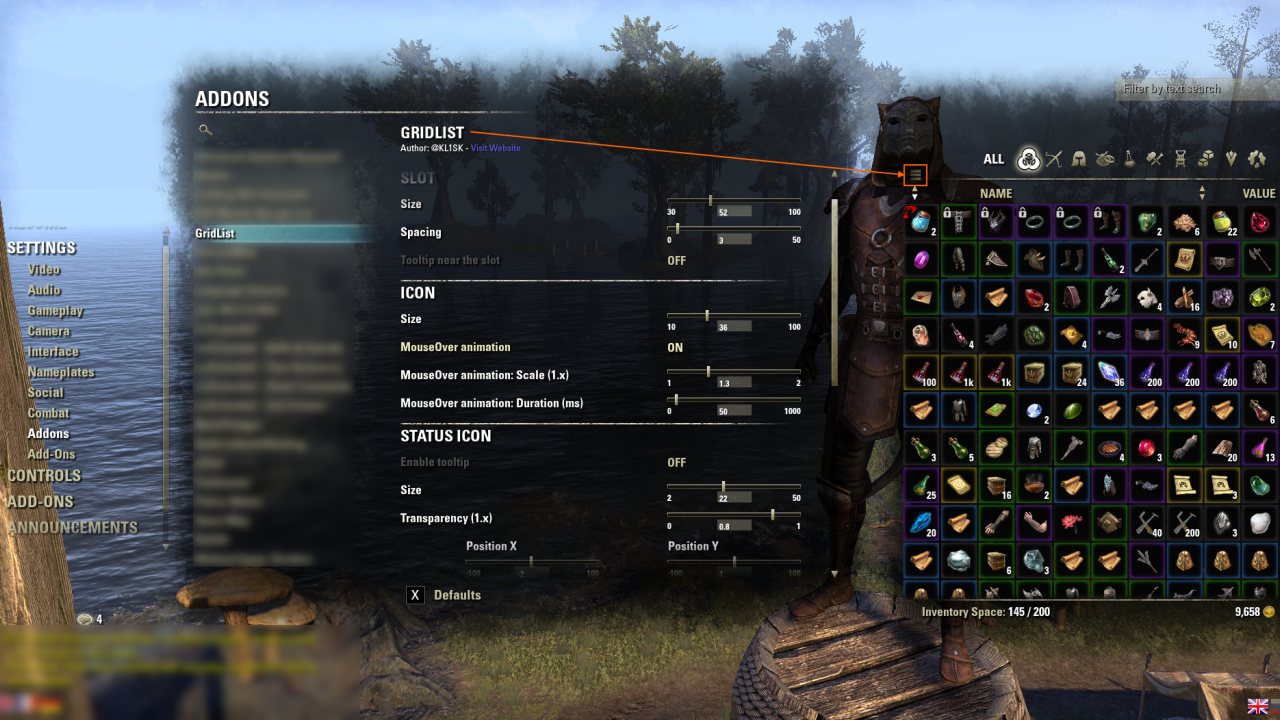
Inventory in the form of a grid with a bunch of settings.
Inventory in the form of a grid with a bunch of settings.
Button to switch the mode, from the left above the list.
To access the settings, use: LibAddonMenu
Additional skins and template for creating your own skins GridListSkins.
Slash commands:
"/gridlist" - Settings menu.
It is recommended to reload the interface after changing the settings "/reloadui" (so that all windows are updated).
Attention!
Delays in updating directly depend on: the number of visible cells and add-ons that add new items to the list.
This page describes GridList by KLISK. The description and screenshots are the author's own, imported from their listing on ESOUI on 26 October 2026: https://www.esoui.com/downloads/info2341-GridList.html
Mythiq.net hosts no files for it. The download button goes straight to the release file on cdn.esoui.com, so you are downloading from the author's own host, not from a copy of ours.
The download count, rating and comments on this page start at zero and count Mythiq.net only. The source's own figures are not copied here — they measure a different site, and a number that cannot be checked against our own ledger is not worth printing.
Requirements
Game versions
10.3.5
10.2.0
10.1.0
API VERSION
Built for ESO API version 10.3.5, 10.2.0, 10.1.0. After a patch the game marks add-ons built for the previous API as out of date; the "Allow out of date add-ons" checkbox in the add-on menu loads them anyway, and most work.
LIBRARIES
Many ESO add-ons depend on a shared library — LibAddonMenu-2.0 above all — which is installed separately, exactly like an add-on. A dependency that is missing shows as the add-on simply not appearing in the list.
CONSOLE
Add-ons are PC and Mac only. There is no way to load them on console.
Installation
1. Download the archive with the button on this page and unzip it.
2. Move the unzipped folder into your add-ons directory:
Windows — Documents\Elder Scrolls Online\live\AddOns
3. Start the game, and at the character select screen click Add-Ons.
4. Tick the add-on. If it is greyed out and marked out of date, tick "Allow out of date add-ons" at the top of the same panel.
5. Log in. Most add-ons need a /reloadui after they are first enabled.
UPDATING
Delete the old folder first. ESO loads everything it finds, and two copies of one add-on is the usual cause of "an add-on has produced an error" on login.
This release downloads from cdn.esoui.com, not from us, so
there is no checksum to compare against. Scan the archive before you unpack it.
Version history
v1.3.2Latest
29 Jan 2025 · 54 KB via cdn.esoui.com · 1 download Download
- 1.3.2
Manifest file (.txt)
function.
- 1.3.1
Error in variables. Thanks to MelanAster.
"Gold Tooltip".
Attention!
To refresh the list view, switch the filter.
ZoS fuck all broke!
- 1.2
Manifest file (.txt)
Significantly increased list performance. Now elements are updated only at creation, were updated earlier at any manipulation with the list.
[Pre-creating lists] Disabled by default!
- 1.1.4
Manifest file (.txt)
- 1.1.3
[Pre-creating lists] "quest item list" only 20% of controls are created.
[Pre-creating lists] Enabled by default!
## APIVersion: 100027
LibStub no longer used.
- 1.1.2
Support for new settings in PerfectPixel.
- 1.1.1
[Pre-creating lists] Now creates only controls without filling data (to avoid potential problems).
(backpack, quest item, craft bag, bank, house bank, guild bank)
- 1.1
Pre-creating lists to avoid delays on first access. (backpack, quest item, house bank, craft bag. The rest have no initial data to process.)
Disabled by default!
- 1.0.1
Changed the handler for the settings panel.
- 1.0 Release.
Off-site on cdn.esoui.com —
no checksum, because we never held this file.
Link checked by our review team on 26 Oct 2026.
Tell us if something is wrong — a file that will not work, content taken from
someone else, or anything that looks unsafe. Reports go to our review team, not
to the author.
We use cookies to ensure that we give you the best experience on our website and improve your experience. By continuing to use this site you consent to such use of cookies.