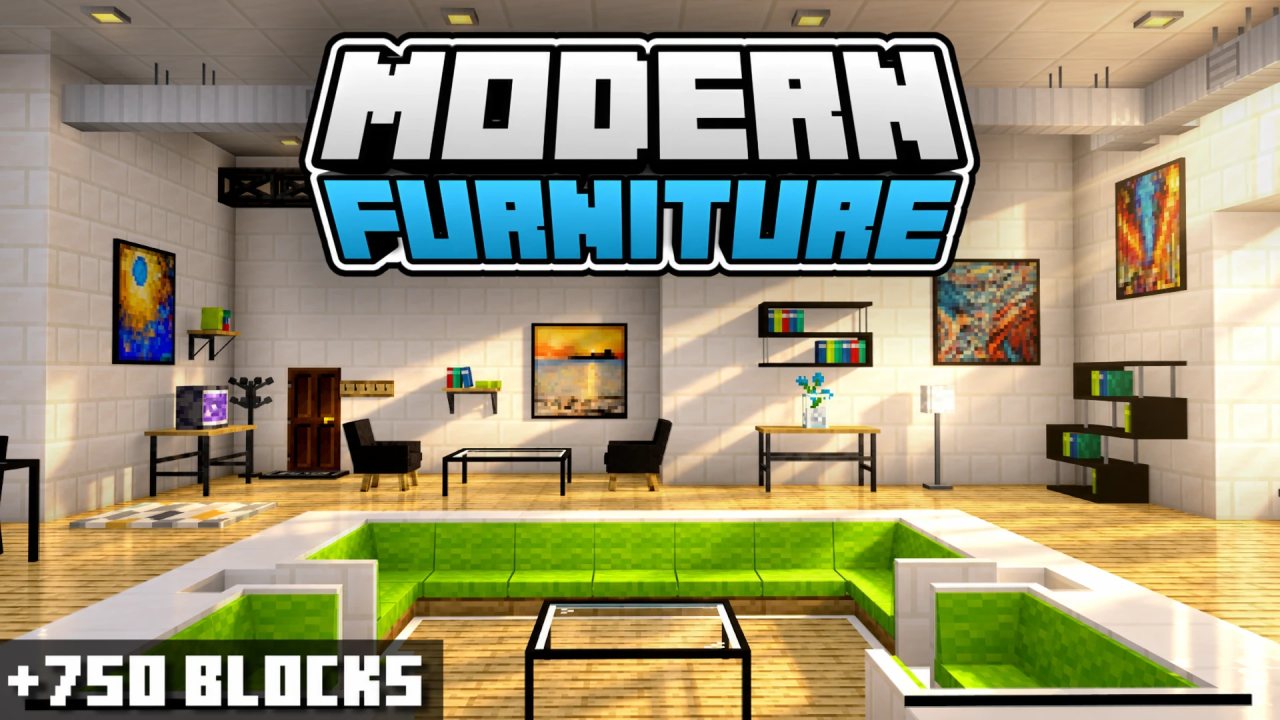
Modern Furniture is a decor addon featuring over 750 blocks, offering a wide variety of sleek and stylish furniture pieces. Perfect for creating contemporary living spaces with unique and functional designs. Ideal for modern builds and interior decoration.
If you’d like to support my Add-Ons, you can download them directly from my official website, TRMC-Add-Ons. Thank you for supporting my work and enjoying my Add-Ons!
🛋 Sofas: Fully functional and modularly arranged
📚 Bookshelves: Apart from being decorative and having different types you can modify them to change variations of the books.
🌸 Decorations: Hundreds of decorations of all kinds such as plants, pots, books, statues, utensils and much more!
🍴 Kitchen Furniture: Functional and modular kitchen cabinets and countertops.
💡 Lamps: Fully functional lights and switches can be turned on/off by clicking with the hand.
🍽️ Tables: Hundreds of variations of both color and material.
🪑 Chairs: Fully functional chairs that allow you to sit with a single click.
🧩 Ducts: Functional ducts and slits that can be opened and closed
🧶 Carpets: Rugs with different designs, simple and powerful.
🚪 Garage Doors: Functional garage door and able to be operated by one lever.
🗑️ Trash Bins: Place a trash bin and throw an item above it to delete the item instantly.
📅 Calendar: Keeps track of the days played in your world. Click to view the full timeline of days spent in your adventure!
🏠 Curtains: Available in all colors, open and close with a click!
To create the furniture, you’ll need clay balls. You can place them in a stonecutter, and from there, you’ll be able to select all kinds of furniture to decorate your Minecraft world.
The furniture design can be described as having a "simple" touch. This means the furniture aims to be minimalist while maintaining a Minecraft-style coherence. Thanks to this consistency, most furniture pieces blend seamlessly with Minecraft’s blocks, allowing for easy integration with other vanilla-style Add-Ons.
The furniture categories are varied. The following are the available categories:
- Interior: It includes functional rugs and curtains along with color variations.
- Bathroom: It includes all bathroom decorations such as sinks, mirrors, decor, etc.
- Construction: Includes all kinds of exterior decoration, designed to enhance outdoor spaces and new construction blocks!
- Kitchen: It contains modern countertops for designing kitchens.
- Vent: It contains ventilation blocks, ducts, and air hatches.
- Painting: It includes dozens of paintings, including custom paintings from Patreon donors!
- Decorations: All kinds of miscellaneous decorations that don’t fit into other categories.
- Festive: It includes all kinds of festive decorations, such as Christmas, Halloween, summer, and spring decor!
- Garage: It includes garage decorations such as compression machines, repair machines, wheels, functional garage doors, and much more!
- Light: It includes functional lamps and LED lights along with smart switches by range, allowing you to configure and use them!
- Bookshelf: It includes many variations of bookshelves.
- Table: It includes all kinds of tables: modern, simple, and medieval.
- Chair: Category that encompasses armchairs, their variations, and colors.
- Sofa: Category with all the sofas, varieties, and colors.
The Add-On includes a wide variety of features. Because of this, it has a special functionality tag. For example, a block might have the tag "Sit-able", indicating that you can click on it and sit down.
If you want to filter and find these specific blocks, you can use the search bar and type keywords like "Ignitable" or "Configurable".
Creative:
To acquire the furniture in Creative mode, you will find it in the decoration tab of the Creative menu. If you want to obtain it using commands, you will need to type /give @p f: (then you can add the name of the furniture you want).
Survival:
To create furniture, you will need clay and a Furniture Table. Craft the table using two iron ingots, a crafting table, and two oak fences. Place it down and interact with it to open the furniture menu.
Put clay in the clay slot, then select a furniture category using the tabs (chairs, sofas, tables, decorations, etc.). Browse the available furniture and use the arrows to switch pages. Click the furniture you want to craft—it will be added to your inventory, consuming clay.
Any unused clay is returned when you close the menu. Time to decorate!
Modern Tool:
The Modern Tool is used to modify the geometry of blocks. If you want to know which blocks are interactive, they will have the label "Configurable" and a wrench symbol.
Clicking on them will change their geometry or a specific aspect of the block. If you want to revert it to its original state, you can either break and replace the block or click it a few more times until it returns to its original form.
Support me on Patreon to continue developing my addons!
Share your suggestions for creating better add-ons!
Downloads at TRMC Add-Ons
- Download Modern Furniture.mcaddon
ABOUT THIS LISTING
This page describes Modern Furniture | +750 BLOCKS by trotamundos872. The description and screenshots are the author's own, imported from their listing on CurseForge on 25 October 2026: https://www.curseforge.com/minecraft-bedrock/addons/modern-furniture-survival-addon
Mythiq.net hosts no files for it. The download button goes straight to the release file on edge.forgecdn.net, so you are downloading from the author's own host, not from a copy of ours.
The download count, rating and comments on this page start at zero and count Mythiq.net only. The source's own figures are not copied here — they measure a different site, and a number that cannot be checked against our own ledger is not worth printing.
Requirements
Game versions
1.18.2
1.15
1.18
1.18.1
1.18.10
1.18.12
1.18.30
1.21.122
NO LOADER
Bedrock imports this file natively — no mod loader, no framework, nothing to install first. The game itself opens .mcaddon, .mcpack, .mcworld and .mctemplate files.
GAME VERSION
Listed against Minecraft Bedrock 1.18.2, 1.15, 1.18, 1.18.1, 1.18.10, 1.18.12. Bedrock updates on every platform at once, and an addon built for a newer version can refuse to import on an older one — the import error names the version it wants.
PLATFORM
Works on Windows and mobile — both import these files directly. Console cannot import files, so console players receive the pack through a Realms world or a friend's world that already has it enabled.
Installation
1. Download the file with the button on this page — do NOT unzip it. Bedrock imports the file itself; an extracted folder is the one way to make this not work.
2. Windows — double-click the file, or right-click → Open with → Minecraft. The game launches and shows "Import started", then "Successfully imported".
Android — open the file from the downloads shade and choose Minecraft. iOS — share the file into Minecraft from the Files app.
3. Where it lands depends on what it is: an addon activates on a world's Behavior Packs / Resource Packs screen; a world appears under Play → Imported; a texture pack appears on the same packs screen.
4. For an addon on a new world: create the world with the pack toggled on. Some addons also need the "Holiday Creator Features" experiment until the author says otherwise.
IF THE IMPORT FAILS
The usual cause is a version gap — the file wants a newer game than is installed. Update the game and import again; the error message on the import screen names the version it expected.
This release downloads from edge.forgecdn.net, not from us, so
there is no checksum to compare against. Scan the archive before you unpack it.
Version history
Modern Furniture WE 14.3s RP.mcpackLatest
24 Oct 2026 · 5.6 MB via edge.forgecdn.net · 1 download Download
Off-site on edge.forgecdn.net —
no checksum, because we never held this file.
Link checked by our review team on 26 Oct 2026.
Tell us if something is wrong — a file that will not work, content taken from
someone else, or anything that looks unsafe. Reports go to our review team, not
to the author.
We use cookies to ensure that we give you the best experience on our website and improve your experience. By continuing to use this site you consent to such use of cookies.