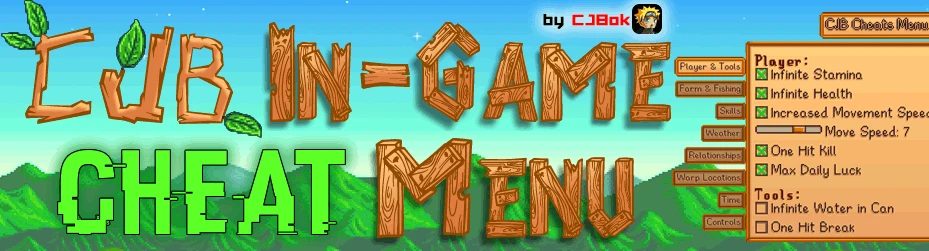
CJB Cheats Menu lets you press P (configurable) to show a full cheats menu:
For non-English players, translations are included in the base mod. Contributions are welcome!
- Install the latest version of SMAPI.
- Download this mod and unzip it into Stardew Valley/Mods.
- Run the game using SMAPI.
Load your save, then press P on your keyboard to show the cheats menu. Press the button when no in-game menu is shown.
To change the button:
- On Linux/macOS/Windows, open the menu and then use the "Controls" tab to choose a different controller/keyboard/mouse button. (You can also change config.json directly if needed.)
- On Android, see use key bindings on Android.
If the menu doesn't open, see the pinned comment on the Posts tab.
Is the mod still compatible?
- The mod is compatible with Stardew Valley 1.5.5 or later on Linux/macOS/Windows, both single-player and multiplayer.
Does the mod work in multiplayer?
- Yep, all the cheats should work in multiplayer (except changing the time if you're a farmhand). The mod is local, so it's fine if only some players have it (whether they're the host or farmhands).
These cheats will affect all players: changes to the world (like changing the date or completing the community center), instant buildings, fast machines, harvest with sickle, adding money (if money is shared), durable fences, auto-feed, auto-pet, infinite hay, setting tomorrow's weather, and time. These cheats will affect players in the same location as you: one-hit kill and one-hit break. Otherwise cheats will mostly only affect you.
Other players usually won't see that you're using cheats (except indirectly, like seeing you zoom across the screen with the speed cheat). However, they might install mods that specifically detect your installed mods.
Does the mod conflict with any others?
- There are no known mod conflicts.
Can you remove the limit on daily NPC dialogue?
- Nope. Due to the way dialogue works in the game, NPCs would just repeat the same lines anyway. (The mod does remove the gift limit though.)
Can you add custom skills/professions to the list?
- Not currently. Custom skills are hard to support due to how they work in the game. It's something I want to look into for future versions, though it's low-priority since it'll probably require changes to all the skill mods too.
Can the mod be used in split-screen mode?
- Yep. You can edit the key binding to add a controller keybind. For example, if you do this:
"OpenMenuKey": "P, LeftShoulder + ControllerB",
Then the main player can press P to open the menu on their screen, and the other players can press left shoulder + B on their controller to open it on theirs.
Main links:
- Source code
- Release notes
- Originally created by CJBok (maintained by Pathoschild since 2017)
ABOUT THIS LISTING
This page describes CJB Cheats Menu by pathoschild. The description and screenshots are the author's own, imported from their listing on CurseForge on 25 October 2026: https://www.curseforge.com/stardewvalley/mods/cjb-cheats-menu
Mythiq.net hosts no files for it. The download button goes straight to the release file on edge.forgecdn.net, so you are downloading from the author's own host, not from a copy of ours.
The download count, rating and comments on this page start at zero and count Mythiq.net only. The source's own figures are not copied here — they measure a different site, and a number that cannot be checked against our own ledger is not worth printing.
Media
Requirements
Game version
1.6.15
SMAPI
This is a SMAPI mod, not a loose content file. SMAPI — the Stardew Modding API, from smapi.io — must be installed first, and the game started through it. Without it the folder sits in Mods and nothing loads.
GAME VERSION
Built against Stardew Valley 1.6.15. SMAPI mods usually survive minor game patches, but a mod built for 1.6 will not load on 1.5.
DEPENDENCIES
Many mods require a framework mod as well — Content Patcher above all, sometimes SpaceCore or Json Assets. SMAPI prints the exact missing name at launch; a red error naming a dependency is the usual reason a freshly installed mod does nothing.
Installation
1. Download the archive with the button on this page and unzip it.
2. Move the mod's folder into your Mods directory:
3. Start the game through SMAPI, not the normal launcher. SMAPI lists every mod it loaded at startup — check yours is there and did not print an error.
UPDATING
Delete the old folder before unzipping the new one. Two copies of a mod is the classic cause of duplicate items and crashes, and unzipping over the top keeps stale files the new version no longer expects.
This release downloads from edge.forgecdn.net, not from us, so
there is no checksum to compare against. Scan the archive before you unpack it.
Version history
CJB Cheats Menu 1.42.0 1.42.0.zipLatest
20 Apr 2026 · 205 KB via edge.forgecdn.net · 5 downloads Download
Off-site on edge.forgecdn.net —
no checksum, because we never held this file.
Link checked by our review team on 26 Oct 2026.
Tell us if something is wrong — a file that will not work, content taken from
someone else, or anything that looks unsafe. Reports go to our review team, not
to the author.
We use cookies to ensure that we give you the best experience on our website and improve your experience. By continuing to use this site you consent to such use of cookies.