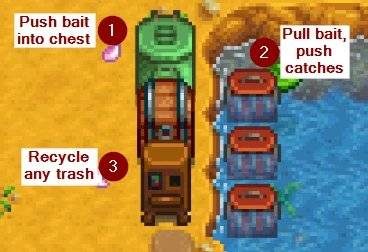
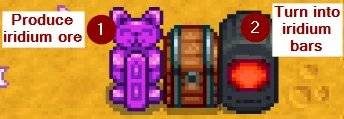
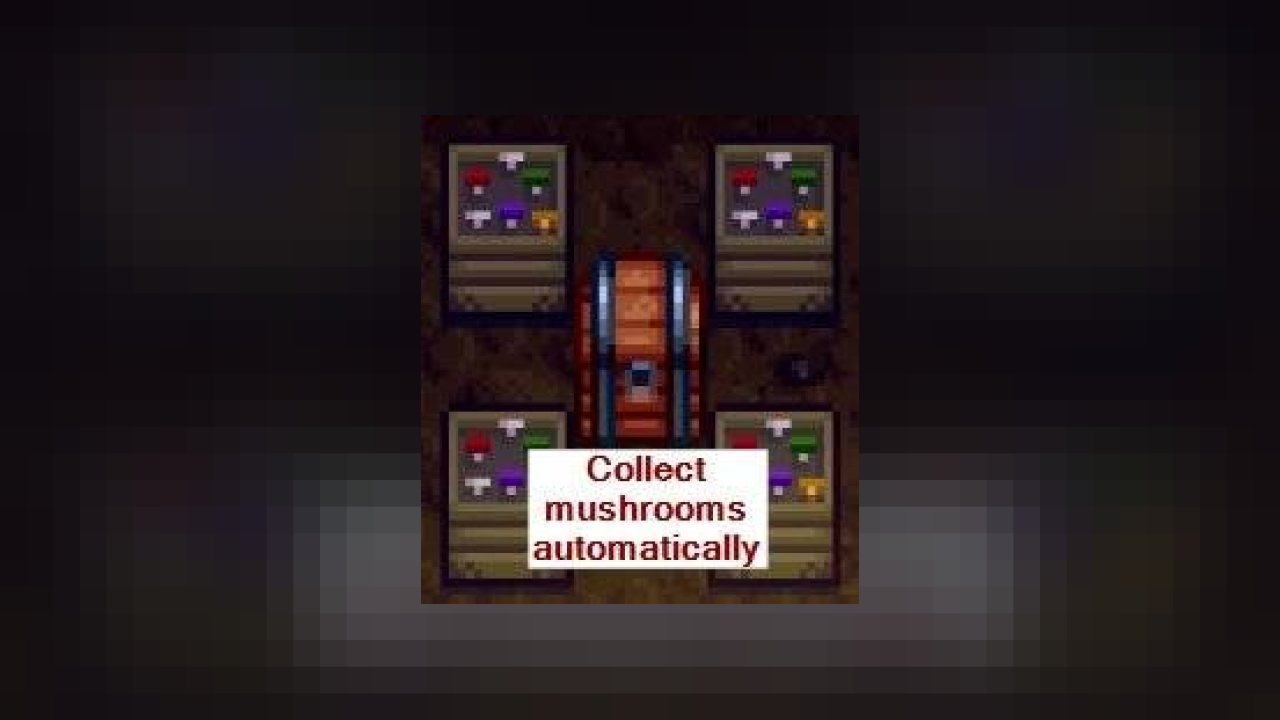
Place a chest next to a machine (like a furnace or crystalarium), and the machine will automatically pull raw items from the chest and push processed items into it. Connect multiple machines with a chest to link them.
Put a chest next to any number of machines (like furnaces or crystalariums), and they'll take raw items from the chest and push their finished items into it. Press U (configurable) to show an automation overlay:
For non-English players, translations are included in the base mod. Contributions are welcome!
- Install the latest version of SMAPI.
- Unzip the mod folder into Stardew Valley/Mods.
- Run the game using SMAPI.
Careful: the shipping bin is automated by default. Make sure to move chests away from the shipping bin (or disable shipping bin automation) if you don't want to ship their contents!
- Compatible with...
- Stardew Valley 1.5.5 or later;
- Linux, macOS, and Windows;
- single-player;
- split-screen and multiplayer. Note: Automate must be installed by the main player, and is optional for farmhands. See In multiplayer, who gets XP and whose professions apply? in the FAQs.
- No known mod conflicts.
Pairs well with...
- Better Junimos adds more crop automation (like replanting) and other improvements.
- Better Workbenches lets you chain chests to workbenches for manual crafting.
- Deluxe Grabber Redux makes auto-grabbers collect nearby animal products, forage, crops, and indoor pot crops too.
- Non-Destructive NPCs prevents NPCs from destroying chests and machines.
- Super Hopper for advanced machine pipelines.
Mod interactions:
- Expanded Storage works fine with Automate, but it'll change Auto-Grabbers to store items output by machines too.
- Qi Chests works fine with Automate, except that Automate will currently treat all Qi chests as part of the single Junimo chest network.
Basic automation
Place a chest next to a crafting machine (in any direction including diagonal) to connect it. Machines connected to a chest will push their output into it, and pull ingredients to process out of it.
By default, Automate supports these machines:
- custom machines using the Stardew Valley 1.6+ format;
- auto-grabbers;
- bee houses;
- bone mills;
- bushes (including blackberry, salmonberry, and tea bushes);
- casks;
- charcoal kilns;
- cheese presses;
- coffee makers;
- crab pots (tip: see how to connect crab pots at the beach);
- crystalariums (once started with the gem/mineral you want);
- deconstructors;
- fish ponds (for output only);
- fruit trees;
- furnaces (don't forget they also need coal);
- garbage cans;
- geode crushers (don't forget they also need coal);
- hay hoppers;
- incubators (for eggs);
- Junimo huts;
- kegs;
- lightning rods;
- looms;
- mayonnaise machines;
- mills;
- mini-shipping bins;
- mushroom boxes;
- oil makers;
- preserves jars;
- recycling machines;
- seed makers;
- shipping bin (configurable);
- silos;
- slime egg-presses;
- slime incubators;
- soda machines;
- solar panels;
- statues of endless fortune;
- statues of perfection;
- statues of true perfection;
- tappers;
- trees;
- wood chippers;
- and worm bins.
And these containers:
- chests and stone chests;
- farmhouse/cabin fridges;
- hoppers (these act just like chests, except they're output-only);
- Junimo chests;
- mini-fridges;
- and mini-shipping bins.
Automated machines will give you the same XP, achievements, and items you'd get for using them directly.
Machine groups
You can connect any number of chests and machines into a 'machine group', just by placing each chest/machine so it's touching another one. You can press U (configurable) to visualise your machine groups. See some machine setups for examples.
If you add multiple chests to the same machine group, they'll all be used in the automation. Input will be taken from all the chests, and output will be sent to chests in this order:
- chests edited using Chests Anywhere to enable 'prefer this chest for output';
- chests which already contain an item of the same type;
- any chest.
Connectors
You can optionally configure objects or paths as connectors, which link machines together. For example, here are wooden paths used as connectors:
Workbenches are the only connectors by default. The optional download on the 'Files' tab adds wood & crystal paths as connectors automatically, or you can edit the config.json manually to add connectors (see connectors in the readme for more info).
Junimo chests
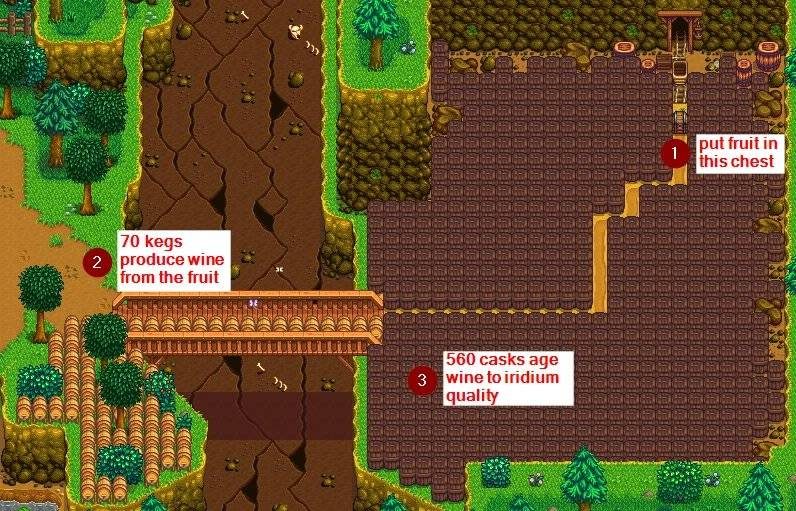
Every machine and chest connected to a Junimo chest is part of a global machine group. This global group behaves just like a regular machine group (including for machine priority), even if it's spread across many locations.
For example, you can use this to distribute automation across the world:
- Junimo huts on your farm collect crops;
- kegs in a shed turn them into juice/wine;
- cellar casks age the juice/wine;
- the shipping bin collects the final output
See Junimo chests in the readme for more info.
Configuration
See configure in the readme for help customizing the mod.
Automate can support custom machines and containers if you create an IAutomationFactory for them. (You don't need to do this for Custom Farming Redux or Producer Framework packs, since they handle that for you.) See extensibility for modders in the readme for more info.
- Release notes
- Source code
- My other mods
Tiny reminder: endorse the mod if you like it. It means more people will see it, and it makes the author happy. :)
ABOUT THIS LISTING
This page describes Automate by pathoschild. The description and screenshots are the author's own, imported from their listing on CurseForge on 25 October 2026: https://www.curseforge.com/stardewvalley/mods/automate
Mythiq.net hosts no files for it. The download button goes straight to the release file on edge.forgecdn.net, so you are downloading from the author's own host, not from a copy of ours.
The download count, rating and comments on this page start at zero and count Mythiq.net only. The source's own figures are not copied here — they measure a different site, and a number that cannot be checked against our own ledger is not worth printing.
Media
1063-0-1491361150.jpg
1063-0-1491361758.jpg
1063-1512350034-893525645.jpg
Requirements
Game version
1.6.15
SMAPI
This is a SMAPI mod, not a loose content file. SMAPI — the Stardew Modding API, from smapi.io — must be installed first, and the game started through it. Without it the folder sits in Mods and nothing loads.
GAME VERSION
Built against Stardew Valley 1.6.15. SMAPI mods usually survive minor game patches, but a mod built for 1.6 will not load on 1.5.
DEPENDENCIES
Many mods require a framework mod as well — Content Patcher above all, sometimes SpaceCore or Json Assets. SMAPI prints the exact missing name at launch; a red error naming a dependency is the usual reason a freshly installed mod does nothing.
Installation
1. Download the archive with the button on this page and unzip it.
2. Move the mod's folder into your Mods directory:
3. Start the game through SMAPI, not the normal launcher. SMAPI lists every mod it loaded at startup — check yours is there and did not print an error.
UPDATING
Delete the old folder before unzipping the new one. Two copies of a mod is the classic cause of duplicate items and crashes, and unzipping over the top keeps stale files the new version no longer expects.
This release downloads from edge.forgecdn.net, not from us, so
there is no checksum to compare against. Scan the archive before you unpack it.
Version history
Automate 2.6.1 2.6.1.zipLatest
16 Mar 2026 · 219 KB via edge.forgecdn.net · 0 downloads Download
Off-site on edge.forgecdn.net —
no checksum, because we never held this file.
Link checked by our review team on 26 Oct 2026.
Tell us if something is wrong — a file that will not work, content taken from
someone else, or anything that looks unsafe. Reports go to our review team, not
to the author.
We use cookies to ensure that we give you the best experience on our website and improve your experience. By continuing to use this site you consent to such use of cookies.