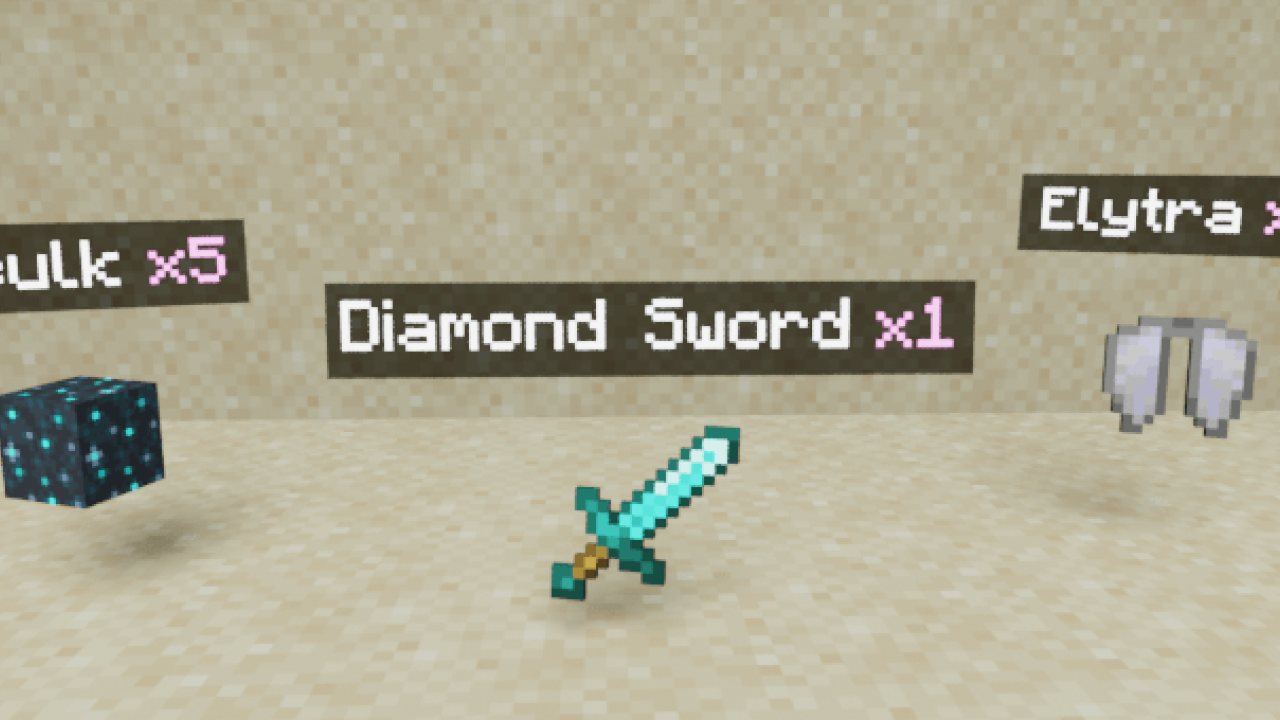
Above each dropped item is shown text-hologram, which displays the name of the item and the amount! Compatible with all other addons! Now you can clearly identify the item from afar without looking at its texture!
Above each dropped item is shown text-hologram, which displays the name of the item and the amount! Compatible with all other addons! Now you can clearly identify the item from afar without looking at its texture!
LIST OF FEATURES:
⭐ Raycasting! Holograms are only displayed on items you can see! For example, items that are behind a block, in the grass, etc. do not display holograms until you see them.
⭐ 2 modes of operation! Display holograms only on the closest items in a certain radius, or only on items that are pointed by your crosshair.
⭐ Editable hologram text pattern! You can change the colors, add a prefix/postfix, add your own text, and even make the text multi-line!
⭐ Fine-tuning! You can adjust the maximum distance to the item to display the hologram, limit the number of nearest items with holograms, change the font size, and many other settings!
⭐ Supports multiplayer and is compatible with all other addons! (without player.json)
⭐ Translated into many languages! You can even translate it into your own language!
Download BP and RP and put these 2 packs into your Minecraft world!
- Enable these experiments: "Beta APIs"
- Only stable Minecraft versions are supported. (not beta or preview)
HOW TO USE:
Apply the addon to your world and that's it! After entering the world, the addon will start working immediately.
Note: after applying the addon, only new dropped items will have holograms. Items that were dropped before the addon was applied will not get holograms.
Raycasting! The hologram is displayed on the item only if there are no obstacles between the player and the item in a straight line:
Multiplayer is supported:
ADDON CONFIGURATION:
Just enter this command: /function itemsHolograms_config
And you will open the settings window for this addon:
Here you can configure:
🔧 Enable addon. Allows you to turn the addon on and off without leaving the world.
🔧 Reduce hologram font size. If enabled, the font size in the holograms will be smaller.
🔧 Raycasting. If disabled, holograms will be displayed even on items that you cannot see (behind the block, in the grass, etc.)
🔧 On which items the hologram will be displayed. You can choose "Nearest items" or "Items the crosshair is aimed at"
In "nearest" mode, holograms are displayed only on items within a certain radius. If raycasting is enabled, the visibility of items is checked before displaying holograms:
Available options in "nearest" mode:
🔧 Limit the number of closest items with holograms to. You can enter any integer. The default is 10. Enter 0 for unlimited (not recommended)
🔧 Maximum distance to the item to display the hologram. You can enter any integer. The default is 12. A maximum of 50 is recommended.
In "crosshair" mode, holograms are displayed only on items that your crosshair is aimed at. Raycasting doesn't affect anything in this mode:
Available options in "crosshair" mode:
🔧 Display a hologram for the first few seconds after item drop, even if you didn't aim at it. If enabled, each item after being dropped will have a hologram for a few seconds. After that, the hologram will disappear until you aim at the item.
CHANGING THE HOLOGRAM PATTERN:
Enter the command /function itemsHolograms_config and scroll to the bottom:
And here you can change the pattern to your liking!
[...9999 more unique combinations]
The pattern is limited only by the number of characters (max 100) and your imagination!
❓FAQ❓
❓Does this addon work on realms? Download the world from your realm, enable the necessary experiments, add this addon to it, and upload it back to the realm. If it still doesn't work, then it's a realms bug
❓In multiplayer, holograms are visible to all players, even in "crosshair" mode! This is a bug and it can't be fixed yet
❓Your addon doesn't work! Please perform all actions listed below:
- Make sure that the type of your Minecraft version is "release" (not beta or preview), and that the version matches the one indicated in the checklist above.
- Make sure that in the settings of your world, you have enabled all the experiments listed in the checklist above. If the world is uploaded to a server, check the server control panel for experiments. If they are not available there, download the world, import it into Minecraft, enable all the necessary experiments, and then upload it back to the server.
- Make sure that in the world settings, only one version of the addon is active in both "behavior packs" and "resource packs," and there are no duplicates or previous versions. If there is at least one duplicate or previous version active at the same time, the addon will not work. The same applies to the world that is uploaded to the server.
❓Your addon works in a local world but does not work on the server! Make sure that you have followed all the steps in the previous point. If you are using Aternos, try "turning off and on again" the experiment toggles, as there is a known issue where they sometimes do not activate on the first attempt. Also, ensure that your hosting provider supports script execution in addons (Beta APIs).
Download BP and RP and put these 2 packs into your Minecraft world!
- Enable these experiments: "Beta APIs"
- Only stable Minecraft versions are supported. (not beta or preview)
ABOUT THIS LISTING
This page describes Holograms on dropped items! by sirob. The description and screenshots are the author's own, imported from their listing on CurseForge on 25 October 2026: https://www.curseforge.com/minecraft-bedrock/addons/holograms-on-dropped-items-cf
Mythiq.net hosts no files for it. The download button goes straight to the release file on edge.forgecdn.net, so you are downloading from the author's own host, not from a copy of ours.
The download count, rating and comments on this page start at zero and count Mythiq.net only. The source's own figures are not copied here — they measure a different site, and a number that cannot be checked against our own ledger is not worth printing.
Requirements
Game version
26.50
NO LOADER
Bedrock imports this file natively — no mod loader, no framework, nothing to install first. The game itself opens .mcaddon, .mcpack, .mcworld and .mctemplate files.
GAME VERSION
Listed against Minecraft Bedrock 26.50. Bedrock updates on every platform at once, and an addon built for a newer version can refuse to import on an older one — the import error names the version it wants.
PLATFORM
Works on Windows and mobile — both import these files directly. Console cannot import files, so console players receive the pack through a Realms world or a friend's world that already has it enabled.
Installation
1. Download the file with the button on this page — do NOT unzip it. Bedrock imports the file itself; an extracted folder is the one way to make this not work.
2. Windows — double-click the file, or right-click → Open with → Minecraft. The game launches and shows "Import started", then "Successfully imported".
Android — open the file from the downloads shade and choose Minecraft. iOS — share the file into Minecraft from the Files app.
3. Where it lands depends on what it is: an addon activates on a world's Behavior Packs / Resource Packs screen; a world appears under Play → Imported; a texture pack appears on the same packs screen.
4. For an addon on a new world: create the world with the pack toggled on. Some addons also need the "Holiday Creator Features" experiment until the author says otherwise.
IF THE IMPORT FAILS
The usual cause is a version gap — the file wants a newer game than is installed. Update the game and import again; the error message on the import screen names the version it expected.
This release downloads from edge.forgecdn.net, not from us, so
there is no checksum to compare against. Scan the archive before you unpack it.
Tell us if something is wrong — a file that will not work, content taken from
someone else, or anything that looks unsafe. Reports go to our review team, not
to the author.
We use cookies to ensure that we give you the best experience on our website and improve your experience. By continuing to use this site you consent to such use of cookies.