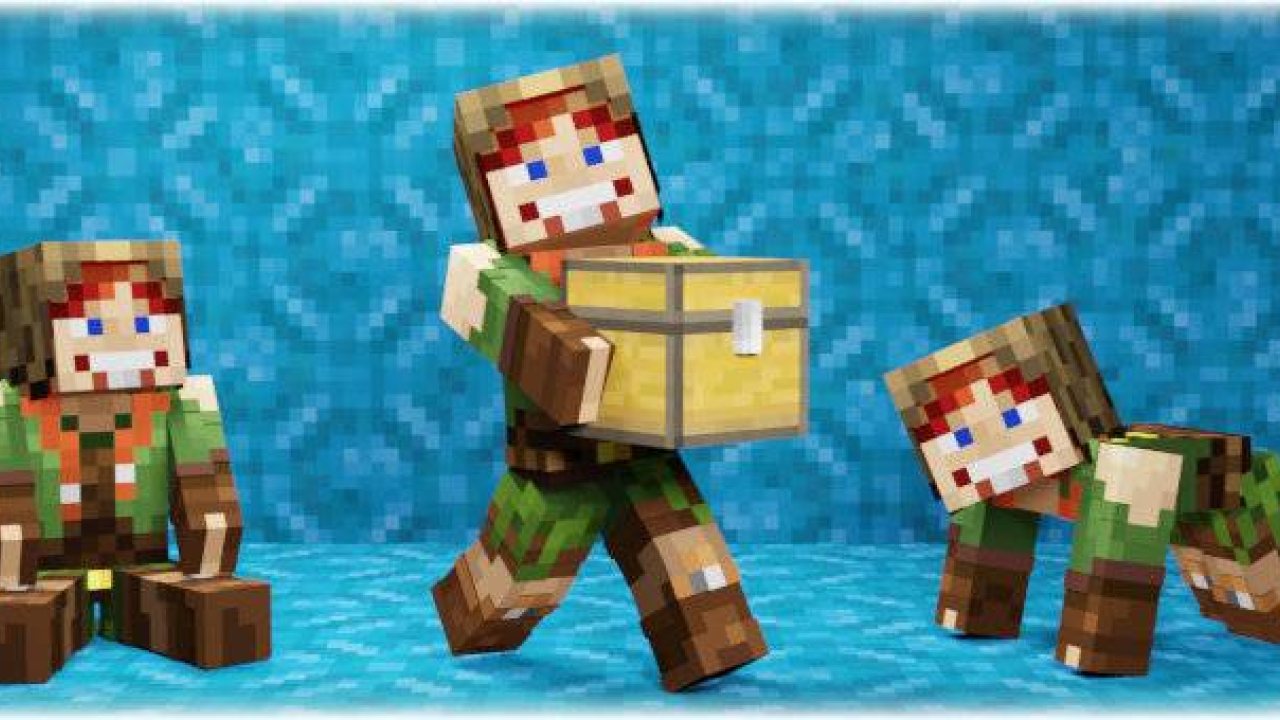
This addon allows you to sit, lie down, crawl, wallclimb and pick up a mob, player or block and carry it! You can also crawl through a 1-block hole! It also works in multiplayer!
This addon allows you to sit, lie down, crawl, wallclimb and pick up a mob, player or block and carry it! You can also crawl through a 1-block hole! It also works in multiplayer!
Download BP and RP and put these 2 packs into your Minecraft world!
- Enable these experiments: "Beta APIs"
- Only stable Minecraft versions are supported. (not beta or preview)
- This addon uses "player.json" and is not compatible with other addons that also use it
This addon is a combination of two of my separately incompatible addons. Here is a brief description of each addon:
𝗠𝗼𝗿𝗲 𝗕𝗼𝗱𝘆 𝗔𝗰𝘁𝗶𝗼𝗻𝘀
“This addon allows you to sit, lie down, crawl, and climb over walls! The first-person camera adjusts its position depending on the body's state! You can also crawl through a 1-block hole! It also works in multiplayer!”
[ How to use ] (More Body Actions)
To sit down, just look as far down as possible and sneak
To lie down, just look as far up as possible and sneak
To start crawling on all fours, first sit down and then just walk forward.
To start crawling normally, jump while crawling on all fours. Jump again to get back on all fours.
To get up, just press sneak
To grasp onto a wall, approach it closely, look slightly upwards, and jump. Then you can move along the edge of the wall to the right or left, or climb onto it by jumping.
Grasping is only possible under the following conditions:
- Both of your hands are free (not holding any items)
- The height of the wall is not more than 3 blocks.
- You're not sneaking
- You are looking slightly upwards (not at a 90-degree angle, but within the range of 30 to 85 degrees).
Learn more about “More Body Actions”
𝗣𝗶𝗰𝗸𝘂𝗽 & 𝗖𝗮𝗿𝗿𝘆
“Pick up the player, mob, or chest with items and carry it to the right place! All mobs, players and blocks with items are carryable! Even mobs or blocks from other addons!”
[ How to use ] (Pickup & Carry)
How to pick up a mob or player:
- Make sure you are not holding any items in your hands (mainhand & offhand)
- Get as close to a mob or player as possible, look at it, then sneak and jump
How to pick up a block with items:
- Make sure you are in "survival" mode
- Make sure you are not holding any items in your hands (mainhand & offhand)
- Approach the block as closely as possible (but do not stand on it)
- Begin sneaking and jumping while simultaneously start breaking the block you want to pick up
You can pick up any block that can store items (chest, dispenser, furnace, etc.). Pickup is only possible if there is at least 0.5 blocks of free space above the block you want to pick up. If the block is at head level, you can still pick it up even if there is no free space above it.
Learn more about “Pickup & Carry”
❓FAQ❓
❓ Does this addon work on realms? Download the world from your realm, enable the necessary experiments, add this addon to it, and upload it back to the realm.
❓ When I sit in 1st person my body rotates, but in 3rd person it does not. It's a bug and can't be fixed yet.
❓Your addon doesn't work! Please perform all actions listed below:
- Make sure that the type of your Minecraft version is "release" (not beta or preview), and that the version matches the one indicated in the checklist above.
- Make sure that in the settings of your world, you have enabled all the experiments listed in the checklist above. If the world is uploaded to a server, check the server control panel for experiments. If they are not available there, download the world, import it into Minecraft, enable all the necessary experiments, and then upload it back to the server.
- Make sure that in the world settings, only one version of the addon is active in both "behavior packs" and "resource packs," and there are no duplicates or previous versions. If there is at least one duplicate or previous version active at the same time, the addon will not work. The same applies to the world that is uploaded to the server.
❓Your addon works in a local world but does not work on the server! Make sure that you have followed all the steps in the previous point. If you are using Aternos, try "turning off and on again" the experiment toggles, as there is a known issue where they sometimes do not activate on the first attempt. Also, ensure that your hosting provider supports script execution in addons (Beta APIs).
Download BP and RP and put these 2 packs into your Minecraft world!
- Enable these experiments: "Beta APIs"
- Only stable Minecraft versions are supported. (not beta or preview)
- This addon uses "player.json" and is not compatible with other addons that also use it
ABOUT THIS LISTING
This page describes More Body Actions + Pickup & Carry! by sirob. The description and screenshots are the author's own, imported from their listing on CurseForge on 25 October 2026: https://www.curseforge.com/minecraft-bedrock/addons/more-body-actions-pickup-carry-cf
Mythiq.net hosts no files for it. The download button goes straight to the release file on edge.forgecdn.net, so you are downloading from the author's own host, not from a copy of ours.
The download count, rating and comments on this page start at zero and count Mythiq.net only. The source's own figures are not copied here — they measure a different site, and a number that cannot be checked against our own ledger is not worth printing.
Requirements
Game version
26.50
NO LOADER
Bedrock imports this file natively — no mod loader, no framework, nothing to install first. The game itself opens .mcaddon, .mcpack, .mcworld and .mctemplate files.
GAME VERSION
Listed against Minecraft Bedrock 26.50. Bedrock updates on every platform at once, and an addon built for a newer version can refuse to import on an older one — the import error names the version it wants.
PLATFORM
Works on Windows and mobile — both import these files directly. Console cannot import files, so console players receive the pack through a Realms world or a friend's world that already has it enabled.
Installation
1. Download the file with the button on this page — do NOT unzip it. Bedrock imports the file itself; an extracted folder is the one way to make this not work.
2. Windows — double-click the file, or right-click → Open with → Minecraft. The game launches and shows "Import started", then "Successfully imported".
Android — open the file from the downloads shade and choose Minecraft. iOS — share the file into Minecraft from the Files app.
3. Where it lands depends on what it is: an addon activates on a world's Behavior Packs / Resource Packs screen; a world appears under Play → Imported; a texture pack appears on the same packs screen.
4. For an addon on a new world: create the world with the pack toggled on. Some addons also need the "Holiday Creator Features" experiment until the author says otherwise.
IF THE IMPORT FAILS
The usual cause is a version gap — the file wants a newer game than is installed. Update the game and import again; the error message on the import screen names the version it expected.
This release downloads from edge.forgecdn.net, not from us, so
there is no checksum to compare against. Scan the archive before you unpack it.
Tell us if something is wrong — a file that will not work, content taken from
someone else, or anything that looks unsafe. Reports go to our review team, not
to the author.
We use cookies to ensure that we give you the best experience on our website and improve your experience. By continuing to use this site you consent to such use of cookies.