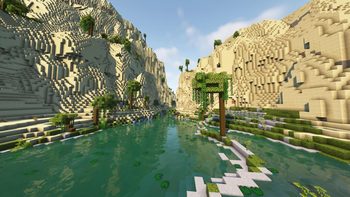
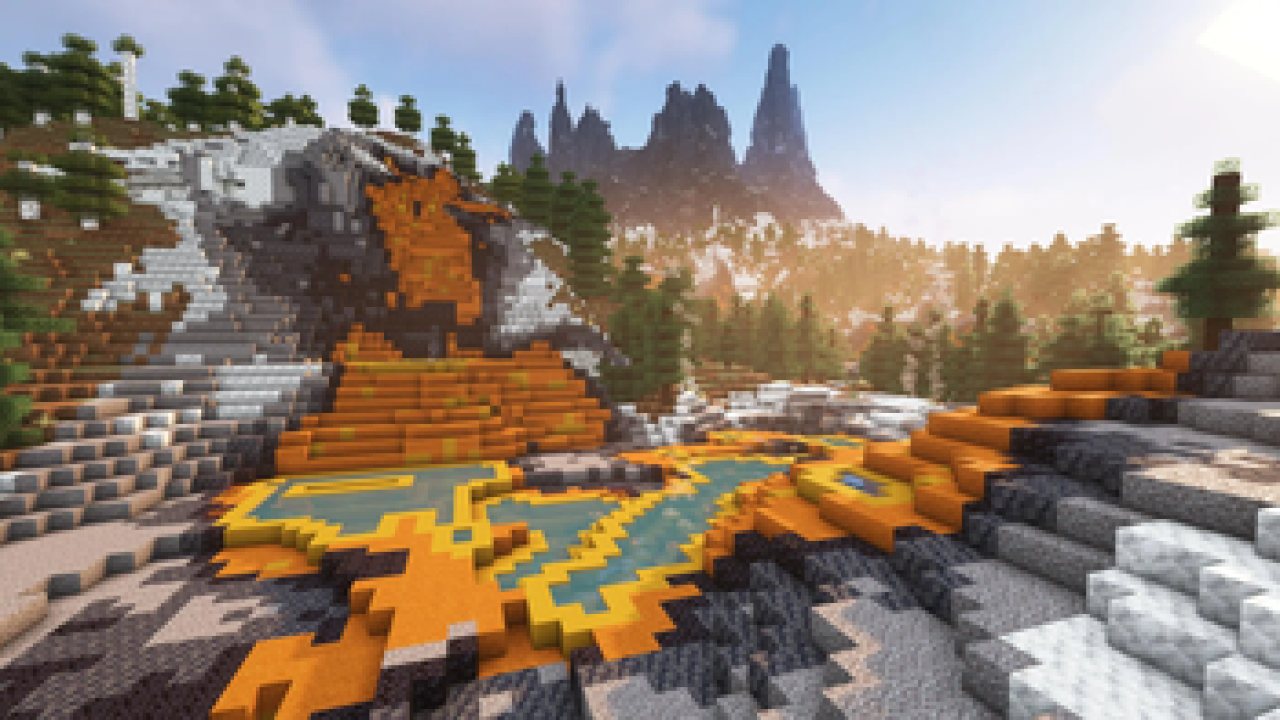
Explore almost 100 new biomes consisting of both realism and light fantasy, using just Vanilla blocks. Complete with several immersive structures to compliment the overhauled terrain.
Terralith
Terralith takes Minecraft's 1.18 massive world generation overhaul, and turns it up to eleven.
Notes
- In 2.6.0, the mod version of Terralith relies on Lithostitched as a required dependency to work.
- In 2.6.0, the mod version of Terralith is different from the datapack version, and it is no longer recommended to swap between the two without causing potential damage to your world.
- Terralith is compatible with most biome-adding mods when using Terrablender or equivilent, but biome-adding datapacks are typically not compatible.
- Terralith is fully compatible with the mod version of Tectonic. If you are using the datapack versions, you must use Terratonic instead of Tectonic.
- You CANNOT remove Terralith from an existing world!
- It is not recommended to add Terralith to an existing world - reset yours first, or use a new world
- View the structures and biomes per seed using jacobsjo's Minecraft Datapack Map
Description
Biomes
Terralith adds over 95 brand new biomes, as well as updating almost every vanilla biome with new and improved features. There are also new terrain types: canyons, shattered biomes, floating islands, deep ocean trenches, and much, much more.
Yellowstone is one of Terralith's staple biomes - a simple and beautiful landscape, based on the real life US National Park. Among the list of realistic biomes are Yosemite Cliffs, Shield, and many more depending on what you're looking for in a biome. Highlands and its variants offer a flat surface to create on - builders can imagine anything from huge mega cities to small simple cottages. Adventurers can explore the breath-taking Volcanic Peaks and discover the beautiful Desert Oases.
While realistic biomes can remind us of the beautiful planet we live on, Terralith offers a plunge into the world of fantasy as well. Adventurers can wander through the purple and mystical Moonlight Grove and Amethyst Rainforest, or climb the unforgiving cliffs of the Scarlet Mountains. If determined, sailers can find the mysterious Mirage Isles, or even the elusive and nostalgic Alpha Islands. Terralith encourages imagination to run wild here.
If you feel the surface is too face, have no fear - custom caves lurk beneath your feet! Similar to Minecraft's Lush Cave, the Underground Jungle is full of foliage, and rarely some old abandoned houses. Other caves, like Infested and Fungal Caves are overgrown with spiders and fungi! If you dig super deep, you could stumble upon a sister to the Deep Dark: the Frostfire Caves are dangerous and menacing. Beware!
Structures
To tie all of Terralith's magnificent biomes together are it's structures. The ominous tall Spire pierces the sky in the iciest biomes. Rarely, you can find Fortified Villages in the plains and desert - the villagers have progressed quite far as a society! Finally, if you find yourself lost at night, cold and hungry, you might stumble into the warm protection of the simple Glacial Hut.
Add-Ons
Terralith has a suite of official add-ons you can try out. When using the datapack versions of the add-ons, ensure they load above Terralith.
- Remove Stardust Labs Intro Message is mostly self explanitory
- Terralith: No Structures prevents all Terralith structures from generating
- Terralith: Extra Recipes adds a couple useful recipe expansions, such as allowing Diorite, Andesite, and Granite to craft stone tools
- Terralith: ReStoned re-adds the Vanilla generation of Andesite/Diorite/Granite blobs
Config
As of 2.6.0, the mod version of Terralith has a config file. It is located in your client's .config folder under the name terralith.json, or you can edit the config directly in game via Neoforge's mod menu or Fabric's Mod Menu.
- Custom Structures (default: on) - Spawns custom structures, such as Fortified Villages and Mage Towers.
- Fog Tweaks (default: on) - Changes fog distance and color is some biomes, such as swamps and caves.
- Intro Message (default: on) - Shows a toast when creating a new world, giving discord link and warning about difficulties when trying to uninstall.
- Skylands (default: on) - A set of four season-themed biomes generating as sky islands above deep oceans. Disabling prevents them from generating.
- Terrain Slabs (default: on) - In biomes with surface stone, stone slabs will generate to smooth the terrain. Disabling prevents them from generating.
- Vanilla Stone Generation (default: off) - Follows Vanilla behavior and generates small blobs of granite, andesite, and diorite throughout the underground. Terralith replaces this with dedicated cave biomes for each stone type.
- Recipe Changes (default: off) - Allows some items crafted with cobblestone to be crafted with alternate stones, and adds a recipe for converting stone slabs to cobblestone.
World Types
As of 2.6.0, the mod version of Terralith adds support for all world types. This means Terralith will respect superflat worlds, and work with the Single Biome, Large Biomes, and Amplified world types. Additionally, Terralith adds two new world types:
- Amplified + Large Biomes (terralith:amplified_large_biomes): Combines the Amplified and Large Biomes into a single world type. It does not look the best, but it is very fun.
- Oops! All Skylands (terralith:all_skylands): Creates a void world that is completely filled in with Skylands, and only Skylands. This world type exists solely for fun.
ABOUT THIS LISTING
This page describes Terralith by Starmute. The description and screenshots are the author's own, imported from their listing on Modrinth on 24 October 2026: https://modrinth.com/mod/terralith
Mythiq.net hosts no files for it. The download button goes straight to the release file on cdn.modrinth.com, so you are downloading from the author's own host, not from a copy of ours.
The download count, rating and comments on this page start at zero and count Mythiq.net only. The source's own figures are not copied here — they measure a different site, and a number that cannot be checked against our own ledger is not worth printing.
Media
Requirements
Game version
26.3
MOD LOADER
This release is built for Datapack. A mod built for one loader will not load under another — Fabric mods do not run on Forge, and vice versa.
GAME VERSION
Built for Minecraft 26.3. Minecraft mods are tied to an exact version: a 1.21.4 build will refuse to load on 1.21.5.
DEPENDENCIES
Check the author's listing for required libraries before you start the game — a missing dependency shows up as a crash on launch, not as a warning.
Installation
1. Install Datapack for the Minecraft version you play, if you have not already.
2. Download the .jar with the button on this page. Do not unzip it — a mod jar is installed as it is.
4. Launch the game with the Datapack profile selected.
ON A SERVER
Anything that changes world generation or gameplay has to be installed on the server as well as on every client. Client-side visual and interface mods do not.
UPDATING
Replace the old .jar rather than adding the new one beside it. Two versions of the same mod in the folder is a crash on launch.
This release downloads from cdn.modrinth.com, not from us, so
there is no checksum to compare against. Scan the archive before you unpack it.
Terralith v2.6.5+26.3
- Updated to support 26.3 (Apollo)
- Implemented new Poplar blocks into existing biomes
- Added Shelf Mushrooms to all fallen logs
- Added custom Abandoned Camps for Alpine Highlands (more later!)
- Vanilla Abandoned Camps generate in Terralith biomes
- Fixed a bug where features would not generate properly in Gravel Desert
- Fixed a bug where Scarlet Mountain had too much snow
- Fixed a bug where upgrading to new versions could result in small chunk borders
Huge thank you to Apollo for making the majority of this update happen.
Off-site on cdn.modrinth.com —
no checksum, because we never held this file.
Link checked by our review team on 25 Oct 2026.
Tell us if something is wrong — a file that will not work, content taken from
someone else, or anything that looks unsafe. Reports go to our review team, not
to the author.
We use cookies to ensure that we give you the best experience on our website and improve your experience. By continuing to use this site you consent to such use of cookies.