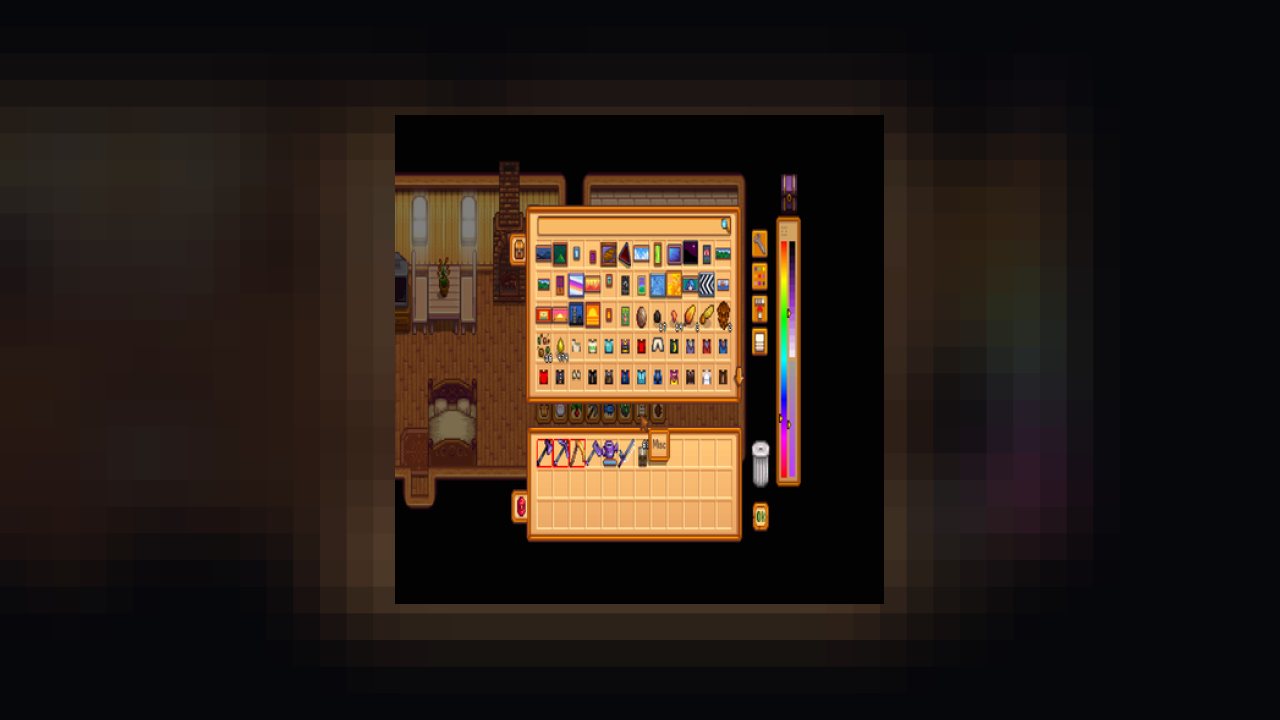
Better Chests adds enhanced chest features to the game.
Better Chests adds enhanced chest features to the game.
Better Chests is safe to add/remove at any time. If Better Chests is removed from your game, and any chest has more than 36 items in it, you'll have to grab items from the top to get to the rest of them.
I regularly test Better Chests alongside other mods which affect chests. It also has integrations with some other mods (noted below).
Full Integration
- Automate - Categorized Chests and Filter Items makes it so that Automate can only push items into chests that you choose.
- Better Crafting - Craft from Chest will open a Better Crafting Page that will include items from all chests, with the Craft from Chest feature enabled, within range.
- Horse Overhaul - SaddleBags can be configured as their own chest type. If you limit the range of Craft from Chest and/or Stash to Chest, it will use the distance to your Horse.
Tested Working
- Bigger Backpacks
- Chests Anywhere
- Custom Backpack Framework and More Backpack Upgrades
Is there another mod you would like to see support added for? Please note it on the Posts tab.
There are too many features and customizability to list them all here, so it is highly recommended you search the Readme for full details on everything this mod can do!
Auto Organize
Every night, after going to bed, your chests will automatically organize items based on the same rules as Stash to Chest.
Config Options
AutoOrganize - Enables the Auto Organize feature.
Better Color Picker
Replaces the Chest Color Picker with a more precise version that lets you pick a color with sliders for hue, saturation, and lightness.
Config Options
CustomColorPicker - Enables the Custom Color Picker feature.
CustomColorPickerArea - Choose which side of the chest menu the color picker will be added to.
Carry Chest
With Carry Chest enabled, you can hit the Use Tool button to pick up chests into your inventory even if it has items.
Config Options
CarryChest - Enables the Carry Chest feature.
CarryChestLimit - Limits how many chests can be carried.
CarryChestSlow - Applies a slowness debuff while carrying a chest.
Categorize Chest
Categorize Chest allows you to assign item categories to chests so that only those items can be stashed into that chest.
Config Options
CategorizeChest - Enables the Categorize Chest feature.
Chest Finder
Search for any chests containing the item you're looking for.
Config Options
ChestFinder - Enables the Chest Finder feature.
CloseChestFinder - Assigns a keybind to close the chest finder.
FindChest - Assigns a keybind to find a chest.
OpenFoundChest - Assigns a keybind to open the closest found chest.
OpenNextChest - Assigns a keybind to open the next found chest.
Chest Info
Display stats to the left of the currently opened chest.
Config Options
ChestInfo - Enables the Chest Info feature.
ToggleInfo - Assigns a keybind to show/hide chest info.
Chest Menu Tabs
Tabs are added to the Chest Menu to allow you to quickly toggle between categories of items.
Config Options
ChestMenuTabs - Enables the Chest Menu Tabs feature.
ChestMenuTabSet - Assigns what tabs to show/hide.
NextTab - Assigns a keybind to move to the next tab.
PreviousTab - Assigns a keybind to move to the previous tab.
Collect Items
While you are carrying a chest in your inventory, any items you pick up may be collected directly into the chest, bypassing your inventory.
Config Options
CollectItems - Enables the Collect Items feature.
Configurator
Adds a button to the chest menu to configure chests individually.
Config Options
Configurator - Enables the Configurator feature.
Craft from Chest
Hit a configurable key to bring up a crafting menu that uses items stored in nearby chests.
Config Options
CraftFromChest - Enables the Craft From Chest feature.
OpenCrafting - Assigns a keybind for opening the crafting menu.
CraftFromChestDisableLocations - A list of locations that crafting will not be allwoed in.
CraftFromChestDistance - Limits the distance that a chest can be crafted from.
Filter Items
Impose restrictions on what types of items are allowed to go into a chest. With this enabled, items that are not part of the allowed list will be blocked.
Config Options
FilterItems - Enables the Filter Items feature.
FilterItemsList - A list of context tags used to select allowed items.
Open Held Chest
With a chest as your active item, you can hit the action button to bring up the chest menu and access the chests contents.
Config Options
OpenHeldChest - Enables the Open Held Chest feature.
Resize Chest
The default storage for a chest is 36 items. With Resize Chest enabled you can increase storage space up to virtually unlimited storage.
Config Options
ResizeChest - Enables the Resize Chest feature.
ResizeChestCapacity - The number of items the chest can store.
ScrollDown - Assigns a keybind to scroll down.
ScrollUp - Assigns a keybind to scroll up.
Search Items
Adds a search bar to the top of the Chest Menu to only display items that meet a search criteria.
Config Options
SearchItems - Enables the Search Items feature.
SearchTagSymbol - Denotes a prefix for searching by item tags.
Slot Lock
Hover over an item slot in your backpack and hit a configurable key to lock that slot which prevents any item in that slot from being stashed into a chest.
Config Options
SlotLock - Enables the Slot Lock feature.
LockSlot - Assigns the keybind for locking a slot.
Stash to Chest
Hit a configurable key to instantly stash items from your inventory into nearby chests.
Config Options
StashToChest - Enables the Stash To Chest feature.
StashItems - Assigns the keybind for stashing items.
StashToChestDisableLocations - A list of locations that stashing will not be allowed in.
StashToChestDistance - Limits the distance that a chest can be stashed into.
StashToChestPriority - Prioritize certain chests over others.
For ease of use, it is recommended to set config options from Generic Mod Config Menu.
More advanced config options can be found on the Readme.
See here for the current status on translations.
Feel free to visit me on my Discord server for announcements and early access to beta releases of my mods.
You're also welcome to seek support or submit issues there. You can also find me on the Stardew Valley discord in #making-mods (LeFauxMatt).
ABOUT THIS LISTING
This page describes Better Chests by LeFauxMatt. The description and screenshots are the author's own, imported from their listing on CurseForge on 25 October 2026: https://www.curseforge.com/stardewvalley/mods/better-chests
Mythiq.net hosts no files for it. The download button goes straight to the release file on edge.forgecdn.net, so you are downloading from the author's own host, not from a copy of ours.
The download count, rating and comments on this page start at zero and count Mythiq.net only. The source's own figures are not copied here — they measure a different site, and a number that cannot be checked against our own ledger is not worth printing.
Requirements
Game version
1.6.14
SMAPI
This is a SMAPI mod, not a loose content file. SMAPI — the Stardew Modding API, from smapi.io — must be installed first, and the game started through it. Without it the folder sits in Mods and nothing loads.
GAME VERSION
Built against Stardew Valley 1.6.14. SMAPI mods usually survive minor game patches, but a mod built for 1.6 will not load on 1.5.
DEPENDENCIES
Many mods require a framework mod as well — Content Patcher above all, sometimes SpaceCore or Json Assets. SMAPI prints the exact missing name at launch; a red error naming a dependency is the usual reason a freshly installed mod does nothing.
Installation
1. Download the archive with the button on this page and unzip it.
2. Move the mod's folder into your Mods directory:
3. Start the game through SMAPI, not the normal launcher. SMAPI lists every mod it loaded at startup — check yours is there and did not print an error.
UPDATING
Delete the old folder before unzipping the new one. Two copies of a mod is the classic cause of duplicate items and crashes, and unzipping over the top keeps stale files the new version no longer expects.
This release downloads from edge.forgecdn.net, not from us, so
there is no checksum to compare against. Scan the archive before you unpack it.
Version history
Better Chests 2.18.6.zipLatest
6 Dec 2024 · 370 KB via edge.forgecdn.net · 0 downloads Download
Off-site on edge.forgecdn.net —
no checksum, because we never held this file.
Link checked by our review team on 26 Oct 2026.
Tell us if something is wrong — a file that will not work, content taken from
someone else, or anything that looks unsafe. Reports go to our review team, not
to the author.
We use cookies to ensure that we give you the best experience on our website and improve your experience. By continuing to use this site you consent to such use of cookies.