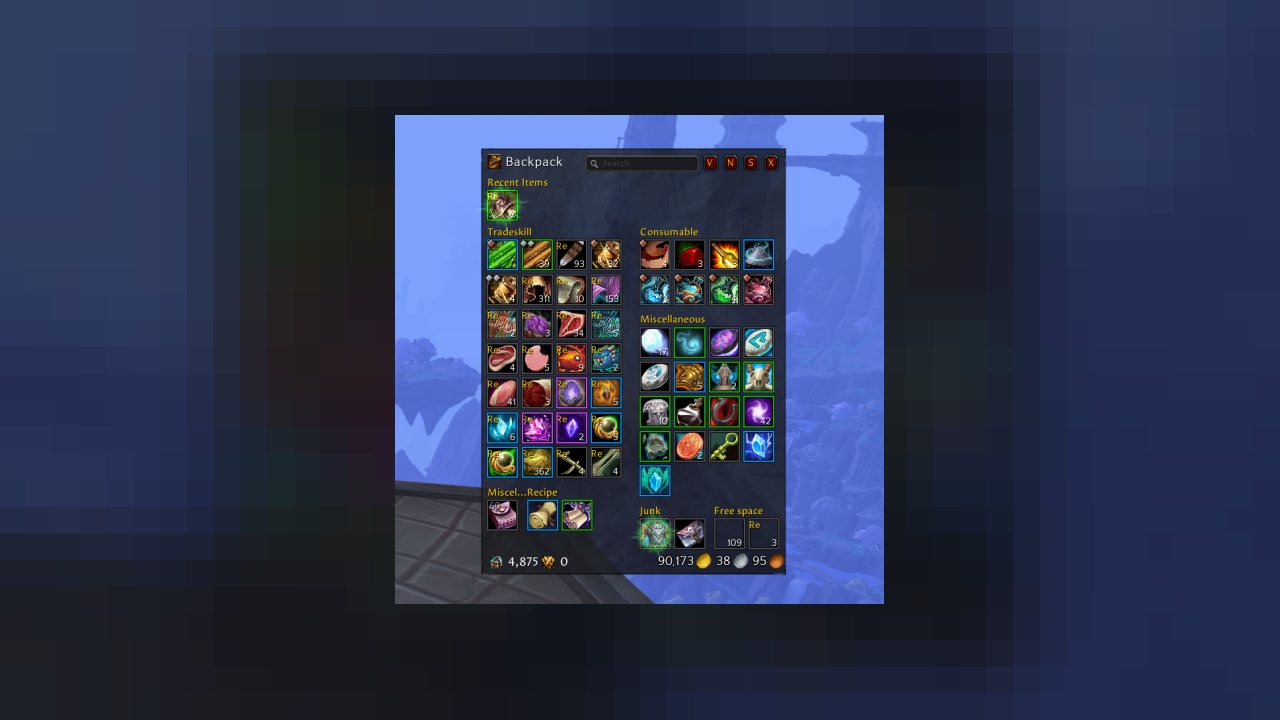
AdiBags is a World of Warcraft addon that displays the contents of your bags in single view, distributed into several sections using smart filters. It is heavily inspired by Nargiddley's Baggins.
Configuration is available through Blizzard addon panel, the /adibags chat command, and by configuring "right-click to open options" and right clicking on any blank space in the bag window.
Main Features
Filter Partitions
AdiBags will automatically filter and group items into partitions so that all like-items are always grouped together. AdiBags tries to make sure there are intelligent defaults that require little-to-no out of the box configuration for item grouping. The partitions them selves are laid out automatically as well, with no human interaction. The result is a beautiful item and bag experience, right from the start!
Character Currencies
AdiBags supports in-frame display of currencies. The specific currencies to display can be configured in the options panel, and currency display supports a dynamic layout that grows to
the number of columns configured.
Full-text Item Searching
AdiBags has built-in support for item searching based on item names. Results are highlighted directly in the bag frame so they can be utilized right away.
Modules
Users can write their own modules that integrate with AdiBags to extend the AddOn's functionality. There are two modules for AdiBags written by the authors:
- AdiBags_Outfitter
- Add filters for the excellent Outfitter addon item sets
- AdiBags_PT3Filter
- Add filters based on LibPeriodicTable-3.1 categories
Feel free to submit your own modules in this readme!
Tips & Tricks
- Custom item sections can be created using the "manual filter" option in the configuration panel. Items can then be dragged and dropped on section titles to reassign that item permanently to that section.
Known Issues, Bugs, and Feature Requests
We welcome all bug reports and feature requests, though we can't promise every single feature will be implemented. Please report any issues or feature requests via GitHub issues.
We highly suggest installing both BugGrabber and BugSack in order to capture bugs in AdiBags. These bug messages should then be used in any bug reports filed through GitHub issues.
Roadmap and Future Thoughts
Guild Bank
AdiBags is an abstraction on top of Blizzard bags, and does not work to make Blizzard bags consistent or sorted. Due to this abstraction, two users of AdiBags accessing the same underlying store, such as a guild bank, may see two different views. For this reason, we've shied away from implementing a Guild Bank for now. However, there is renewed interest in solving this problem overall, so stay tuned for changes in this space.
Alt Bags and Bank
For the moment, alt bags and banks are not supported. Once we invest a bit more time into our abstraction engine, we may revisit this as an added feature.
In-Depth Filter Editing
There are no plans to add a fully featured, scriptable, or logic/waterfall based filtering engine at this time.
License
AdiBags is licensed under the GNU General Public License version 3.
ABOUT THIS LISTING
This page describes AdiBags by Adirelle. The description and screenshots are the author's own, imported from their listing on CurseForge on 3 October 2026: https://www.curseforge.com/wow/addons/adibags
Mythiq.net hosts no files for it. The download button goes straight to the release file on edge.forgecdn.net, so you are downloading from the author's own host, not from a copy of ours.
The download count, rating and comments on this page start at zero and count Mythiq.net only. The source's own figures are not copied here — they measure a different site, and a number that cannot be checked against our own ledger is not worth printing.
Requirements
Game versions
1.15.3
4.4.0
3.4.3
11.0.2
2.5.4
GAME FLAVOUR
This is a Classic build. Retail and Classic run different interface APIs, and an addon built for one throws Lua errors on the other — check you are installing into the right client folder.
INTERFACE VERSION
Built against game version 1.15.3, 4.4.0, 3.4.3, 11.0.2, 2.5.4. After a patch, an addon that has not been updated is flagged out of date; most keep working, and the "Load out of date AddOns" checkbox on the character screen lets you try.
DEPENDENCIES
Some addons need a separate library addon (Ace3, LibStub and friends) that is not bundled. If the addon does not appear in the list in game, a missing dependency is the usual reason.
Installation
1. Quit World of Warcraft completely. The game reads the AddOns folder at launch and will overwrite settings for an addon added while it is running.
2. Download the archive with the button on this page and unzip it.
3. Move the folder — the one with the .toc file in it, not the zip's wrapper folder — into:
World of Warcraft\_classic_era_\Interface\AddOns (or _classic_ for the current Classic expansion)
4. Start the game. On the character selection screen, click AddOns and check that it is listed and enabled.
IF IT DOES NOT APPEAR
Nine times out of ten the folder is nested one level too deep. Interface/AddOns/Thing/Thing/Thing.toc will not load; Interface/AddOns/Thing/Thing.toc will.
UPDATING
Delete the old folder before unzipping the new one. Unzipping over the top leaves files behind that the new version no longer expects.
This release downloads from edge.forgecdn.net, not from us, so
there is no checksum to compare against. Scan the archive before you unpack it.
Tell us if something is wrong — a file that will not work, content taken from
someone else, or anything that looks unsafe. Reports go to our review team, not
to the author.
We use cookies to ensure that we give you the best experience on our website and improve your experience. By continuing to use this site you consent to such use of cookies.