Overview
Little Tweaks and Quality of Life improvements like: Drink Macro, Mythic Keystone Improver, Quick Signup LFG
Enhance QoL – Small Tweaks & UI Improvements for World of Warcraft
A modular collection of tiny quality-of-life fixes and UI polish.
Every feature can be switched off; footprint is negligible.
Discord:
Slash Commands
Command
Action
/eqol
Open the configuration window
/eqol resetframe
Re-center all Enhance QoL windows
/eqol lag
List gossip IDs of the current NPC dialog
/eqol aag
Auto-pick a gossip option (chosen via /eqol lag)
/eqol rag
Remove an auto-picked gossip ID
Supported Languages
English • German • French • Spanish • Italian • Russian • Korean • zhCN • zhTW • ptBR
Feature Set
Chat & Social
- Chat fading with configurable delay.
- Instant Messenger – mini whisper window with tabs, history, optional fade, animation, and combat suppression. Toggle with /eim.
- Custom whisper sounds.
- Context menu links for Raider.IO and WarcraftLogs.
Bags & Inventory
- Show item level, gems, enchants and durability on bag and bank icons.
- Display bind type (BoE/WB/etc.).
- Positioning options for item-level labels.
- Flexible Bag Filter Window – filter by slot, rarity, spec-usable, expansion or custom item-level range.
- Hideable Bag Bar (mouse-over).
- Money tracker – total gold across characters and Warband, with option to show account-only gold.
- Inventory item filter (by category, upgrade track, item level, spec relevance).
- Fade profession quality icons during search.
Character & Inspect
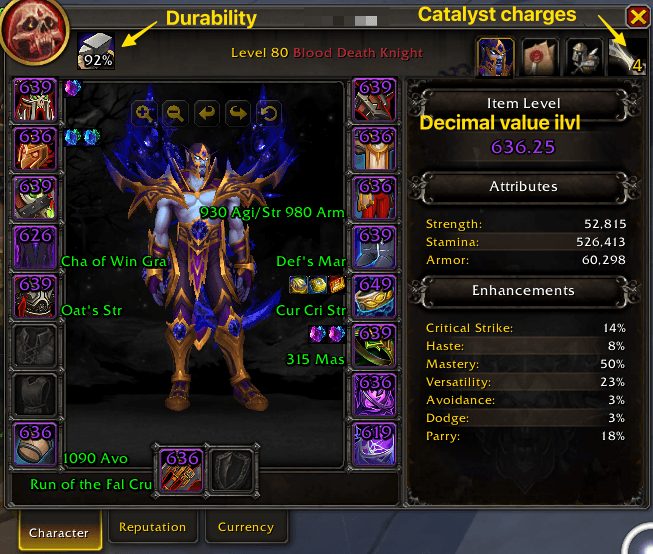
- Item level, gems, enchants and durability displayed in the Character Frame.
- Catalyst charge display.
- Gem-Socket Helper.
- Extra info in the Inspect Frame.
- Class-specific frame toggles (e.g. rune frame, combo points).
Action Bars & Mouse
- Mouse-over action bars.
- Full button range coloring – tint entire action button when out of range.
- Visible cursor ring and trail, with options to hide the dot or adjust visuals.
- Optional shortened keybind text and custom fonts/outlines for macro/keybind labels.
Unit Frames & Resource Bars
- Hide floating combat text (player/pet).
- Custom EQoL Player/Target/ToT/Pet/Focus/Boss frames with Edit Mode sizing/anchoring, borders, bar textures, fonts, castbar options, aura anchors.
- Options to hide Target, Player or Boss frames until mouse-over.
- Truncate long unit names with adjustable limit.
- Frame scale adjustment for compact frames.
- Resource Bars: configurable health/power bars with global profiles, out-of-combat/mounted/vehicle visibility, anchoring to other EQoL frames, separator ticks, and absorb bar settings (enable, custom color/texture, sample preview).
Minimap & Micro Menu
- Gather minimap buttons into a movable, lockable button sink.
- Quick spec/loot switching.
- Optional square minimap and custom instance difficulty icon.
- Right-click menus for expansion/garrison buttons.
- Hide minimap button, bags bar, micro menu, Quick Join Toast, Raid Tools in party.
- Show/hide specific landing page buttons.
Group & Raid Tools
- Leader icon in compact party frames.
- Auto-accept invites (friends/guild configurable).
- Option to show party frames solo; option to hide player frame.
- Block duel and group invites.
Dungeon / Mythic+
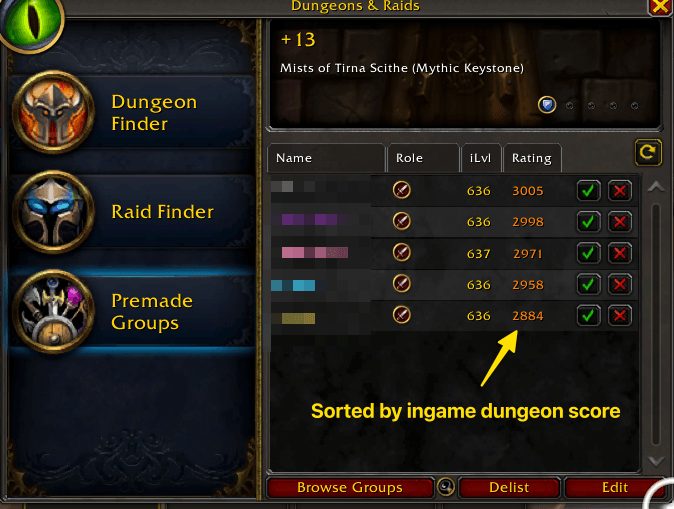
- Quick signup with persisted note.
- Skip role selection when possible.
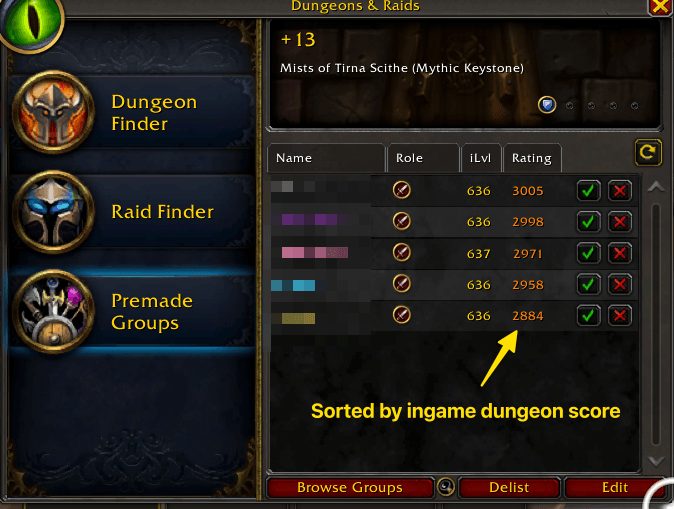
- Sort applicants by Mythic Score.
- Extended group filters (Bloodlust, Battle Res, role fit, duplicates).
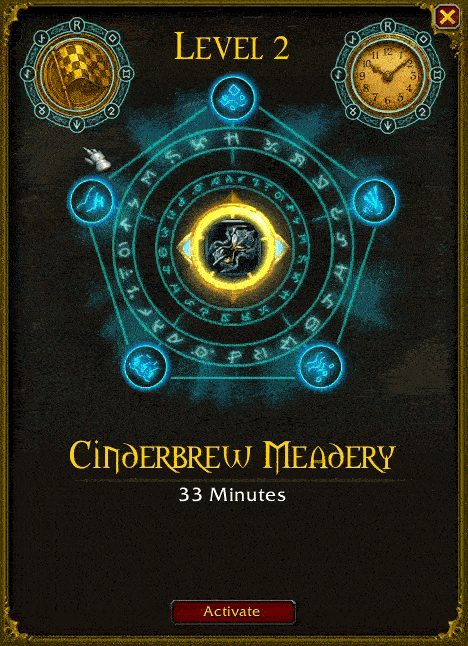
- Keystone Helper – auto insert, improved UI, auto-start after pull, close bags, decimal forces, chest timers.
- Talent Reminder – check on Ready Check, show active build name, play sound if mismatched.
- Combat resurrection tracker and rating display.
- Hide LFG text messages, shift reset filter button.
Teleports & Travel
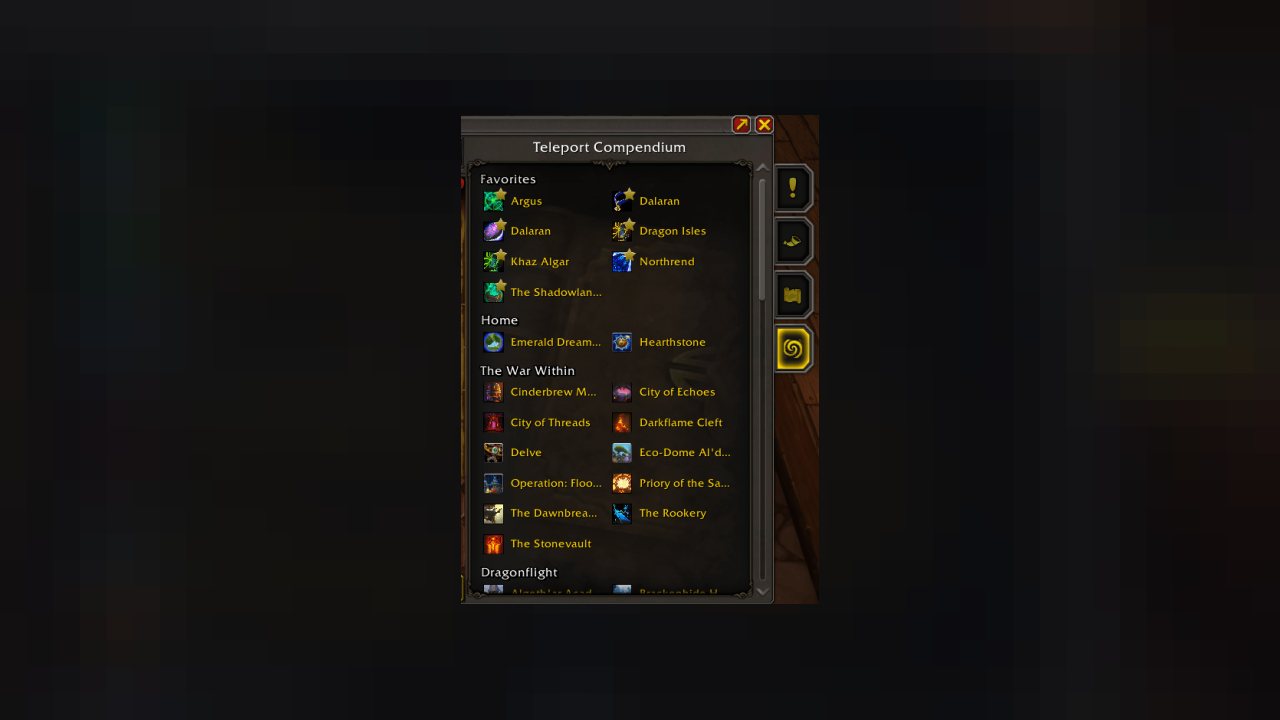
- Dedicated Teleport Frame with class, engineering, toy and item teleports.
- “Teleport Compendium” inside PvE frame.
- Filter/hide missing or seasonal teleports.
- Always show favourites.
Quest, Vendor & Loot Automation
- Auto-accept/turn-in quests with excludes (daily/weekly/trivial/account-completed).
- Auto-repair and smart vendoring by quality, ilvl, bind type, upgrade track, crafting expansions.
- Auto-sell junk, drag-and-drop whitelist/blacklist.
- Quick loot mode.
- Auto confirm for crafting orders and loot trades.
- DELETE text confirmation.
- Custom loot toasts with thresholds, IDs, mounts/pets, sounds.
- Hide boss banners, Azerite toasts, add instant Catalyst button.
Tooltip Control
- Context-based filtering (combat/dungeon/friendly/enemy).
- Show/hide item, spell, unit, buff/debuff tooltips.
- Add IDs: item, spell, NPC, quest, currency, enchant, icons.
- Show counts per location, account-wide currency, Mythic+ score, class colours.
Map & CVars
- Provide basic /way command for waypoints.
- Expose CVars as toggles (autodismount, map fade, nameplate colours, castbars, disable tutorials, enhanced tooltips, etc.).
Drink Macro
- Smart food/drink usage – prefer mage food, ignore Well Fed, handle Recuperate.
- Reminders for mage food, with sound alerts and custom sound options.
- Ignore Jewelcrafting gems for Earthen race.
Sound Control
- Mute categories (class abilities, mounts, etc.).
ABOUT THIS LISTING
This page describes Enhance QoL by R41Z0R. The description and screenshots are the author's own, imported from their listing on CurseForge on 3 October 2026: https://www.curseforge.com/wow/addons/eqol
Mythiq.net hosts no files for it. The download button goes straight to the release file on edge.forgecdn.net, so you are downloading from the author's own host, not from a copy of ours.
The download count, rating and comments on this page start at zero and count Mythiq.net only. The source's own figures are not copied here — they measure a different site, and a number that cannot be checked against our own ledger is not worth printing.