Dugi Questing Essential is an All-In-One addon for anything to do with questing & leveling.
Brought to you by Dugi Guides™ makers of the best Midnight WoW Warcraft leveling guides
For tech support best to contact us in our discord channel https://discord.gg/y4eTGDUeAU
Every option in the list below can be disable easily from the config menu.
Right click on the Dugi Icon for config menu
Type /dugi for a list of commands.
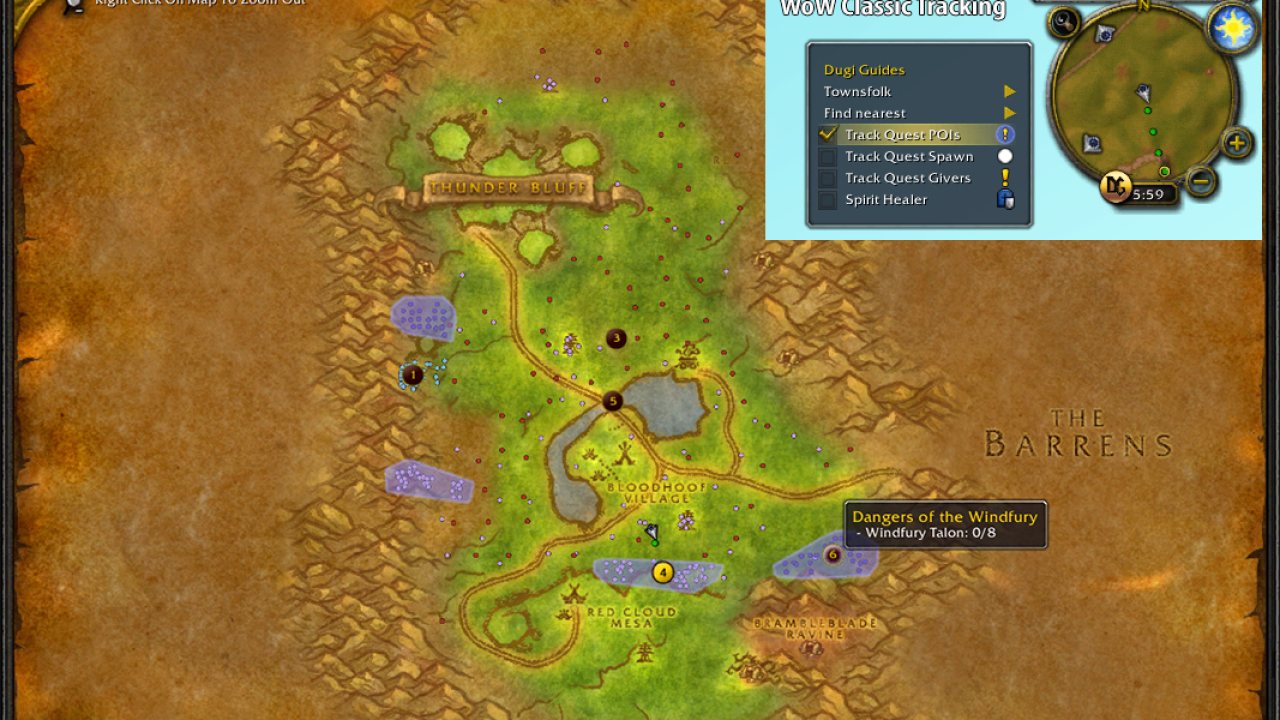
- NEW Track Quest POIs - Displays quest area highlight with POIs for WoW Classic
- NEW Track Quest Spawns - Display quest spawns dots similar to Questie and Classic Codex for WoW Classic
- NEW Nameplates - Display objective nameplates above relevant NPCs
- GPS style "Search Location" - You can use this to search for locations in WoW by name and get a result of clickable waypoint for the location name.
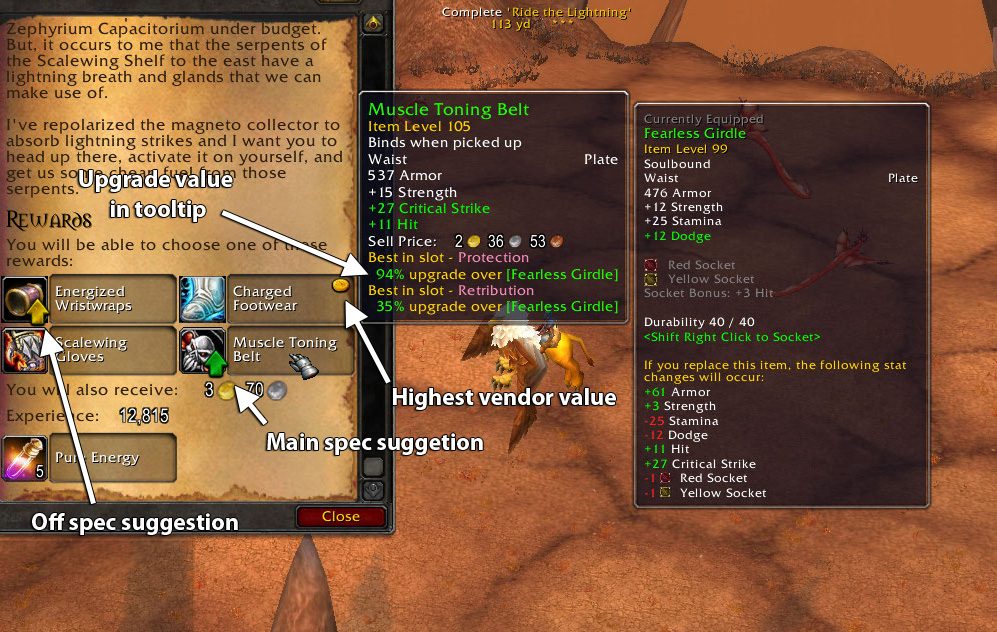
- Gear Advisor Feature - Using gear scoring algorithm it will automatically suggest / equip best in slot item from your bag and quest reward suggestion. (see screenshots)
- Works automatically no setup required.
- Weight Stats used for calculation is the same as AskMrRobot to ensure the best gear suggestion.
- Green Arrow to suggest which item is an upgrade in quest reward panel (Similar to Pawn)
- Green Arrow will also appear during loot roll, dungeon journal, vendors.
- Customizable Hit and Expertise cap.
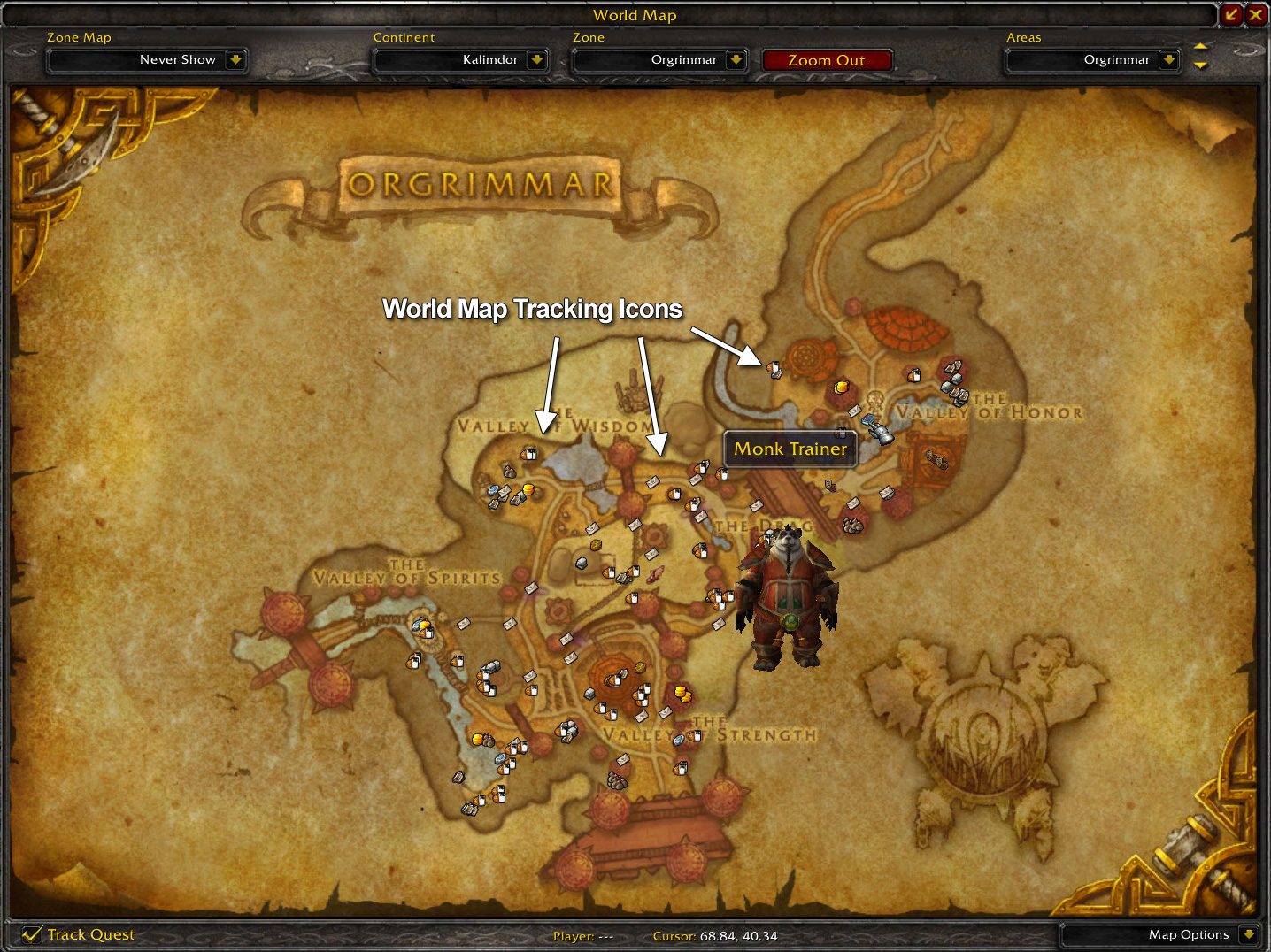
- World Map Tracking feature - Option is available in Settings > Maps category. Add icons in the world map when you use your minimap tracking. Video: http:youtu.be/050vaRzMJ6o
- Find Nearest feature - Accessible from the Minimap tracking button to find the closest NPC from your current position. Video: http:youtu.be/050vaRzMJ6o
- Watch Frame Border - A set of cool borders available for the Watch Frame (Objective Tracker), the border will also play a *flash* animation when you complete a quest.
- Quest Complete Sound - Play a sound whenever you complete a quest, a set of voice sound available for all races and genders.
- Map Preview - A slick Minimap will fade in and fade out showing your the quest location. This will work automatically when you interact with the quest POI on your Objective Tracker.
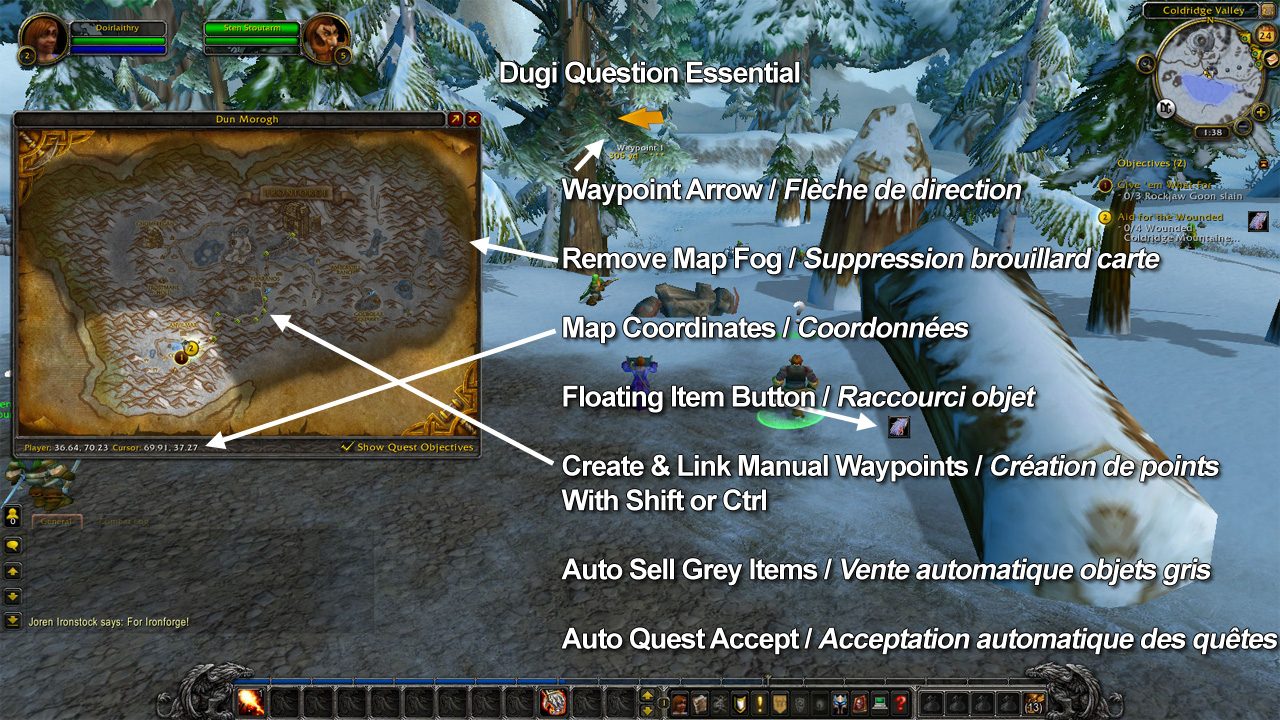
- Waypoint System with Taxi Feature - Works similar to TomTom, clicking the Quest POI in your Objective Tracker will automatically place a waypoint for the quest. The waypoint arrow will turn green if you enter the selected quest area. You can also create your waypoint by CTRL + Right Click on your map and you can also link them together by holding SHIFT + Right Click on your map.
- Taxi feature will automatically create the fastest possible route using flight master, teleport spells, portals, boats zeppelins and available items. Video http:youtu.be/CPx5RsqJh2M
- Map Coordinates - Your standard map coordinates system which will appear at the bottom of your World Map and Minimized Map.
- Remove Map Fog - Reveal all unexplored area, but you can still tell which area is unexplored from the slight dark overlay, similar to Mapster.
- Auto Quest Accept - Lightning fast quest accept and turn in, hold Shift while talking to a NPC to temporarily disable it.
- Auto Sell Grey Items - Sell all the junk that you picked up while questing automatically and display the total profit.
- Auto Quest Item Loot - Loot quest item automatically without picking up other junks.
- Floating Quest Item Button - Don't you hate clicking the quest item on the Objective Tracker because its in an awkward position? The floating quest item can be moved anywhere on your screen and the button will appear if a quest item is available when you click on the Quest POI in Objective Tracker.
ABOUT THIS LISTING
This page describes Dugi Questing Essential by DugiGuides. The description and screenshots are the author's own, imported from their listing on CurseForge on 26 October 2026: https://www.curseforge.com/wow/addons/dugi-questing-essential
Mythiq.net hosts no files for it. The download button goes straight to the release file on edge.forgecdn.net, so you are downloading from the author's own host, not from a copy of ours.
The download count, rating and comments on this page start at zero and count Mythiq.net only. The source's own figures are not copied here — they measure a different site, and a number that cannot be checked against our own ledger is not worth printing.
Media
Zone Map
Waypoints
Gear Advisor
Gear Advisor
World Map Tracking
Requirements
Game version
1.15.9
GAME FLAVOUR
This is a Classic build. Retail and Classic run different interface APIs, and an addon built for one throws Lua errors on the other — check you are installing into the right client folder.
INTERFACE VERSION
Built against game version 1.15.9. After a patch, an addon that has not been updated is flagged out of date; most keep working, and the "Load out of date AddOns" checkbox on the character screen lets you try.
DEPENDENCIES
Some addons need a separate library addon (Ace3, LibStub and friends) that is not bundled. If the addon does not appear in the list in game, a missing dependency is the usual reason.
Installation
1. Quit World of Warcraft completely. The game reads the AddOns folder at launch and will overwrite settings for an addon added while it is running.
2. Download the archive with the button on this page and unzip it.
3. Move the folder — the one with the .toc file in it, not the zip's wrapper folder — into:
World of Warcraft\_classic_era_\Interface\AddOns (or _classic_ for the current Classic expansion)
4. Start the game. On the character selection screen, click AddOns and check that it is listed and enabled.
IF IT DOES NOT APPEAR
Nine times out of ten the folder is nested one level too deep. Interface/AddOns/Thing/Thing/Thing.toc will not load; Interface/AddOns/Thing/Thing.toc will.
UPDATING
Delete the old folder before unzipping the new one. Unzipping over the top leaves files behind that the new version no longer expects.
This release downloads from edge.forgecdn.net, not from us, so
there is no checksum to compare against. Scan the archive before you unpack it.
Version history
DugisGuideViewerZ-TBC-Ann-2.03.zipLatest
17 Aug 2026 · 7.3 MB via edge.forgecdn.net · 0 downloads Download
Off-site on edge.forgecdn.net —
no checksum, because we never held this file.
Link checked by our review team on 26 Oct 2026.
Tell us if something is wrong — a file that will not work, content taken from
someone else, or anything that looks unsafe. Reports go to our review team, not
to the author.
We use cookies to ensure that we give you the best experience on our website and improve your experience. By continuing to use this site you consent to such use of cookies.