TomTom is your personal navigation assistant in World of Warcraft.
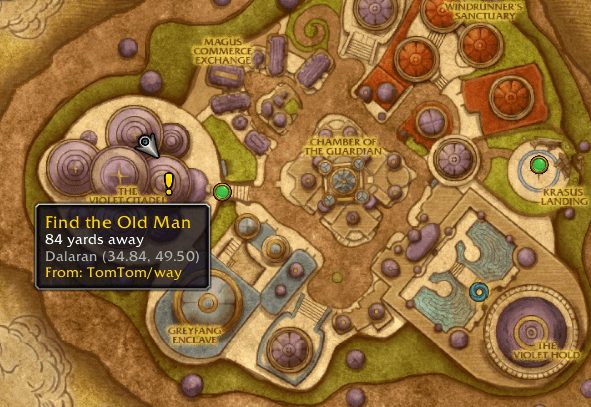
- Set waypoints via command, or by clicking on the world map
- Set multiple waypoints at a time (such as those you can copy and paste from WowHead)
- A draggable coordinate display with customizable accuracy. This frame can be hidden or locked.
- Player and cursor coordinates on the World Map (these can be hidden)
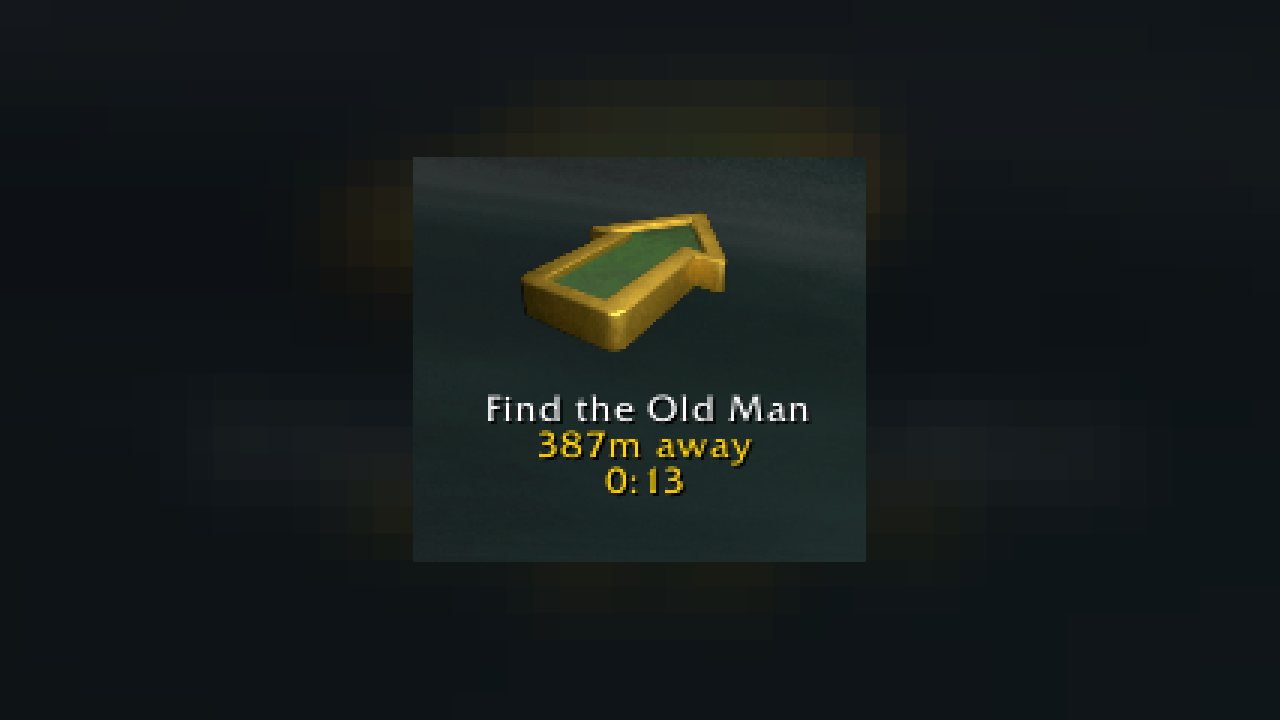
- A floating "crazy-taxi" style arrow that points you to your destination
- Displaying the "crazy-taxi" arrow or coordinate block in compatible LDB displays
- Show a waypoint that points you towards your corpse for easy recovery
- Can set waypoints by clicking on quest objective POIs on the World Map and watch
- Works amazingly when paired with Kaliel's Tracker for all of your quest-related navigation needs
Support
If you're having an issue, the best way to get support is via Discord. Please join our Discord server here: https://discord.gg/StzZfsbUSQ
New Updates
As we head into Midnight we've been able to give TomTom a fresh coat of paint, thanks to some lovely community members. There are now theme customizations for the Crazy Arrow, and for both the Minimap and Worldmap waypoints. Just run /tomtom to open the options and navigate to the section to preview and select a theme.
Features
TomTom offers the following major features:
- Set waypoints via command, or by clicking on the world map
- Set multiple waypoints at a time (such as those you can copy and paste from WowHead)
- A draggable coordinate display with customizable accuracy. This frame can be hidden or locked.
- Player and cursor coordinates on the World Map (these can be hidden)
- A floating "crazy-taxi" style arrow that points you to your destination
- Displaying the "crazy-taxi" arrow or coordinate block in compatible LDB displays, such as NinjaPanel
- Show a waypoint that points you towards your corpse for easy recovery
- Can set waypoints by clicking on quest objective POIs on the World Map and watch frame.
Slash Commands:
/tomtom - Opens configuration GUI
/ttpaste - Opens a window where you can paste a list of /way commands, such as those you might copy from WowHead, and have them all added in one go!
In addition you can use the /way command to add and reset waypoints. In order to overcome conflicts with the Cartographer /way command, you can also use /tway to access TomTom's waypoint command. The following slash commands are available:
Slash Command
Description
/tway 14.78 23.9
Add a new waypoint at 14.78, 23.90
/tway Nagrand 45 50
Add a new waypoint in Nagrand at 45, 50
/tway 14.78 23.90 This is a waypoint!
Add a new waypoint with a description
/tway reset all
Remove ALL current waypoints
/tway reset Nagrand
Remove all waypoints in Nagrand
/wayb or /wayback
Sets a waypoint at the current location
/cway or /closestway
Set the crazy arrow to the closest waypoint
/tway list
List the current known waypoints
/tway arrow
Print the status of the Crazy Arrow
TomTom has been designed to publish the Crazy-Arrow and Coordinate Block as LDB feeds, allowing them to be displayed in compatible display addons. I've written a very simple, easy-to-configure panel that is capable of displaying these called NinjaPanel.
If you're looking to bulk import waypoints (to track achievements, etc), use the /ttpaste command to open an easy bulk create waypoint window.
Credits/ and Thanks:
- Esamynn for Astrolabe which did the heavy lifting in this addon before Blizzard changed the mapping system
- Nevcairiel for HereBeDragons, which does the heavy lifting these days
- Carl Thomas and Chris Braithwaite for their contributions of the new lovely artwork and themes
- Ludovicus for maintaining during my days away from WoW
Donations:
Some folks have asked for how they can donate money, and for many years I've enjoyed hearing about how my addons have helped other people enjoy World of Warcraft. If you would like to donate, I'd ask you to make a donation to the Colorectal Cancer Alliance, a worthy organisation that helped my sister immensely from her diagnosis through her final years. If you or a family member suspect you might have something not right in your butt, please have a doctor check it out. Colorectal cancer is one of the most preventable cancers in the world.
ABOUT THIS LISTING
This page describes TomTom by jnwhiteh. The description and screenshots are the author's own, imported from their listing on CurseForge on 14 August 2026: https://www.curseforge.com/wow/addons/tomtom
Mythiq hosts no files for it. The download button goes straight to the release file on edge.forgecdn.net, so you are downloading from the author's own host, not from a copy of ours.
The download count, rating and comments on this page start at zero and count Mythiq only. The source's own figures are not copied here — they measure a different site, and a number that cannot be checked against our own ledger is not worth printing.
Media
TomTom-Worldmap.png
TomTom-Themes.png
Requirements
Game versions
5.5.4
12.0.7
12.1.0
2.5.6
1.15.9
3.80.2
GAME FLAVOUR
This is a retail (modern World of Warcraft) build. It will not work in the Classic clients, which run a different interface API.
INTERFACE VERSION
Built against game version 5.5.4, 12.0.7, 12.1.0, 2.5.6, 1.15.9, 3.80.2. After a patch, an addon that has not been updated is flagged out of date; most keep working, and the "Load out of date AddOns" checkbox on the character screen lets you try.
DEPENDENCIES
Some addons need a separate library addon (Ace3, LibStub and friends) that is not bundled. If the addon does not appear in the list in game, a missing dependency is the usual reason.
Installation
1. Quit World of Warcraft completely. The game reads the AddOns folder at launch and will overwrite settings for an addon added while it is running.
2. Download the archive with the button on this page and unzip it.
3. Move the folder — the one with the .toc file in it, not the zip's wrapper folder — into:
World of Warcraft\_retail_\Interface\AddOns
4. Start the game. On the character selection screen, click AddOns and check that it is listed and enabled.
IF IT DOES NOT APPEAR
Nine times out of ten the folder is nested one level too deep. Interface/AddOns/Thing/Thing/Thing.toc will not load; Interface/AddOns/Thing/Thing.toc will.
UPDATING
Delete the old folder before unzipping the new one. Unzipping over the top leaves files behind that the new version no longer expects.
This release downloads from edge.forgecdn.net, not from us, so
there is no checksum to compare against. Scan the archive before you unpack it.
Version history
v4.3.8-releaseLatest
2 Aug 2026 · 11 MB via edge.forgecdn.net · 12 downloads Download
Off-site on edge.forgecdn.net —
no checksum, because we never held this file.
Link checked by our review team on 14 Aug 2026.
Tell us if something is wrong — a file that will not work, content taken from
someone else, or anything that looks unsafe. Reports go to our review team, not
to the author.
We use cookies to ensure that we give you the best experience on our website and improve your experience. By continuing to use this site you consent to such use of cookies.