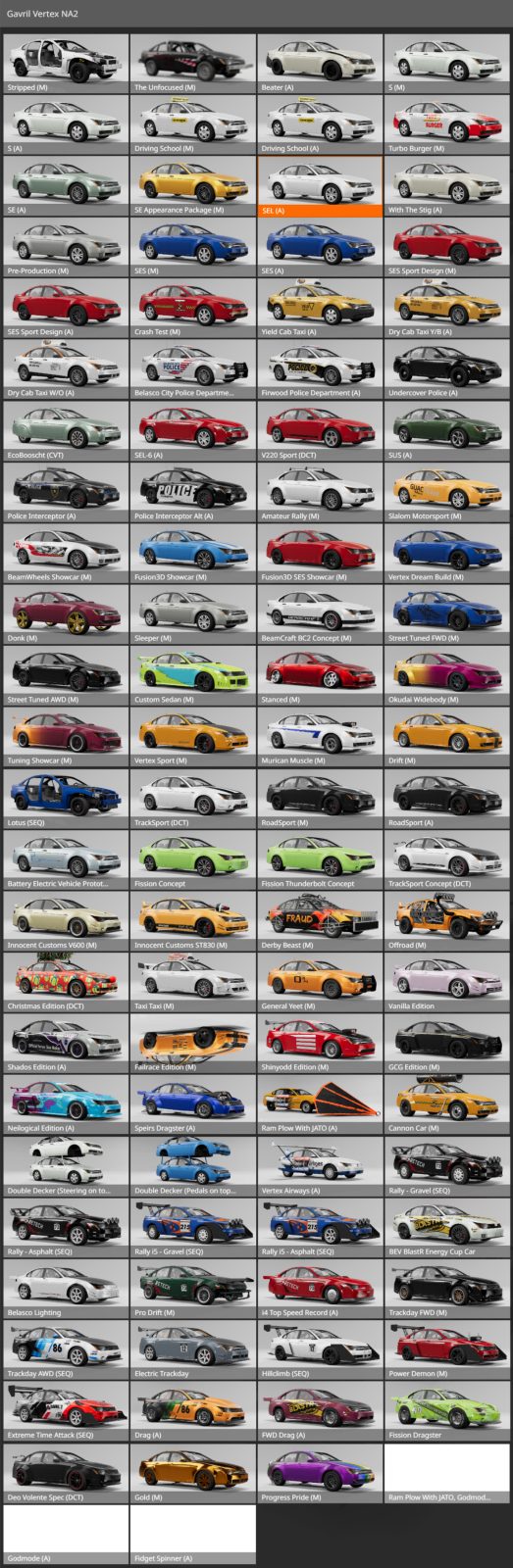
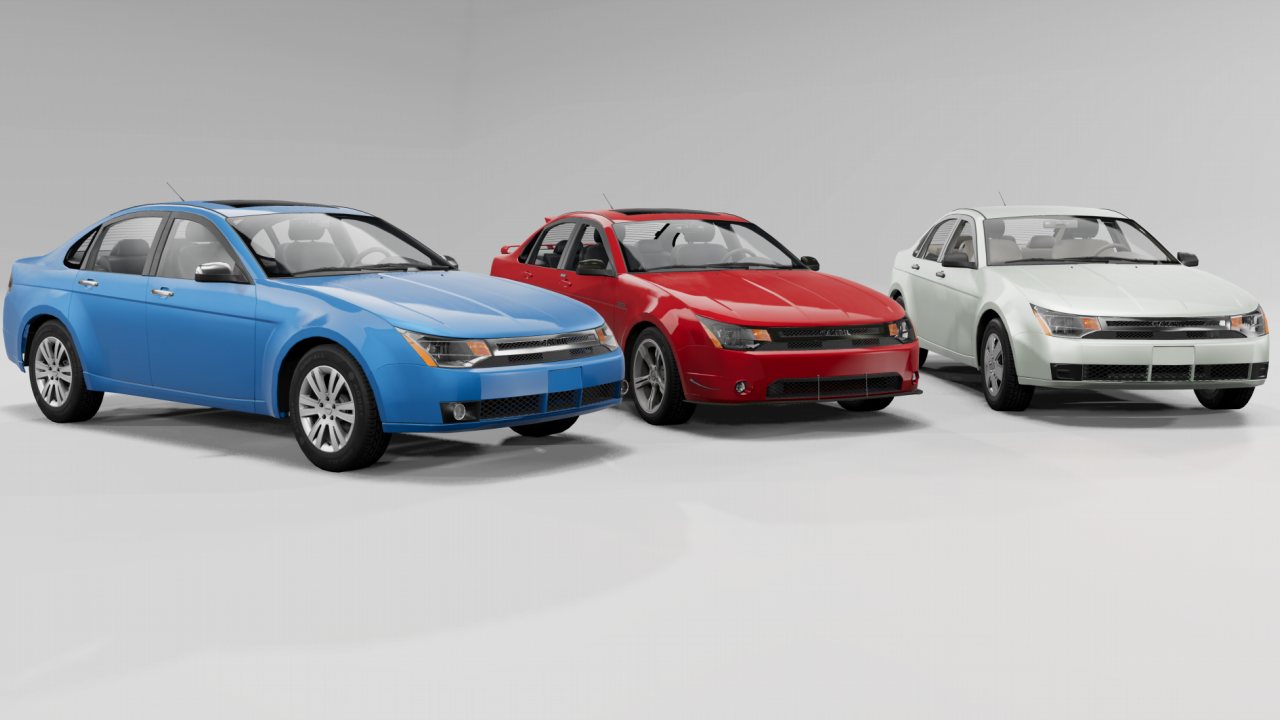
Completely reworked. The most customizable vehicle in the game! 106 configs and 1300 parts to choose
An update will release POST game version 0.39 with new content, optimization, cleanup and fixes to things that will inevitably break.
Introducing the Gavril Vertex NA2
Spoiler: V3.0+ Featured Videos
Spoiler: V1.0 Showcase Video
Very big thank you to my friend here ^w^
The Gavril Vertex. BeamNG's most customizable vehicle.
It is basing on a Ford Focus NA2. It is however not a complete replica but more of it's own thing. That hasn't stopped me from replicating various irl Foci and it's lore.
2 years of work with a combined ~1500+ hours over the updates has turned this otherwise kind of boring economy sedan into a customization heaven!
All of this would not have been possible without the help of @Nacho Problem , @Theo Wilkinson , @Shadows and all of my trusted testers!
The mod is stuffed full of ways to make it your own. A bunch of the parts included arent even used on any of the configs! Some easter eggs are hidden as well of course
Please take your time to read through the description. It is worth it.
Anyways, here some pictures!
Image of all configurations
There are some add ons for this mod!
For example, a removed config for this version and a legacy version can be gotten on the discussion thread.
There also is a Pride add on available on the repository
In the following spoilers you'll find a lot of the mod content, because this is just too much to show in one description here
List of various features:
Spoiler: List of various features
Well.. lets begin with a list of what the mod contains
- 1300 selectable parts
- 11 engines to choose
- 56 liveries
- A domelight and ambient footwell lighting that can be turned on
- Openable doors
- Fully interactable interior with triggers that control various functions
- AFR tuning and camshaft timing tuning to tune your engine in depth!
- A unique drag system that makes the car have drastically less top speed when body panels are removed. Certain add on parts even reduce drag
- Glowing brakes
- Lots of custom screens and html
- Loads of engine customization, twincharging, aspiration in any way you want kinda (also a sideways blower)
- Gauge cluster lights up when starting the engine
- A working radio that can be edited to have more music!
Included Engines:
-Ecobooscht 1.0l i3
-Enduratec 2.0l i4
-Enduratorq 2.0l TDCI i4
-Jargl Modular 2.5l T i5
-Enduratec 3.0l V6
-Gavril Stallion 4.6l V8
-Gavril Tialoque 8.6l V12
-BEV Electric Motor
-REV Electric Motor
-Dual Electric Motors
-Deo Volente 9.5l V8
Notable quirks and features, custom LUA stuff:
The Laptop in this mod has various cool functions! You can make it show a large map, performance stats, or just look at a desktop. It also has 3 easter eggs in it regarding the engine
Interior triggers to press
Openable doors
The brakes can glow!
AFR and Camshaft timing tuning
The Infotainment screen has a backup camera. It also shows the currently playing music
Nitrous creates some exhaust fire
When turning the engine on, the car key twists!
And... There also is a fully functional Taximeter. The Taximeter's prices can be adjusted in the tuning menu. It will also notify you about how much you have to pay after each respawn
NEONS!!! They're cool right? I disallow you to disagree
There is a flying car config
A bunch of extra screenshots and scenes:
Spoiler: Assorted screenshots
Deformation:
50km/h, 80km/h and side impact at ~70km/h
Controls:
Radio:
Next song: CTRL M
Past song: CTRL B
More volume: CTRL H
Less volume: CTRL N
Turn Off Radio: CTRL V
Toggle Autoplay: CTRL 9
Next Playlist: CTRL 5
Past Playlist: CTRL 6
Airplane Config:
Roll/Ailerons + Rudder (axis): [Whatever your steering control is] (can be inverted in the parts menu)
Pitch/Elevators (axis): Left Stick Y axis
Pitch/Elevators (up): SHIFT R
Pitch/Elevators (down): SHIFT F
Toggle Ambient Footwell Lighting: CTRL 3
Toggle Domelight: CTRL 4
Toggle Underglow: CTRL 1
Change Underglow Pattern: CTRL 2
Shoot cannon: Shift + Space
Open all Doors: CTRL + O
Toggle NOS Fire: K
Air suspension: look at in game controls
Credits:
I want to thank everyone who helped me out with this gigantic mod!
- @Nacho Problem kicking the rework off, modeling the new body and various pieces of customization, bug testing, ideas and so much more
- @Theo Wilkinson for entirely remodeling the interior with brand new textures, bug testing
- @Shadows Making over 30 high quality skins, taking high quality pictures
- @szanto_sz modeling the Okudai bodykit, allowing me to use the Clockwise 533 rims, bug testing
- @D-Troxx modeling and texturing the new factory wheels and hubcaps, allowing me to use the SSR Vienna and Work Equip rims
- @AX53 for the stretched tire textures for the SSR Viennas
- @HR28QT for making the gauge cluster textures as well as the furry livery
- @RenAzuma66 for making the boost gauge textures and setting the Nürburgring time with the Time Attack config, bug testing
- @B25Mitch for the STIG model and jbeam (Branding removed from textures by me)
- ModdingForDummies, for helping me figure out various things
- @Dummiesman for helping with lua and other things as well, the Odometer lua code
- @Shiokarai for the fire extinguisher model and texture
- @ItsJustCurtis for the base of the underglow jbeam
- @StivJocuri for roof rack model and roof box jbeam and model
- @vistabluemk2 for originally coming up with the idea of creating this vehicle in automation, reference images, many suggestions which lead this mod to what it became
- @gabester for making a bunch the music used in the radio
- @player965347 for the DT wing mesh
- All of my testers for finding bugs so that I could fix them and taking a lot of amazing pictures
Have fun with my mod and leave a rating if you want to!
Do not upload the file to any other websites. Ask before using my models and give credit
If you want to support me financially, you can also get the Golden Vertex!
I uploaded it on Ko-Fi. It costs 1€. You can spend more if you want or just donate. It's just a little thank you for those who choose to support me and my craft
It is not just a Vertex but painted golden, but it also weights as much as if it was painted in gold. Above that, the lights, rims and exhaust tips are golden as well and all parts can be mounted as small accents on your own config as well
https://ko-fi.com/inn0centjok3r
https://patreon.com/Inn0centJok3r
Please use the discussions tab or just DM me if you experience issues or have questions.
Please clear cache if you have any texture issues.
Spoiler: Known Bugs and Mod Conflictions
KNOWN BUGS:
-The JATO rockets‘ flame texture is broken
This bug should be fixed in V3.21, also be weary of mod conflicts as some other JATO related mods might use the Vertex‘s models/materials
-There are missing textures and/or models
Clear your cache. Use the support tools option in the game launcher.
-The vehicle doesn't spawn/is invisible
Try playing the game with ONLY the Gavril Vertex mod activated. If it doesn’t work then, clear cache and re-install the mod. If it still doesnt work DM ME and send me images of the console in game.
KNOWN MOD CONFLICTIONS:
According to MightyCaprice, the Beater engine mod by Derpdeherp conflicts with the Vertex.
↑↑↑↑↑↑↑↑↑↑↑↑↑↑ BEFORE LEAVING A REVIEW ↑↑↑↑↑↑↑↑↑↑↑↑↑↑
RenAzuma66 and Car_Killer like this.
ABOUT THIS LISTING
This page describes Gavril Vertex NA2 by Inn0centJok3r. The description and screenshots are the author's own, imported from their listing on the BeamNG.drive repository on 31 August 2026: https://www.beamng.com/resources/gavril-vertex-na2.13061/
Mythiq.net hosts no files for it. The download button goes straight to the release file on beamng.com, so you are downloading from the author's own host, not from a copy of ours.
The download count, rating and comments on this page start at zero and count Mythiq.net only. The source's own figures are not copied here — they measure a different site, and a number that cannot be checked against our own ledger is not worth printing.
Media
Requirements
BeamNG.drive on a current build. The repository lists a mod as outdated once it stops loading, but a mod written for an older release can still misbehave quietly rather than fail outright — check the resource page for the author's own compatibility note before reporting a fault.
Nothing else is required unless the author says so above. BeamNG mods are self-contained zip archives; there is no loader or framework to install first.
Installation
1. Download the archive with the button on this page. Do NOT unzip it — BeamNG loads mods as zips.
2. Put the zip in your mods folder:
Windows — Documents\BeamNG.drive\\mods
Linux — ~/.local/share/BeamNG.drive//mods
3. Start the game and open the Mod Manager from the main menu to confirm it is listed and active.
4. Vehicles appear in the vehicle selector; maps appear under Freeroam.
UPDATING
Delete the old zip before adding the new one. Two versions of the same mod in the folder is the usual cause of a vehicle appearing twice, or of parts that will not fit together.
IF SOMETHING LOOKS WRONG
Clear the cache: in the Mod Manager, use "Clear cache and restart". Most oddities after an update — missing textures, parts that vanish — are a stale cache rather than a broken mod.
This release downloads from beamng.com, not from us, so
there is no checksum to compare against. Scan the archive before you unpack it.
Tell us if something is wrong — a file that will not work, content taken from
someone else, or anything that looks unsafe. Reports go to our review team, not
to the author.
We use cookies to ensure that we give you the best experience on our website and improve your experience. By continuing to use this site you consent to such use of cookies.