DMagic Orbital Science Presents: Probe and Rover Science Pack
Recommended Add-ons:
- Contracts Window +
- A replacement window for monitoring active contracts.
- Contract Rewards Modifier
- An in-game UI for customizing all contract rewards and penalties, and limiting the amount of each contract type.
- CapCom
- Review, manage and accept contracts outside of the Mission Control Center.
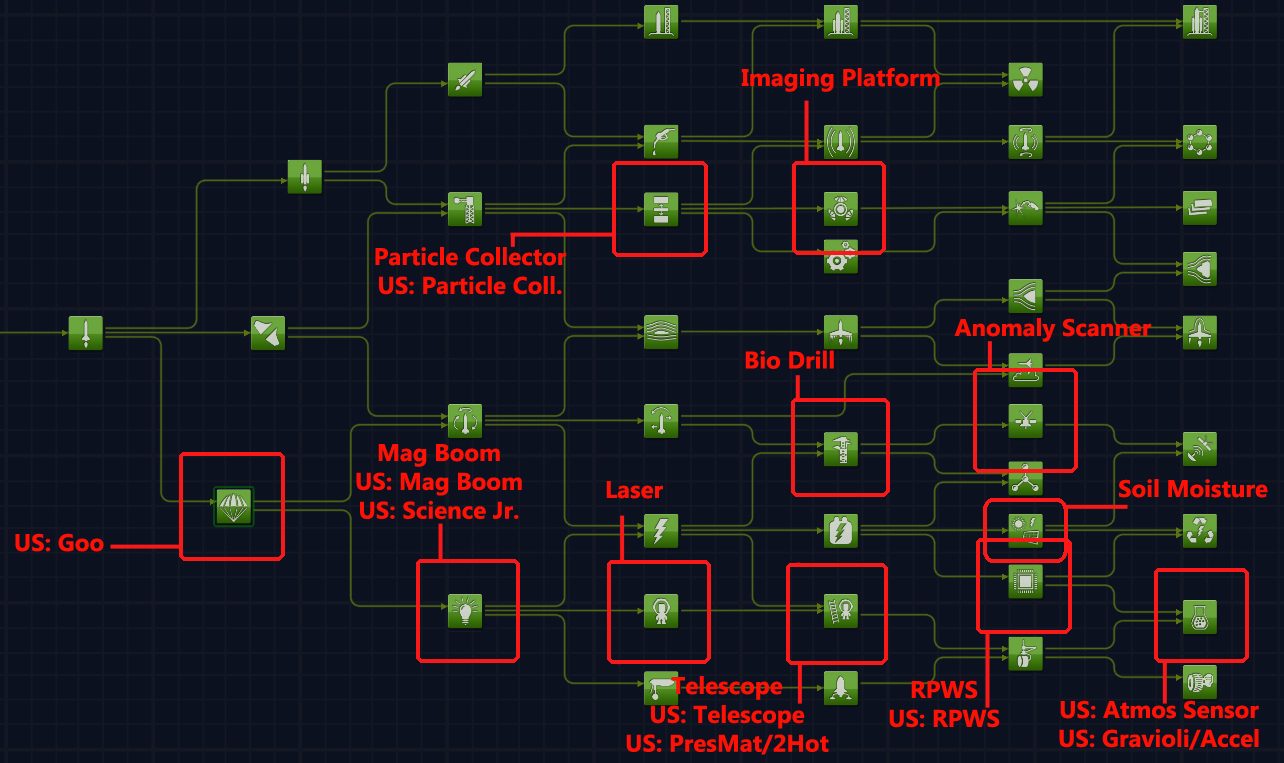
- Community Tech Tree
- Provides a new, more mod friendly tech tree; expands on the stock tree with several new nodes; all DMagic parts are reassigned and rebalanced when using this tree.
- Universal Storage
- Use the nine US parts included in my pack with the Universal Storage mod. Provides a cleaner, sleeker look to you spacecraft while allowing for more convenient placement of science parts.
- Otter Submersible
- A set of dedicated submarine parts that will work great with the new underwater science experiment.
- SCANsat
- Map and identify biomes and terrain features from orbital scanning satellites. Two included parts, the multispectral imaging platform and the anomaly sensor, can also be used as SCANsat sensors.
- Module Manager
- Required for Universal Storage and SCANsat parts; also required for stock contract integration.
- Science Alert
- Monitors the availability of science experiments based on biomes, experimental situations, and the value of previously recovered reports.
- Outer Planets Mod
- Several high quality additional planets; complete science reports for each planet and moon are included here.
- Tweak Scale
- All parts have TweakScale functionality included; parts can be re-sized from 60 - 160% of the standard size in 20% increments.
- Celestial Body Science Value Editor
- Science too easy? You can edit the situation multipliers for each planet/moon and experimental situation to make science easier or harder to suit your needs.
FAQ
-
How do I install this?
- Always delete any existing copies of DMagic Orbital Science; completely remove the old folder from the GameData folder.
- Place everything from the included GameData folder into your 'Kerbal Space Program/GameData' folder
- Versions of KSP prior to 1.0.5 are not supported and will break
-
I'm not seeing any Universal Storage parts
- First make sure that you actually have the latest version of Universal Storage installed
- Kerbal Space Program/GameData/UniversalStorage/Parts etc...
- Check the Universal install location; it must be correct or none of my Universal Storage parts will function
-
This addon is terrible, how do I uninstall it without breaking everything!?
- Just remove the DMagicOrbitalScience folder from your GameData folder. Squad fixed the missing agent bug in the latest release so the method shown below is no longer necessary.
-
What's this about asteroid science experiments? How does that work?
- A number of my experiments allow for the collection of data either while grappled to an asteroid or while nearby one; the supported instruments are specified in the experiment list below.
- The experiments that support asteroid science collection do so according to their standard situation collection rules. Anything that can collect science while on the surface of a planet can collect science while grappled to an asteroid. Anything that can collect science from low orbit can collect science while within 2.0km of an asteroid that you are not currently grappled to.
- All asteroids are randomly assigned a specific spectral type, these are based on the real-world classification schemes used to study asteroids; nine different spectral types are included here. These spectral types are used to determine which set of results will be given for each experiment.
- The science value for each report is based on several factors:
- The asteroid size; these are the stock KSP asteroid classes (from A to E in order of increasing size and science value)
- The number of experiments performed on each asteroid spectral type.
- Science points are given using a scheme similar to the stock asteroid surface samples, but with diminishing returns. Experiments conducted using the same instrument will give a diminishing amount of science for each asteroid visited of the same type. This allows for multiple asteroids to be studied (around 10 or so can be studied, based on size; i.e. fewer E-class asteroids can be studied before reaching the cap), without providing the infinite science returns of the stock asteroid samples.
Contracts
Four contract types included in this addon; user configuration options are available in the included config file*. All contracts require that a certain level of progression be met before they are generated, and take into account progression when selecting target planets.
Orbital Survey
- Require you to collect and transmit or return several results from orbit.
- These are biome independent, but require that returned science have at least some value.
- Max of two simultaneous missions by default.
Asteroid Survey
- Visit and collect science results from an asteroid of a specified class. The location of the asteroid does not matter, only that it match the required class size. No science value required.
- An on-screen message will indicate successful science experiment collection; results must still be transmitted or returned to complete the contract.
- Science experiments must be collected with DMagic Orbital Science Parts. Any asteroid survey contracts that ask for stock experiments must be carried out with the Universal Storage versions.
- Max of one simultaneous mission by default.
Investigate Anomalous Signal
- Search for and study the source of the anomalous signal coming from the target planet. A vague description of the target location is given.
- Returned science value must exceed a threshold amount for the Anomalous Signal Scanner (the same as the standard science collection mission described above); all other results need not have any science value, but must be collected within range of the anomalous signal.
- An on-screen message will indicate successful science experiment collection; results must still be transmitted or returned to complete the contract.
- The magnetometer functions as a crude anomaly detector for those not using SCANsat or any other method for detecting anomalies. Watch for spikes in the magnetic field readings found in the magnetometer's right-click context menu.
- Max of one simultaneous mission by default.
Long Term Magnetic Field Mission
- Use one or more vessels equipped with a magnetometer and a radio plasma wave instrument to study a planet or moon's magnetic field environment. Enter an orbit that matches the specified parameters (monitor this mission in the contract window to see when these parameters have been met) and remain in orbit for the specified amount of time.
- The vessel does not need to remain active during the entire mission. You only need to achieve orbit and meet the required orbital parameters while the vessel is active. From that point on you can return to the space center or other vessels.
- Undocking, stage separation and docking that takes place during the mission is accounted for. As long as a vessel with both required parts remains in orbit and meets the required orbital parameters the mission should carry on unchanged by these events.
- No science value required for the experiment parameters, but the results must be returned or transmitted; results do not need to be collected before the orbital parameters are completed.
- Max of two simultaneous missions by default.
Long Term Orbital Reconnaissance Mission
- Use a vessel equipped with the requested recon part to study a planet or moon and search for the presence of any anomalous signals. Match the requested orbit and remain in orbit for the specified amount of time.
- The vessel does not need to remain active during the entire mission. You only need to achieve orbit and meet the required orbital parameters while the vessel is active. From that point on you can return to the space center or other vessels.
- No science value required for the experiment parameters, but the results must be returned or transmitted; results do not need to be collected before the orbital parameters are completed.
- Emphasis is on Funds rewards
- Max of two simultaneous missions by default.
FinePrint Contract Integration
- Module Manager required for all FinePrint integration.
- DMagic parts can be used to satisfy Satellite part request parameters.
- Surface and Biological Activity surveys will be given using the FinePrint waypoint system.
-
Custom waypoint icons for several DMagic science experiments are included as indicated below.
-
Check in the file: GameData/DMagic Orbital Science/Resources/DMContracts.cfg. Included in this file are options to change the amounts for all rewards, advance payments, penalties, science values, deadlines, the maximum amount of each contract available at any given time, and numerous other parameters for each contract. This file also includes a list of experiments that is used to generate contracts; don't alter these. Extra experiments can be added if they are standard ModuleScienceExperiment type of experiments and if all of the required information is included. In-game mission descriptions are included at the bottom for each mission type.
Science Instruments
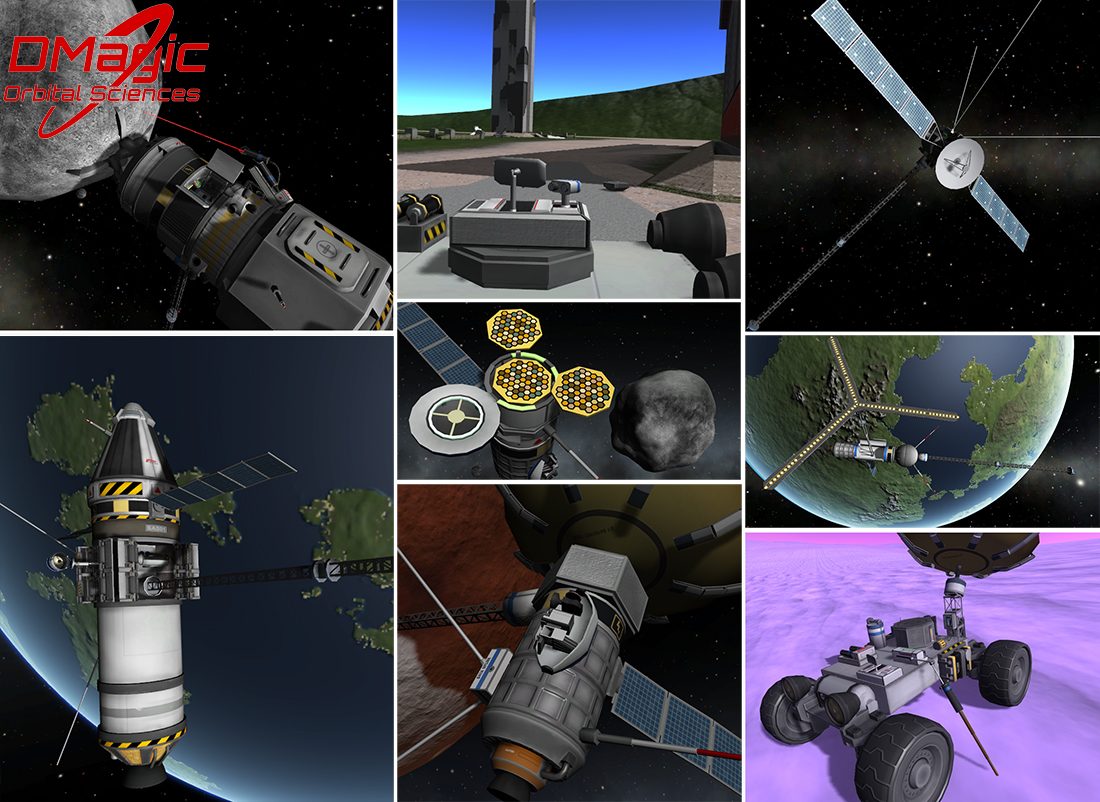
This part pack includes eighteen new science parts; alternate versions of eight of my parts and seven stock science parts for the Universal Storage Mod are also included:
Diffraction Surface Analyzer
- A powder X-ray diffraction instrument used to make a detailed analysis of the mineral composition of the surface; the instrument's drill must make contact with the ground to obtain a sample.
- Use only on the surface.
- Use while grappled to asteroids.
Dynamic Albedo of Neutrons
- This instrument records the reflectance of neutrons in the upper layers of the surface to determine hydrogen/water content; based on Sethnizzle's Panda Jager rover part set.
- Use only on the surface.
- Use while grappled to asteroids.
Soil Moisture Sensor
- This large L-band microwave detector can be used to study the water content of the soil and the salinity levels of large bodies of water.
- Use while in low orbit.
- Use while near asteroids.
- Available in Universal Storage version.
Multispectral Imaging Platform
- Multiple imaging sensors are mounted on this platform, covering the IR, visible and UV spectrum.
- Use while in orbit, includes full biome support.
- Use while near asteroids.
- Available in Universal Storage version.
Exobiology Core Drill
- The drill is for use on atmospheric planets to search for trace levels of gasses associated with biological activity.
- Use on the surface, includes full biome support.
- Can collect and store up to three samples.
Surface Scan Laser
- Used to study the geology and composition of surface samples.
- Use on the surface/splashed down, includes full biome support.
- Use while grappled to an asteroid.
Magnetometer Boom
- Measures planetary magnetic field strength and direction.
- Use on the surface with full biome support, also used in high and low space (without biome support).
- Use while near to or grappled to an asteroid.
- Available in Universal Storage version.
Simple Orbital Reconnaissance Telescope
- A 1.25m, single-camera orbital surveillance telescope
- Supports two pseudo-biomes: Northern- and Southern-Hemisphere
- Can collect two samples; reset with a level 1 scientist or a science lab
- Supports limited on-board film processing; allows for 50% transmission rate
- Conducts a simple anomaly scan on a planet whenever science is collected; this is used by the anomaly scanner instrument and for anomaly contracts
- Works only in low orbit, but at up to five times the normal low orbit altitude
Stereo Orbital Reconnaissance Telescope
- A 2.5, dual-camera orbital surveillance telescope
- Supports two pseudo-biomes: Northern- and Southern-Hemisphere
- Can collect four samples; reset with a level 2 scientist or a science lab
- Supports on-board film processing; allows for 75% transmission rate
- Conducts a simple anomaly scan on a planet whenever science is collected; this is used by the anomaly scanner instrument and for anomaly contracts
- Works only in low orbit, but at up to five times the normal low orbit altitude
Radio Signals Intelligence Dish
- A ~100m radio signal dish
- Supports two pseudo-biomes: Northern- and Southern-Hemisphere
- Conducts a simple anomaly scan on a planet whenever science is collected; this is used by the anomaly scanner instrument and for anomaly contracts
- The dish is fragile and non-retractable; it will break in the atmosphere but can be fixed by an engineer (this requires a reload after the dish breaks for technical reasons)
- Works only in low orbit, but at up to five times the normal low orbit altitude
Seismic Impact Hammer and Seismic Sensor Pod
- A multi-part experiment for studying the interior composition of planets and asteroids using seismic wave recordings.
- Each part can be used individually to gain science; use them in conjunction to increase the amount of science gained.
- Place at least two seismic sensor pods at varying distances and angles from the seismic impact hammer to maximize science. The ideal distances and angles are specified in the VAB/SPH part descriptions and can be configured.
- The seismic impact hammer must contact the surface to function; it will automatically adjust its rotation to compensate for the hammer's orientation with respect to the surface.
- Signal lights and a right-click context menu field on the hammer and sensor pod indicate the amount of science to be gained.
- Use while grappled to an asteroid; have at least one seismic sensor pod attached to the same asteroid to maximize science gained.
Submersible Oceanography and Bathymetry
- An undersea experiment for studying the composition of the ocean and study the seafloor.
- Use in both shallow and deep oceans; the depth threshold is configurable in the part config file.
Asteroid Sounding Experiment by Radiowave Transmission
- An asteroid-only experiment designed to study the interior composition of its target. This experiment requires two instruments to be used together on either side of an asteroid.
- Position one instrument on one side of an asteroid and another on the opposite side. Instruments can be on the same vessel (i.e. two instruments grappled to the same asteroid), two vessels nearby an asteroid, or with one vessel grappled to the asteroid and the other simply nearby. Once you have targeted the other vessel (or cleared any targets if your instruments are both on the same vessel) the sensor will find the other instrument. Signal lights and a right-click context menu field will indicate when the experiment is ready.
- Use while near to, or grappled to an asteroid.
- Available in Universal Storage version.
Global Orbital Radiance Experiment Satellite
- An orbital radiometer designed to measure the total amount of light reflected from a planet's surface and/or atmosphere over a wide range of wavelengths.
- Use only in high orbit.
- Available in Universal Storage version.
Micro Goo Containment Pod
- A miniature version of the standard goo pod; this high cost, late stage part can collect two samples before requiring reset; based on Sethnizzle's Panda Jager rover part set.
- Use near or grappled to asteroids.
SC-901 Science Micro
- A miniature version of the SC-9001 Science Jr. Materials Bay; this high cost, late stage part can collect two samples before requiring reset; based on Sethnizzle's Panda Jager rover part set.
Solar Particle Collector
- This instrument is used to collect particles of planetary dust, asteroid debris, and solar wind matter.
- Use only in space.
- Use while near asteroids.
- Can collect and store up to four samples.
- Available in Universal Storage version.
Anomalous Signal Scanner
- Scanner used to detect and study anomalies.
- Use from the surface and while flying low/low orbit.
- Can collect and store only one sample.
Optical Telescope
- A high resolution telescope for visual range observations.
- Use only in high and low space, full biome support.
- Available in Universal Storage version.
Radio and Plasma Wave Science Antenna
- Monitors interactions between the solar plasma (solar wind) and planetary magnetic fields and/or atmospheres.
- Use only in high and low space.
- Available in Universal Storage version.
Universal Storage PresMat / 2Hot
- The PresMat Barometer and 2Hot temperature sensor are combined into one Universal Storage wedge.
Universal Storage Accelerometer / GravMax
- The Double-C Seismic Accelerometer and GravMax Gravioli Detector are combined into one Universal Storage Wedge.
- Both can be used while grappled to an asteroid.
Universal Storage Mystery Goo Containment Pod
- Can be used while near or grappled to an asteroid.
Universal Storage Atmospheric Sensor
Universal Storage Science Jr. Materials Lab
*The default and Universal Storage system versions of my parts are functionally identical, they can be used together; you can safely delete the Universal Storage parts if you don't intend to use them. Be aware that many parts share textures and all parts use Model nodes, do not delete anything other than the parts found in the 'DMagic Orbital Science/Universal Storage' folder unless you know what you are doing.
*All parts based on Sethnizzle's Panda Jager were created from scratch by DMagic and use no assets from Sethnizzle.
ABOUT THIS LISTING
This page describes DMagic Orbital Science by dmagic_ksp. The description and screenshots are the author's own, imported from their listing on CurseForge on 25 October 2026: https://www.curseforge.com/kerbal/ksp-mods/dmagic-orbital-science
Mythiq.net hosts no files for it. The download button goes straight to the release file on edge.forgecdn.net, so you are downloading from the author's own host, not from a copy of ours.
The download count, rating and comments on this page start at zero and count Mythiq.net only. The source's own figures are not copied here — they measure a different site, and a number that cannot be checked against our own ledger is not worth printing.
Media
Multispectral Scanner
Soil Moisture Sensor
Techtree nodes
showcase
Magnetometer
Requirements
Game version
1.8
GAME VERSION
Built against KSP 1.8. Parts and plugins compiled for one major version routinely misbehave on another — a plugin for 1.8 can fail silently on 1.12.
DEPENDENCIES
Many part packs and plugins depend on ModuleManager, and some on each other. KSP's loading log (KSP.log in the game folder) names the missing dependency when a part does not appear; the author's page lists the usual set.
Installation
1. Download the archive with the button on this page and unzip it.
2. Move the mod's folder — the one containing the .version file or the part folders — into:
Kerbal Space Program\GameData
The path in game must read GameData\\…, not GameData\\\…
3. Start the game. Parts appear in their categories in the VAB; plugins show their own toolbars or settings screens.
4. If the mod ships a CraftNote or extras folder, leave it — some packs store example ships and textures there.
UPDATING
Delete the old folder in GameData first. Two versions of one plugin loaded together is the usual cause of duplicate parts and toolbar errors.
This release downloads from edge.forgecdn.net, not from us, so
there is no checksum to compare against. Scan the archive before you unpack it.
Version history
DMagic Orbital Science Version 1.4.3Latest
3 Nov 2019 · 15 MB via edge.forgecdn.net · 0 downloads Download
Off-site on edge.forgecdn.net —
no checksum, because we never held this file.
Link checked by our review team on 26 Oct 2026.
Tell us if something is wrong — a file that will not work, content taken from
someone else, or anything that looks unsafe. Reports go to our review team, not
to the author.
We use cookies to ensure that we give you the best experience on our website and improve your experience. By continuing to use this site you consent to such use of cookies.