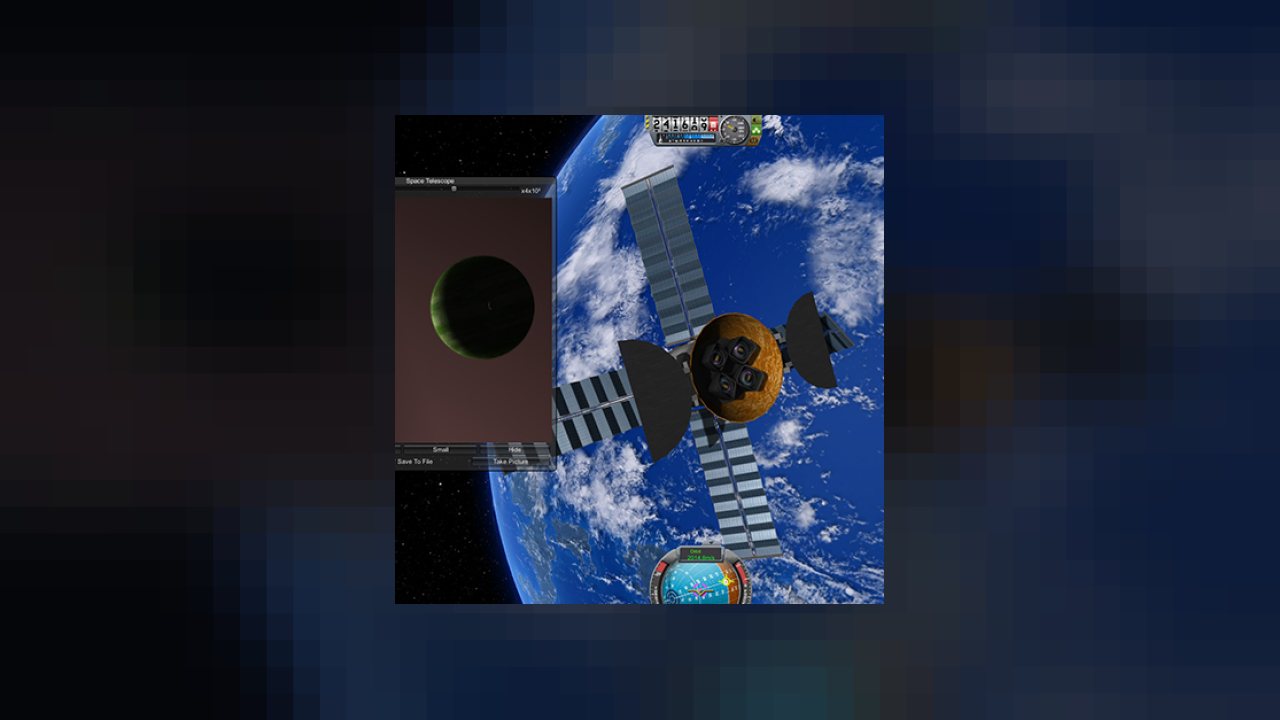
Space Telescopes with Galaxies and Rover Chemical analysis
Tarsier Space Technology is a set of parts with enhanced science capability.
Please read the ChangeLog and Install notes.
The original author of this mod @tobyb121 has given me full permission (back-dated to Jan 2015) to take over and continue to develop and maintain this mod given he simply no longer has the time to do so himself.
He has also given me complete permission to change the license agreement. Anyone wishing to see this permission can get in contact with me via Personal Message here on the forums.
The original content and Credit for this mod goes to tobyb121.
His original releases can be found here
Forum Thread link here
Source Code link here
If you like my mods and you want to show your support, then you can support me on Patreon:
Installation:
- Download ZIP file and un-zip into your KSP install Directory.
-
Optional: Requires Module Manager for KIS, KAS and Research bodies support (not in this distribution, use this link).
- Optional: ToolBar by Blizzy for Toolbar Support, comes pre-configured for in-game AppLauncher Icon support.
- KIS if you want to use it (optional).
- ResearchBodies if you want to use it (optional).
CRITICAL When installing over older versions please DELETE the old TarsierSpaceTech folder from your GameData folder manually first.
Parts:
- ChemCam - Analyse the surface of planets by shooting them with lasers.
- Space Telescopes - Peer deep into the solar system and now to distant galaxies
- Science Hard Drive - Store science in hard drives to maximise your science points.
ChemCam
- Analyse the surfaces of planets using a high powered laser
- Uses biomes where available
- Save your images to share on the forums!! (Now saves in camera size and Full Screen Size).
- Fully integrated into the tech tree
Space Telescopes
- Look deep into the Kerbol system (you can see to Eeloo and beyond from the comfort of a Kerbin orbit)!!
- Science experiments depend on what you're actually looking at!! (I welcome suggestions on experiment results)
- Target reticule to help find distant planets
- Save your images to share on the forums!! (Now saves in camera size and Full Screen Size).
- Servos for fine control (use I,J,K,L to look around)
- Extra info displayed on what telescope is looking at
- Can collect science from EVA and transfer to command pods
- Two telescopes with different zoom capability integrated into the science tree
- Look at distant galaxies and take photos of them for science
- When you also install the ResearchBodies mod can be used as a Body Scanner (function of ResearchBodies) and taking pictures of bodies will add discovery points in the ResearchBodies Mod.
Science Storage Drives
- Store science data on hard drives to maximise science value
- Don't need to save up electricity to transmit data home
- 2 great sizes: 120 Mits and 480 Mits
- Kerbals can collect and STORE data from them in EVA
- Support for KIS for the small SDD (this requires Module Manager to be installed).
Vessel GUI
- View Tarsier Space Tech parts on Vessel.
- Open/Close Cameras.
- Move Pictures onto Vessel SDDs.
- View stored Science on each part.
- AppLauncher/Toolbar Icons and Menu only available if you have TST parts on the current active vessel.
ABOUT THIS LISTING
This page describes Tarsier Space Technology Continued... by JPLRepo. The description and screenshots are the author's own, imported from their listing on CurseForge on 25 October 2026: https://www.curseforge.com/kerbal/ksp-mods/tarsier-space-technology-continued
Mythiq.net hosts no files for it. The download button goes straight to the release file on edge.forgecdn.net, so you are downloading from the author's own host, not from a copy of ours.
The download count, rating and comments on this page start at zero and count Mythiq.net only. The source's own figures are not copied here — they measure a different site, and a number that cannot be checked against our own ledger is not worth printing.
Requirements
Game version
1.12.0
GAME VERSION
Built against KSP 1.12.0. Parts and plugins compiled for one major version routinely misbehave on another — a plugin for 1.8 can fail silently on 1.12.
DEPENDENCIES
Many part packs and plugins depend on ModuleManager, and some on each other. KSP's loading log (KSP.log in the game folder) names the missing dependency when a part does not appear; the author's page lists the usual set.
Installation
1. Download the archive with the button on this page and unzip it.
2. Move the mod's folder — the one containing the .version file or the part folders — into:
Kerbal Space Program\GameData
The path in game must read GameData\\…, not GameData\\\…
3. Start the game. Parts appear in their categories in the VAB; plugins show their own toolbars or settings screens.
4. If the mod ships a CraftNote or extras folder, leave it — some packs store example ships and textures there.
UPDATING
Delete the old folder in GameData first. Two versions of one plugin loaded together is the usual cause of duplicate parts and toolbar errors.
This release downloads from edge.forgecdn.net, not from us, so
there is no checksum to compare against. Scan the archive before you unpack it.
Tell us if something is wrong — a file that will not work, content taken from
someone else, or anything that looks unsafe. Reports go to our review team, not
to the author.
We use cookies to ensure that we give you the best experience on our website and improve your experience. By continuing to use this site you consent to such use of cookies.