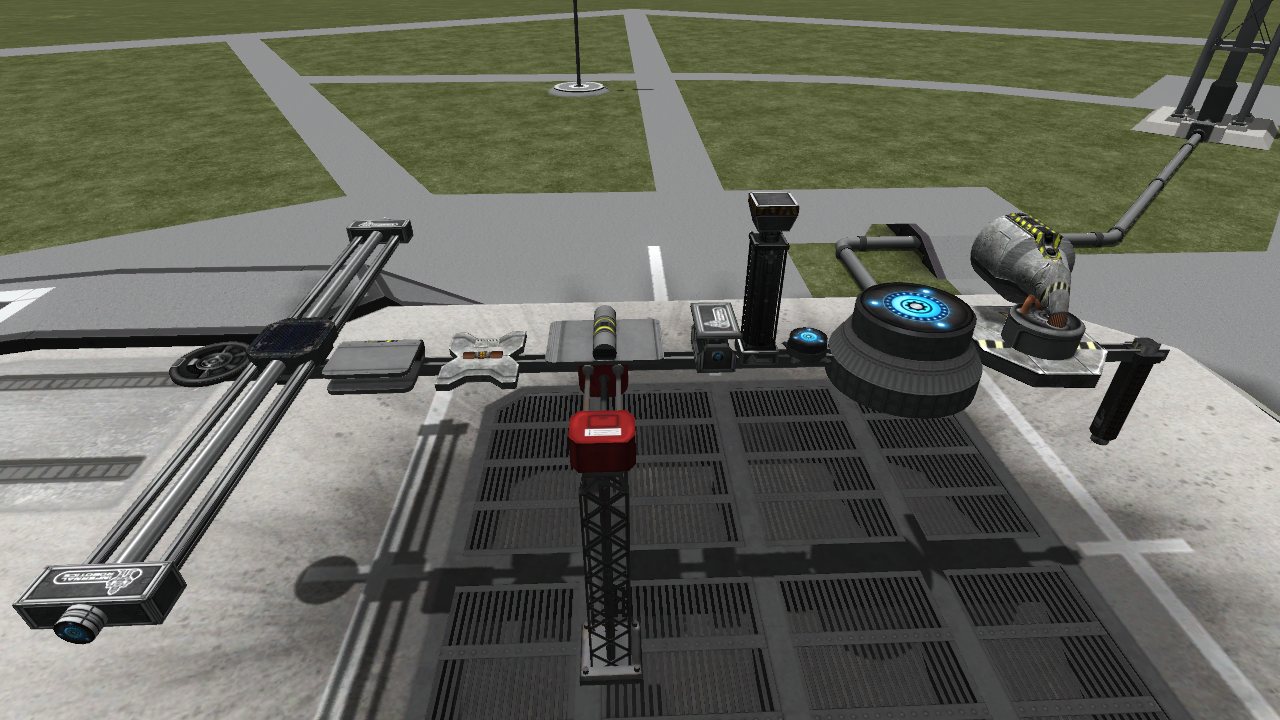
This mod introduces robotics parts to the game, letting you create moving or spinning contraptions that just aren't possible under stock KSP.
How do I use Infernal Robotics parts?
What does Infernal Robotics let me do?
NOTE: robotics parts in this video came from the http://forum.kerbalspaceprogram.com/threads/65365 Model Rework & Expansion
2.0.2
- Support for 1.1
- Fix for unnecessary EC consumption for uncontrolled parts.
0.21.4
- Recompile for 1.0.5
0.21.2 Changelog
- Made our AppLauncher icon follow the same behaviour as when blizzy's toolbar installed and only show when there are robotic parts on the craft in flight. Editor button is still always visible.
- Fixed .version file
- Updated KSPAPIExtensions.dll dependency
- Converted Legacy parts textures to DDS
- Rearranged Legacy parts position in tech tree.
- Added support for CTT for Legacy parts.
0.21.1 Changelog
- Updated the stock toolbar as there was a bug.
0.21.0 Changelog
- Recompiled for KSP 1.0
- Updated stock toolbar support
- Updated custom parts filter. New icon!
0.20.0 Changelog
- BREAKING: Field "Coarse Speed" has been renamed in the UI to just "Speed". Will affect all KOS scripts that read or change that field. Field name in part.cfg has not changed, so all existing crafts should load successfully.
- BREAKING: Some Events and Actions has been renamed in the UI, check your IR related kOS scripts.
- BREAKING: Part config fields "maxRange" and "minRange" are now obsolete. There are no reworked or legacy parts that use those two fields.
- NEW: All controllable servos now have Acceleration parameter. As the name suggest it is the rate at which servos speed up or slow down. Default value for legacy parts is 4x.
- Acceleration and Speed are only applied in-flight, in editor parts move at their default speed.
Tip: Lower acceleration allows for smoother movements leading to less wobble, but at the cost of lower speed.
- NEW: You can create preset positions for all controllable servos and switch between them in flight and in editor.
- Presets are automatically sorted from lowest to highest
- In editor you can switch between presets either on main Servo Configurator GUI or via Preset Editor
- In flight you can move servo from current position to next or previous preset position via main Servo Controller GUI or using ActionGroups
- You can move servo to arbitrary preset position via Preset Editor window both in flight and in editor.
- For examples on using presets refer to the video overview linked below.
- NEW: Integration into other mods through API
- GUI Redesign
- Redesigned Editor UI to fit most of the relevant fields and actions in one window.
- You can now move individual servos and change their main parameters from single IR window without the need to right-click every servo.
- Redesigned in-flight controls to accommodate all new changes and for better readability.
- All IR in-flight windows now obey F2 command (hide/show UI) and should not get in the way of your awesome screenshots.
- Custom category in editor listing all robotic parts.
- Editor and Flight window width is scaled dynamically.
- Editor window now has an option to revert servo to default position (usually 0).
- You can move servos to precise positions in editor by creating presets and snapping servos to them.
- Position and ranges for inverted axis parts are now shown in different style.
- All buttons now have basic tooltips.
- Whole set of new icons for a polished looks.
- TweakScale configs on Legacy parts have been fixed to work with the latest version of TweakScale.
- Servo sound's pitch now scales with servo's movement speed
ABOUT THIS LISTING
This page describes Magic Smoke Industries Infernal Robotics by flagmaggot. The description and screenshots are the author's own, imported from their listing on CurseForge on 25 October 2026: https://www.curseforge.com/kerbal/ksp-mods/magic-smoke-industries-infernal-robotics
Mythiq.net hosts no files for it. The download button goes straight to the release file on edge.forgecdn.net, so you are downloading from the author's own host, not from a copy of ours.
The download count, rating and comments on this page start at zero and count Mythiq.net only. The source's own figures are not copied here — they measure a different site, and a number that cannot be checked against our own ledger is not worth printing.
Requirements
Game version
1.1
GAME VERSION
Built against KSP 1.1. Parts and plugins compiled for one major version routinely misbehave on another — a plugin for 1.8 can fail silently on 1.12.
DEPENDENCIES
Many part packs and plugins depend on ModuleManager, and some on each other. KSP's loading log (KSP.log in the game folder) names the missing dependency when a part does not appear; the author's page lists the usual set.
Installation
1. Download the archive with the button on this page and unzip it.
2. Move the mod's folder — the one containing the .version file or the part folders — into:
Kerbal Space Program\GameData
The path in game must read GameData\\…, not GameData\\\…
3. Start the game. Parts appear in their categories in the VAB; plugins show their own toolbars or settings screens.
4. If the mod ships a CraftNote or extras folder, leave it — some packs store example ships and textures there.
UPDATING
Delete the old folder in GameData first. Two versions of one plugin loaded together is the usual cause of duplicate parts and toolbar errors.
This release downloads from edge.forgecdn.net, not from us, so
there is no checksum to compare against. Scan the archive before you unpack it.
Version history
IR-2.0.2-Final-Full.zipLatest
5 May 2016 · 8.8 MB via edge.forgecdn.net · 0 downloads Download
Off-site on edge.forgecdn.net —
no checksum, because we never held this file.
Link checked by our review team on 26 Oct 2026.
Tell us if something is wrong — a file that will not work, content taken from
someone else, or anything that looks unsafe. Reports go to our review team, not
to the author.
We use cookies to ensure that we give you the best experience on our website and improve your experience. By continuing to use this site you consent to such use of cookies.