The most feature-complete and optimized dynamic lighting mod.
📖 What's this mod?
It's dark outside, extremely dark...
You can't see a lot in the darkness, you wish you had a torch,
or a lantern to hold and see in the light...
And this is now possible with this mod as it adds dynamic lights to the game.
You can see in the darkness thanks to your torch now!
This mod adds dynamic lights to Minecraft. Dynamic lights are lights created by an entity holding an
item which makes light as a block, or created by an entity on fire, etc.
Searching other mods to replace OptiFine? Check out this list!
✅ Features:
- Dynamic lighting.
- Settings to select how smoothly the dynamic lighting updates.
- Any entity holding an item which emits light will emit light!
- Item lighting can be customized through resource-packs and can work with modded items!
- Some items like torches, soul torches, etc. will not light up in water.
- Various entities will naturally emit light, like:
- Allays
- Blazes
- Fireballs
- Glow squids
- Magma cubes
- Spectral arrows
- Burning entities emit light.
- Quick and simple API for developers and resource pack makers.
- Check out [the documentation][documentation] for more details!
- And more!
🖼️ Screenshots
Items emit light
Dropped items which already emit light as a block, will also dynamically emit light!
Held items emit light
Light is emitted when entities hold light emitting items.
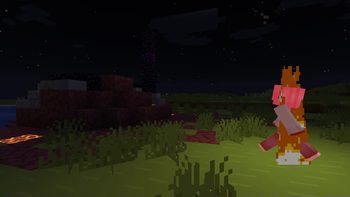
Fire! Fire! Fire!
Any entity on fire will emit light!
Explosion imminent!
Creepers can make their imminent explosions more apparent through a progressive emission of light!
Glow Squids!
The infamous glow squids finally glow in your world!
Guardian Lasers!
Wait... what? Lasers?! They do pack a punch...
Fireflies
Fireflies particle will emit light as they fly!
Configuration GUI
As of v4.0.0.
❓ Usage
Using this mod is very simple!
On Fabric, install it in your mods folder along with [Fabric API] and [ModMenu], (and [Sodium] if wanted for better performances).
On NeoForge, install it in your mods folder (and along with [Sodium] if wanted for better performances).
It will work as-is. If you want, you can configure the mod through its settings screen by heading to the video settings or via the mods list.
Need help? Come check out [my Discord server][LambdAurora Discord].
🔥 Integrations and Compatibility
- [Sodium] is recommended for better performances.
- [Beltborne Lanterns] to equip a lantern on a belt and have a light source on yourself at all time!
- [Illuminated] a flashlight mod using LambDynamicLights.
❓ Is there an API? How to use it as a developer?
[Check out this in-depth documentation][documentation].
❓ How does it work internally?
Check out this document I've written on the fundamentals of it.
[fabric]: https://fabricmc.net "Fabric home page"
[Mod loader: Fabric]: https://img.shields.io/badge/modloader-Fabric-1976d2?style=flat-square&logo=data:image/png;base64,iVBORw0KGgoAAAANSUhEUgAAACAAAAAgCAYAAABzenr0AAAACXBIWXMAAAsTAAALEwEAmpwYAAAFHGlUWHRYTUw6Y29tLmFkb2JlLnhtcAAAAAAAPD94cGFja2V0IGJlZ2luPSLvu78iIGlkPSJXNU0wTXBDZWhpSHpyZVN6TlRjemtjOWQiPz4gPHg6eG1wbWV0YSB4bWxuczp4PSJhZG9iZTpuczptZXRhLyIgeDp4bXB0az0iQWRvYmUgWE1QIENvcmUgNS42LWMxNDIgNzkuMTYwOTI0LCAyMDE3LzA3LzEzLTAxOjA2OjM5ICAgICAgICAiPiA8cmRmOlJERiB4bWxuczpyZGY9Imh0dHA6Ly93d3cudzMub3JnLzE5OTkvMDIvMjItcmRmLXN5bnRheC1ucyMiPiA8cmRmOkRlc2NyaXB0aW9uIHJkZjphYm91dD0iIiB4bWxuczp4bXA9Imh0dHA6Ly9ucy5hZG9iZS5jb20veGFwLzEuMC8iIHhtbG5zOmRjPSJodHRwOi8vcHVybC5vcmcvZGMvZWxlbWVudHMvMS4xLyIgeG1sbnM6cGhvdG9zaG9wPSJodHRwOi8vbnMuYWRvYmUuY29tL3Bob3Rvc2hvcC8xLjAvIiB4bWxuczp4bXBNTT0iaHR0cDovL25zLmFkb2JlLmNvbS94YXAvMS4wL21tLyIgeG1sbnM6c3RFdnQ9Imh0dHA6Ly9ucy5hZG9iZS5jb20veGFwLzEuMC9zVHlwZS9SZXNvdXJjZUV2ZW50IyIgeG1wOkNyZWF0b3JUb29sPSJBZG9iZSBQaG90b3Nob3AgQ0MgMjAxOCAoV2luZG93cykiIHhtcDpDcmVhdGVEYXRlPSIyMDE4LTEyLTE2VDE2OjU0OjE3LTA4OjAwIiB4bXA6TW9kaWZ5RGF0ZT0iMjAxOS0wNy0yOFQyMToxNzo0OC0wNzowMCIgeG1wOk1ldGFkYXRhRGF0ZT0iMjAxOS0wNy0yOFQyMToxNzo0OC0wNzowMCIgZGM6Zm9ybWF0PSJpbWFnZS9wbmciIHBob3Rvc2hvcDpDb2xvck1vZGU9IjMiIHBob3Rvc2hvcDpJQ0NQcm9maWxlPSJzUkdCIElFQzYxOTY2LTIuMSIgeG1wTU06SW5zdGFuY2VJRD0ieG1wLmlpZDowZWRiMWMyYy1mZjhjLWU0NDEtOTMxZi00OTVkNGYxNGM3NjAiIHhtcE1NOkRvY3VtZW50SUQ9InhtcC5kaWQ6MGVkYjFjMmMtZmY4Yy1lNDQxLTkzMWYtNDk1ZDRmMTRjNzYwIiB4bXBNTTpPcmlnaW5hbERvY3VtZW50SUQ9InhtcC5kaWQ6MGVkYjFjMmMtZmY4Yy1lNDQxLTkzMWYtNDk1ZDRmMTRjNzYwIj4gPHhtcE1NOkhpc3Rvcnk+IDxyZGY6U2VxPiA8cmRmOmxpIHN0RXZ0OmFjdGlvbj0iY3JlYXRlZCIgc3RFdnQ6aW5zdGFuY2VJRD0ieG1wLmlpZDowZWRiMWMyYy1mZjhjLWU0NDEtOTMxZi00OTVkNGYxNGM3NjAiIHN0RXZ0OndoZW49IjIwMTgtMTItMTZUMTY6NTQ6MTctMDg6MDAiIHN0RXZ0OnNvZnR3YXJlQWdlbnQ9IkFkb2JlIFBob3Rvc2hvcCBDQyAyMDE4IChXaW5kb3dzKSIvPiA8L3JkZjpTZXE+IDwveG1wTU06SGlzdG9yeT4gPC9yZGY6RGVzY3JpcHRpb24+IDwvcmRmOlJERj4gPC94OnhtcG1ldGE+IDw/eHBhY2tldCBlbmQ9InIiPz4/HiGMAAAAtUlEQVRYw+XXrQqAMBQF4D2P2eBL+QIG8RnEJFaNBjEum+0+zMQLtwwv+wV3ZzhhMDgfJ0wUSinxZUQWgKos1JP/AbD4OneIDyQPwCFniA+EJ4CaXm4TxAXCC0BNHgLhAdAnx9hC8PwGSRtAFVMQjF7cNTWED8B1cgwW20yfJgAvrssAsZ1cB3g/xckAxr6FmCDU5N6f488BrpCQ4rQBJkiMYh4ACmLzwOQF0CExinkCsvw7vgGikl+OotaKRwAAAABJRU5ErkJggg==
[Fabric API]: https://modrinth.com/mod/fabric-api "Fabric API Modrinth page"
[neoforge]: https://neoforged.net "NeoForge home page"
[Mod loader: NeoForge]: https://img.shields.io/badge/modloader-NeoForge-1976d2?style=flat-square&logo=data:image/png;base64,iVBORw0KGgoAAAANSUhEUgAAABIAAAARCAYAAADQWvz5AAAACXBIWXMAAC4jAAAuIwF4pT92AAAB5klEQVQ4T6VUTSgEYRh+x1/bHvytMojiQHJRcqFQDsSJizihSElROPgnUWwclovCxUXKjXKRhAO5+YnSitaMn125bLIx9nm372t2hxw8NfO987zv+3zPvN80imEY5JxfNOgf6O3pVJTZuQWjpr6WZZKSky1yrz7fn1tsb25RjBA42N0nR2oK2e12blydGOK1ZWSS/H4/rTun+Lmhd0AKex9fuAeIwu3y/IIys7OYQBNE8rIyZIMQBycEkRQiUkhNU1kADShEQ1NHJwvdDLfzBYCLFIMrKaRrunRTFniiqzsP3R4/EOIMxydfiMEhh1hAuOIZRaIxXqP33UEqyg1QgmrjtKq/kx7kGuOJPN7osDnhwSKE3VVH4Cf9MP4rooKHLRC11MXFOWOHlNi2Jvm3oBsAHHKoQW1Y75MWGhbw1e4i3RvLcXldM69CxMyhxta9LD8VaEhHmL423c27+Txu8j5rLIQmIQ4OOdTgJO/dd9KE0tc3ZlTXV5E4xo+VyeCQQ6/yG06vbRTXGvpggZPDU+uwhQusJa49Ss/O5eIH9zUddVX8Km45NezkCboSODvYkbE4drMbkWQhvBbsFZcWMS8KN5oqwxxECph7pKOCwnyL7Z92NheZexT8j/r7x//1P5qZGVW+AVtL0JQsBbtXAAAAAElFTkSuQmCC
[ModMenu]: https://modrinth.com/mod/modmenu "Mod Menu Modrinth page"
[Sodium]: https://modrinth.com/mod/sodium "Sodium Modrinth page"
[Beltborne Lanterns]: https://modrinth.com/mod/beltborne-lanterns "Beltborne Lanterns Modrinth page"
[Illuminated]: https://modrinth.com/mod/illuminated "Illuminated Modrinth page"
[documentation]: https://lambdaurora.dev/projects/lambdynamiclights/docs/v4/ "The documentation page of LambDynamicLights"
[LambdAurora Discord]: https://discord.lambdaurora.dev
ABOUT THIS LISTING
This page describes LambDynamicLights - Dynamic Lights by LambdAurora. The description and screenshots are the author's own, imported from their listing on Modrinth on 31 August 2026: https://modrinth.com/mod/lambdynamiclights
Mythiq.net hosts no files for it. The download button goes straight to the release file on cdn.modrinth.com, so you are downloading from the author's own host, not from a copy of ours.
The download count, rating and comments on this page start at zero and count Mythiq.net only. The source's own figures are not copied here — they measure a different site, and a number that cannot be checked against our own ledger is not worth printing.
Media
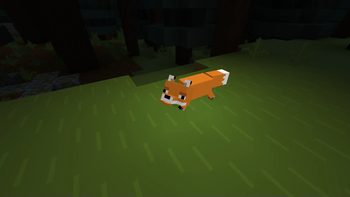
Dropped items emit light!
Hold a torch to light up your adventures!
HEY GIVE THAT BACK!
Water please!!
Sniper duel
Requirements
Game version
26.2
MOD LOADER
This release is built for Fabric, Neoforge and Quilt. A mod built for one loader will not load under another — Fabric mods do not run on Forge, and vice versa.
GAME VERSION
Built for Minecraft 26.2. Minecraft mods are tied to an exact version: a 1.21.4 build will refuse to load on 1.21.5.
DEPENDENCIES
Check the author's listing for required libraries before you start the game — a missing dependency shows up as a crash on launch, not as a warning.
Installation
1. Install Fabric for the Minecraft version you play, if you have not already.
2. Download the .jar with the button on this page. Do not unzip it — a mod jar is installed as it is.
4. Launch the game with the Fabric profile selected.
ON A SERVER
Anything that changes world generation or gameplay has to be installed on the server as well as on every client. Client-side visual and interface mods do not.
UPDATING
Replace the old .jar rather than adding the new one beside it. Two versions of the same mod in the folder is a crash on launch.
This release downloads from cdn.modrinth.com, not from us, so
there is no checksum to compare against. Scan the archive before you unpack it.
Version history
v4.12.3+26.2Latest
16 Aug 2026 · 1.3 MB via cdn.modrinth.com · 23 downloads Download
- Fixed version display in configuration screen being misplaced with some resolutions.
- Fixed the configuration save task thread executor not being shutdown when closing the game (#396).
- The configuration saving task is now using Minecraft's own I/O thread pool, which is properly shutdown.
- Fixed inconsistent behavior with invisible entities emitting dynamic lighting (#394).
- The initial intent of the check was to make sure spectator entities do not emit dynamic lighting, but some forms of invisibility do not hide items in hands which should emit light.
Tell us if something is wrong — a file that will not work, content taken from
someone else, or anything that looks unsafe. Reports go to our review team, not
to the author.
We use cookies to ensure that we give you the best experience on our website and improve your experience. By continuing to use this site you consent to such use of cookies.