The most Immersive and Customizable modern FPS experience in Minecraft - A complete Remaster of the TaC gun mod by the original team.
The most immersive Minecraft FPS gaming experience --
- Sophisticated shooting, maneuvering, and inspecting animations
- Well-designed gun craft system - Modify your guns, survival friendly!
- Refined models and optimization go hand in hand - LOD optimization strategies
- Compatibility - Compatible with most shaders, play with confidence!
- Feel free to customize the guns' data via config and data JSON! (need Cloth Config API)
- If you want - Create your own GUN PACKS without any coding!
TaCZ was developed by reorganizing the original TaC development team devs, completely rewriting all the code, remaking the models and animations, and adding and modifying many features-
Versions 1.18.2 and 1.20.1 are now supported!
Features
Spoiler
Unique reloading and inspection animation - every gun is different!
Modify your weapon with the new attachment UI
Crafting in exclusive workbenches - Survival Friendly
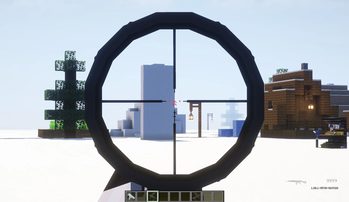
Visualization and compatibility at the same time - new scope view implementation
Latest Showcase Video
Official Gunpack
How to install:(1.0.3 release version and earlier)
Open the .minecraft folder, go to "config/tacz/custom", put the .zip file in it (no need to unzip), and it's ready to play. If not, try command "/tacz reload" in game.
How to install:(1.1.4 release version and later)
Open your game version folder, go to ".minecraft/tacz," put the .zip file in it (there's no need to unzip), and it's ready to play. If not, try the command "/tacz reload" or the command "/reload" in-game.
Attention:
The in-game auto-convert system will not work on nonstandard gun packs. If you can't convert your unpack, please wait for the author of that unpack to update to the 1.1.4 version instead of contacting us.
Support us
Please support us on Patreon to get more perks!
Patreon (Global)
Afdian (CN)
Installation Help
REQUIRES(mandatory): No mandatory mod required! The current version will have a better shadow experience on Oculus.
Related Links
Linkage:
Yes Steve Model
Hit Feedback
Community add-ons:
Better third-person shooting
TaC-Reforged: LesRaisins Append Pack
Community gun packs: (You need to install gun packs following their instructions, they are not mods!)
Hell Divers2 Gun Pack
Gucci Attachments
TTI Gun Pack
The Division gunpack
ARIP Attachments Pack
EMX-Arms gunpack
Xiaomantou GunPack
Hui lin
Firefox missile
Discord
We strongly recommend you join our discord server to get the latest information on mod updates.
Click Here
Wiki
https://tacwiki.mcma.club/
Crowdin
You can translate this mod into various languages using the TACZ Crowdin project!
https://crowdin.com/project/tacz
License
Timeless and Classics Zero's code is licensed under the terms of the GNU GPL 3.0
found here https://www.gnu.org/licenses/gpl-3.0.txt
All the assets are licensed under the terms of the CC BY-NC-ND 4.0
found here https://creativecommons.org/licenses/by-nc-nd/4.0/
ABOUT THIS LISTING
This page describes [TaCZ] Timeless and Classics Zero by craneblock6666. The description and screenshots are the author's own, imported from their listing on Modrinth on 3 October 2026: https://modrinth.com/mod/timeless-and-classics-zero
Mythiq.net hosts no files for it. The download button goes straight to the release file on cdn.modrinth.com, so you are downloading from the author's own host, not from a copy of ours.
The download count, rating and comments on this page start at zero and count Mythiq.net only. The source's own figures are not copied here — they measure a different site, and a number that cannot be checked against our own ledger is not worth printing.
Media
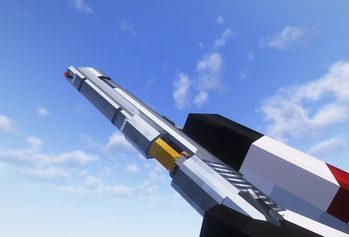
Deagle .50
Scope view
Requirements
Game version
1.20.1
MOD LOADER
This release is built for Forge. A mod built for one loader will not load under another — Fabric mods do not run on Forge, and vice versa.
GAME VERSION
Built for Minecraft 1.20.1. Minecraft mods are tied to an exact version: a 1.21.4 build will refuse to load on 1.21.5.
DEPENDENCIES
Check the author's listing for required libraries before you start the game — a missing dependency shows up as a crash on launch, not as a warning.
Installation
1. Install Forge for the Minecraft version you play, if you have not already.
2. Download the .jar with the button on this page. Do not unzip it — a mod jar is installed as it is.
4. Launch the game with the Forge profile selected.
ON A SERVER
Anything that changes world generation or gameplay has to be installed on the server as well as on every client. Client-side visual and interface mods do not.
UPDATING
Replace the old .jar rather than adding the new one beside it. Two versions of the same mod in the folder is a crash on launch.
This release downloads from cdn.modrinth.com, not from us, so
there is no checksum to compare against. Scan the archive before you unpack it.
Version history
v1.1.8-hotfix2Latest
3 Oct 2026 · 55 MB via cdn.modrinth.com · 0 downloads Download
- sync i18n
- backported a vulnerability fix from 1.2.0 (in dev)
Off-site on cdn.modrinth.com —
no checksum, because we never held this file.
Link checked by our review team on 3 Oct 2026.
Tell us if something is wrong — a file that will not work, content taken from
someone else, or anything that looks unsafe. Reports go to our review team, not
to the author.
We use cookies to ensure that we give you the best experience on our website and improve your experience. By continuing to use this site you consent to such use of cookies.

![[TaCZ] Timeless and Classics Zero cover art](/assets/img/uploads/mods/modcover_cat_tacz-timeless-and-classics-zero_c5a7d35c.jpg)