This addon allows you to use the fast travel functionality of the game in a comfortable and highly-customizable way. All fast travel options you have through your guilds, friends and group are listed in a clear way and are usable with different search and filtering features. To get the most out of…
This addon allows you to use the fast travel functionality of the game in a comfortable and highly-customizable way. All fast travel options you have through your guilds, friends and group are listed in a clear way and are usable with different search and filtering features. To get the most out of it, as with any other addon, it is recommended to check the settings after initial installation.
Dependencies
YOU NEED TO INSTALL THE FOLLOWING LIBRARIES SEPARATELY:
Optional dependencies
The following libraries/addons are not necessary, but extend the features of BeamMeUp (integration):
Port to Friend's House (display of your guild halls or friends houses in BeamMeUp)
LibSets (see your set item collection progress directly in the zone name's tooltip in BeamMeUp)
LibMapPing (to use MapPings)
LibSlashCommander (improved auto-completion, color coding and short descriptions for chat commands)
LibChatMenuButton (the BMU chat button will be handled by a separate library (for harmonization with other addons))
AFTER ADDON INSTALLATION A COMPLETE GAME RESTART IS NECESSARY. OTHERWISE, THE ICONS OF THE ADDON WILL NOT BE LOADED CORRECTLY.
BeamMeUp Community is live
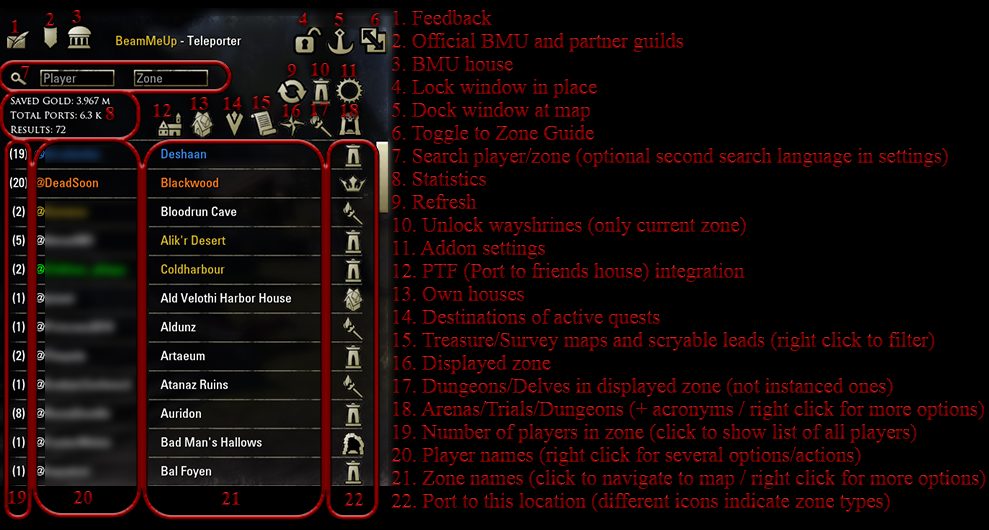
We run 4 BeamMeUp guilds on NA and EU server. Everyone is welcome, no requirements or obligations! With your membership and activity we all benefit from free fast travel options! You find our guilds by clicking on the guild button in the upper left corner of the addon interface (2) or via the guild finder.
Furthermore, we also have a Discord where everyone is welcome to communicate with us and other players: https://discord.gg/sFharXq
All features:
- Search, Filter, Favorite, Customize
- Search by player or zone names
- Easily port to Group Leader or Group Members in Dungeons (always on top) and see if they are in the same game instance as you
- Set specific players or zones as favorites and easily port to them via keybinding
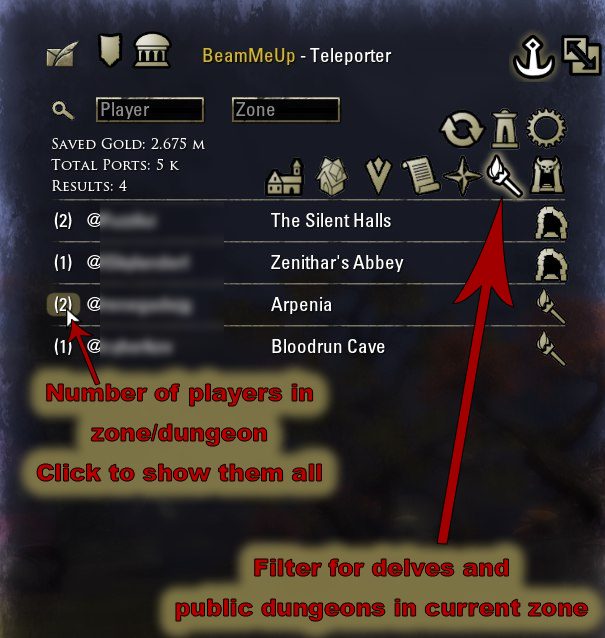
- Use the different tabs to find Fast Travel options to the open/displayed map (world map) and also to the Delves located there
- Use filters and blacklists and many other options to customize your personal filtering
- Change the sorting and configure the number of entries (number of visible lines)
- Navigate and optimize your journey by many additional information
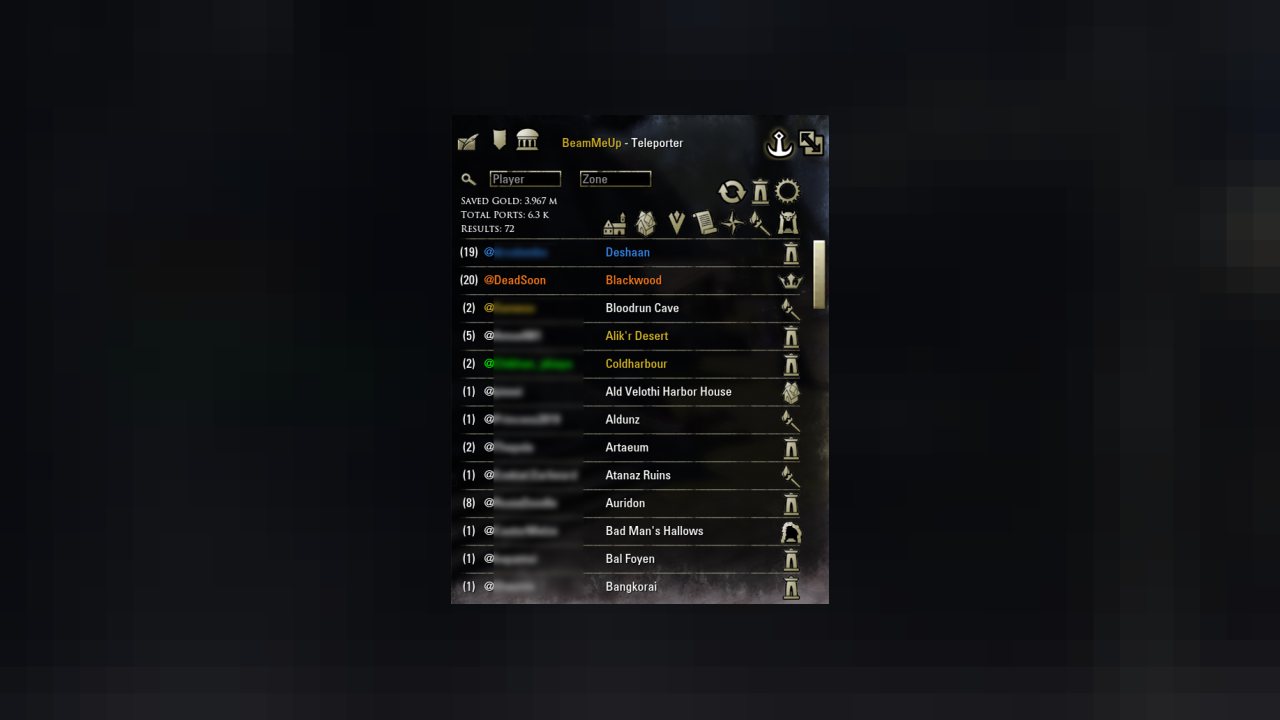
- Identify different types of zones by its icon (Delve, Dungeon, House, ...)
- Check how many skyshards and wayshrines you have already discovered
- Check your set collection progress of the zone (if ou have LibSets installed)
- Easily navigate through the maps by clicking on the zone name
- Location/Entrance of Delves, Houses, Dungeons etc. are zoomed or will be marked with a MapPing
- Discover all the features in the context menus
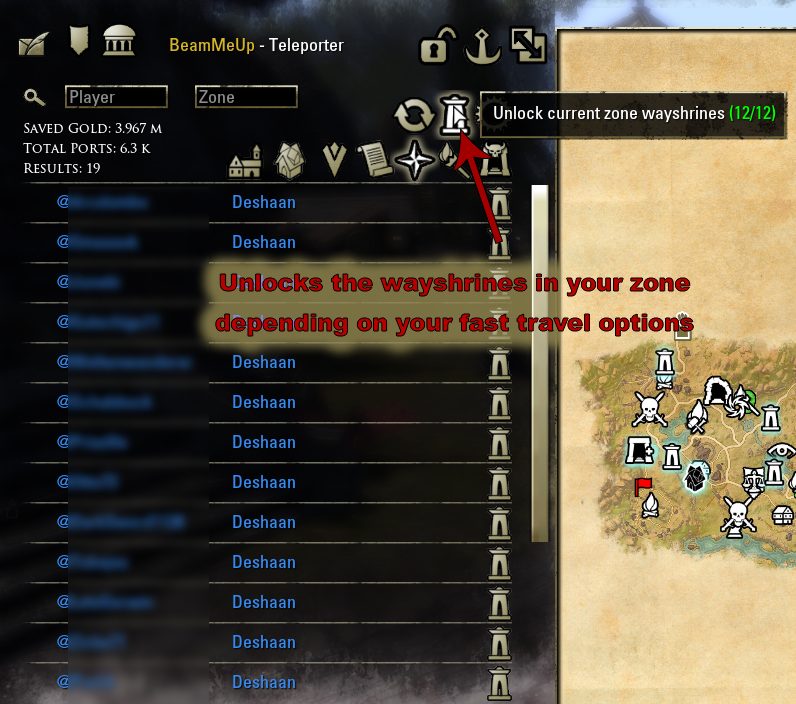
- Discover wayshrines automatically
- Discover unknown wayshrines fully automated
- Depending on your fast travel options BMU will travel you automatically from wayshrine to wayshrine in to discover as much as possible wayshrines
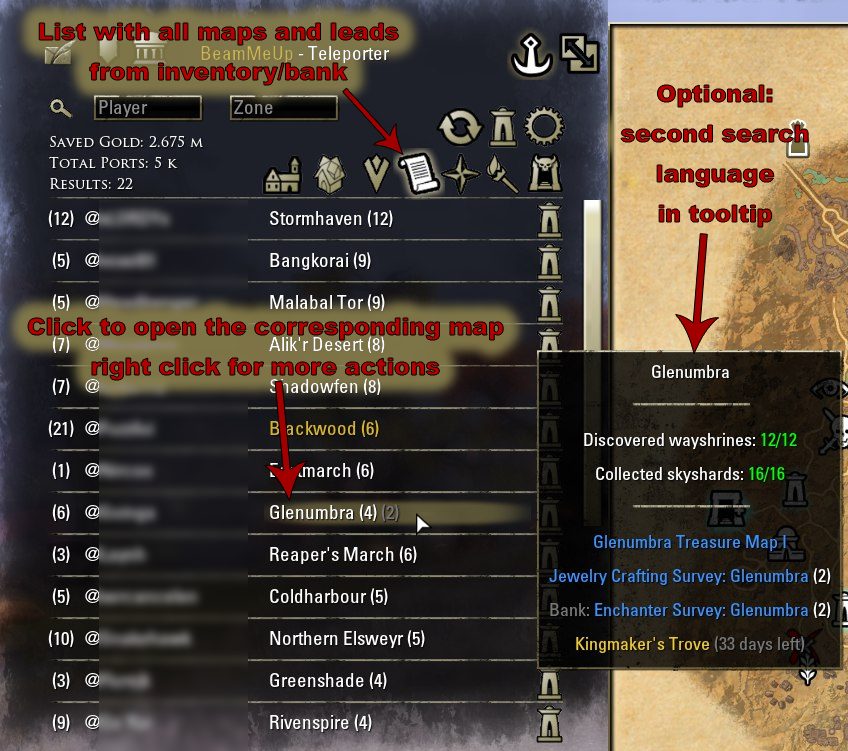
- Connect Treasure & Survey Maps, Leads and Tribute Clues with found Travel Options
- See where your Treasure and Survey maps (from inventory and bank), scryable leads and Tribute Clues (for the card game) are located and travel to them immediately with just one click
- Connect Active Quests with found Travel Options
- As with Treasure and Survey Maps, see in which zones you have active quests
- Identify repeatable quests by its blue color
- Find and travel to Dungeons more easily
- See all Arenas, Trials and Dungeons, their acronyms and corresponding DLC names in a sorted list
- See where the dungeon is located (parent map) and toggle the dungeon difficulty (normal/veteran)
- Visit and manage your own houses
- See all your houses with additional information
- Easily rename your houses and change your primary residence without you having to enter the house
- Arrange the list of houses as you like
- Access your guild halls and friends' houses via the integration of "Port to Friend's House"
- The addon Port to Friend's House must be installed separately
- Your houses and guild halls configured in PTF are displayed in a separate list
- Interact with players appearing in your list
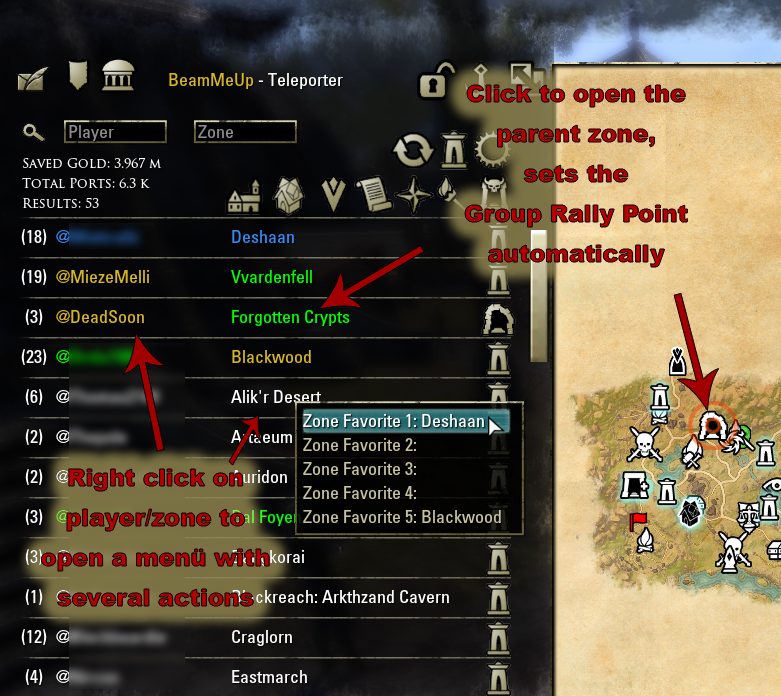
- By right clicking on a player/zone name in the list several actions are available
- Favorite Actions
- Add a Player or a Zone to a Favorite slot
- Remove Player or Zone Favorite
- Group Actions
- Invite to Group
- Kick from Group
- Leave Group
- Vote to Kick
- Promote to Leader
- Vote to Leader (especially useful for large random groups (e. g. in Cyrodiil) to set up a new leader if the old one leaves; this function is exclusive accessible with this Addon because the function is implemented by the game but not available by the basic game interface)
- Miscellaneous
- Whisper
- Send Mail
- Add / Remove Friend
- Visit Primary Residence
- Invite to the card game (Tribute)
- Many Keybinding Options to personalize your usage
- Many Chat Commands for advanced users
- All available chat commands are listed at the end of the settings menu!
- Use /bmutp/ to port to any zone (auto-completion, Hint: when you type / the Addons suggestion will also appears on top)
- /bmutp/house to port to own primary residence
- /bmutp/leader to port to group leader
- /bmutp/quest to port to the focused quest destination
- Manually add a player to favorites (e.g. /bmu/favorites/add/player 1 @DeadSoon) (slot and player name)
- Manually add a zone to favorites (e.g. /bmu/favorites/add/zone 1 Deshaan or 57 ) (slot and zoneName or zoneId of the specific zone)
- Use /bmu/misc/current_zone_id to get the current zoneId
- Or use this Table: https://wiki.esoui.com/Zones
- Add a specific wayshrine as favorite and travel via hotkey (e.g. /bmu/favorites/add/wayshrine 1)
- Create custom elections/votes in your group (e. g. /bmu/vote/custom_vote_unanimous Do you like BeamMeUp?)
- Use /bmu/vote/custom_vote_unanimous to create elections where 100% are necessary
- Use /bmu/vote/custom_vote_supermajority to create elections where >=60% are necessary
- Use /bmu/vote/custom_vote_simplemajority to create elections where >50% are necessary
- Change the game client language (e.g. /bmu/lang en)
- Extras / Special features
- Set a second language for searching for zone names
- Set another main language in the options
- You can search by zone names in your client and in this second language at the same time
- The Tooltip of zone names shows also the name in the second language
- Receive a notification when a player favorite comes online
- Enable this option to see a short notification/center screen message when a favorite player enters the game
- Intelligent error handling
- Detection of errors while porting and output of a note in the chat
- When an error occurs while porting (player you try to port to is in the loading screen) the Addon automatically starts a port process to another player
- Share your travel destination via the chat
- If you right-click on the travel button, the teleport will start as usual but, additionally a clickable Link will be printed into the group chat (you have to press Enter!). Your group member can follow you by clicking on the Link (this also allows you to share your houses)
- Integration into Bandits User Interface
- A button for BeamMeUp is automatically inserted into the sidebar of Bandits User Interface Addon
- Useful notification while mining a survey map
- If you mine a survey map and there are still some identical maps (same location) in your inventory, a notification (center screen message) will inform you (disabled by default).
- Useful offline reminder
- If you stay offline for a while while using BMU or whispering to someone, a discrete screen message will remind you that you are still set to offline. This feature helps to avoid unwanted blocking of replies and accidentally staying offline (enabled by default!).
- Meaning of Colors:
- GOLD = player and zone favorites
- ORANGE = Group members
- GREEN = Friends
- BLUE = current zone (where your character actual is)
Troubleshooting:
- No players you can port to / empty result list
- Remember, free fast travel is only possible to your personal group members, friends or guild members. So first of all, you should check if any of your contacts are online and in a "normal" zone (no instance or pvp zone).
- If you still cannot see any port options, check your addon settings. You can also try resetting them to defaults.
- Finally, disable all other addons except BMU and its libraries and test again. Especially, language patches can corrupt ingame functions that are used by BMU.
- Missing icons
- If you still cannot see any icons/buttons after the installation of the addon, please restart the complete game. Unfortunately, ESO loads custom icons only once at game start.
- Also, please check if you installed the addon correctly and that the addon folder BeamMeUp is placed correctly in \Elder Scrolls Online\live\AddOns\
- If you then still cannot see the icons/buttons, please close the game and delete the file ShaderCache.cooked in the live folder.
- In rare cases, the McAfee antivirus solutions can delete/block the icon files in the addon folder. You can try to disable the protection while downloading and installing the addon. You can also check if dozens of .dds files are in the /BeamMeUp/media/ folder.
- Issues with Pan&Zoom
- When using BeamMeUp together with the outdated addon Map Tools, the Pan&Zoom feature might not work correctly. You can disable Map Tools or the Pan&Zoom feature in BeamMeUp.
- Gamepad mode
- The gamepad mode is currently not supported! Gamepad Mode users have to use the mouse (or keybind) to open the addon interface manually. If you notice any bugs while using the Gamepad Mode, please let us know!
Thank you
- This Addon is based on the well-known "Luminary - Teleporter". Special Thanks to awesomebilly for his pioneering work. ;)
- Thank you for your translation support:
Hypnos882382 & Provision & TGCGeek & Oakiyo & igx31 (FR)
Siegtime & shinntarou & DoubleMean (JP)
KLISK & M-ree & bopogatop & Th3M3nT0r (RU)
Jarogniewa (PL)
Sairiin (IT)
Telmatoscopus (PT-BR)
Kushina & Whasabi (SP/ES)
Damifan (ZH)
- Thank you for bug reporting and suggested solutions: Baertram & igx31
Your feedback (bug reports or suggestions for improvements or new features) is always welcome!
This page describes BeamMeUp - Teleporter (Fast Travel) by @DeadSoon. The description and screenshots are the author's own, imported from their listing on ESOUI on 3 October 2026: https://www.esoui.com/downloads/info2143-BeamMeUp-TeleporterFastTravel.html
Mythiq.net hosts no files for it. The download button goes straight to the release file on cdn.esoui.com, so you are downloading from the author's own host, not from a copy of ours.
The download count, rating and comments on this page start at zero and count Mythiq.net only. The source's own figures are not copied here — they measure a different site, and a number that cannot be checked against our own ledger is not worth printing.
Media
Requirements
Game versions
12.1.0
12.0.0
API VERSION
Built for ESO API version 12.1.0, 12.0.0. After a patch the game marks add-ons built for the previous API as out of date; the "Allow out of date add-ons" checkbox in the add-on menu loads them anyway, and most work.
LIBRARIES
Many ESO add-ons depend on a shared library — LibAddonMenu-2.0 above all — which is installed separately, exactly like an add-on. A dependency that is missing shows as the add-on simply not appearing in the list.
CONSOLE
Add-ons are PC and Mac only. There is no way to load them on console.
Installation
1. Download the archive with the button on this page and unzip it.
2. Move the unzipped folder into your add-ons directory:
Windows — Documents\Elder Scrolls Online\live\AddOns
3. Start the game, and at the character select screen click Add-Ons.
4. Tick the add-on. If it is greyed out and marked out of date, tick "Allow out of date add-ons" at the top of the same panel.
5. Log in. Most add-ons need a /reloadui after they are first enabled.
UPDATING
Delete the old folder first. ESO loads everything it finds, and two copies of one add-on is the usual cause of "an add-on has produced an error" on login.
This release downloads from cdn.esoui.com, not from us, so
there is no checksum to compare against. Scan the archive before you unpack it.
4.0.5:
- updated zone data for Update 51
- fixed a few bugs in Gamepad mode
4.0.4:
- several changes & fixes for gamepad/console mode (automatic wayshrine discovery still in development)
- updated zone data for Update 50
- updated partner guilds
4.0.3:
- fixed several issues in gamepad mode
- fixed Clue filter
- further improvements for console integration
- added new partner guild on NA server
4.0.2:
- improved filter in the own houses tab
- fixed several bugs of the core features
- fixed several issues in gamepad mode
- improved gamepad compatibility and integration
NOTE: You can now delete "IsJusta BeamMeUp Gamepad Plugin" because it is fully integrated.
4.0.1:
- Added LibHarvensAddonSettings as necessary dependency
- fixed repeating notifications when switching to/from gamepad mode
- fixed some smaller issues in gamepad mode
4.0.0:
Joint revision by Baertram and Saranicole1980
- Major performance optimization and code refactoring (Baertram)
- Revision and extension of all context menus (Baertram)
- Several adjustments and improved user guidance (Baertram)
- Initial implementation of gamepad support on basis of the gamepad plugin by IsJustaGhost (Saranicole1980)
- Preparation of console migration (Saranicole1980)
- Updated zone data (Update 49)
-> Please update your libraries!
-> Please install LibScrollableMenu (LSC) - it replaces LibCustomMenu as required dependency!
-> Backup of saved variables is recommended!
-> Feel free to report any bugs. We will improve this major release in the next weeks. In case of problems you can always downgrade to 3.7.4.
-> Many thanks to the contributors Baertram and Saranicole1980
3.7.4:
- new context menu option in the own houses tab to set/unset preferred houses
- small icons in the related items tab show what kind of map (survey type, treasure etc.) is located
- smaller fixes and code adjustments
Don't forget to update your libraries!
3.7.3:
- NEW: Set preferred houses for zones
--- you can jump outside your houses for free
--- select one of your own houses as preferred (e.g. closer to a wayshrine)
--- use the chat command to set a specific house as preferred
--- preferred houses for a zone are displayed in the main list
--- all new chat commands are described in the addon settings (submenu chat commands)
--- BIG THANK YOU to Treuce for providing idea and implementation!
- updated zone data (Update 48)
- added new partner guilds on NA & EU server
3.7.2:
- updated zone data (Update 47)
- added new partner guilds on NA & EU server
- fixed wayshrine interaction issue
- fixed treasure survey ID for Telvanni Peninsula Treasure Map
Don't forget to update your libraries!
3.7.1:
- NEW: travel to specific wayshrines via hotkey (set a wayshrine as favorite via chat command)
- updated zone data (Update 46)
- added new partner guild on NA server
- several technical improvements:
-- several code adjustments - Many thanks to DakJaniels
-- force updated dependencies (libs)
-- removed LibStub fallback
3.7.0:
- NEW: options in the addon settings to control the chat output (informative messages)
- own houses & dungeon tab can now also be set as default tab
- added Eyevea (mage guild) as overland zone
- fixed open tooltips
3.6.2:
- NEW: set your default tab/list via the context menu of the buttons
- updated zone data (Update 45 "Fallen Banners")
- workaround API bug when jumping to group leader
- added new partner guilds on NA server
- code cleanup
3.6.1:
- fixed automatic wayshrine discovery
3.6.0:
- NEW: display of the furniture count in the tooltip of each of your houses (you have to travel there once)
- new filter (context menu) to filter out completed antiquity leads (codex)
- increased number of available keybindings for zone favorites
3.5.8:
- NEW: allow text search in dungeon/arena tab - Many thanks to Treuce
- added context menu option to link own houses into the chat
- updated zone data (Update 44)
- added new partner guilds on NA & EU server
Off-site on cdn.esoui.com —
no checksum, because we never held this file.
Link checked by our review team on 3 Oct 2026.
Tell us if something is wrong — a file that will not work, content taken from
someone else, or anything that looks unsafe. Reports go to our review team, not
to the author.
We use cookies to ensure that we give you the best experience on our website and improve your experience. By continuing to use this site you consent to such use of cookies.