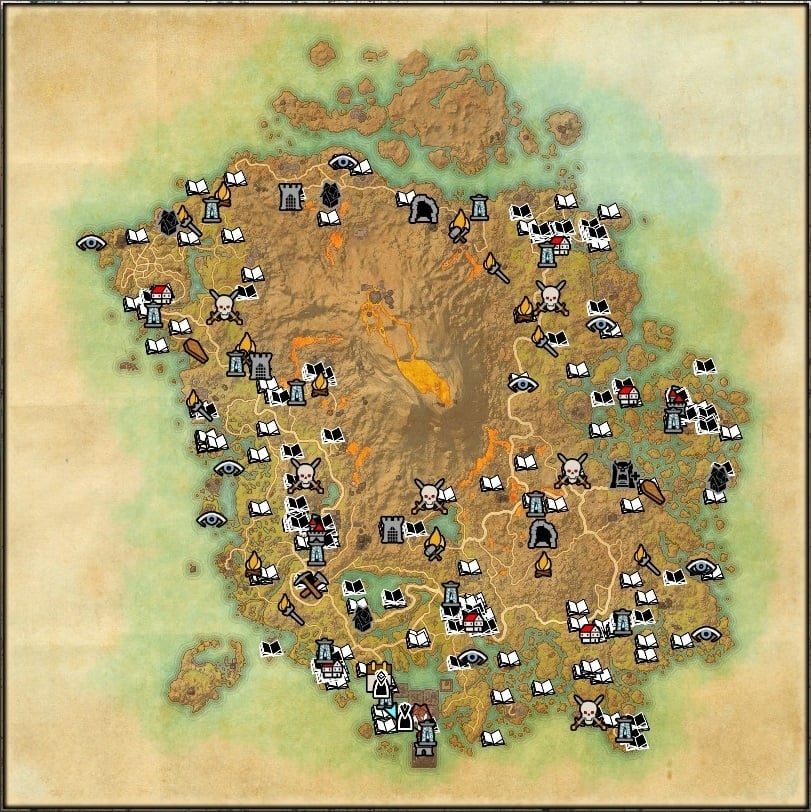
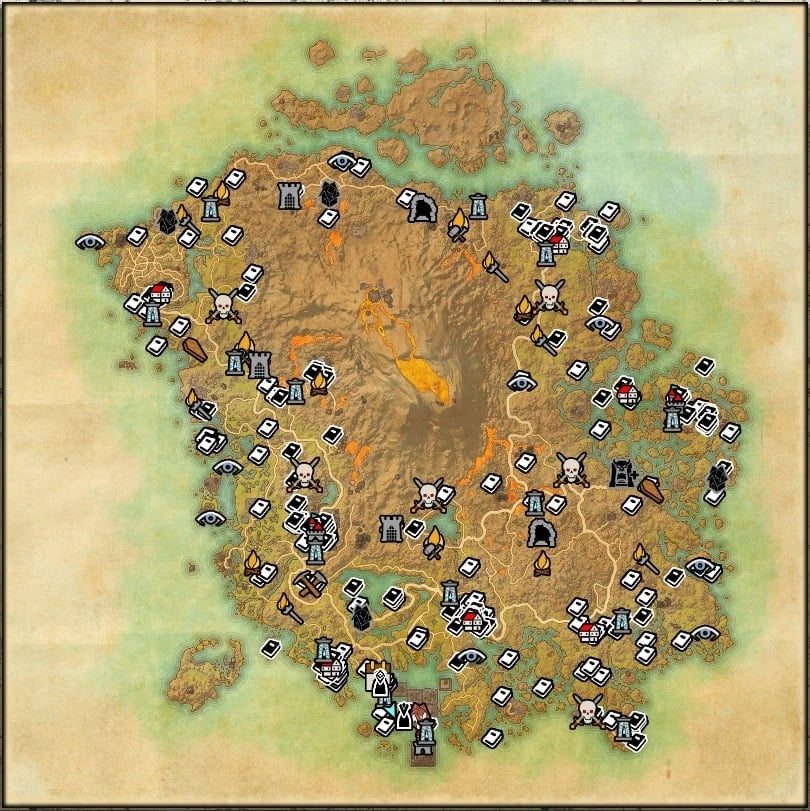
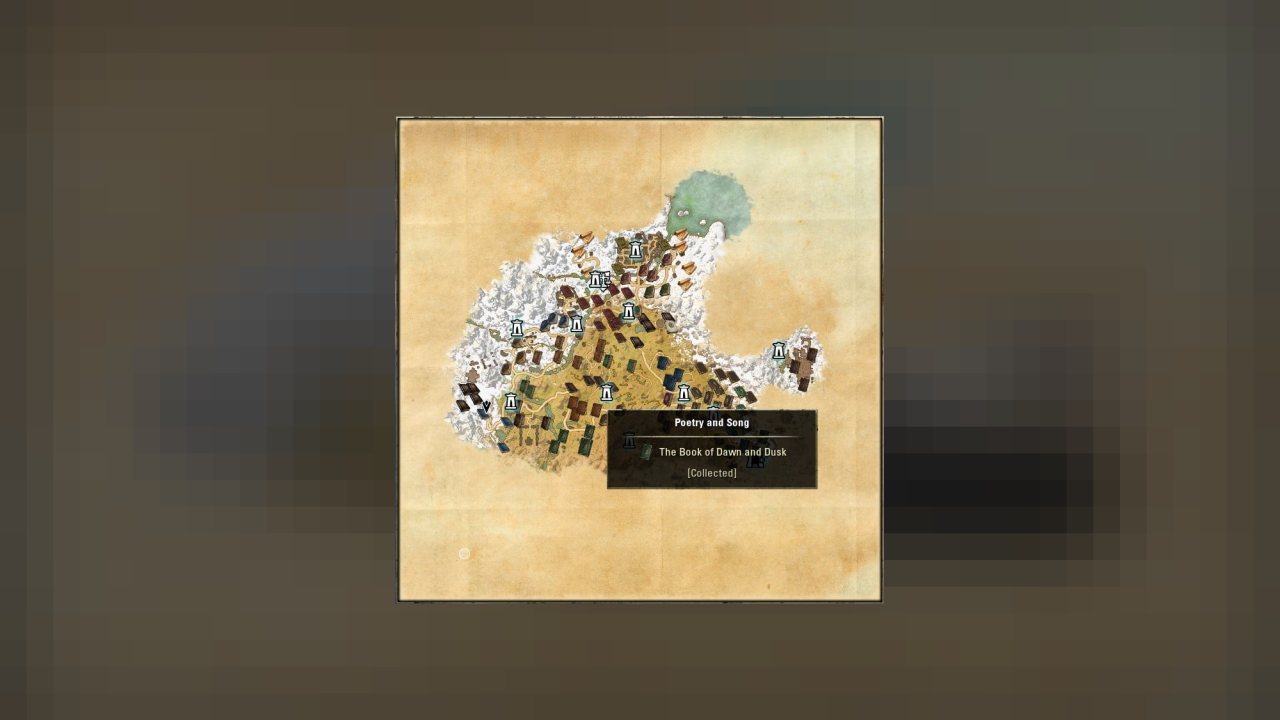
Displays map pins for Shalidor's Library books and Eidetic Memory Scrolls
Features :
- Pins on maps of all books of the game. Divided into 3 filters Unknown Lorebooks, Collected Lorebooks, Eidetic Memory. In both Keyboard & Gamepad Modes. Pins also displays if book is in a dungeon & for Eidetic Memory linked to which quest.
- Pins on your compas for the Unknown Lorebooks & Eidetic Memory. In both Keyboard & Gamepad Modes
- Possibility to unlock Eidetic Memory even without doing the Mage Guild Questline.
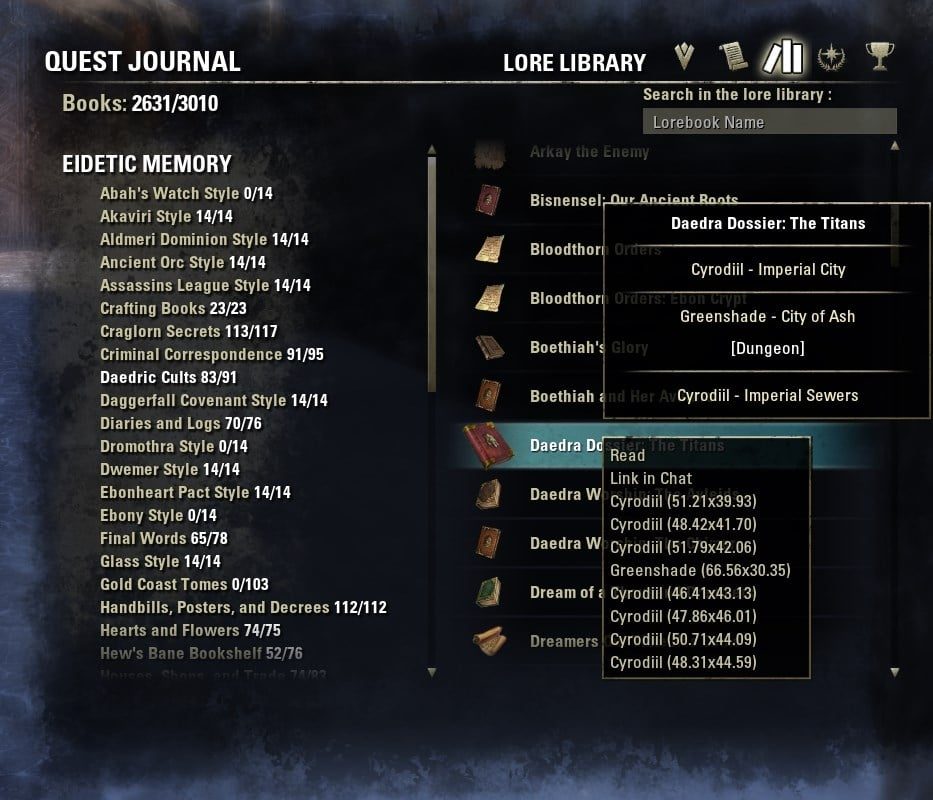
- Improvements of the Lore Library in Keyboard Mode:
- A research for collection and boks at the top of the library
- Coordinates of each book with a right-clic on the book. It will open map, zoom & set a rally point on the focused book.
- For Eidetic Memory, a tooltip to inform if book is in a bookshelve, in a dungeon, linked to a quest, etc.
- A detailled report and its copyable version in the Lore Library through R keybind.
- A setting to disable the click option to set a player waypoint. This is useful if the books are stacked on a wayshrine.
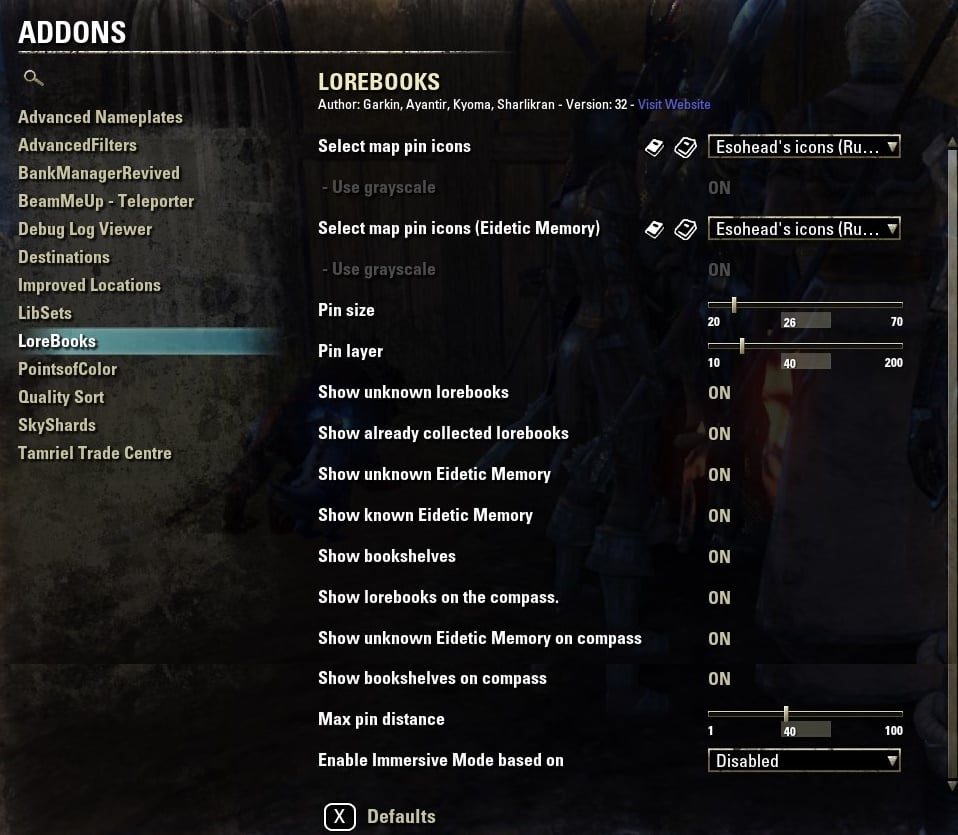
- Account wide settings so you don't have to set pinsize and pinlayer on all of your characters.
In-game setting are in the SETTINGS -> Addons Settings -> LoreBooks.
You can also choose what icons you want to use, which kind of book to display on map filters or in options and much more.
Please try it yourself and let me know your thoughts. All ideas how to improve this addon are welcome.
It includes thousands of lorebook locations and with every update will be this number higher.
If you find any lorebook not listed in database, addon will save its location and display it on the map for all other characters.
Please help me with updating database and share your locations:
- Use /lbpos or /lbfake to obtain Lorebook information to post in the comments section
Thank you.
Slash commands:
How to manually install addon:
- Go to the Elder Scrolls Online folder in your Documents, then
- Elder Scrolls Online\\
(replace with the client you're using - "live" or "liveeu")
- You should find an AddOns folder, if you don't, create one.
- Extract the addon from downloaded zip file to the AddOns folder
- Log into the game, and in the character creation screen, you'll find the Addons menu. Enable your addons from there.
Many thanks to reporters
- Every people who contribued to improve DB throught the sharing system - hundreds of gamers shared their discoveries ! (Automated feature not in use)
- Previous books added from Esohead interactive map (No longer available)
- Loads of screenshots provided by Kodiak of Mostly Harmless
- TESO Life's Lorebook Locations Map
- Also thanks to Dulfy's ESO Lorebooks locations guide (No longer available)
ABOUT THIS LISTING
This page describes LoreBooks by Kyoma. The description and screenshots are the author's own, imported from their listing on ESOUI on 14 August 2026: https://www.esoui.com/downloads/info288-LoreBooks.html
Mythiq hosts no files for it. The download button goes straight to the release file on cdn.esoui.com, so you are downloading from the author's own host, not from a copy of ours.
The download count, rating and comments on this page start at zero and count Mythiq only. The source's own figures are not copied here — they measure a different site, and a number that cannot be checked against our own ledger is not worth printing.
Media
Requirements
Game version
11.3.0
API VERSION
Built for ESO API version 11.3.0. After a patch the game marks add-ons built for the previous API as out of date; the "Allow out of date add-ons" checkbox in the add-on menu loads them anyway, and most work.
LIBRARIES
Many ESO add-ons depend on a shared library — LibAddonMenu-2.0 above all — which is installed separately, exactly like an add-on. A dependency that is missing shows as the add-on simply not appearing in the list.
CONSOLE
Add-ons are PC and Mac only. There is no way to load them on console.
Installation
1. Download the archive with the button on this page and unzip it.
2. Move the unzipped folder into your add-ons directory:
Windows — Documents\Elder Scrolls Online\live\AddOns
3. Start the game, and at the character select screen click Add-Ons.
4. Tick the add-on. If it is greyed out and marked out of date, tick "Allow out of date add-ons" at the top of the same panel.
5. Log in. Most add-ons need a /reloadui after they are first enabled.
UPDATING
Delete the old folder first. ESO loads everything it finds, and two copies of one add-on is the usual cause of "an add-on has produced an error" on login.
This release downloads from cdn.esoui.com, not from us, so
there is no checksum to compare against. Scan the archive before you unpack it.
Version history
v107Latest
22 Jun 2026 · 336 KB via cdn.esoui.com · 14 downloads Download
v107
- Updated code for Correspondence (DakJaniels)
v106
- Update to various books (oath2order) including some night market books
v104, v105
- Bug fix for lorebook
v100, 101, 103
- Updated Eidetic category list to include U48 information
v99
- Updated Eidetic Data (oath2order)
v98
- Fix for missing Motif categories due to zos changes in lore library text
v97
- Updated license information
v96
- Updated for Console support
v94, v95
- Patch to map data cache causing error: /AddOns/LoreBooks/EideticData.lua:61660: table index is nil
v93
- Patch to Eidetic Memory feature for not showing up on characters that have not unlocked it
v92
- Added cache to help with performance
v90, v91
- Added separate map filters for PVE and PVP
v88, 89
- Eidetic Memory feature updated so it is not disabled when there is a patch
- Updated Bookshelf name functionality. Hopefully it will not error when the language is not supported.
- Removed dependency for LibLoreLibrary
- Added some of oath2order's Eidetic Memory additions
v87
- Enable Eidetic Memory for Update 46
v86
- Enable Eidetic Memory for Update 45
v85
- Enable Eidetic Memory for Update 44
v82
- Added code for Hireling Correspondence (DakJaniels)
v81
- Update to Eidetic Memory list for Gold Road (note this is the category names, only)
v80
- Rough draft for Gold Road
NOTE: Eidetic Data has not been updated. Will be updated as time permits after the live release.
v79
- Updated for U41
v78
- Added untranslated files for Turkish to prevent errors
v77
- Update to Eidetic Memory by desertforce and oath2order, with notes from BixenteN7Akantor
v76
- Update to Eidetic Memory for U40
v75
- Update to Eidetic Memory by desertforce
- Update to chat text output for Eidetic Memory books
v74
- Attempt to fix: LoreBooks.lua:672: attempt to index a nil value
v73
- Update to Eidetic Memory for U39
v72
- Update to various books (oath2order, Sharlikran)
v71
- Update to Eidetic Memory adding oath2order's updates. Other updates still pending.
v69, v70
- Rough draft for PTS
v68
- Update to Eidetic Memory for Update 37
v67
- Update to various books (oath2order, Sharlikran)
v66
- Update Galen and High Isle (oath2order)
- Added Schiffy's updates
v65
- Update for Zenithar's Abbey in Blackwood including "Merchant Lords' Compiled Documents", which will only appear in the Adytum after you complete the quest.
- Updated some quest related pins to display properly while the quest in activly in your quest journal or to display properly after you complete the quest.
Quest Books displaying under certain conditions has been a long time goal of the developers and as of a recent patch or DLC ZOS finally added the means to check quest requirements without a library like LibQuestData.
Hardly any books have the proper information to display properly depending on the conditions but will be updated as time permits.
v64
- Update to display the location of Lorebook within Dungeons more clearly
- Update to processing Lorebook pins when there are quest requirements
v63
- Update to address ghost pins on the compass
v62
- Fix: user:/AddOns/LoreBooks/ShalidorData.lua:3434: attempt to index a nil value
v60, v61
- Updated Localization
v59
- Updated routines that determine when to place a pin on the map, and it's a Quest. If the book does not appear unless you are on the quest then it will not show up doing the quest.
NOTE: No data has been collected over the years for this so it will all have to be entered from scratch.
v58
- Updated routines that determine when to place a pin on the map
- Depreciated unused or unneeded data tags for tooltips
- More updated Eidetic Memory books
v56, v57
- More updated Eidetic Memory books (yachoor)
v55
- Update to try and ping map when zooming in using current LibGPS routines (yachoor)
- Updated to work with current LibMapData for better handeling when switching zones
v54
- Updated books from comments section (yachoor)
Off-site on cdn.esoui.com —
no checksum, because we never held this file.
Link checked by our review team on 14 Aug 2026.
Tell us if something is wrong — a file that will not work, content taken from
someone else, or anything that looks unsafe. Reports go to our review team, not
to the author.
We use cookies to ensure that we give you the best experience on our website and improve your experience. By continuing to use this site you consent to such use of cookies.