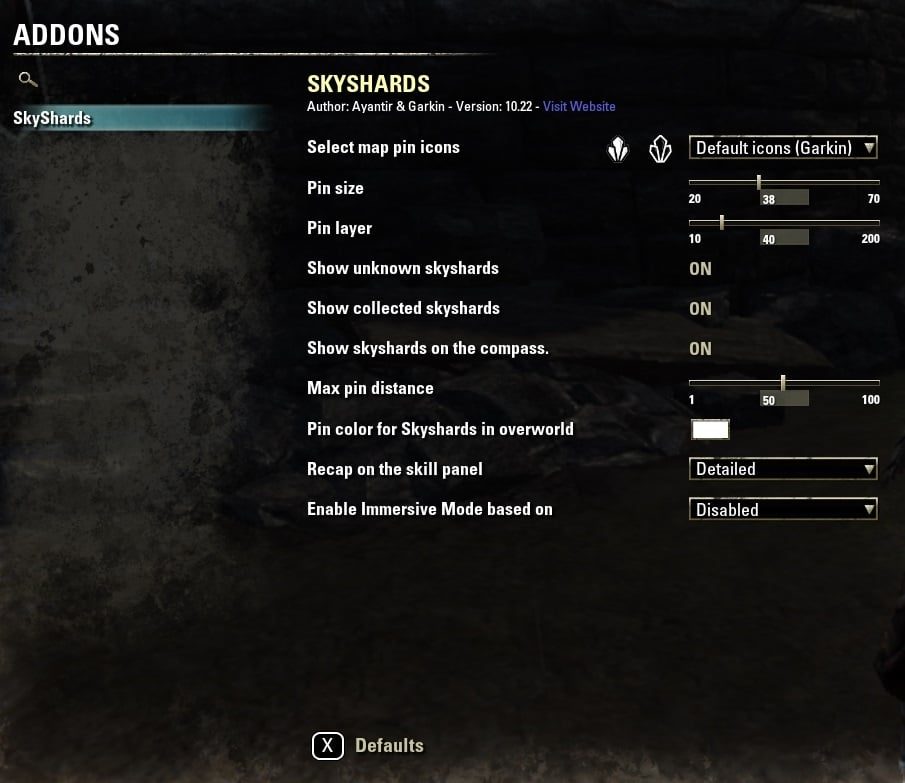
In-game configuration is in the SETTINGS -> Addon Settings -> SkyShards menu,
or use command /skyshards
Slash commands:
How to manually install addon:
- Go to the "Elder Scrolls Online" folder in your Documents
Documents\Elder Scrolls Online\\
(replace with the client you're using - "live" or "liveeu")
- You should find an AddOns folder, if you don't, create one.
- Extract the addon from downloaded zip file to the AddOns folder
- Log into the game, and in the character creation screen, you'll find the Addons menu. Enable your addons from there.
This page describes SkyShards by AssemblerManiac. The description and screenshots are the author's own, imported from their listing on ESOUI on 14 August 2026: https://www.esoui.com/downloads/info128-SkyShards.html
Mythiq hosts no files for it. The download button goes straight to the release file on cdn.esoui.com, so you are downloading from the author's own host, not from a copy of ours.
The download count, rating and comments on this page start at zero and count Mythiq only. The source's own figures are not copied here — they measure a different site, and a number that cannot be checked against our own ledger is not worth printing.
Media
Requirements
Game version
11.2.0
API VERSION
Built for ESO API version 11.2.0. After a patch the game marks add-ons built for the previous API as out of date; the "Allow out of date add-ons" checkbox in the add-on menu loads them anyway, and most work.
LIBRARIES
Many ESO add-ons depend on a shared library — LibAddonMenu-2.0 above all — which is installed separately, exactly like an add-on. A dependency that is missing shows as the add-on simply not appearing in the list.
CONSOLE
Add-ons are PC and Mac only. There is no way to load them on console.
Installation
1. Download the archive with the button on this page and unzip it.
2. Move the unzipped folder into your add-ons directory:
Windows — Documents\Elder Scrolls Online\live\AddOns
3. Start the game, and at the character select screen click Add-Ons.
4. Tick the add-on. If it is greyed out and marked out of date, tick "Allow out of date add-ons" at the top of the same panel.
5. Log in. Most add-ons need a /reloadui after they are first enabled.
UPDATING
Delete the old folder first. ESO loads everything it finds, and two copies of one add-on is the usual cause of "an add-on has produced an error" on login.
This release downloads from cdn.esoui.com, not from us, so
there is no checksum to compare against. Scan the archive before you unpack it.
Version history
v10.64Latest
5 Dec 2025 · 73 KB via cdn.esoui.com · 12 downloads Download
v10.64
- Update to Solstice location logic (DackJaniels)
v10.63
- Update to Solstice locations hamgatan
v10.62
- Quick fix for map name change
v10.61
- Updated SpentSkillPoints support
v10.60
- Update license information
v10.56, v10.57, v10.58, v10.59
- Update for Seasons of the Worm Cult Pt1, Update 46
v10.55
- Update for Gold Road, Update 44: locations hamgatan
v10.53, 10.54
- Rough draft for Gold Road
v10.52
- Added Necrom Skyshard achievement for Skyshard totals on Skill Panel
v10.51
- Added PTS locations from 10.50 that were accidentally excluded from the update
v10.50
- Address issue with some Skyshards being excluded from the location pool
v10.49
- Pre PTS Version, No Skyshards entered at this time
v10.48
- Added Galen Skyshard's (pesakm) with a few minor adjustments
v10.47
- Adjusted location for Breakwater Cave
v10.43, 10.44, 10.45, 10.46
- Added High Isle Skyshards
- Thanks to pesakm for providing the overland Skyshards 1-10. I had them on the PTS but must have overwrote them somehow or I never copied them to my GitHub. So thanks pesakm you are a life saver. I did not want to go hunt them down again.
v10.42 (Sharlikran)
- Pre PTS Version
v10.41 (Sharlikran)
- Revert Cyrodiil Skyshard index workaround to ensure the proper indices are used as they should not change for each character.
v10.40 (Sharlikran)
- SkyShards.lua:922 is SkyShards_BuildSkyShardCyrodiilData (Hopefully)
v10.39 (Sharlikran)
- Switch to using Zone Guide Skyshard completion for total Skyshards collected instead of Achievement information
- Update for Cyrodiil to attempt to keep all the Skyshard tooltips on the proper Skyshard (and the proper completion status) due to report from canofbutter where he feels he has different index values for all his characters
v10.38 (Sharlikran)
- Switch to using Zone Guide Indexes for Skyshard data since Craglorn and Cyrodiil have more then one Achievement for the zone
Thanks to canofbutter for beta testing the changes and making sure the Skyshards for Craglorn and Cyrodiil show the proper status
v10.37 (Sharlikran)
- Update to use Zone Guide for collected or uncollected Skyshards instead of Achievement information
v10.36 (Sharlikran)
- Update Skyshard info for Gloomreach
v10.35 (Sharlikran)
- Update Spanish Localization
- Update location of Skyshard near Hozzin's Folly in Bleakrock Isle
- Update total amount of Skyshards
v10.34 (Sharlikran)
- Pre PTS Version
v10.32, v10.33 (Sharlikran)
- Add Deadlands SkyShards
- Update Skill point count for Spent Skill Points code65536
v10.31 (Sharlikran)
- Added support for Spent Skill Points pointed out by EnigmaniteZ
v10.29 (AssemblerManiac)
- API Bump
- Add Blackwood SkyShards
v10.28 (Sharlikran)
- Fix for LibGPS call
v10.27 (Sharlikran)
- API Bump
- Fix for game pad mode when hovering over a Skyshard. You will now see a prompt to set a waypoint instead of "Travel" (ZOSDanBaston)
Tell us if something is wrong — a file that will not work, content taken from
someone else, or anything that looks unsafe. Reports go to our review team, not
to the author.
We use cookies to ensure that we give you the best experience on our website and improve your experience. By continuing to use this site you consent to such use of cookies.