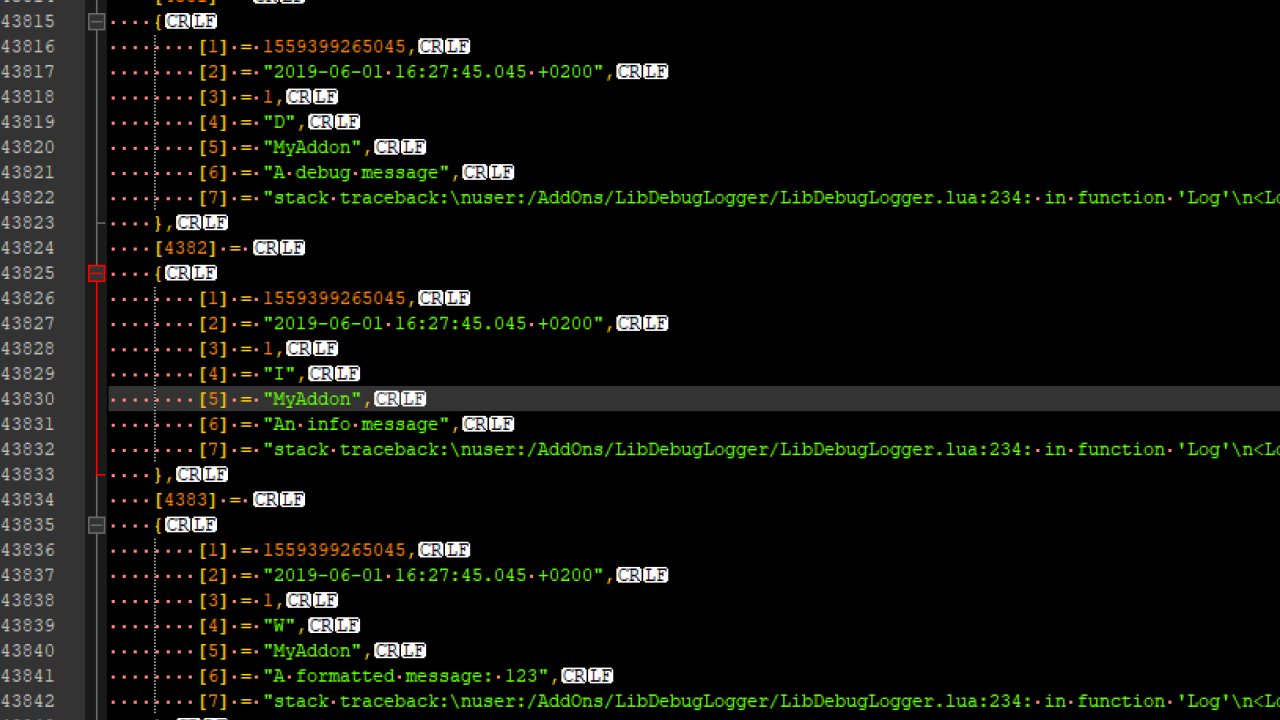
This library provides facilities to log debug output in the background without running the risk of it showing in the chat output. It can also be very helpful in debugging issues out in the wild, since it will store the output into its saved variable file. It will automatically log information…
This library provides facilities to log debug output in the background without running the risk of it showing in the chat output. It can also be very helpful in debugging issues out in the wild, since it will store the output into its saved variable file. It will automatically log information about the current client. During startup the library will use the settings overrides defined in StartUpConfig.lua, until the saved variables become available.
The log output can be inspected with the help of the DebugLogViewer add-on or the external Log Viewer.
Features
Client Information
The library will automatically log the following information about a character on login:
- account name - in case you play with multiple accounts and that is somehow causing issues (e.g. with the saved variables)
- character name - in case the problem occurs due to switching characters or due to some special characters in the name
- login time - in case a problem occurs a fixed time after logging in on the character
- client version - hope that doesn't need an explanation
- mega server - in case of server specific issues
- service type - steam or non-steam in case that makes a difference
- UI type - keyboard or console UI is quite an important detail
- ESO+ - changes how some APIs react
- language - in case it is some localization problem
- out of date checkbox state - good to know when someone has an issue with some add-on not loading
- add-on count - how many are active and how many are installed
- add-on load events - this gives information about the load order of your add-ons, the loaded add-on version and which subdirectory of the add-on folder it was loaded from
In addition it will also log Lua errors, add-on output done via the in-game debug functions d(), df() and CHAT_SYSTEM:AddMessage(), alert messages in the error category, loading screens and more based on the configuration in StartUpConfig.lua.
Stack Traces
Usually only Lua errors contain a stack trace, but the library can be configured to log the stack trace for any message. Due to the fact that saved settings are not available until after an add-on has fully loaded, the library will default to log everything during login and switch to the configured settings afterwards.
Logger Class
Authors can create a logger object which can be used to log messages of different severity (debug/info/warning/error). Those messages will be marked with the tag passed to the logger on creation and can be easily filtered that way.
A logger can create any number of sub-instances which will use the original tag with another part appended. This can be useful for big add-ons with many components, or when some very verbose logging should be disabled for a release version without having to remove all calls to the logger.
Quick Start
Add LibDebugLogger as a dependency to your add-on manifest:
Afterwards you can create a logger instance and start logging messages like so:
Settings
The /debuglogger slash command can be used to configure what should get logged or show the current settings when no value is passed to a setting.
/debuglogger stack - when turned on, the library will log the stack trace for the logger call. Can be very useful to figure out where a log is coming from.
/debuglogger level - determines the minimum severity for logs to be stored
/debuglogger clear - will delete all stored logs
LibDebugLogger will automatically remove old logs after one day, or when the total amount surpasses 11k entries.
API Reference
LibDebugLogger.DEFAULT_SETTINGS
This constant contains the default settings for the library. The contained values should not be changed.
LibDebugLogger.TAG_INGAME
This constant contains the tag that is used to log messages that are generated by in-game methods (Lua Errors, chat debug output, alerts).
Log Levels
The values of the available log levels are stored in the following constants:
The log levels are also stored in the LibDebugLogger.LOG_LEVELS array in order of their severity.
There are also two mappings LibDebugLogger.LOG_LEVEL_TO_STRING and LibDebugLogger.STR_TO_LOG_LEVEL which can be used to convert the level values into untranslated lowercase strings and back.
The different log levels serve different purposes which authors should keep in mind when they add log output.
- LOG_LEVEL_VERBOSE is not logged unless explicitly white-listed in the StartUpConfig.lua. It should be used for messages that are printed very often and are not of much interest to other parties.
- LOG_LEVEL_DEBUG is not logged by default and can be used for anything that helps identifying a problem, but is not of interest during regular operation.
- LOG_LEVEL_INFO is the default log level and should be used to log messages that give a rough idea of the flow of events during regular operation. It is also used for logging d() messages.
- LOG_LEVEL_WARNING should be used to log messages that could potentially lead to errors. Ingame alert messages of the UI_ALERT_CATEGORY_ERROR are logged as warnings.
- LOG_LEVEL_ERROR should usually not be used by addons, except when they suppress the ingame error message via pcall. UI errors are otherwise automatically logged with this level.
Log Entry Indices
A log entry is a numerically indexed table with the following values:
- raw timestamp in milliseconds
- human readable time
- occurrence count
- log level
- tag
- message
- stack trace (optional)
To use the values one can either use the unpack function and assign them to variables, or directly access them with the following index constants:
Create
This function will return an instance of a logger. Anything logged via that instance will automatically contain the tag for easy identification.
or
or
Logger:Create
Convenience method to create a new instance of the logger with a combined tag. Can be used to separate logs from different files. Anything logged via that instance will automatically contain the parent tag and the child tag separated by a slash (e.g. MyAddon/SomeFile).
Logger:SetEnabled
Setter to turn this logger off, so it no longer adds anything to the log when one of its log methods is called.
Logger:SetMinLevelOverride
Setter to define a non-persistent override for the minimum log level from the global configuration. Passing nil clears the override value.
This method is intended to allow authors to provide users with a way to temporarily enable debug logging on a per-addon basis (e.g. via a LAM button).
Logger:SetLogTracesOverride
Setter to define a non-persistent override for the stack trace logging from the global configuration. Passing nil clears the override value.
This method is intended to allow authors to provide users with a way to temporarily enable debug logging on a per-addon basis (e.g. via a LAM button).
Logger:Log
Method to log messages with the passed log level. The first argument has to be a valid log level. If the second argument is a formatting string, the method will call string.format, otherwise each argument will get passed through tostring and concatenated with a space.
Logger:Verbose
Method to log messages with the verbose log level. See Log method for details on how messages are formatted. Verbose messages are not logged unless explicitly white-listed in StartUpConfig.lua.
Logger:Debug
Method to log messages with the debug log level. See Log method for details on how messages are formatted.
Logger:Info
Method to log messages with the info log level. See Log method for details on how messages are formatted.
Logger:Warn
Method to log messages with the warning log level. See Log method for details on how messages are formatted.
Logger:Error
Method to log messages with the error log level. See Log method for details on how messages are formatted.
SESSION_START_TIME
Contains the time when the client was started in milliseconds.
UI_LOAD_START_TIME
Contains the approximate time when the UI has started loading in milliseconds. There is currently no way to get the real time, so instead this is just the time when LibDebugLogger.lua is executed first, which can be happen several seconds after the actual UI load start. Since the purpose of this function is to provide a way to discern log messages that have been created in the current UI load, this is fine.
IsTraceLoggingEnabled
Returns true if the library is set to capture stack traces for all messages.
SetTraceLoggingEnabled
Sets stack traces capturing for all messages enabled or disabled.
GetMinLogLevel
Returns the minimum log level.
SetMinLogLevel
Sets the minimum log level. Has to be one of the values in the LOG_LEVELS constant.
GetLog
Returns the current log table.
ToggleFormattingErrors
When toggled on, the log handler will append errors in case the first argument was interpreted as a formatting string, but the subsequent call to string.format failed. This is purely for the convenience of authors who try to debug their log output and as such it doesn't have a corresponding setting.
Intended use is either via "/script d(LibDebugLogger:ToggleFormattingErrors())" or in StartUpConfig.lua
Returns the new state.
ClearLog
Clears the log by creating a new table.
SetBlockChatOutputEnabled
Function to block showing chat debug messages created via d(), df() or CHAT_SYSTEM:AddMessage() in the regular chat. Can be used by other add-ons that display the log content, to avoid having the messages show up twice on screen. Should be called as early as possible.
IsBlockChatOutputEnabled
Returns true if chat debug messages are blocked from showing in chat.
CombineSplitStringIfNeeded
This method rebuilds the input string in case it has been split up to circumvent the saved variables string length limit.
RegisterCallback
The library fires callbacks whenever the log is modified. Callbacks should be as lightweight as possible. If you plan to use expensive calls, defer the execution with zo_callLater!
Callback names are available via the LibDebugLogger.callback table and are defined in Callbacks.lua.
callback.LOG_CLEARED
This callback is fired when the log is wiped by the user or an addon. Passes the reference to the empty log.
callback.LOG_PRUNED
This callback is fired after a new message was added and the log contains too many entries.
This pruning is necessary to prevent the log from growing too large to be loaded on login.
Pruning will create a new log table and the startIndex passed to the callback is the first index in the old log table that will be kept in the new log.
callback.LOG_ADDED
This callback is fired whenever a log entry is added. The entry parameter is the data as stored in the log and wasDuplicate is true when the entry had the same message, level and stack trace as the previous one and only the time and occurrence count was adjusted.
ABOUT THIS LISTING
This page describes LibDebugLogger by sirinsidiator. The description and screenshots are the author's own, imported from their listing on ESOUI on 31 August 2026: https://www.esoui.com/downloads/info2275-LibDebugLogger.html
Mythiq.net hosts no files for it. The download button goes straight to the release file on cdn.esoui.com, so you are downloading from the author's own host, not from a copy of ours.
The download count, rating and comments on this page start at zero and count Mythiq.net only. The source's own figures are not copied here — they measure a different site, and a number that cannot be checked against our own ledger is not worth printing.
Requirements
Game version
12.0.0
API VERSION
Built for ESO API version 12.0.0. After a patch the game marks add-ons built for the previous API as out of date; the "Allow out of date add-ons" checkbox in the add-on menu loads them anyway, and most work.
LIBRARIES
Many ESO add-ons depend on a shared library — LibAddonMenu-2.0 above all — which is installed separately, exactly like an add-on. A dependency that is missing shows as the add-on simply not appearing in the list.
CONSOLE
Add-ons are PC and Mac only. There is no way to load them on console.
Installation
1. Download the archive with the button on this page and unzip it.
2. Move the unzipped folder into your add-ons directory:
Windows — Documents\Elder Scrolls Online\live\AddOns
3. Start the game, and at the character select screen click Add-Ons.
4. Tick the add-on. If it is greyed out and marked out of date, tick "Allow out of date add-ons" at the top of the same panel.
5. Log in. Most add-ons need a /reloadui after they are first enabled.
UPDATING
Delete the old folder first. ESO loads everything it finds, and two copies of one add-on is the usual cause of "an add-on has produced an error" on login.
This release downloads from cdn.esoui.com, not from us, so
there is no checksum to compare against. Scan the archive before you unpack it.
Version history
v2.6.2Latest
9 Jun 2026 · 20 KB via cdn.esoui.com · 13 downloads Download
v2.6.2
- fixed error in XBox Play Anywhere edition
v2.6.1
- fixed error on consoles
v2.6.0
- added additional logging for external log viewer website
- updated for Season Zero Pt.2
v2.5.3
- fixed error on PTS
v2.5.2
- added compatibility for console
- added license information
- updated for Seasons of the Worm Cult Part 1
v2.5.1
- fixed error when launching game through epic store
v2.5.0
- added preliminary support for storing newly introduced errorCode (NOTE: stacktrace can now be an empty string instead of nil)
- updated for Necrom
v2.4.1
- added a warning when baseobjects have been modified with a __call meta method
- renamed LibDebugLogger.lua to StartUp.lua to avoid people mistaking it for the saved variable file
v2.4.0
- added optional feature to append the stacktrace of the registation to any stacktrace logged inside a zo_callLater call (enabled via StartUpConfig.lua)
- added optional capture of stacktraces for "TopLevelControl cannot be parented to any control but GuiRoot" errors where possible (enabled together with the previous new feature)
- added optional logging of latency, fps and memory usage every 10 seconds (enabled via StartUpConfig.lua)
- added flag to StartUpConfig.lua to ignore saved settings
- renamed StartUpConfig.lua to StartUpConfig.example.lua and uncommented settings so users can simply rename the file to enable full logging
- filter combat alerts based on their sound id so they no longer show up as warnings
- keep first occurrence of an entry in the log when logging repetitions so both the first and last timestamp can be seen
- updated for High Isle
v2.3.0
- added new api functions Logger:SetMinLevelOverride and Logger:SetLogTracesOverride to allow authors to temporarily enable debug logging for their addon (see description for more details)
- updated for Deadlands
v2.2.0
- added additional information to startup logging
- updated for Blackwood
v2.1.2
- fixed incorrect addon version (thanks esran!)
v2.1.1
- log end of initial loading screen on info level so it shows correctly in the external log viewer when using the default configuration
- updated for Markarth
v2.1.0
- added new function to dynamically change the sub tag of a Logger (see Logger:SetSubTag)
- added a way to append internal formatting errors at the end of the log output (see lib:ToggleFormattingErrors)
- modified Create function so it can be called both ways (lib.Create or lib:Create)
- updated for Greymoor
v2.0.0
- reorganized code into multiple files
- disabled logging stack traces and debug log level by default during UI load
- added StartUpConfig.lua which should be used by authors to define settings used during UI load
- improved startup logging to include some additional information
- added new log level "verbose" which has to be whitelisted in StartUpConfig.lua. See API Reference for details when to use which log level.
- added new method Log() to logger which accepts a log level as first argument.
- deprecated lib.CALLBACK_* constants. Use lib.callback.* defined in callbacks.lua instead
- deprecated GetSessionStartTime. Use lib.SESSION_START_TIME instead
- deprecated GetUiLoadStartTime. Use lib.UI_LOAD_START_TIME instead
v1.1.1
- updated for chat system changes in game version 5.3.5
- fixed incorrect arguments in fallback message logging
- added assertion to prevent creating a logger without a tag, which would cause trouble for DebugLogViewer
v1.1.0
- added new APIs (see description for full details)
* settings functions
* getters for session and ui start time
* function to rebuild split log strings
* various constants, enums and variables
* callbacks for log modifications
- improved slash command settings menu
- reuse provided stack trace from Lua errors when possible
- update last logging time on identical log messages
- added chat debug output logging
- added ingame error alert logging
- added loading screens logging
- added IsLibrary flag
Off-site on cdn.esoui.com —
no checksum, because we never held this file.
Link checked by our review team on 31 Aug 2026.
Tell us if something is wrong — a file that will not work, content taken from
someone else, or anything that looks unsafe. Reports go to our review team, not
to the author.
We use cookies to ensure that we give you the best experience on our website and improve your experience. By continuing to use this site you consent to such use of cookies.