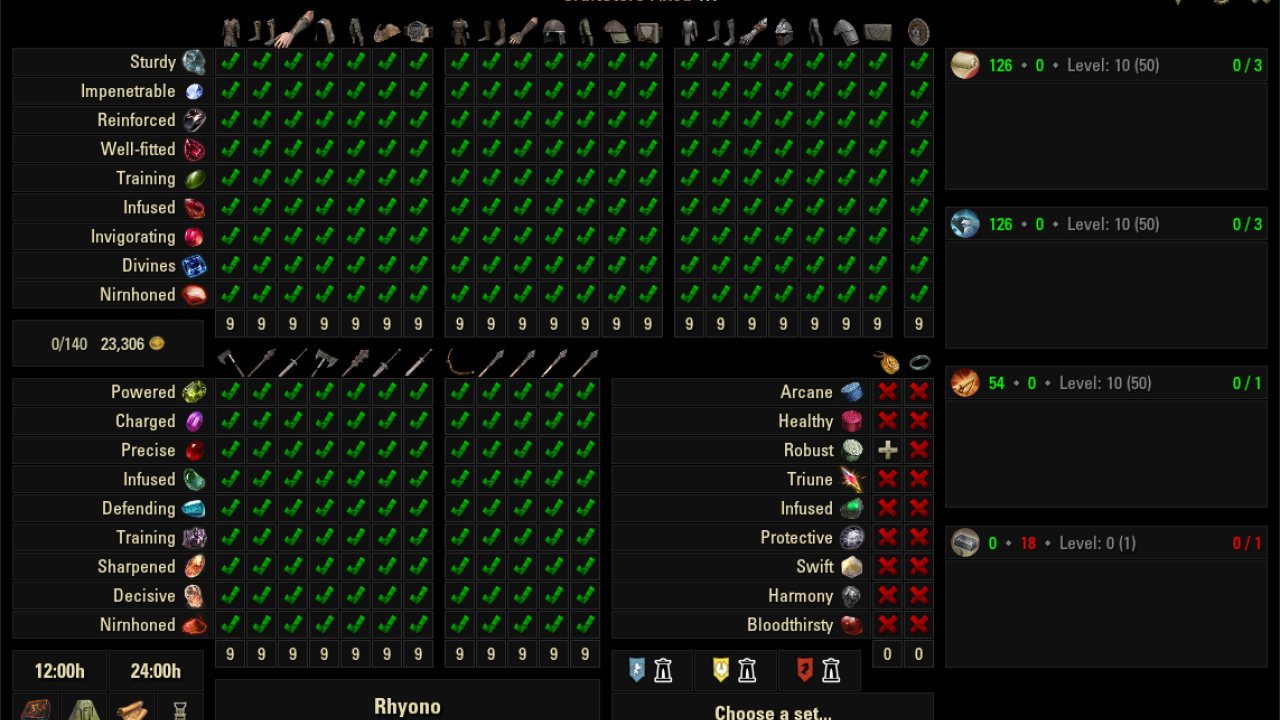
CS does a lot and this is only going to be a brief overview:
What does it do?
CS does a lot and this is only going to be a brief overview:
- Tracks known traits, styles, recipes and blueprints
- Custom enchanting and provisioning station UI
- Craft set, style, rune & glyph, recipe and blueprint lists
- View items across characters
- Overview of all character stats
- Research and mount training reminders
Required Addons
- LibBinaryEncode
- LibAddonMenu
- LibRecipe
Recommended Addons
- Tamriel Trade Centre - allows displaying item value stats in relevant CS tooltips
- LibChatMessage - allows more user control over addon messages
How do I open it?
There should be an icon in the top left of the screen. You can also use /cs to open/close the main UI.
How do I use it?
I will continue to add more images over time, but the two most confusing menus seem to be the main UI and the character overview, so I've started there.
Main UI Window
- Displays Daily Writs progress when moused over.
- Options
- Close the UI
- Opens styles UI
- Opens enchanting/rune/glyph UI
- Opens recipe UI
- Opens blueprint/furniture UI
- Opens character overview UI
- Opens craftable set list. Note: changing the style weight in the styles UI will change it for this list as well.
- The alliance wayshrines that are closest to the set selected in the craftable set list. Mouse over for teleport location and cost.
- The 12h and 24h timers can be started and reset as needed when you need a timer.
- Total items fenced today and total that can be fenced by this character.
- Net earnings in gold today. Does not account for the value of accumulated but un-sold items.
- The title and version number.
- Clicking on the icons for a column will cause unknown items of those traits and slot to be marked in your inventory and tooltips. Red outlines mean it is not tracking.
- The name of the trait with the icon of the trait item. Mousing over shows the trait item's name.
- The research grid, color coded by knowledge. Red = unknown by all, orange = known by some, but unknown on this, yellow = known by some, not this, but has item, white = unknown by all, but has item, green = known by this.
- Icon of the passive ability that determines materials you are allowed to use in that craft.
- Number of known (or in progress) traits for that craft.
- Number of unknown traits for that craft.
- The passive ability level for that craft.
- The rank for that craft.
- The number of actively research traits and the concurrent limit for that craft.
- An actively researched trait with icon and trait.
- The remaining time on an actively researched trait.
Advanced Color Coded Grid
This is a setting that can be turned off, but adds additional granularity to the main UI's item tracking via color coding.
- Red - unknown by all
- Orange - known by some, but unknown on the currently viewed character
- Yellow - known by some, unknown on viewed, item on a character
- Blue - unknown on all and viewed character has the item
- Navy Blue - unknown on all and item in bank
- Cyan - unknown on all and currently logged in character has the item (or in the bank)
- Purple - known by some, but unknown on viewed, and viewed has the item
- Eggplant- known by some, but unknown on viewed, and item in bank
- Pink - known by some, but unknown on viewed, and currently logged in character has the item
Character Overview
- Menu name
- Close menu
- Character name
- Charater level (does not show if CP)
- Character alliance
- Character class
- Character race
- Shows skill points available and total earned
- Shows skyshards gathered and available
- Mount capacity
- Mount stamina
- Mount speed
- Time until mount can next be trained
- Checkbox for tracking all traits for this character. Does the same thing as the main UI's #15, except on all items at once.
- Track styles.
- Track recipes.
- Track blueprints.
- Crafts with their passive level and craft rank. Research slots where applicable. (hidden in Minimal)
- Actively researched trait with remaining time. (hidden in Minimal and Slim)
- Mount knowledge is complete and shown in a consolidated form.
Slash Commands
- /cs - opens/closes the main UI
- /craftstore - same as /cs
- /cspurge - clears out saved data on items
- /csrepair - fixes issues with researchable items showing incorrectly
- /csremovechar - removes the character's name entered with the command from CS' tracked data
- /csoptions - opens settings
Request backlog
Planned, but do not have an estimated completion date.
- Searchable motifs
- Explaining Advanced Color Grid in the tooltips
- Manually sortable characters
- Modularize Cook
- Sharing known with others
- Individual keybinds for CS windows
- Exclude some characters from tracking altogether
- Track daily writ completion
- Update timers on alts after time reduction scroll
- Advanced Color Grid option for only unknown on current
ABOUT THIS LISTING
This page describes CraftStore by Rhyono. The description and screenshots are the author's own, imported from their listing on ESOUI on 14 August 2026: https://www.esoui.com/downloads/info1590-CraftStore.html
Mythiq hosts no files for it. The download button goes straight to the release file on cdn.esoui.com, so you are downloading from the author's own host, not from a copy of ours.
The download count, rating and comments on this page start at zero and count Mythiq only. The source's own figures are not copied here — they measure a different site, and a number that cannot be checked against our own ledger is not worth printing.
Requirements
Game version
11.3.0
API VERSION
Built for ESO API version 11.3.0. After a patch the game marks add-ons built for the previous API as out of date; the "Allow out of date add-ons" checkbox in the add-on menu loads them anyway, and most work.
LIBRARIES
Many ESO add-ons depend on a shared library — LibAddonMenu-2.0 above all — which is installed separately, exactly like an add-on. A dependency that is missing shows as the add-on simply not appearing in the list.
CONSOLE
Add-ons are PC and Mac only. There is no way to load them on console.
Installation
1. Download the archive with the button on this page and unzip it.
2. Move the unzipped folder into your add-ons directory:
Windows — Documents\Elder Scrolls Online\live\AddOns
3. Start the game, and at the character select screen click Add-Ons.
4. Tick the add-on. If it is greyed out and marked out of date, tick "Allow out of date add-ons" at the top of the same panel.
5. Log in. Most add-ons need a /reloadui after they are first enabled.
UPDATING
Delete the old folder first. ESO loads everything it finds, and two copies of one add-on is the usual cause of "an add-on has produced an error" on login.
This release downloads from cdn.esoui.com, not from us, so
there is no checksum to compare against. Scan the archive before you unpack it.
** Changed name to Craftstore because changing it each update messes with Minion so keeping it one name is important. Hopefully it won't change again going forward. **
Version 3.05 (Sharlikran)
*Added missing recipes up to update 50
Version 3.03, 3.04 (Sharlikran)
*Added additional keybindings added
*Added Chinese Simplified translation
Version 3.02 (Sharlikran)
* Removed the LibRecipe dependency after further evaluation, as CraftStore does not utilize recipe data in the manner originally anticipated.
Version 3.01 (Sharlikran)
*Added missing recipes after update 43, and up to update 49
Version 3.00 (Sharlikran)
*Version
*API Bump
*Added new recipe ingredient handler via LibRecipe
Version 2.99 (JohnWalker75)
*Version
*API Bump
*Added new styles
*Added new blueprints
*Added new sets
Version 2.98 (JohnWalker75)
*API Bump
*Added new styles
*Added new blueprints
Version 2.97 (JohnWalker75)
*API Bump
*Added new styles
*Added new blueprints
*Fixed zone ids issue due to ZOS change
*Fixed queue causing cooking station lag (dlrgames)
Version 2.96
*Fixed typo (OblancC)
Version 2.95 (MuMuQ)
*API Bump
*Added new blueprints
*Fixed UI bug (breadispan)
Version 2.94 (MuMuQ)
*API Bump
*Added new styles
*Added new blueprints
Version 2.93
*Changed migration trigger (Zeratoxx)
Version 2.92
*Fixed jewelry and nirnhoned shield indices caused by ZOS change (Sc4rlite)
*Implemented migration routine to resolve existing data (Zeratoxx)
Version 2.91 (MuMuQ)
*API Bump
*Added new styles
*Added new blueprints
*Added new sets
*Added helper for crafted wayshrines
*Added option for filtering fully unknown styles (wyndstryke)
Version 2.90
*API Bump
*Fixed missing lang options
Version 2.89
*Added new blueprints (MuMuQ)
*API Bump (MuMuQ)
*Fix for PerfectPixel support (DakJaniels)
Version 2.88 (MuMuQ)
*Disabled hiding CraftStoreCook in Gamepad mode
Version 2.87 (MuMuQ)
*Fixed button alignment in recipe list
*Fixed Russian recipe sorting
*Added option to disable the inspiration gain scroll text
*Added new styles
*Added new blueprints
*Added tooltips to the options for enabling modules
*Added ability to open the vanilla fish fillet UI from CraftStoreCook
Version 2.86 (MuMuQ)
*API Bump
*Added new styles
*Added new blueprints
*Added new sets
*Fixed motif number parsing
*Removed references to the defunct Furniture Preview
Version 2.85 (MuMuQ)
*API Bump
*Added new styles
*Added new blueprints
*Added fix for nirnhoned
Version 2.84 (MuMuQ)
*API Bump
*Added new styles
*Added new blueprints
*Added counts to needed/unneeded indicators in tooltips (otac0n)
Version 2.83 (MuMuQ)
*API Bump
*Added new styles
*Added new blueprints
Version 2.82 - Fixed setupCallbacks (thanks KLISK)
Version 2.81 - Added Spanish translation (thanks Ekys)
Version 2.80 (MuMuQ)
*Added new sets
*Fixed tracking markers
Version 2.79 (MuMuQ)
*API Bump
*Added new styles
*Added new blueprints
*Compatibility fix for new TLC restrictions
*Added filter on startup to remove unpublished styles/blueprints
*Bring windows to top on open
Version 2.78 - Added support for Giladil the Ragpicker and House Storage (thanks GoddessArtemis)
Version 2.77 (MuMuQ) - Added new styles
Version 2.76 (MuMuQ)
*Added new blueprints
*Compatibility fix for Ascending Tide changes
*API Bump
Version 2.75.1 - Fixed error (thanks deinspanjer)
Version 2.75 - Improved PerfectPixel and CraftStoreCook compatibility (thanks DakJaniels)
Version 2.74 - Fixed trade tooltips (thanks otac0n)
Version 2.73
*Improved MM integration (thanks Sharlikran)
*Added new sets (thanks Antisenil)
Version 2.72 - Added new blueprints (thanks MuMuQ)
Version 2.71 - Fixed style compatibility with existing SavedVars
Version 2.70 - Added new styles (thanks MuMuQ)
Version 2.69
*API Bump
*Added new styles
*Added new blueprints
Version 2.68 - Fixed API version
Version 2.67 - Added new blueprints
Version 2.66
*Switched FCOIS Glyph API
*Added new styles
Version 2.65 - Fixed leaking variable
Version 2.64 - Fixed zone names
Off-site on cdn.esoui.com —
no checksum, because we never held this file.
Link checked by our review team on 14 Aug 2026.
Tell us if something is wrong — a file that will not work, content taken from
someone else, or anything that looks unsafe. Reports go to our review team, not
to the author.
We use cookies to ensure that we give you the best experience on our website and improve your experience. By continuing to use this site you consent to such use of cookies.