DO NOT ACCESS THE PRELOADED TABLES [like LibSets.setsInfo etc.] DIRECTLY BUT USE THE API FUNCTIONS -> e.g. LibSets.GetAll* to READ THE PRELOADED DATA!
Attention please - To the addon devs:
DO NOT ACCESS THE PRELOADED TABLES [like LibSets.setsInfo etc.] DIRECTLY BUT USE THE API FUNCTIONS -> e.g. LibSets.GetAll* to READ THE PRELOADED DATA!
!If you use my library or any of it's data for any commercial addons or websites you must ask me in advance if this is allowed!
Optional depends on:
LibAddonMenu-2.0
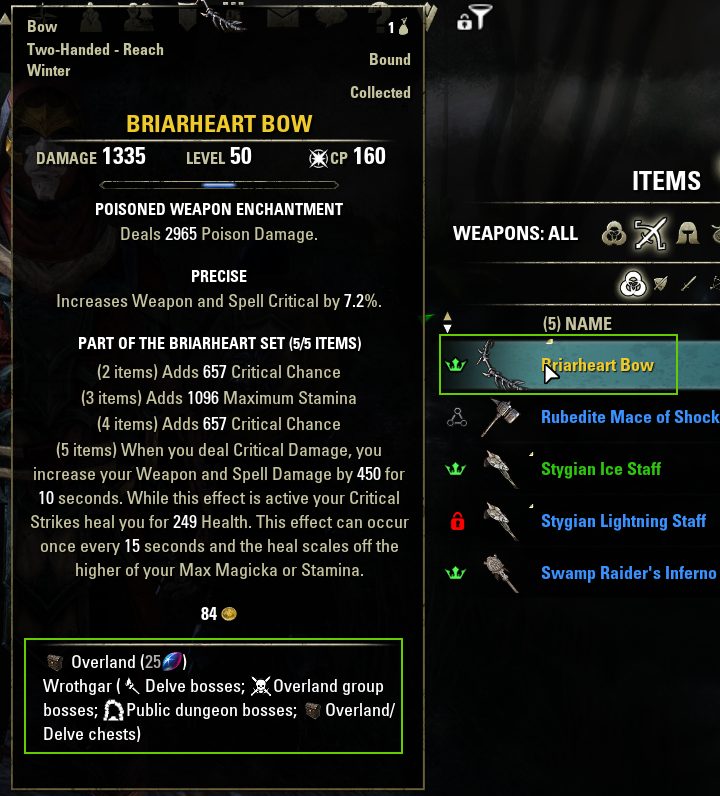
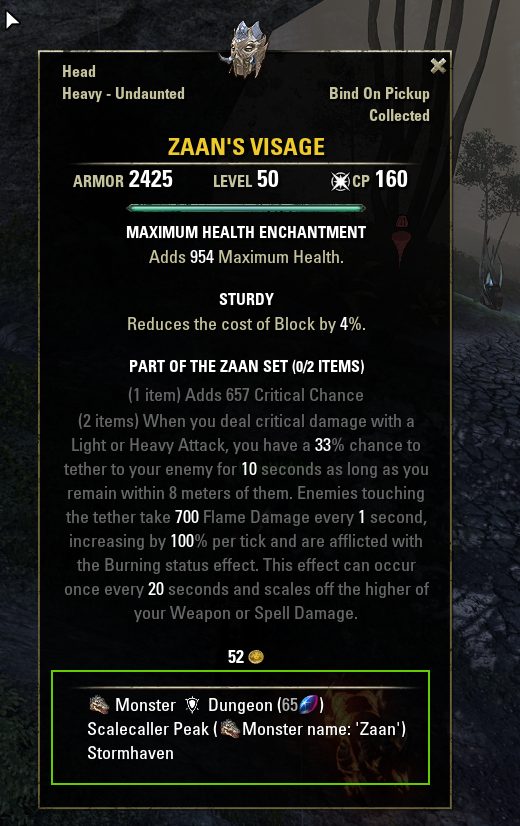
-> If you install this library you got a LibSets settings menu ingame to define a tooltip at your set itms, showing you where and how the set items drop.
LibSlashCommander
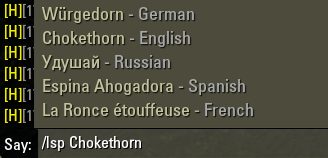
-> If you install this library you get a slash command helper for /libsetspreview or /lsp set search which uses auto completion as you type the setname. It will show you a matching list of set's, including their unique setId. If you press the SPACE key after the setName was selected from the dropdown list, you can see a list of translations into all other supported langages, for this choosen set.
Pressing the return key will provide you a random itemLink of the set into the chat editbox, where you can send it to others or copy it from.
LibCustomMenu
LibScrollableMenu
New optional dependency needed for gamepad/Console UI: LibHarvensAddonSettings
LibSets
A library to help with item sets in the ESO game.
Added support for gamepad UI and Console UI tooltips, slash commands and settings menu
Workaround: If the gamepad/console tooltips from the slash commands do not show open any tooltip (e.g. of a skill on your action bar) first and then repeat the slash command.
-> The SetSearchUI is currently not working in gamepad/Console mode!
Total new Set search UI (Keyboard mode / Gamepad maybe in the future)
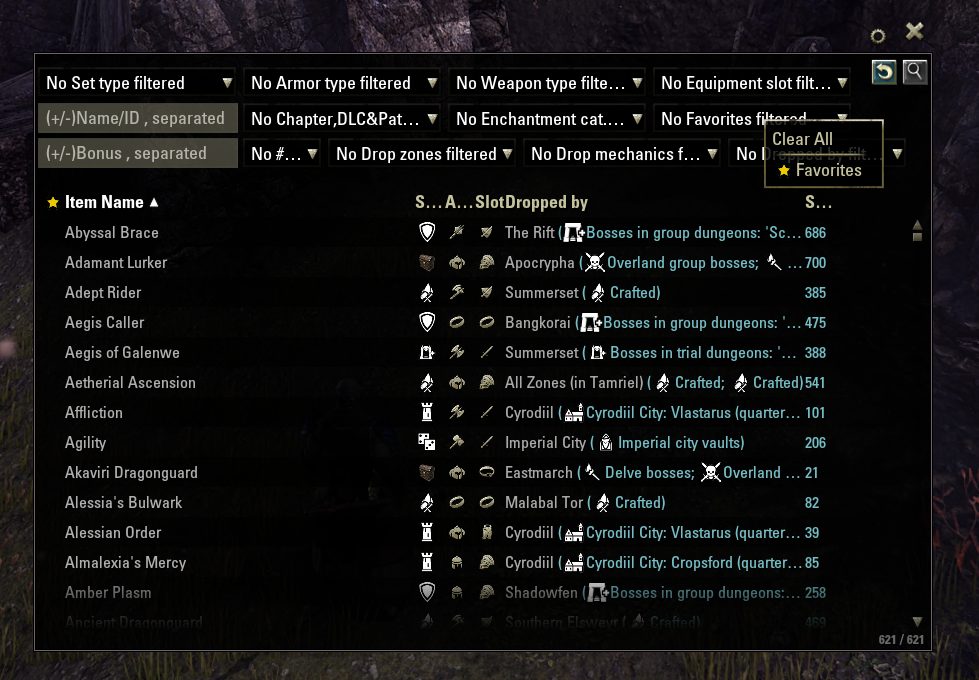
Added a complete new set search user interface which you can show/hide via slash command /lss or /libsets search
You can use /lss to directly open the search with that search text.
A settings menu at the top right of the search UI can be used to change a few settings.
Moving the mouse above the results list will show a tooltip of that set.
You can right click any results list entry to save the set as a favorite, with a yellow star icon (or any other predefined favorites icon, e.g. Tank or StamDD,...) showing that to you.
Or link the set to chat, copy the set info text and drop locations (including textures of the drop info, or without) from a copy dialog box.
Open a fixed popup tooltip at the right/left/auto side for example, to compare that set with the next dynamic tooltip shown at the left.
In the settings menu you can define what should happen on left click by default: Link to chat/Show popup tooltip
-> Default set tooltip settings can be changed at the LibSets settings menu (LibAddonMenu-2.0)
The dropdown boxes are multiselect so each selected entry filters.
Changing the multiselect filters needs to actively press the search button to apply the filters!
Text editboxes will directly apply the search, without pressing the search button.
Right click context menus at the multiselect dropdowns or editboxes provide extra possibilities, like a search history (editboxes) or directly choose some sets (favorites, currentzone), select all, select none or invert the selection.
If enabled at the settings menu
-Shows you the set's drop locations, how to get etc. at the tooltip (including Mythic item lead drop location/info)
-Provides a small triangle button at the set collections top right to scroll to the current zone/parent zone
-Adds slash commands (install LibSlashCommander to assist you with the search results) like /lsp to show you a list of sets and creae an itemlink you can send to chat
The update for this library is very time conuming at each patch so I'd be glad to get help or recompensation for my invested time.
I love bears ;)
Slash commands
/lss or /libsets search Open the set search UI
Optional dependency: LibSlashCommander
-Added slash command /libsetspreview or /lsp to search for set names/ids and preview a tooltip of that set (default: legendary divine chest -> if not available any other random item of the set)
-->Shows tooltip of the set item and returns the itemlink to chat input field
-Optional dependency LibSlashCommander was added for the set name search (multi language). Type /lsp to search in client language or /lsp e.g. /lspde to search for German set names.
Or just type /lsp e.g. /lsp 633 to show that's set item
/libsetsdlcsandchapters
/dlcsandchapters
Show the data about the DLCs and chapters of the game: LibSets DLCId, release date, name, DLC type (dungeon, zone)
/libsetsdlcs
/dlcs
Show the data about the DLCs of the game: LibSets DLCId, release date, name, DLC type (dungeon, zone)
/libsetschapters
/chapters
Show the data about the chapters of the game: LibSets DLCId, release date, name, DLC type (chapter)
It provides the following "setTypes":
The library provides drop mechanics which describe how the sets drop, together with the zoneIds where the sets drop it will describe how you are able to get the setItems:
Provides the following DLC types:
-> See file LibSets_Constants_All.lua, table possibleDlcTypes for the DLC type constants
DLC_TYPE_ITERATION_BEGIN = DLC_TYPE_BASE_GAME
DLC_TYPE_ITERATION_END = maximum DLC type
Also provides DLC Ids for each released DLC and/or chapter:
And several API functions to read set's drop zone, drop boss, and other info.
Global variable of the library to access it in your code:
LibSets
Please do NOT use LibStub with this library as it will not work!
Simply include the following tag into your addon's manifest txt file:
This library uses SavedVariables and thus needs it's own LibSets.txt manifest file!
You must not include this library into subfolders of your addon and you must not include it manually into your addon's manifest txt file like
Supported languages are:
German
English
French
Russian
Spanish
Chinese (missing some translations, if you can provide them please contact me or use the ESOUI translation forums to provide them, thank you).
-> If you want your language supported as well contact me via private message here on www.esoui.com please.
It contains:
-SetId of the set
-Set's itemIds for all set items (to build an itemlink use function LibSets.buildItemLink)
-Name of a set for the supported languages
-Tables which contain the setIds and setData for each setType
-Tables which contain a mapping between the wayshrines and their zoneIds
-Counters to check how many sets of a type exist
-Functions to get & check the set data, get set languages, teleport to craftable set's near wayshrines, open set drop zone on map, open and show wayshrine of set on map, etc.
@developers
Be sure to check if LibSets finished loading the sets properly before accessing it.
Custom tooltip controls of your addon - Add LibSets info
If you want to add the LibSets tooltips info to your own created tooltips (at the bottom), you can use the API function here:
XML defined tooltip control for that: param "tooltipCtrlName" in API function LibSets.RegisterCustomTooltipHook -> use "YourAddonNameSetTooltip"
At your row control's OnMouseEnter handler show the tooltip then and load the itemlink of the set via YourAddonNameSetTooltip:SetLink(itemLink) to it, and at the OnMouseExit hide it again.
Here an example from addon WishList: YourAddonNameSetTooltip -> WishListTooltip in this example
Custom context submenu (using LibCustomMenu) at the set search UI results list
Use the API functin
Example:
Unique setId
The API provides an unique setId for items which belong to a set.
If you do not have an itemLink, but you know the setId, you can get that setInfos via API function
If you got an itemLink of the item you would like to check your ca the following API function to get the setId and some other parameters as well.
Important: The data this API function GetItemLinkSetInfo(itemLink) provides is NOT stored redundantly inside the library LibSets!
So please be sure to get the parameters "numBonuses", "numEquipped", "maxEquipped" by help of this ESO API function.
If you need e.g. the "_numEquipped_" parameter info you need to build an itemLink of a set's itemId, like this:
You can use the function LibSets.BuildItemLink(LibSets.GetSetItemId(setId, equipType)) to build the itemLink and then use the API function GetItemLinkSetInfo(itemLink, false) to get this information.
What constants can be used?
The non-API version dependent constants are available within this library's files LibSets_ConstantsLibraryInternal.lua and LibSets_Constants_All.lua.
-> Please check these file for the possible constants for:
-LibSet tableKeys
-LibSet setTypes & names
-DLC Ids (see above)
-LibSet Undaunted Chest Data & names
-LibSets Dropmechanics (dungeon, overland, cyrodiil, etc.)
Where is the data?
The setsData is stored inside the included excel document LibSets_SetData.xlsx. From this file the lua contents for the following files is created:
The setsData is stored in the file LibSets_Data_All.lua
Inside this file there is a table LibSets.setInfo which provides the set information from the included excel.
And there are many pre-loaded (scanned ingame multilingual, shrinked and stored in this lua file) tables for the set itemIds, set names /multi language)m wayshrineNodeIndices mapping to their zoneId, and others.
-The file itsself got comments to describe how to get the data needed and what format is needed.
DO NOT ACCESS THESE TABLES DIRECTLY BUT USE THE API FUNCTIONS like LibSets.GetAll* to READ THE PRELOADED DATA!
Else you will get error messages as the data is sotmetimes compressed and needs to be decompressed first!
API functions of the library:
Global variable of the library to access it:
PLEASE CHECK THE FILE LibSets.lua for the API functions (starting at "-- Global helper functions")
Below are only some important ones:
Updating the library with new PTS data:
If you want to know what is to do as the library needs an update with new PTS data, check files "LibSets.lua" AND "LibSets_Debug.lua" at the top and read + understand the steps needed please!
Basically it's using LibSets.DebugGetAllData() once, then wait until all itemIds are scanned for sets, and after a few reloaduis (where all languages are scanned) it will switch back to your client language where you've started.
After that you need to backup the /PTS/SavedVariables/LibSets.lua file and check the SV debug table for the scanned compressedItemIds, wayshrine names, DLC&chapter collectibleIds (maybe you need to use other debug functions to find the correct ones. Chapters often work, DLCs need another collectible ID...), weapon types, armor types, equipment types, jewelry types, dungeons, set names (Attention: You need to transfer the scanned compressedItemIds to file LibSets_Data.lua FIRST before you are able to get the other languages setNames! Else only the client language where you've started the LibSets.DebugGetAllData() is correct and all others show "n/a" only! After having transfered the compressedItemIds to the data file you need to run LibSets.DebugGetAllData(true, false, true) again so that no new itemIds are scanned but ONLY the names will be updated to the SavedVariables.).
All data of the SV files need to be cleaned from the leading [] = " table indices & " and the taling ", and then split at the | chars into the LibSets_Data.xlsx spreadsheet. Each SV data relates to 1 Excel map! You can use the map "Dumped data" to split the SV data.
Make sure to NOT overwrite ANY excel formula if you copy&paste data! Only past in data to fields without formula and then pull down the formulas from above lines to your new added lines.
You can use the slash command /libsets to get a list of supported debug function calls.
/libsets getall will scan the itemIds for sets, detect the names, wayshrines, zones, dungeons etc. and write it to the SavedVariables.
If it was already done for the current APIversion and you want to re-start it, use /libsets getall true
GitHub - If you want to contribute
LibSets on GitHub
LibSets for PTS on GitHub
Most up 2 date excel document for the LibSets data, like sets, zones, maps, wayshrines, ...
Download excel from github "Baertram/LibSets"
ABOUT THIS LISTING
This page describes LibSets (All set items ingame & preview. lua API + excel sheet) by Baertram. The description and screenshots are the author's own, imported from their listing on ESOUI on 31 August 2026: https://www.esoui.com/downloads/info2241-LibSetsAllsetitemsingamepreview.luaAPIexcelsheet.html
Mythiq.net hosts no files for it. The download button goes straight to the release file on cdn.esoui.com, so you are downloading from the author's own host, not from a copy of ours.
The download count, rating and comments on this page start at zero and count Mythiq.net only. The source's own figures are not copied here — they measure a different site, and a number that cannot be checked against our own ledger is not worth printing.
Media
Requirements
Game versions
12.0.0
11.3.0
11.2.0
11.1.0
11.0.0
10.3.5
API VERSION
Built for ESO API version 12.0.0, 11.3.0, 11.2.0, 11.1.0, 11.0.0. After a patch the game marks add-ons built for the previous API as out of date; the "Allow out of date add-ons" checkbox in the add-on menu loads them anyway, and most work.
LIBRARIES
Many ESO add-ons depend on a shared library — LibAddonMenu-2.0 above all — which is installed separately, exactly like an add-on. A dependency that is missing shows as the add-on simply not appearing in the list.
CONSOLE
Add-ons are PC and Mac only. There is no way to load them on console.
Installation
1. Download the archive with the button on this page and unzip it.
2. Move the unzipped folder into your add-ons directory:
Windows — Documents\Elder Scrolls Online\live\AddOns
3. Start the game, and at the character select screen click Add-Ons.
4. Tick the add-on. If it is greyed out and marked out of date, tick "Allow out of date add-ons" at the top of the same panel.
5. Log in. Most add-ons need a /reloadui after they are first enabled.
UPDATING
Delete the old folder first. ESO loads everything it finds, and two copies of one add-on is the usual cause of "an add-on has produced an error" on login.
This release downloads from cdn.esoui.com, not from us, so
there is no checksum to compare against. Scan the archive before you unpack it.
!If you use my library or any of it's data for any commercial addons or websites you must ask me in advance if this is allowed!
---Do not access the LibSets sub-tables and data directly please - Use the provided API functions---
0.9.3 - 2026-07-12
-Enabled JP as officially supported language
-Updated missing JP set names
-Fixed auto completion not showing all available names if EsoPL addon was not loaded
0.9.2 - 2026-05-27
-Updated APIversion and dependencies -> !!! New version of LibScrollableMenu needed: 2.4.3 !!!
-Added Update 50 sets and data
-Several fixes at the set search UI, context menus and settings menu
-Several changes at the set search UI, context menu (radiobuttons instead of checkboxes e.g.)
-Added set search UI settings menu entry to control the position of the additional set drop location tooltip
-Added set search UI settings menu radiobuttons entries to sort the DLC dropdown by name or by release date
-Added sort buttons to set search UI's DLC dropdown header
-Fixed some API function lua documentation to show nilable parameters or return values
-Secured some tables returned by API functions, so addons cannot overwrite/change LibSets data "by accident".
Again the urgent request to PLEASE use the proper API functions provided and do NOT acces LibSets.setInfo or any other tables directly!!! Thank you for respecting this, preventing any problems for anyone of us using the lib.
0.9.0 - 2026-04-15
-Fixed set search UI context menus
-Fixed several other bugs at the set search UI
-Fixed opening of set collections, nil error or opening wrong or non entry for Nightmarket or Seaon of the Wormcult sets
-Added resize possibility for set search UI
-Added tooltip at set search UI DLC dropdown -> Shows the release date
-Added search at set search UI DLC dropdown -> Supports release date date now (searches the tooltip text)
-Added set name and extra line with set type + icon to context menu at set search UI's set list
-Added API function
--Returns the name and the timestamp it was released of the DLC by help of the DLC id
--> Parameters: dlcId number: The DLC id given in a set's info
--> Returns: name dlcName, nilable:number releaseDateTimeStamp
function lib.GetDLCInfo(dlcId)
0.8.9 - 2026-03-14
-Fixed nil error at Lib sets search UI -> Open settings menu entry
-Fixed LibScrollableMenu detection at set search UI context menu
0.8.8 - 2026-03-14
-Updated for API101049
-Fixed some wrong data entries
-Fixed nil error at API function set collections open (1st open)
0.8.6 - 2025-12-01
-Re-checked all DLCIds of the sets and fixed them all
-Fixed undaunted chestIds
0.8.5 - 2025-11-24
Fixed switched setIds of new zone
0.8.4 - 2025-11-17
Removed debug message
0.8.3 - 2025-11-13
Hotfix fo mythic item tooltips not showing the LibSets info
0.8.2 - 2025-11-13
!!!Renamed folders and files!!! If you manually update make sure to please delete the WHOLE live/AddOns/LibSets folder prior to extracting the new version's files and folders!!!
New optional dependency needed for gamepad/Console UI: LibHarvensAddonSettings
Added support for gamepad UI and Console UI tooltips, slash commands and settings menu.
Workaround: If the gamepad/console tooltips from the slash commands do not show open any tooltip (e.g. of a skill on your action bar) first and then repeat the slash command.
-> The SetSearchUI is currently not working in gamepad/Console mode!
-Updated API version and dependencies
-Added sets of Season of the Wormcult 2
-Updated mythic set items and drop locations
-Updated all overland set items
-Fixed some other sets
-Updated excel data
Added new API functions for dungeons and achievements of dungeons:
--Returns a boolean isZoneIdADungeon by the help of a zoneId
--> Parameters: zoneId number: The zone id given
--> Returns: boolean isZoneIdADungeon
function lib.IsDungeonZoneId(zoneId)
Off-site on cdn.esoui.com —
no checksum, because we never held this file.
Link checked by our review team on 31 Aug 2026.
Tell us if something is wrong — a file that will not work, content taken from
someone else, or anything that looks unsafe. Reports go to our review team, not
to the author.
We use cookies to ensure that we give you the best experience on our website and improve your experience. By continuing to use this site you consent to such use of cookies.