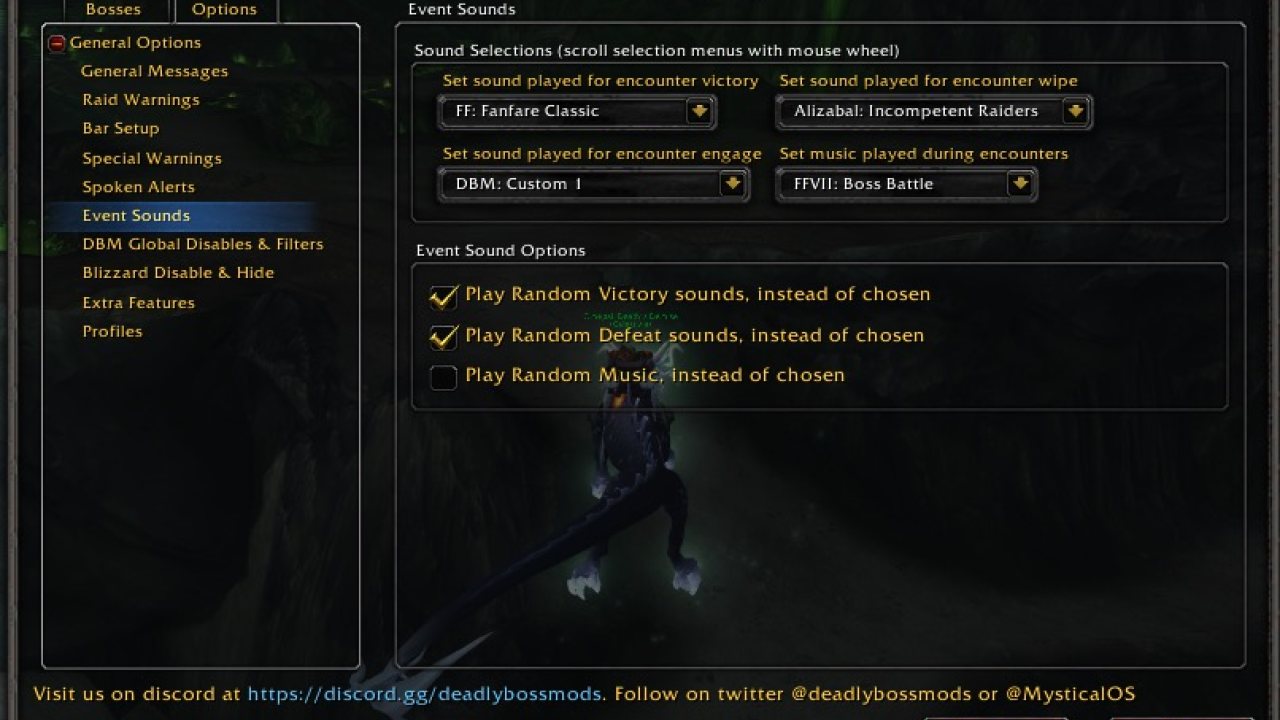
Several media files for DBM encounter Event feature.
History:
For longest time, I did not add support or Victory sounds or encounter music because it was already nicely done by a 3rd party addon called DBM-Victory sounds. However, this project seems long abandoned. Additionally, it's high time DBM supported these features built in.
Now that feature is built into DBM, I had to decide how to handle media. I liked how the overwatch and heroes and voice pack media worked so I continue this trend with Event Sounds system. Basically, DBM supports event sounds but doesn't include media for it by default. No one wants to download tons sound files every DBM update when none of sound files actually changed.
Additionally, I hope many download this template and learn to make their own Event Sound packs to further expand options. Today, DBM has couple dozen voice packs out there. Lets see if we can do same for Event Sounds! Please do so properly though. Don't go downloading latest Taylor Swift or Kanye album, make a mod with it and upload a music pack. Find some free to use media or get permission from the artist.
Installation:
Just install this with Twitch client, or download and unzip and drop the DBM-EventSoundPack folder directly into addons folder and DBM-Core version 7.3.24 or higher will be able to detect and add media to Event Sound Options automatically
After that, just configure how you want.
Additional Note:
Some of music is volume boosted heavily. The media from Victory Sounds was just recorded that way. I tried to normalize it with online tools but it's still too loud compared to other media. This will result in inconsistent volumes between some of music selections. Some of them will play at proper volume like some of the SMG audio that's coming soon, while some of these will be so blaring loud that you'll find yourself having to turn down audio. If anyone with better tools than free online ones wants to help fix this issue, please get in touch.
ABOUT THIS LISTING
This page describes Deadly Boss Mods (DBM) - Event Pack by MysticalOS. The description and screenshots are the author's own, imported from their listing on CurseForge on 26 October 2026: https://www.curseforge.com/wow/addons/deadly-boss-mods-dbm-event-sound-pack
Mythiq.net hosts no files for it. The download button goes straight to the release file on edge.forgecdn.net, so you are downloading from the author's own host, not from a copy of ours.
The download count, rating and comments on this page start at zero and count Mythiq.net only. The source's own figures are not copied here — they measure a different site, and a number that cannot be checked against our own ledger is not worth printing.
Requirements
Game versions
3.4.5
5.5.4
12.1.0
2.5.6
1.15.9
3.80.2
12.1.5
1.60.1
GAME FLAVOUR
This is a Classic build. Retail and Classic run different interface APIs, and an addon built for one throws Lua errors on the other — check you are installing into the right client folder.
INTERFACE VERSION
Built against game version 3.4.5, 5.5.4, 12.1.0, 2.5.6, 1.15.9, 3.80.2. After a patch, an addon that has not been updated is flagged out of date; most keep working, and the "Load out of date AddOns" checkbox on the character screen lets you try.
DEPENDENCIES
Some addons need a separate library addon (Ace3, LibStub and friends) that is not bundled. If the addon does not appear in the list in game, a missing dependency is the usual reason.
Installation
1. Quit World of Warcraft completely. The game reads the AddOns folder at launch and will overwrite settings for an addon added while it is running.
2. Download the archive with the button on this page and unzip it.
3. Move the folder — the one with the .toc file in it, not the zip's wrapper folder — into:
World of Warcraft\_classic_era_\Interface\AddOns (or _classic_ for the current Classic expansion)
4. Start the game. On the character selection screen, click AddOns and check that it is listed and enabled.
IF IT DOES NOT APPEAR
Nine times out of ten the folder is nested one level too deep. Interface/AddOns/Thing/Thing/Thing.toc will not load; Interface/AddOns/Thing/Thing.toc will.
UPDATING
Delete the old folder before unzipping the new one. Unzipping over the top leaves files behind that the new version no longer expects.
This release downloads from edge.forgecdn.net, not from us, so
there is no checksum to compare against. Scan the archive before you unpack it.
Version history
v1.6.46Latest
15 Oct 2026 · 16 MB via edge.forgecdn.net · 1 download Download
Off-site on edge.forgecdn.net —
no checksum, because we never held this file.
Link checked by our review team on 26 Oct 2026.
Tell us if something is wrong — a file that will not work, content taken from
someone else, or anything that looks unsafe. Reports go to our review team, not
to the author.
We use cookies to ensure that we give you the best experience on our website and improve your experience. By continuing to use this site you consent to such use of cookies.