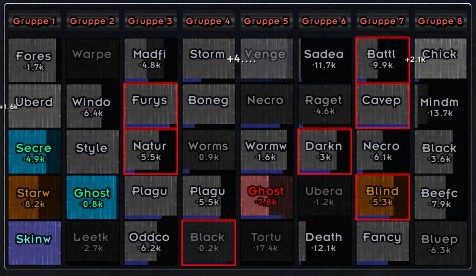
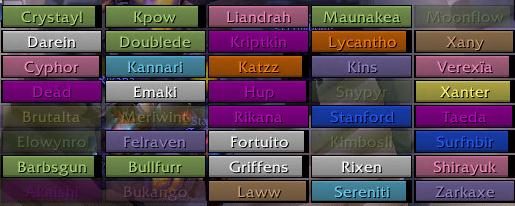
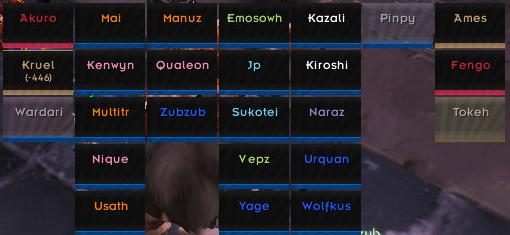
VuhDo is a raid monitor similar to CTRaidAssist or Blizzards built-in raid frames. Basically this is about displaying the health of raid members in form of clearly arranged bars. VuhDo is primarily directed to healing classes, but will make use to almost any other class. Moreover several healing spells or other actions can be asserted to mouse clicks on those bars (Click-Heal).
What VuhDo can do:
Display all relevant informations about your raid members:
- Life,
- Mana, other types of power
- Debuffs
- Range
- Incoming Heal
- Aggro
- Threat
- HoTs
- Charmed status
- PvP status
- Tooltips (for race, class, level and current location)
- Player Tags (such as afk, disconnected, dead)
- Shields
Casting:
- You can heal, decurse, target, assist or focus raid members with just one click
- You can bind any usable item and any macro to mouse clicks
- You can assign up to 40 mouse click combinations to cast on raid members
- You can assign up to 16 keys to cast when mouse over
- You can automatically fire your trinkets and instant casts whenever cooldown is over
- You can automatically resurrect and decurse players out of combat
Set up the raid:
- Manage main tanks (CTRA/ORA compatible) and personally selected players.
- Setup who is raid lead, assistant and master looter
- Check who is one of the above
Buffing:
- You can easily keep track of all of your buffs
- You can rebuff automatically chosing the most suitable spell and target
- You can smart buff your raid automatically selecting missing buffs
Special Features:
- Up to 10 independent raid member panels
- Completely free arrangement of raid members: You can move any group to any position in any panel:
- You can select to see your groups by class, group number role or any combination.
- Easy group arrangement via Drag-n-Drop.
- You can additionally setup to display Pets, Vehicles, Main Tanks, private Tanks.
- A panel setup wizard lets you setup most common settings with a few clicks
- You can store different skins and arrangements of panels separately
Supported standards / Compatibility:
- CTRA/oRA: Main Tank setup / resurrection monitor
- libSharedMedia: Fonts, Statusbar textures
- Masque
- Clique
To be absolutely clear VuhDo is still fully supported and will continue to see bug fixes / new features.
Below we have archived the parting message from Iza @ EU-Gilneas, the original creator of this amazing addon:
2014-04-25: I (Iza) am sorry to announce that I'm not
going to further develop or maintain VuhDo anymore.
I haven't been actively playing wow for some years
now and lately - as you might have noticed -
my efforts (and also interest) in maintaining and
developing WoW addons tends to zero, so I'll be
gone for good I guess.
Thanks to a fine community for the great times
and for sharing all the uncounted ideas and suggestions
which finally have made VuhDo what I believe is a decent
addon.
All the best to you & keep it going,
Iza
ABOUT THIS LISTING
This page describes VuhDo by humfras. The description and screenshots are the author's own, imported from their listing on CurseForge on 14 August 2026: https://www.curseforge.com/wow/addons/vuhdo
Mythiq hosts no files for it. The download button goes straight to the release file on edge.forgecdn.net, so you are downloading from the author's own host, not from a copy of ours.
The download count, rating and comments on this page start at zero and count Mythiq only. The source's own figures are not copied here — they measure a different site, and a number that cannot be checked against our own ledger is not worth printing.
Media
vdraid6.jpg
vdraid3.jpg
vdraid4.jpg
Requirements
Game version
1.15.9
GAME FLAVOUR
This is a Classic build. Retail and Classic run different interface APIs, and an addon built for one throws Lua errors on the other — check you are installing into the right client folder.
INTERFACE VERSION
Built against game version 1.15.9. After a patch, an addon that has not been updated is flagged out of date; most keep working, and the "Load out of date AddOns" checkbox on the character screen lets you try.
DEPENDENCIES
Some addons need a separate library addon (Ace3, LibStub and friends) that is not bundled. If the addon does not appear in the list in game, a missing dependency is the usual reason.
Installation
1. Quit World of Warcraft completely. The game reads the AddOns folder at launch and will overwrite settings for an addon added while it is running.
2. Download the archive with the button on this page and unzip it.
3. Move the folder — the one with the .toc file in it, not the zip's wrapper folder — into:
World of Warcraft\_classic_era_\Interface\AddOns (or _classic_ for the current Classic expansion)
4. Start the game. On the character selection screen, click AddOns and check that it is listed and enabled.
IF IT DOES NOT APPEAR
Nine times out of ten the folder is nested one level too deep. Interface/AddOns/Thing/Thing/Thing.toc will not load; Interface/AddOns/Thing/Thing.toc will.
UPDATING
Delete the old folder before unzipping the new one. Unzipping over the top leaves files behind that the new version no longer expects.
This release downloads from edge.forgecdn.net, not from us, so
there is no checksum to compare against. Scan the archive before you unpack it.
Version history
v3.213-vanilla-classicLatest
12 Aug 2026 · 1.3 MB via edge.forgecdn.net · 17 downloads Download
Off-site on edge.forgecdn.net —
no checksum, because we never held this file.
Link checked by our review team on 14 Aug 2026.
Tell us if something is wrong — a file that will not work, content taken from
someone else, or anything that looks unsafe. Reports go to our review team, not
to the author.
We use cookies to ensure that we give you the best experience on our website and improve your experience. By continuing to use this site you consent to such use of cookies.