Classic WoW world buff timers and pre buff drop warnings so you never miss a buff.
Nova World Buffs
Classic WoW world buff timers and pre buff drop warnings so you never miss a buff.
Novaspark-Arugal for any questions.
What it does
Warning msgs in chat window, middle of the screen, and guild chat.
Warnings for each channel and time left can be turned on and off with /wb config.
Current warning times are 30/15/10/5/1 minutes left until buff reset.
Guild msgs are configured so only 1 person online at a time will send warning msgs to avoid spam.
Guild chat is notified and timer reset if a buff NPC is killed infront of a member with the addon installed (mind control reset).
Any guild member can type !wb in guild chat to display all timers.
Display timers to yourself by typing /wb.
Display timers to any channel by typing /wb Example: /wb party or /wb say.
Display timers automatically when you log on.
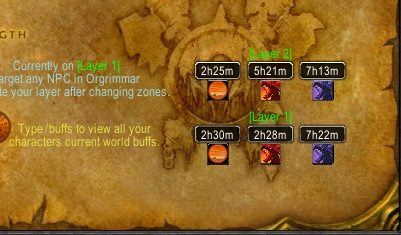
Display timers on the Orgrimmar/Stormwind world map.
Songflowers
Songflowers will show on the Felwood world map.
Timers will display beside each flower on the worldmap and minimap if that flower has an active timer.
Type /sf to show songflower timers to yourself.
Type /sf map to open the felwood map for viewing all active timers.
Type /sf to display songflower timers to the specified channel.
Shift + click on a songflower map icon to send that flower's timer to guild chat with location name and coords.
If you see a flower get picked it will tell your guild chat the next spawn, can be disabled in /wb config.
Prints to chat window when you receive a new songflower timer from someone, can be disabled in /wb config.
Also tracks Whipper Root Tuber/Night Dragon's Breath.
Track your World Buffs across all alts
Type /buffs or click on the [WorldBuffs] prefix in chat to open this window.
You can also open this buff window by clicking on any of the map icons from this addon.
Darkmoon Faire
Track Darkmoon Faire spawn/despawn times and where it will spawn next with map marker.
Track how long left on your buff cooldown from the Darkmoon Faire so you know exactly when you can get a new buff.
Layered Realms
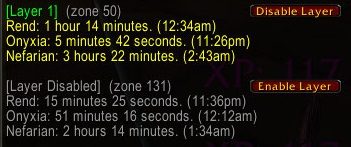
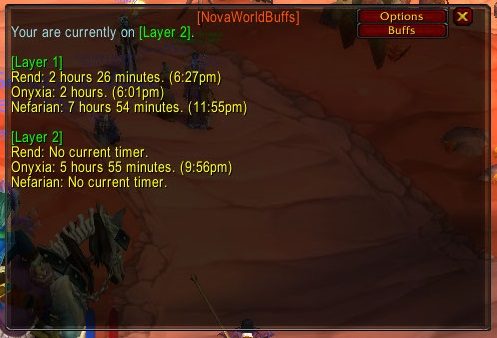
Tracks world buffs for each layer at the same time.
Shows you which layer you are on across all zones.
For Guild Masters:
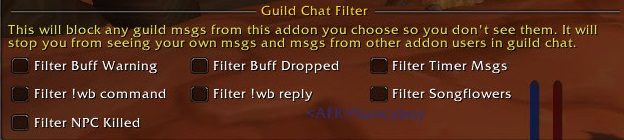
You can disable guild msgs from this addon by adding any of the following to your public guild note, any combination of them works and can be along side your normal note.
#nwb1 = Disable All msgs.
#nwb2 = Disable timers msgs.
#nwb3 = Disable buff dropped msgs.
#nwb4 = Disable !wb command.
#nwb5 = Disable Songflowers msgs.
#nwb6 = Disable all timer data from outside the guild.
#nwb7 = Disable NPC was killed msgs.
#nwb8 = Disable NPC has started walking msgs.
Please type /wb config after installing this addon and choose what timer messages you want to receive, you may find it too spammy with the default settings.
Localization
If you would like to help with localization so this works in your region I need both yell msgs each buff NPC yells out when a buff drops.
Check the localization files in the addon if you think your locale is missing something.
Supporting
https://www.paypal.me/venomisto
All support is appreciated but please don't donate if it's not easy for you, I enjoy making this and seeing so many people get use out of it is enough reward.
My addon discord for support or suggestions: https://discord.gg/RTKMfTmkdj
ABOUT THIS LISTING
This page describes Nova World Buffs by Venomisto. The description and screenshots are the author's own, imported from their listing on CurseForge on 14 August 2026: https://www.curseforge.com/wow/addons/nova-world-buffs
Mythiq hosts no files for it. The download button goes straight to the release file on edge.forgecdn.net, so you are downloading from the author's own host, not from a copy of ours.
The download count, rating and comments on this page start at zero and count Mythiq only. The source's own figures are not copied here — they measure a different site, and a number that cannot be checked against our own ledger is not worth printing.
Media
Early NPC walking alert
Disable old layers.
Chat filter.
Layered map timers.
Layers Window
Requirements
Game versions
4.4.2
5.5.4
2.5.6
1.15.9
GAME FLAVOUR
This is a Classic build. Retail and Classic run different interface APIs, and an addon built for one throws Lua errors on the other — check you are installing into the right client folder.
INTERFACE VERSION
Built against game version 4.4.2, 5.5.4, 2.5.6, 1.15.9. After a patch, an addon that has not been updated is flagged out of date; most keep working, and the "Load out of date AddOns" checkbox on the character screen lets you try.
DEPENDENCIES
Some addons need a separate library addon (Ace3, LibStub and friends) that is not bundled. If the addon does not appear in the list in game, a missing dependency is the usual reason.
Installation
1. Quit World of Warcraft completely. The game reads the AddOns folder at launch and will overwrite settings for an addon added while it is running.
2. Download the archive with the button on this page and unzip it.
3. Move the folder — the one with the .toc file in it, not the zip's wrapper folder — into:
World of Warcraft\_classic_era_\Interface\AddOns (or _classic_ for the current Classic expansion)
4. Start the game. On the character selection screen, click AddOns and check that it is listed and enabled.
IF IT DOES NOT APPEAR
Nine times out of ten the folder is nested one level too deep. Interface/AddOns/Thing/Thing/Thing.toc will not load; Interface/AddOns/Thing/Thing.toc will.
UPDATING
Delete the old folder before unzipping the new one. Unzipping over the top leaves files behind that the new version no longer expects.
This release downloads from edge.forgecdn.net, not from us, so
there is no checksum to compare against. Scan the archive before you unpack it.
Tell us if something is wrong — a file that will not work, content taken from
someone else, or anything that looks unsafe. Reports go to our review team, not
to the author.
We use cookies to ensure that we give you the best experience on our website and improve your experience. By continuing to use this site you consent to such use of cookies.