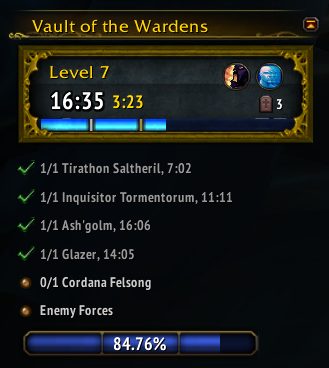
Displays additional information for Mythic Keystone dungeons
Adds additional information to the Mythic Keystone objective tracker.
Bonus Chest Timer
Adds a secondary timer next to main one to show time left for bonus chests. Shows in gold for time for 2 bonus chest, and in silver for time for 1 bonus chest. It also adds a line on the timer bar to mark when this will occur.
Extended Progress Bar
Shows more exact information on how much Enemies Forces progress is needed. Either displaying it as a more exact percent (24.19%) or as a numerical value (90/372), or both. Will also show on enemy tooltips how much progress they each give, after killing them once to learn how much progress they give.
Death Tracker
Will show an icon in the objective tracker with total number of deaths for the current run. Hover over it for a tooltip to show a breakdown of deaths per player, and the total time lost. It won't count deaths very far away from you that didn't show in the combat log.
Keystone Linking
Replaces Keystones links you see in chat from [Mythic Keystone] to [Keystone: The Arcway - Level 5], will also color it grey if it is depleted.
Auto Gossip
During Mythic Keystone dungeons it will automatically select gossip entries for you. For example for starting Odyn and his trash, and Court of Stars buff objects.
Also has an option to output the clue from Chatty Rumormongers to party chat during the Court of Stars event. Currently only available for English locales.
Options
Configuration options can be accessed with /akeys, or in the addon interface options panel. There is an option for auto gossip, format of progress bar, and whether to show progress value on enemy tooltips.
Frequently Asked Questions
Can you disable hiding the objective tracker during boss battles?
This is caused by another addon, likely DBM, hiding the tracker during boss battles. To disable this, uncheck the "Hide watch (objective) frame during boss fights..." in the "Blizzard Disable & Hide" area of DBM settings.
I received an ADDON_ACTION_BLOCKED error, can you fix it?
First try disabling the "Hide quest and achievement trackers during Mythic Keystones" and "Show objective tracker after Mythic Keystone completion" configuration options.
ADDON_ACTION_BLOCKED very frequently doesn't accurately blame the correct addon. There is a reason that is not displayed as a standard Lua error by default, and you need an additional addon (like BugGrabber) to even see the contents of the message. If you really believe it is AngryKeystone causing the error and causes a defect to occur, please first verify the error appears with only AngryKeystones enabled and that it stops happening when it is disabled.
ABOUT THIS LISTING
This page describes Angry Keystones by Ermads. The description and screenshots are the author's own, imported from their listing on CurseForge on 31 August 2026: https://www.curseforge.com/wow/addons/angry-keystones
Mythiq.net hosts no files for it. The download button goes straight to the release file on edge.forgecdn.net, so you are downloading from the author's own host, not from a copy of ours.
The download count, rating and comments on this page start at zero and count Mythiq.net only. The source's own figures are not copied here — they measure a different site, and a number that cannot be checked against our own ledger is not worth printing.
Media
akeysmain.png
Requirements
Game version
12.1.0
GAME FLAVOUR
This is a retail (modern World of Warcraft) build. It will not work in the Classic clients, which run a different interface API.
INTERFACE VERSION
Built against game version 12.1.0. After a patch, an addon that has not been updated is flagged out of date; most keep working, and the "Load out of date AddOns" checkbox on the character screen lets you try.
DEPENDENCIES
Some addons need a separate library addon (Ace3, LibStub and friends) that is not bundled. If the addon does not appear in the list in game, a missing dependency is the usual reason.
Installation
1. Quit World of Warcraft completely. The game reads the AddOns folder at launch and will overwrite settings for an addon added while it is running.
2. Download the archive with the button on this page and unzip it.
3. Move the folder — the one with the .toc file in it, not the zip's wrapper folder — into:
World of Warcraft\_retail_\Interface\AddOns
4. Start the game. On the character selection screen, click AddOns and check that it is listed and enabled.
IF IT DOES NOT APPEAR
Nine times out of ten the folder is nested one level too deep. Interface/AddOns/Thing/Thing/Thing.toc will not load; Interface/AddOns/Thing/Thing.toc will.
UPDATING
Delete the old folder before unzipping the new one. Unzipping over the top leaves files behind that the new version no longer expects.
This release downloads from edge.forgecdn.net, not from us, so
there is no checksum to compare against. Scan the archive before you unpack it.
Version history
v0.33.0Latest
27 Aug 2026 · 56 KB via edge.forgecdn.net · 12 downloads Download
Off-site on edge.forgecdn.net —
no checksum, because we never held this file.
Link checked by our review team on 31 Aug 2026.
Tell us if something is wrong — a file that will not work, content taken from
someone else, or anything that looks unsafe. Reports go to our review team, not
to the author.
We use cookies to ensure that we give you the best experience on our website and improve your experience. By continuing to use this site you consent to such use of cookies.