GTFO warns you when you're standing in fire or other bad stuff.
Midnight Update (6/1/2026):
Blizzard has lifted GTFO's restriction that limited alerts to private auras. GTFO can now work with any trackable debuff.
This means that if standing in something bad applies a debuff, GTFO can once again warn you. Stackable debuffs can also trigger additional warnings as the stacks increase.
Over the next month, I'll be testing raids and dungeons and adding as many alerts as possible. I'll also be working to restore support for delves, PvP, and outdoor content wherever possible.
Here is a rundown of the 12.1 limitations still present in Midnight:
- GTFO can only track a spell when it applies a trackable buff or debuff. Mechanics without one still can't be detected.
- No repeated alerts unless the mechanic applies a stackable debuff (you get one buzzer when you stand in fire, it won't buzz repeatedly until you exit)
- No friendly fire alerts have been found (yet) to work with the new system
- No smart filtering (e.g. don't alert for X if you have the Y buff)
- No ability to unmute the game to play sounds
- No anti-spam protection
Hopefully Blizzard will continue to loosen restrictions so I can restore more of GTFO's previous functionality.
GTFO: Stop standing in fire!
Supported Versions: Retail, Classic
GTFO provides an audible alert when you're standing in something you're not supposed to be standing in. In some cases, you'll be warned before you start taking damage. This mod improves your situational awareness and is recommended for dungeon divers and raiders of all skill levels as even the most seasoned veteran sometimes needs a reminder to GTFO.
It's particularly useful for individuals that play with their spell graphics turned down as well as assisting with PvP when you can't tell who's casting the AOE.
Visual Alert support for GTFO using WeakAuras: https://wago.io/H5H731UaU
Important Announcement: As with any new expansion or content patch, there may be alerts that are untested as well as encounter changes from Beta/PTR. Bug reports are highly appreciated!
Shameless Plugs:
- Twitch: https://twitch.tv/zensunim
- Twitter/X: https://x.com/zensunimwow
- I'm also definitely not a friend of the grummles: https://youtu.be/gNQ3PznTOto
Features
- 4 distinct audible alerts for different types of damage
- High Alert - Dungeon/raid encounter AOE that you want to get out of it ASAP
- Low Alert - PvP and low damage AOE, use your best judgment whether or not to move
- Fail Alert - AOE you should have moved out of the way of, but it's too late (e.g. KZ void zone, Sindragosa bomb)
- Friendly Fire Alert - AOE radiating from a teammate's body, one of you needs to move
- Tuned for all dungeons and raid modes
- Alert you before you start taking damage (when possible, in some cases)
- Alert you during vehicle fights when your vehicle is in danger (e.g. Malygos, Flame Leviathan)
- Alert you if you're AFK and get attacked
- Tank and non-tank specific alerts
- Visual alerts available when used with WeakAuras or Power Auras Classic (optional)
- Statistical information of alerts when used with Recount or Skada (optional)
- GTFO-specific volume slider
- Small memory footprint and very little CPU usage
- Option to ignore alerts for trivial content
- Option to auto-unmute sounds if you play without sound on
Slash Commands
/gtfo - Help menu
/gtfo options - Set configuration options
/gtfo standby - Suspend/Resume addon
/gtfo version - Show version numbers for your party/raid
/gtfo test1 - Simulate a high damage alert
/gtfo test2 - Simulate a low damage alert
/gtfo test3 - Simulate a fail alert
/gtfo test4 - Simulate a friendly fire alert
/gtfo custom1 [Sound ID # or file path] - Set a custom high damage alert
/gtfo custom2 [Sound ID # or file path] - Set a custom low damage alert
/gtfo custom3 [Sound ID # or file path] - Set a custom fail alert
/gtfo custom4 [Sound ID # or file path] - Set a custom friendly fire alert
/gtfo ignore [Spell ID #] - Add/Remove a spell to your custom ignore list
Usage
Install and you're ready to go.
You can configure the mod by typing "/gtfo options" or by navigating to Options->Interface->AddOns->GTFO.
To use the "Play sounds when muted" option and still hear GTFO sounds, your "Master Volume" slider must be set to a value higher than 0%.
WeakAuras Integration
GTFO can be set up with WeakAuras to provide visual alerts in addition to (or in lieu of) the audible alerts.
- Install the WeakAuras addon
- Type "/wa" in game to bring up the Weak Auras menu
- Click "Import" and paste the import string from https://wago.io/H5H731UaU
Power Auras Integration
GTFO can be set up with Power Auras to provide visual alerts in addition to (or in lieu of) the audible alerts.
- Install the Power Auras Classic addon
- Type "/powa" in game to bring up the Power Auras menu
- Click "Page 1" to create a character-only alert or "Global 1" to create an account-wide alert
- Click "new" to create a new alert
- Change the dropdown value for "Activation By:" to "GTFO Alert"
- Select your alert type: High/Low/Fail/Friendly Fire
- Use the other configuration options to fine-tune your alert
Recount/Skada Integration
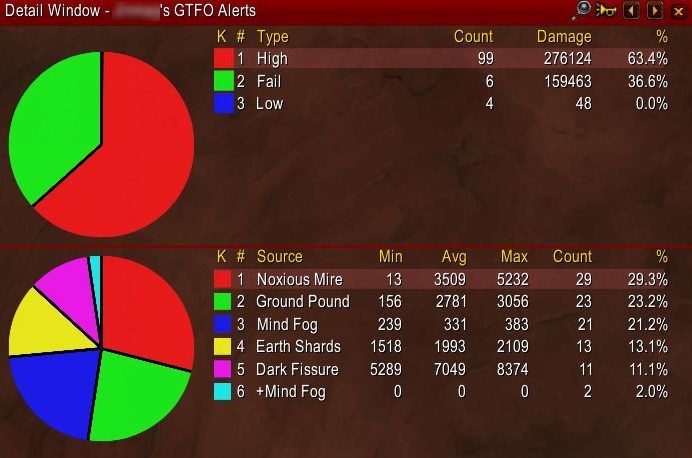
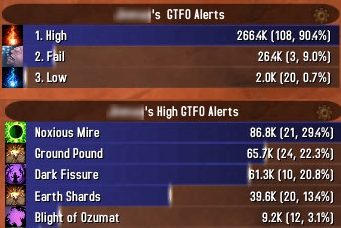
GTFO can be set up with Recount or Skada to provide detailed statistical information of alerts.
A word of caution: the damage amount displayed on GTFO Alerts may not be fully indicative of the total damage done, especially with fail alerts. For example: if you're hit by a tornado, the damage and fail alert from the tornado picking you up could be 5k, but the fall damage when you hit the ground afterwards is 100k. The amount recorded by Recount/Skada will be 5k.
Custom Sound Support
GTFO can be configured to use your own custom sounds for alerts. You can use the file data ID for official WoW sounds or use a file path for custom addon sounds.
Examples:
This will change the high damage alert sound to the mage's clearcasting sound:
/gtfo custom1 569649
This will change the low damage alert sound to DBM's blip sound:
This will set the high damage alert sound back to default:
/gtfo custom1
ABOUT THIS LISTING
This page describes GTFO by Zensunim. The description and screenshots are the author's own, imported from their listing on CurseForge on 14 August 2026: https://www.curseforge.com/wow/addons/gtfo
Mythiq hosts no files for it. The download button goes straight to the release file on edge.forgecdn.net, so you are downloading from the author's own host, not from a copy of ours.
The download count, rating and comments on this page start at zero and count Mythiq only. The source's own figures are not copied here — they measure a different site, and a number that cannot be checked against our own ledger is not worth printing.
Media
gtfo3.jpg
gtfo2.jpg
gtfo4.jpg
gtfo5.jpg
Requirements
Game versions
4.4.2
3.4.5
3.80.1
5.5.4
12.0.7
12.1.0
2.5.6
1.15.9
GAME FLAVOUR
This is a retail (modern World of Warcraft) build. It will not work in the Classic clients, which run a different interface API.
INTERFACE VERSION
Built against game version 4.4.2, 3.4.5, 3.80.1, 5.5.4, 12.0.7, 12.1.0. After a patch, an addon that has not been updated is flagged out of date; most keep working, and the "Load out of date AddOns" checkbox on the character screen lets you try.
DEPENDENCIES
Some addons need a separate library addon (Ace3, LibStub and friends) that is not bundled. If the addon does not appear in the list in game, a missing dependency is the usual reason.
Installation
1. Quit World of Warcraft completely. The game reads the AddOns folder at launch and will overwrite settings for an addon added while it is running.
2. Download the archive with the button on this page and unzip it.
3. Move the folder — the one with the .toc file in it, not the zip's wrapper folder — into:
World of Warcraft\_retail_\Interface\AddOns
4. Start the game. On the character selection screen, click AddOns and check that it is listed and enabled.
IF IT DOES NOT APPEAR
Nine times out of ten the folder is nested one level too deep. Interface/AddOns/Thing/Thing/Thing.toc will not load; Interface/AddOns/Thing/Thing.toc will.
UPDATING
Delete the old folder before unzipping the new one. Unzipping over the top leaves files behind that the new version no longer expects.
This release downloads from edge.forgecdn.net, not from us, so
there is no checksum to compare against. Scan the archive before you unpack it.
Version history
v6.7Latest
11 Aug 2026 · 471 KB via edge.forgecdn.net · 10 downloads Download
Off-site on edge.forgecdn.net —
no checksum, because we never held this file.
Link checked by our review team on 14 Aug 2026.
Tell us if something is wrong — a file that will not work, content taken from
someone else, or anything that looks unsafe. Reports go to our review team, not
to the author.
We use cookies to ensure that we give you the best experience on our website and improve your experience. By continuing to use this site you consent to such use of cookies.