A powerful, comprehensive utilty for displaying graphics and information based on buffs, debuffs, and other triggers.
WeakAuras
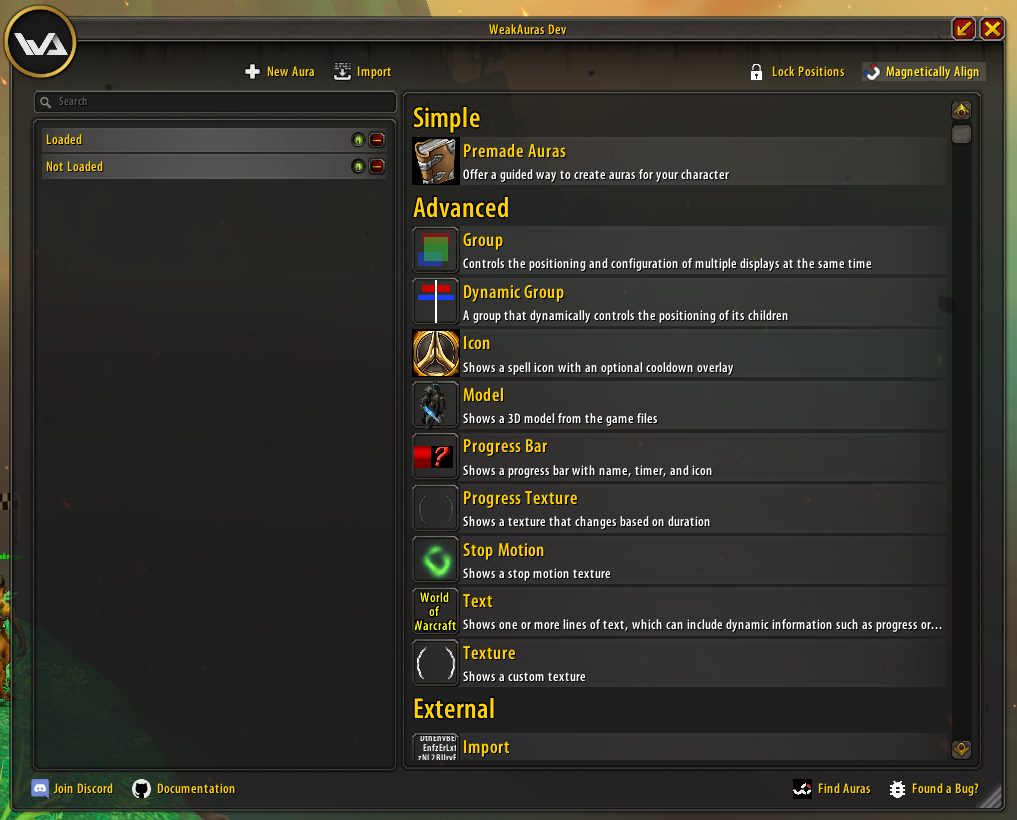
WeakAuras is a powerful and flexible framework that allows the display of highly customizable graphics on World of Warcraft's user interface to indicate buffs, debuffs, and other relevant information. This addon was created to be a lightweight replacement for Power Auras but has since introduced more functionalities while remaining efficient and easy to use.
Features
- An intuitive and powerful configuration interface
- Custom textures including all textures from Power Auras and Blizzard's spell alerts
- Progress bars and textures that show the exact duration of auras
- Displays based on auras, health, power (mana, rage, soul shards, holy power, etc.), cooldowns, combat events, runes, totems, items, and many other triggers
- Preset and user-defined animations
- Custom side-effects such as chat announcements or sounds
- Grouping, which allows multiple displays to be positioned and configured at the same time
- CPU optimizations such as conditional loading/unloading of displays, modularity, and prevention of full aura scanning
- Powerful customization options, such as animation paths, on-show/on-hide code, and custom triggers, for Lua-savvy users
Quick Start
To open the options window, type /wa or /weakauras into your chat and hit enter or use the minimap icon.
Extensions
- WeakAuras Companion: This application adds the missing link between Wago.io and the World of Warcraft addon, enabling you to update your auras in a convenient fashion.
- WeakAuras_StopMotion: This addon adds a new region type to WeakAuras that allows for stop motion animations. Stop Motion textures contain each frame of the animation as a separate image. The addon ships with a number of animations and it supports custom textures.
- SharedMedia for more bar textures.
- SharedMediaAdditionalFonts for more fonts.
- ColorPickerPlus for a better version of the WoW color picker that includes class color templates and a copy and paste function.
Documentation
For in-depth documentation, see the wiki page.
Examples
For some examples of what WeakAuras can do, take a look at wago.io where tons of people upload their creations and even feature complete interfaces utilizing WeakAuras!
Problems
- Please see the wiki page.
- If you've discovered something that's clearly wrong, or if you get an error, please create a ticket.
- You're a programmer yourself and want to contribute? Check out our contributing guidelines to get started!
- Feel free to join our Discord Community to talk, get help and discuss everything WeakAuras!
Support
If you want to help out with development without providing code yourself, you can always donate to the WeakAuras project maintainers using PayPal or become a Patreon:
ABOUT THIS LISTING
This page describes WeakAuras by Stanzilla. The description and screenshots are the author's own, imported from their listing on CurseForge on 14 August 2026: https://www.curseforge.com/wow/addons/weakauras-2
Mythiq hosts no files for it. The download button goes straight to the release file on edge.forgecdn.net, so you are downloading from the author's own host, not from a copy of ours.
The download count, rating and comments on this page start at zero and count Mythiq only. The source's own figures are not copied here — they measure a different site, and a number that cannot be checked against our own ledger is not worth printing.
Media
Templates
Default Window
Display Tab
Avatar.png
Requirements
Game versions
4.4.2
3.4.5
11.2.7
1.15.8
5.5.3
3.80.0
2.5.5
GAME FLAVOUR
This is a retail (modern World of Warcraft) build. It will not work in the Classic clients, which run a different interface API.
INTERFACE VERSION
Built against game version 4.4.2, 3.4.5, 11.2.7, 1.15.8, 5.5.3, 3.80.0. After a patch, an addon that has not been updated is flagged out of date; most keep working, and the "Load out of date AddOns" checkbox on the character screen lets you try.
DEPENDENCIES
Some addons need a separate library addon (Ace3, LibStub and friends) that is not bundled. If the addon does not appear in the list in game, a missing dependency is the usual reason.
Installation
1. Quit World of Warcraft completely. The game reads the AddOns folder at launch and will overwrite settings for an addon added while it is running.
2. Download the archive with the button on this page and unzip it.
3. Move the folder — the one with the .toc file in it, not the zip's wrapper folder — into:
World of Warcraft\_retail_\Interface\AddOns
4. Start the game. On the character selection screen, click AddOns and check that it is listed and enabled.
IF IT DOES NOT APPEAR
Nine times out of ten the folder is nested one level too deep. Interface/AddOns/Thing/Thing/Thing.toc will not load; Interface/AddOns/Thing/Thing.toc will.
UPDATING
Delete the old folder before unzipping the new one. Unzipping over the top leaves files behind that the new version no longer expects.
This release downloads from edge.forgecdn.net, not from us, so
there is no checksum to compare against. Scan the archive before you unpack it.
Version history
v5.21.1Latest
19 Jan 2026 · 10 MB via edge.forgecdn.net · 11 downloads Download
Off-site on edge.forgecdn.net —
no checksum, because we never held this file.
Link checked by our review team on 14 Aug 2026.
Tell us if something is wrong — a file that will not work, content taken from
someone else, or anything that looks unsafe. Reports go to our review team, not
to the author.
We use cookies to ensure that we give you the best experience on our website and improve your experience. By continuing to use this site you consent to such use of cookies.