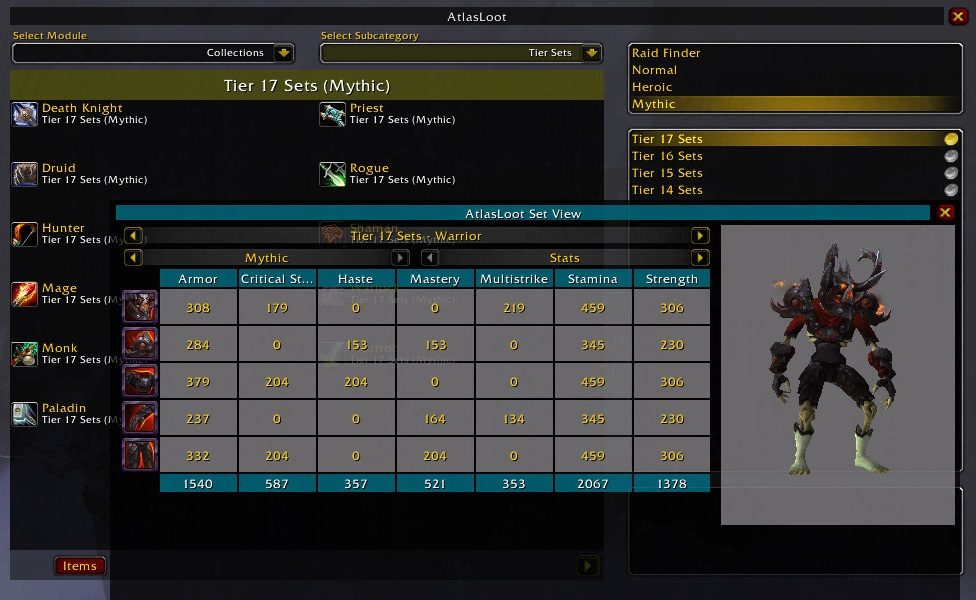
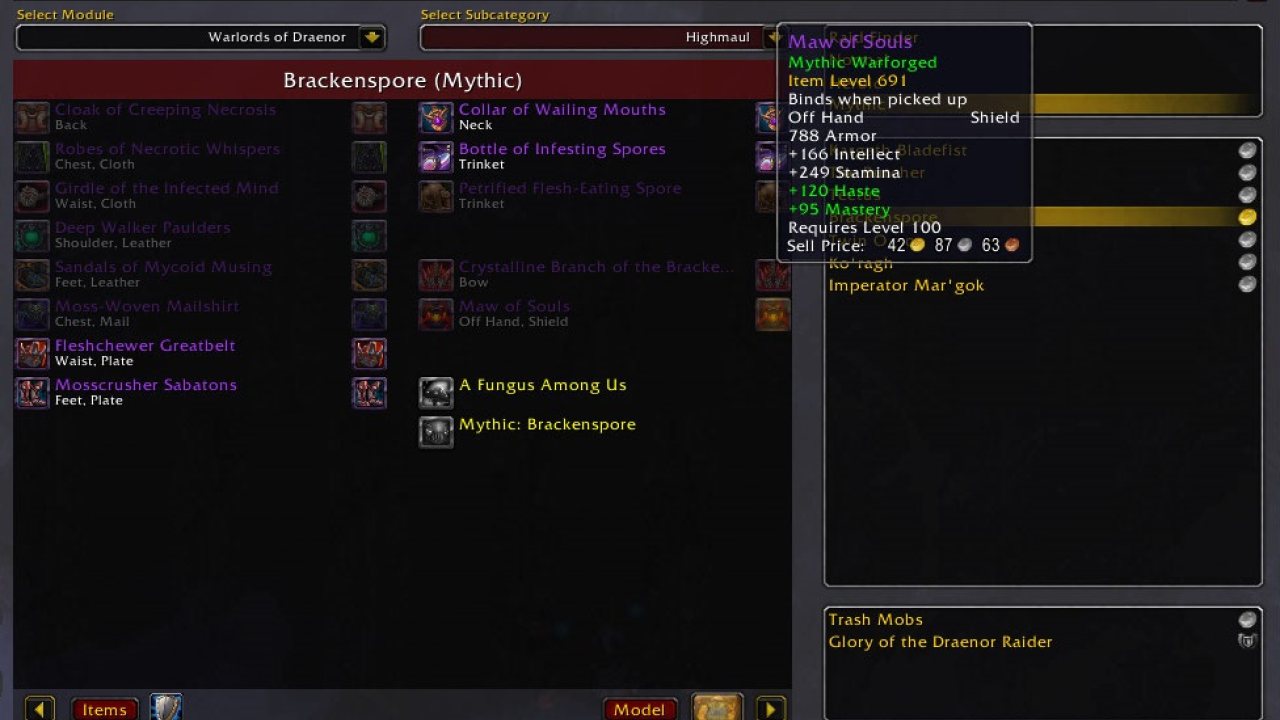
AtlasLoot was originally created by Pernicius as a plugin for Atlas and contained a handful of raid loot tables to browse. Unfortunately, Pernicius was unable to maintain the mod, so Daviesh took over and renamed it to AtlasLoot Enhanced to provide a distinction between the two versions. Since that time, AtlasLoot has grown to cover every loot table for every boss, every item set, PvP Items and items for every reputation faction. In January 2010 Hegarol took over the project from Daviesh. Finally, in 2014/2015 Lag completely rewrote the entire addon for AtlasLoot v8.
What is Atlasloot
AtlasLoot Enhanced is an UI mod allowing for loot tables of bosses to be browsed whenever needed within the game.
It would be great if you can help to report issue here. It's easier to keep track on them.
Optional Addons
- Atlas
Custom Modules
Below is list of custom modules which are developed and maintained by different author teams.
- AtlasLoot_Shadowlands
- AtlasLoot_Dragonflight
Features
- Atlas Integration: You can easily link to Atlas map browser if your current visited instance loot table has a corresponding map provided in Atlas.
- Dressing Room: Control-click items to show them in the Dressing Room.
- Price Preview: See the prices for token items like PvP rewards.
- Filter: Filter loot tables based on your class or set up your filter manually (NYI).
- Instance Loot: All instance loot from every Dungeon (Normal and Heroic) and Raid.
- Faction and PvP rewards
- Collection Items: Armor Sets (Dungeon, Tier and Crafted), Mounts, Companions, Tabards, Legendary items and more.
- Season and World Events: Skettis, Abyssal Council, Ethereum Prison, Feast of Winter Veil, Hallow's End, Brewfest, etc.
To Do
- Add skill / source to crafting
- Wishlist: Alt-click on any item to add it to the wishlist, alt-clicking on an item in the wishlist deletes it. There are buttons added to the Atlas panel and the loot browser to open the wishlist.
- Partial Searching: Allows searching the whole AtlasLoot database for an item where you only know part of the name.
- Quicklooks: Bind up to ten loot tables to 'Quicklook' buttons, allowing you to jump to them with only one click.
Slash Commands
- '/al' or '/atlasloot' by itself brings up the loot browser.
- '/atlasloot options' brings up the options menu.
- '/atlasloot reset' resets the last viewed loot table (fixes disconnects when opening AtlasLoot) and moves all draggable frames back to the middle of the screen.
- '/atlasloot mmb' toggles the minimap button on / off.
- '/atlasloot togglebg' toggles background pictures on / off.
Localization
If you want to help us translate AtlasLoot check:
http://www.wowace.com/addons/atlasloot-enhanced/localization/
Feedback
Comments are always welcome. Please leave your feedback in the project page. Things like you have anything to tell us, whether you get an error message when starting WoW, want a certain feature to be integrated in the mod or just want to thank us.
Current Team
- Authors: Lag, Arith
- Contributors: 2TailedFox, Proteyer, Dynaletik, Valixx, Celellach, TrAsHeR, maqjav, StingerSoft, Asurn, Dan, Diablohu, K2hyun, KKram, Pownas, Sohonmr2, Telic, 560889223 and probably more we have missed.
- Former Authors: Daviesh, Hegarol
ABOUT THIS LISTING
This page describes AtlasLoot Enhanced by Lag123. The description and screenshots are the author's own, imported from their listing on CurseForge on 26 October 2026: https://www.curseforge.com/wow/addons/atlasloot-enhanced
Mythiq.net hosts no files for it. The download button goes straight to the release file on edge.forgecdn.net, so you are downloading from the author's own host, not from a copy of ours.
The download count, rating and comments on this page start at zero and count Mythiq.net only. The source's own figures are not copied here — they measure a different site, and a number that cannot be checked against our own ledger is not worth printing.
Media
SetView.jpg
Requirements
Game version
10.0.2
GAME FLAVOUR
This is a retail (modern World of Warcraft) build. It will not work in the Classic clients, which run a different interface API.
INTERFACE VERSION
Built against game version 10.0.2. After a patch, an addon that has not been updated is flagged out of date; most keep working, and the "Load out of date AddOns" checkbox on the character screen lets you try.
DEPENDENCIES
Some addons need a separate library addon (Ace3, LibStub and friends) that is not bundled. If the addon does not appear in the list in game, a missing dependency is the usual reason.
Installation
1. Quit World of Warcraft completely. The game reads the AddOns folder at launch and will overwrite settings for an addon added while it is running.
2. Download the archive with the button on this page and unzip it.
3. Move the folder — the one with the .toc file in it, not the zip's wrapper folder — into:
World of Warcraft\_retail_\Interface\AddOns
4. Start the game. On the character selection screen, click AddOns and check that it is listed and enabled.
IF IT DOES NOT APPEAR
Nine times out of ten the folder is nested one level too deep. Interface/AddOns/Thing/Thing/Thing.toc will not load; Interface/AddOns/Thing/Thing.toc will.
UPDATING
Delete the old folder before unzipping the new one. Unzipping over the top leaves files behind that the new version no longer expects.
This release downloads from edge.forgecdn.net, not from us, so
there is no checksum to compare against. Scan the archive before you unpack it.
Version history
v8.13.14Latest
27 Dec 2022 · 1.2 MB via edge.forgecdn.net · 0 downloads Download
Off-site on edge.forgecdn.net —
no checksum, because we never held this file.
Link checked by our review team on 26 Oct 2026.
Tell us if something is wrong — a file that will not work, content taken from
someone else, or anything that looks unsafe. Reports go to our review team, not
to the author.
We use cookies to ensure that we give you the best experience on our website and improve your experience. By continuing to use this site you consent to such use of cookies.