Tools and tweaks to make the lives of players seeking Achievements a little bit easier.
NOTICE: Manual installation may be necessary for some users as there are reports of the CurseForge installer failing to install the addon correctly. Hopefully, this problem is resolved soon.
Tools and tweaks to make the lives of players seeking achievements a little bit easier.
Overachiever is highly configurable and has many features, many (but not all) of which are listed below. Most features can be disabled and/or tweaked.
Options can be found using the /oa command or at Interface Options -> AddOns tab -> Overachiever.
A Few Highlights
- New tabs added to the GUI:
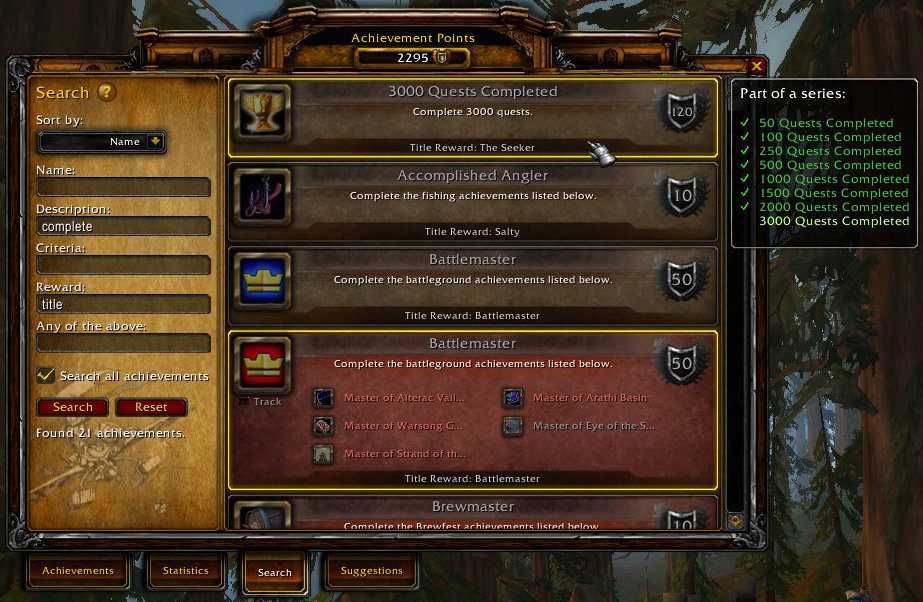
- Search: Search for achievements by name, description, reward, and more. (Quickly search by name using slash commands like "/ach food".)
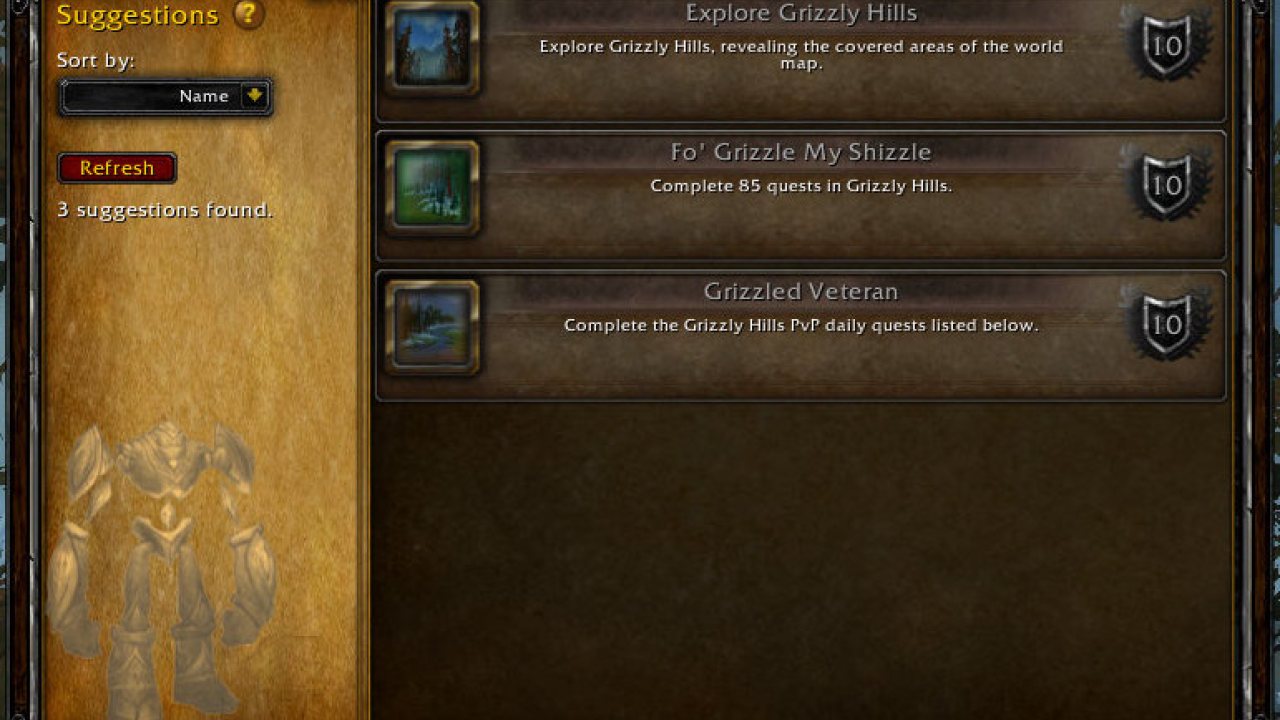
- Suggestions: Get suggested achievements based on your current location, active holiday events, etc.
- Watch: Create custom watch lists of achievements.
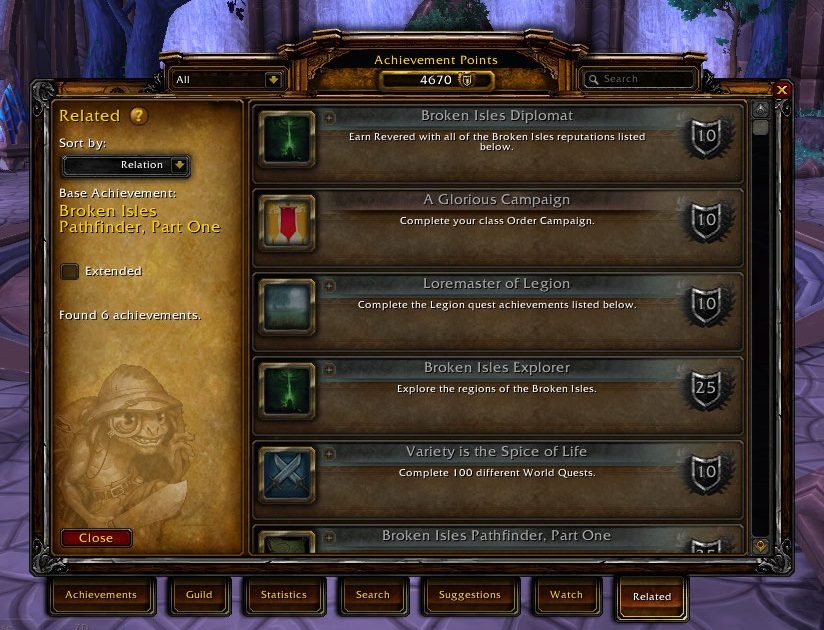
- Related: See how achievements relate to each other.
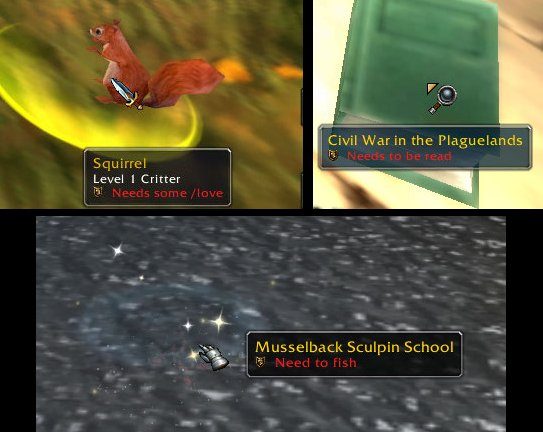
- Tooltip and audio reminders for objectives you find in the world (and in your bags).
- Automatically track exploration achievements and suggested achievements you chose as you travel.
- Automatically track timed achievements when the timer starts.
Achievement Tooltip Enhancements
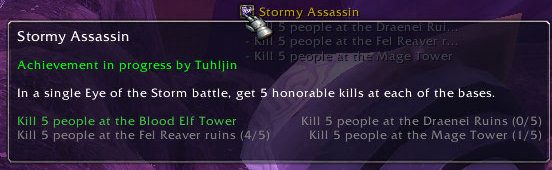
- Add information from progress bars and normally-hidden progress information. (For example, "Progress: 5/10" or "Assault 2 bases (0/2).")
- Compare progress using chat links: Display your progress below that of the player who linked the achievement.
- Optionally add the achievement's ID to its tooltip. (Convenient for addon authors.)
- Ctrl+click on an achievement link to open the GUI to that achievement. Ctrl+click again to track it.
GUI Enhancements
- Draggable Frames: The achievement frame is draggable.
- New tabs added to the default achievement frame, as highlighted above.
- Cooking Trade Skill UI:
- Display icons next to recipes you need to cook for "The Northrend Gourmet", "The Legion Menu", and similar achievements. Ctrl+click on one of these recipes to open the UI to the achievement that requires it.
- Works with the default UI and the addon Skillet.
- Display a tooltip when the cursor is over certain achievements in the GUI:
- ''Part of a series'': Give the names of other achievements in the series and its relation to them.
- ''Required by'': Give the names of any meta-achievements that list this achievement as a criteria.
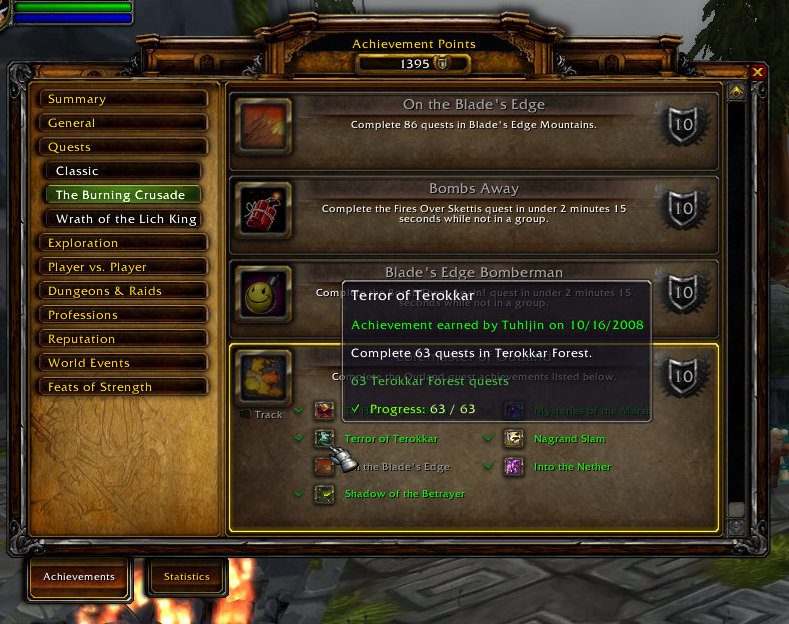
- Meta-criteria (achievements displayed as the criteria for obtaining a larger achievement) in the GUI use a detailed achievement tooltip instead of simply giving the date the criteria was completed (or nothing if it isn't complete).
Tooltip and Audio Reminders
- Add information to units', items', and/or world objects' tooltips to help you complete...
- "To All The Squirrels I've Loved Before", "To All The Squirrels Who Shared My Life": Do I need to /love this critter?
- "Pest Control": Have I exterminated this critter?
- "Well Read", "Higher Learning": Have I read this book?
- "The Scavenger," "Outland Angler," "Northrend Angler": Have I fished this type of node?
- "It's Happy Hour Somewhere", "Tastes Like Chicken": Have I consumed this food or drink?
- "Northern Exposure", "Medium Rare", and many others: Do I need to kill this creature? (Includes many dungeon and raid-based achievements.)
- Holiday Achievements:
- "Let It Snow": Do I need to use a Handful of Snowflakes on this player?
- "Fistful of Love": Do I need to use a Handful of Rose Petals on this player?
- "Shake Your Bunny-Maker": Do I need to use Spring Flowers on this player?
- Sound Reminder: Choose a sound to play when one of the above tooltip reminders shows up if you need to do something.
Key Bindings
You can associate key bindings with each of the new tabs added to the Achievement frame using the standard key binding interface. The new bindings are located under the heading "Overachiever."
Localization
Localized to one degree or another for English, Spanish, German, French, Italian, Korean, Portuguese, Russian, simplified Chinese, and traditional Chinese. Translations generously provided by your fellow overachievers using the CurseForge localization system.
Disabling Modules
Some of Overachiever's features are implemented using modules, namely Overachiever_Tabs and Overachiever_Trade. Modules have their own folders that should be placed inside the Interface\AddOns folder alongside Overachiever. They can be enabled or disabled as you would a separate addon. Additionally, the individual tabs of the Tabs module (Search, Suggestions, Watch, Related) can be disabled by deleting or renaming the corresponding .lua files (Search.lua, Suggestions.lua, etc.).
Donations
This is a one-man project that can be quite time-consuming, depending on Blizzard's whims. All donations of any size are appreciated.
If you see a "Donate" link above, please use it. If not, you may try this link.
Thanks for your support!
- Tuhljin
About the lengthy project name: "Overachiever" was not showing up on curse.com addon searches for "achievement"; the name change fixes that.
ABOUT THIS LISTING
This page describes Overachiever by Tuhljin. The description and screenshots are the author's own, imported from their listing on CurseForge on 26 October 2026: https://www.curseforge.com/wow/addons/overachiever
Mythiq.net hosts no files for it. The download button goes straight to the release file on edge.forgecdn.net, so you are downloading from the author's own host, not from a copy of ours.
The download count, rating and comments on this page start at zero and count Mythiq.net only. The source's own figures are not copied here — they measure a different site, and a number that cannot be checked against our own ledger is not worth printing.
Media
Search Achievements
Reminder Tooltips
Multi-criteria Progress
Meta Tooltip
Related Achievements List
Requirements
Game version
9.1.0
GAME FLAVOUR
This is a retail (modern World of Warcraft) build. It will not work in the Classic clients, which run a different interface API.
INTERFACE VERSION
Built against game version 9.1.0. After a patch, an addon that has not been updated is flagged out of date; most keep working, and the "Load out of date AddOns" checkbox on the character screen lets you try.
DEPENDENCIES
Some addons need a separate library addon (Ace3, LibStub and friends) that is not bundled. If the addon does not appear in the list in game, a missing dependency is the usual reason.
Installation
1. Quit World of Warcraft completely. The game reads the AddOns folder at launch and will overwrite settings for an addon added while it is running.
2. Download the archive with the button on this page and unzip it.
3. Move the folder — the one with the .toc file in it, not the zip's wrapper folder — into:
World of Warcraft\_retail_\Interface\AddOns
4. Start the game. On the character selection screen, click AddOns and check that it is listed and enabled.
IF IT DOES NOT APPEAR
Nine times out of ten the folder is nested one level too deep. Interface/AddOns/Thing/Thing/Thing.toc will not load; Interface/AddOns/Thing/Thing.toc will.
UPDATING
Delete the old folder before unzipping the new one. Unzipping over the top leaves files behind that the new version no longer expects.
This release downloads from edge.forgecdn.net, not from us, so
there is no checksum to compare against. Scan the archive before you unpack it.
Tell us if something is wrong — a file that will not work, content taken from
someone else, or anything that looks unsafe. Reports go to our review team, not
to the author.
We use cookies to ensure that we give you the best experience on our website and improve your experience. By continuing to use this site you consent to such use of cookies.