Code's Combat Alerts provides notifications and alerts for a selection of mechanics in dungeons, trials, and arenas.
Code's Combat Alerts provides notifications and alerts for a selection of mechanics in dungeons, trials, and arenas.
External Dependencies
Required:
- None
Recommended/Optional:
- LibAddonMenu-2.0
What new in version 2?
Version 2 of Code's Combat Alerts is essentially a rewrite and overhaul of the addon, but one that should be mostly transparent to the user.
This overhaul will make CCA2 easier to maintain and update, easier for other addons to extend, and it opens the way for new features in the future. Robust support for the latest trial, Lucent Citadel, was made possible by the foundational improvements in CCA2.
The CCA2 overhaul is an ongoing process, in which some content is still supported under the legacy framework and some under the new framework. Over time, more of the addon will be migrated to the new framework. This will be a long-term undertaking.
Configuration
Perhaps the most noticeable change in CCA2 is the long-requested addition of an addon settings panel; the old chat commands will eventually all be replaced.
Repositioning UI elements
CCA2 offers more customization options, including the ability to reposition more UI elements (the repositioning of banner and timer alerts will be added in a future version, pending the overhaul of those subsystems).
The process of repositioning UI elements has also been improved to allow users to control how elements are anchored.
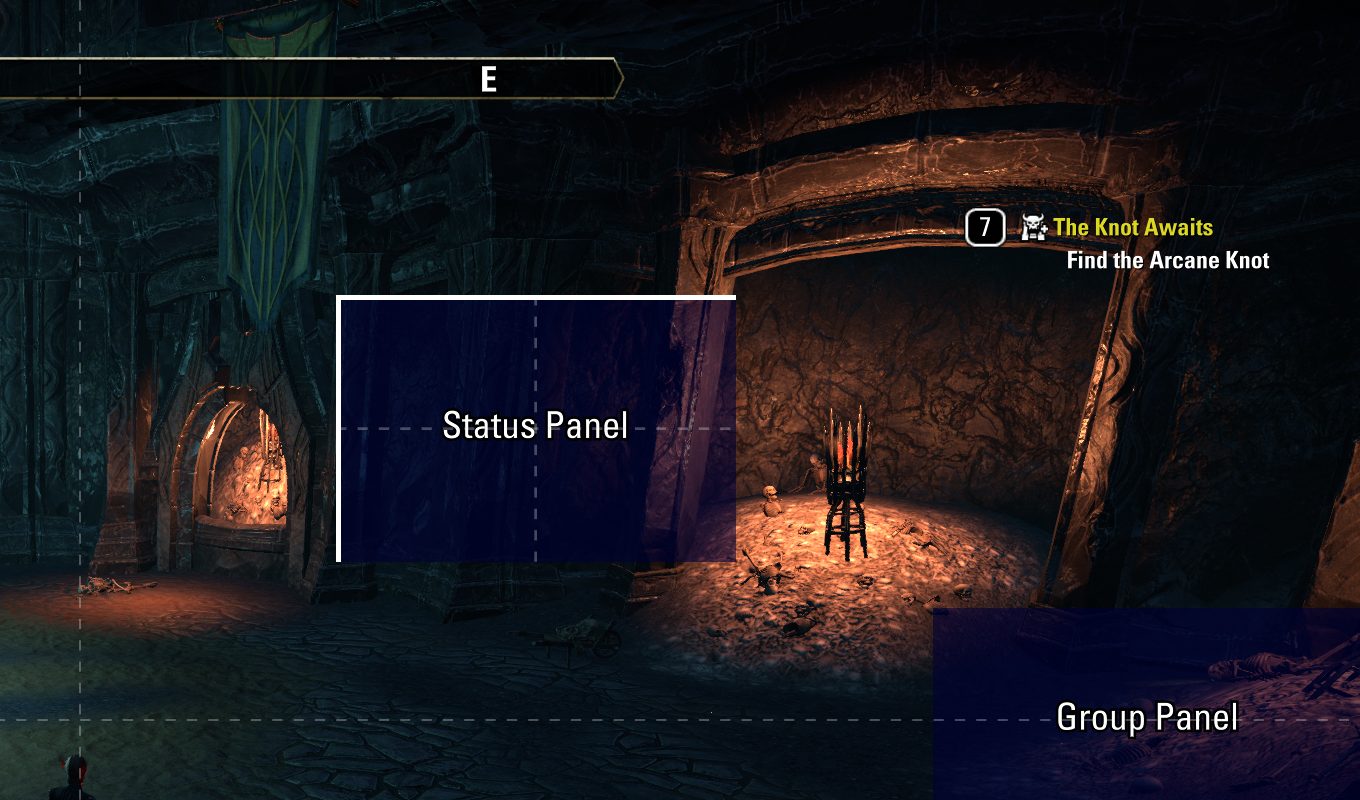
For example, when moving the Status Panel element around, you will probably see something like this:
Anchor Lines: What are these thick white lines?
In the image above, you'll see that the top and left edges have thick white lines. These represent how the UI element will be anchored to your screen.
In this case, it means that the top-left of the UI element is anchored to your selected position, and if the UI element needs to grow in size, that growth will be towards the bottom and right.
Can these anchor lines be changed?
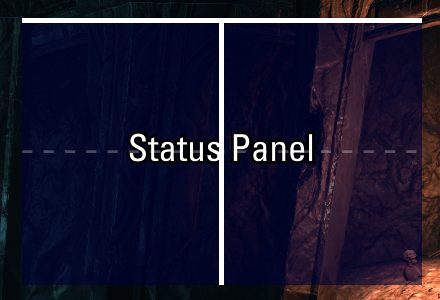
Yes! Here's an example of the anchor lines being along the top and through the middle. This means if the UI element grows in height, it will expand downwards, but if it grows in width, it will expand to both the left and right, keeping the center anchored to the spot that you chose.
Each direction will have one of three anchors: top, middle, and bottom for vertical anchoring, and left, center, and right for horizontal anchoring.
How do I change how a UI element is anchored?
While dragging the UI element around with your mouse, just briefly touching the edge of the screen will cause that edge of the UI element to be set as the new anchor for that direction. You don't have to keep the UI element along the edge of the screen or even on that side of the screen: the gesture of touching the edge is just the way to change the anchor and it will remain that way until you change it again by touching a different edge.
Similarly, if you line up the middle of the UI element with the middle of the screen and hover in that position for one second, it will anchor along the middle. Again, you don't have to actually keep your UI element anywhere near the middle, once you've changed the anchor.
ABOUT THIS LISTING
This page describes Code's Combat Alerts by code65536. The description and screenshots are the author's own, imported from their listing on ESOUI on 31 August 2026: https://www.esoui.com/downloads/info1855-CodesCombatAlerts.html
Mythiq.net hosts no files for it. The download button goes straight to the release file on cdn.esoui.com, so you are downloading from the author's own host, not from a copy of ours.
The download count, rating and comments on this page start at zero and count Mythiq.net only. The source's own figures are not copied here — they measure a different site, and a number that cannot be checked against our own ledger is not worth printing.
Media
Requirements
Game versions
12.1.0
12.0.0
11.3.0
11.2.0
11.1.0
11.0.0
API VERSION
Built for ESO API version 12.1.0, 12.0.0, 11.3.0, 11.2.0, 11.1.0. After a patch the game marks add-ons built for the previous API as out of date; the "Allow out of date add-ons" checkbox in the add-on menu loads them anyway, and most work.
LIBRARIES
Many ESO add-ons depend on a shared library — LibAddonMenu-2.0 above all — which is installed separately, exactly like an add-on. A dependency that is missing shows as the add-on simply not appearing in the list.
CONSOLE
Add-ons are PC and Mac only. There is no way to load them on console.
Installation
1. Download the archive with the button on this page and unzip it.
2. Move the unzipped folder into your add-ons directory:
Windows — Documents\Elder Scrolls Online\live\AddOns
3. Start the game, and at the character select screen click Add-Ons.
4. Tick the add-on. If it is greyed out and marked out of date, tick "Allow out of date add-ons" at the top of the same panel.
5. Log in. Most add-ons need a /reloadui after they are first enabled.
UPDATING
Delete the old folder first. ESO loads everything it finds, and two copies of one add-on is the usual cause of "an add-on has produced an error" on login.
This release downloads from cdn.esoui.com, not from us, so
there is no checksum to compare against. Scan the archive before you unpack it.
Version history
v2.6.1Latest
27 Aug 2026 · 450 KB via cdn.esoui.com · 9 downloads Download
- Version 2.6.1 (2026/08/26)
- Fixed an issue with the option to disable the group panel in Ossein Cage
- Version 2.6.0 (2026/08/25)
- Migrated Moon Hunter Keep and March of Sacrifices to the CCA2 framework and added support for their solo versions
- Improved reliability of the Cutthroat's Focus protection
- Fixed a recent bug with the distance-to-center measurements during the Falgravn encounter in Kyne's Aegis
- Added an option to disable the marker for Drakeeh's spawn position in Blackrose Prison
- Removed the banner alert for players not targeted by Cinder Cleave in Rockgrove (the dodge timer will remain); the targeted player will still see the banner, the text and sound of which have been revised for better clarity
- Improved the Cinder Shot alert in Dreadsail Reef
- Added chat notification for the Unsinged Boots achievement in Lep Seclusa
- Added an option to disable the Caustic Carrion and Biting Blaze panel in Ossein Cage
- Added chat and screen border alerts for Reflective Scales in Ossein Cage, enabled by default for non-tanks; this can be configured in the settings panel
- Version 2.5.2 (2026/08/17)
- Added optional protection against the accidental use of Cutthroat's Focus for the following scenarios:
- Obliterate in Coral Aerie
- Smite in Lucent Citadel
- Spark Smash, Blazing Smash, Spark Surge Bolt, and Forge Fire Bolt in Ossein Cage
- Version 2.5.1 (2026/08/10)
- Fixed a bug introduced in 2.5.0 that caused modules to fail to load after having been unloaded earlier
- Version 2.5.0 (2026/08/09)
- Migrated Bal Sunnar and Scrivener's Hall to the CCA2 framework
- Migrated Dreadsail Reef to the CCA2 framework
- Significant portions of the Dreadsail Reef code have been rewritten
- Various DSR-related settings that used to be accessed via slash commands have been reset and are now found in the new settings panel for DSR
- Version 2.4.13 (2026/07/13)
- Migrated Blackrose Prison to the CCA2 framework
- Version 2.4.12 (2026/06/09)
- Improved compatibility for Xbox on PC
- Version 2.4.11 (2026/06/08)
- Update for LibCombatAlerts
- Version 2.4.10 (2026/03/09)
- Fixed a Lua error that can sometimes occur due to a missing default setting
- Version 2.4.9 (2026/03/09)
- Added timer alert for Fiery Detonation in Rockgrove
- This feature is enabled by default for non-healers and can be configured in the settings panel
- Updated the legacy status panel's positioning logic; this allows the legacy panel to be repositioned on consoles, and it means that the legacy panel will now share the same positioning as the modern status panel instead of using its own separate position
- Version 2.4.8 (2026/02/24)
- Added aura alerts for Soul Storm and Vile Maw in Naj-Caldeesh
- Fixed an issue with the status panel in Kyne's Aegis if Falgravn's Chain Lightning mechanic is ignored
- Reverted the change that made the LibAddonMenu-2.0 dependency non-optional
- Version 2.4.7 (2025/11/04)
- The atronach summon alerts during the twins encounter in Dreadsail Reef will now be visible only by players with a taunt slotted
- Version 2.4.6 (2025/10/28)
- The Caustic Carrion panel in Ossein Cage will now dynamically swap between tracking Caustic Carrion and Biting Blaze during the Kazpian encounter
- Version 2.4.5 (2025/10/14)
- A chat message will now be displayed if Possession is attempted during the Poxito encounter in Veteran Naj-Caldeesh if the player has not yet completed the Total Self-Control achievement
- Version 2.4.4 (2025/09/28)
- Changed the appearance of the rotating ground arrow for Creeping Eye in Rockgrove, in an effort to make it less visually distracting while also making the direction of movement more obvious; thanks Kyzeragon for the new design concept
- Version 2.4.3 (2025/09/20)
- Added the option to label the Volatile Shells in Rockgrove using directions instead of arbitrary letters
- Added workaround for screen border issues caused by an Update 47 HDR bug
- Version 2.4.2 (2025/09/11)
Off-site on cdn.esoui.com —
no checksum, because we never held this file.
Link checked by our review team on 31 Aug 2026.
Tell us if something is wrong — a file that will not work, content taken from
someone else, or anything that looks unsafe. Reports go to our review team, not
to the author.
We use cookies to ensure that we give you the best experience on our website and improve your experience. By continuing to use this site you consent to such use of cookies.