NEW: Overhauled prominent aura system: Add any aura to any frame!
SRENDARR: Advanced Aura Tracking
(Click your flag to translate the page. Addon includes in-game support for all listed languages.)
REQUIRED LIBRARIES: LibAddonMenu LibMediaProvider
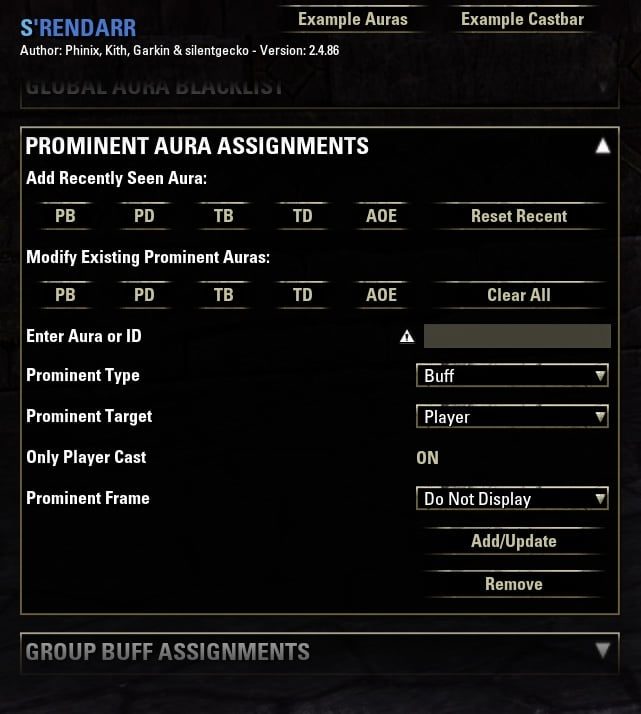
How to add a Prominent Aura:
Latest changes:
NEW: Overhauled prominent aura system: Add any aura to any frame!
NEW: Can now set player buff/debuff, target buff/debuff, and AOE to custom frames by aura or ID!
NEW: Added the ability to set individual ID's for configured prominent auras to separate frames!
Srendarr replaces the game's limited built-in buff and debuff tracking and gives you the ability to customize the display of these effects on yourself as well as others (even group members). It supports all the standard abilities that appear under the Character window or the built-in tracker, as well as many effects like enchants and gear procs, cooldowns and other things that normally only show via graphical effects on your character (or not at all).
It can also do other things, like keep track of stacks from various abilities like Hawkeye and Merciless Resolve, or from gear like Thrassian Stranglers or Relequin. It also supports display of gear proc cooldowns, and has accurate mechanics for things like collecting the pools from Essence Thief dismissing the proc AOE display, etc.
The aura tracking is designed to visually mesh with the standard UI theme but includes many improvements and options to change the appearance and location of different types of effects.
(older description) ...and even more options to categorize and filter how the auras appear including multiple movable display windows, groupings for auras of a similar nature, a blacklist for unwanted auras, and now whitelist options for only showing auras you choose on a given frame.
As of version 2.0.0 (and above), S'rendarr uses the API changes made in late 2015 to allow for 'perfect' knowledge about aura details sent directly from the game API. All auras on the player and their target are now displayed and accurate, as is the castbar for the few abilities in game that have a cast time. The downside to this change is the occasional display of 'junk' auras you may not care about. These can be added to the included blacklist (enable debug option to show IDs) or, if you believe the aura should never be displayed, please report its name and when it appeared and it can be included in a 'never show' list built into the mod itself.
Track buffs and debuffs on group members!
Options allow either showing only those group buffs/debuffs you care about and specifically whitelist, or to show all group buffs/debuffs except those you blacklist.
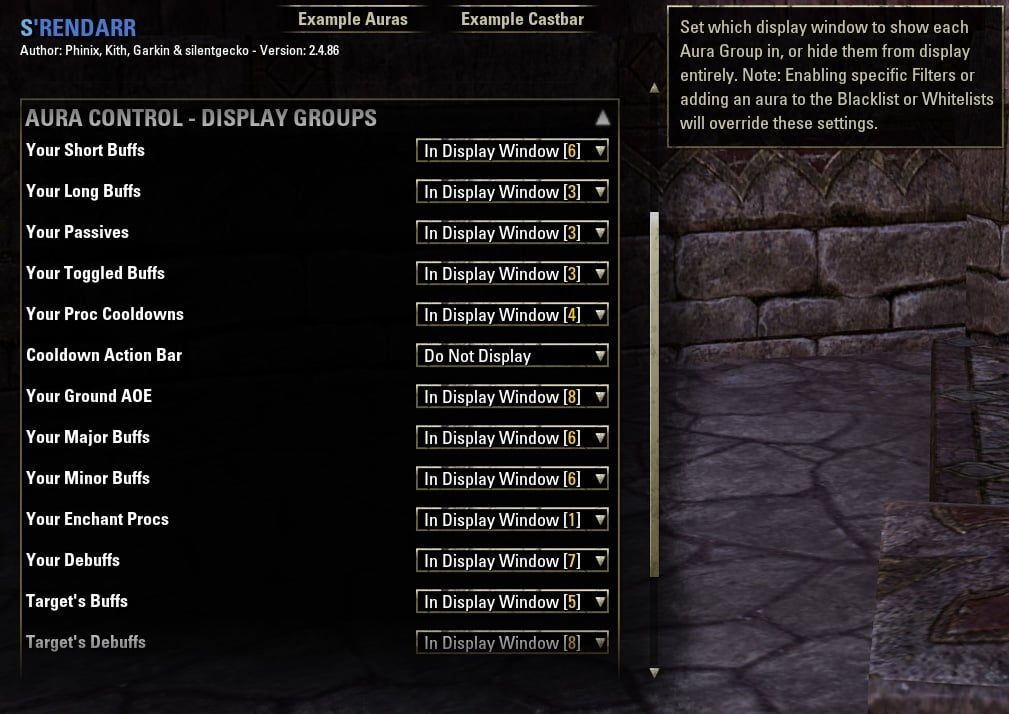
Separate different effect types into individual frames with their own controls.
Filter options allow sending Short Buffs, Long Buffs, Passives, Toggled Buffs, Proc Cooldowns, Ground AOE, Major/Minor Buffs/Debuffs, Enchant Procs, Debuffs,
Target Debuffs, and Target Buffs to their own separate frames, or have multiple types go to the same frames.
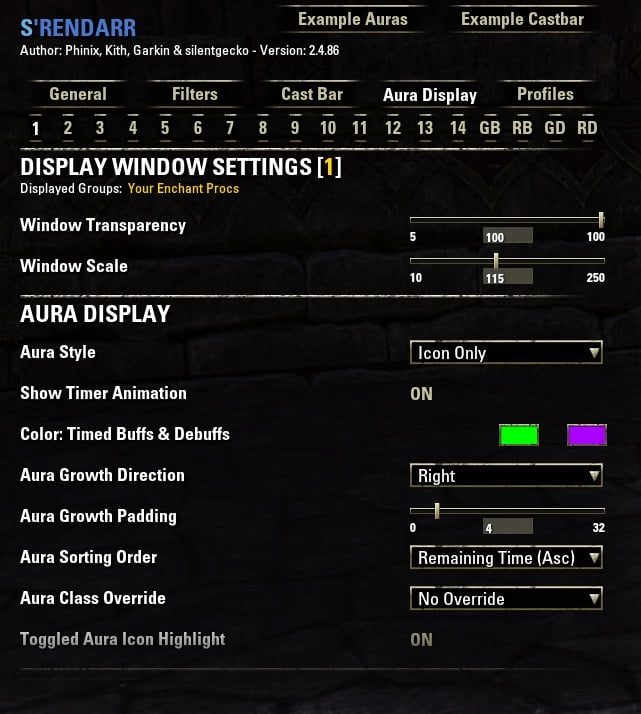
Full customization with individual frame appearance controls from Addon Settings.
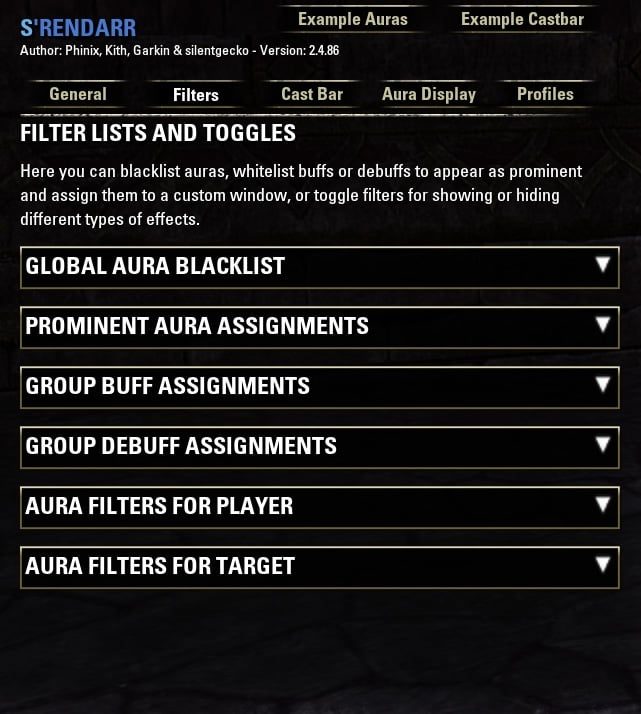
Assign important effects to specific frames by name or ability ID, separately for player and target.
Option to only show player-cast debuffs on targets, and many other filters.
Full debug options for showing all combat ability IDs in chat and for showing ability ID over active effects.
v2.4.52 includes major performance improvements!
NEW: Now supports Cooldown Tracking for procs (gear & monster sets) with internal cooldowns!
NEW: Now supports Stack Tracking for abilities and procs with stacks!
NEW: Now supports Release Triggers for abilities and procs with mechanics that cancel timers early (like collecting Essence Thief pools)!
NEW GROUP BUFF & DEBUFF TRACKING FEATURE: New in 2.4.19 is the option to show buffs AND debuffs with a duration (configured and shown separately) for everyone in your group or raid on their unit frames. You can either whitelist specific auras to track, or show all buffs/debuffs with a duration that you don't specifically block. Full customization and positioning options, see below video for details.
Group buff & debuff tracking currently supports vanilla, Foundry Tactical Combat, Lui Extended, Bandits User Interface, and AUI group & raid frames.
Slash Commands:
/srendarr unlock -- unlock the aura display for movement
/srendarr lock -- relock the display
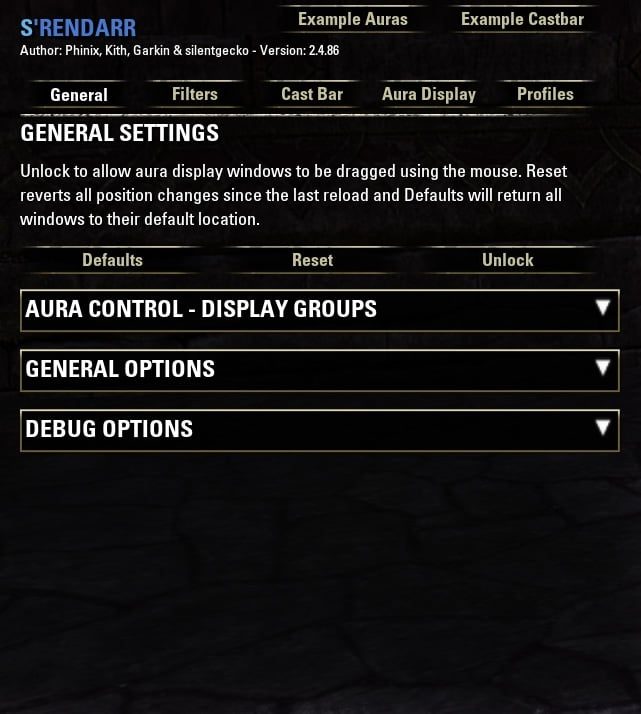
Additional options can be found in the Settings menu under Addon Settings, S'rendarr.
Debug Options:
Some new debug options have been added under Addon Settings, Srendarr to help track down missing/incorrect auras:
- Enable Display Of Aura's AbilityID - Set whether to display the internal abilityID of all auras. This can be used to find the exact ID of auras you may want to Blacklist from display or add to the Aura Whitelist display group. This option can also be used to assist in fixing inaccurate aura display by reporting the errant ID's to the addon author."
- 'Show All Combat Events' - Shows the ID, name, source, and target of every named effect that occurs in combat (both on your character and caused by them),
including gear set procs and enchant procs which add a buff effect (but which don't necessarily show on your character sheet for Srendarr to pick up automatically).
- 'Disable Flood Control' - By default, events will only show once until a reload (to prevent chat spam), however you can type /sdbclear at any time to reset the debug memory.
Enabling this option however will turn off the flood filter entirely, allowing events to show multiple times.
- 'Allow Manual Debug Edit' - The option lets you type /sdbadd XXXXXX or /sdbremove XXXXXX (where XXXXXX is the number of an ID you wish to hide/show)
to add/remove ID's from the flood filter. You can turn the above on to show everything and then manually blacklist just the specific events you aren't interested in,
letting others show multiple times.
- 'Show Verbose Debug' Shows the entire data block returned for EVENT_COMBAT_EVENT, formatted in a human-readable way.
- 'Show Nameless Events' When enabled, Show All Combat Events will also show events with no name as well.
- Only Player Events - Only show debug combat events that are the result of player actions.
/sdbclear -- Clears the current flood filter.
/sdbadd -- Adds a single ID to the flood filter so it is no longer shown (must enable manual debug option).
/sdbremove -- Remove a single ID from the flood filter.
/sdbignore -- Add a single ID to the ignore list for the flood filter (always shows).
Future Plans:
- Migrate saved variables to new character ID format (preserves settings when renaming). Done.
- Implement new API-supported event filters for EVENT_COMBAT_EVENT to significantly improve performance. Done.
- Fix any changes/issues with gear set proc tracking and add new sets as needed. (Current as of 10-1-2021).
- Continually monitor whether unique event data needed for target nameplate anchoring becomes available in API.
- Continued updates of Major/Minor buff/debuff sources & code/bug fixes. (Current as of 11-28-2021).
- Investigate possible new features.
(update option info)
Check out this helpful configuration tutorial from Yolo Wizard!
I wanted to share my gratitude and appreciation for the excellent players who came together to help me through vMoL. Raiding and PVP haven't really been an option for me since my brain cavernoma, but these kind folks helped me through it and what's more, it was a blast hanging out and chatting with them! Thanks @nekotakoyaki, @anotherTimeWizard, @Sneebly, @Dr'Strange, @YuYJ, @Rossdresser, @HalfEatenCornea, @MrPickel, @FKNSTEVO, @iTz_RickDawg, and @stileanima for the help and humor and good times, and the awesome Dro-m'Athra skin of course!
Click here to view my other addons.
ABOUT THIS LISTING
This page describes Srendarr - Aura, Buff & Debuff Tracker by Phinix. The description and screenshots are the author's own, imported from their listing on ESOUI on 14 August 2026: https://www.esoui.com/downloads/info655-Srendarr-AuraBuffDebuffTracker.html
Mythiq hosts no files for it. The download button goes straight to the release file on cdn.esoui.com, so you are downloading from the author's own host, not from a copy of ours.
The download count, rating and comments on this page start at zero and count Mythiq only. The source's own figures are not copied here — they measure a different site, and a number that cannot be checked against our own ledger is not worth printing.
Media
Requirements
Game version
12.0.0
API VERSION
Built for ESO API version 12.0.0. After a patch the game marks add-ons built for the previous API as out of date; the "Allow out of date add-ons" checkbox in the add-on menu loads them anyway, and most work.
LIBRARIES
Many ESO add-ons depend on a shared library — LibAddonMenu-2.0 above all — which is installed separately, exactly like an add-on. A dependency that is missing shows as the add-on simply not appearing in the list.
CONSOLE
Add-ons are PC and Mac only. There is no way to load them on console.
Installation
1. Download the archive with the button on this page and unzip it.
2. Move the unzipped folder into your add-ons directory:
Windows — Documents\Elder Scrolls Online\live\AddOns
3. Start the game, and at the character select screen click Add-Ons.
4. Tick the add-on. If it is greyed out and marked out of date, tick "Allow out of date add-ons" at the top of the same panel.
5. Log in. Most add-ons need a /reloadui after they are first enabled.
UPDATING
Delete the old folder first. ESO loads everything it finds, and two copies of one add-on is the usual cause of "an add-on has produced an error" on login.
This release downloads from cdn.esoui.com, not from us, so
there is no checksum to compare against. Scan the archive before you unpack it.
- Fixed FormatTime nil error when an aura display group is set to Do Not Display while long-duration timers are still updating.
- Fixed Example Auras being cleared when unlocking or locking display frames for move.
- Changed default growth direction for Display Window 6 to UP so short/major/minor buffs no longer flow off-screen.
v2.5.48 ~DakJaniels (16-July-2026)
- Add support for Alternate Group Frames.
v2.5.47 ~DakJaniels (7-July-2026)
- Updated for API support to include 101051.
- Raised minimum library versions: LibMediaProvider and LibAddonMenu-2.0.
- Fixed LuiExtended integration for group and raid aura frame anchoring.
- Fixed LuiExtended raid aura anchoring when using custom raid unit frames.
- Fixed right-click cancel on player auras to respect clickable-off effects only.
- Fixed settings "Show Example Auras" preview being cleared by equipment changes and combat opacity during preview.
- Fixed prominent Major/Minor aura timers not updating when refreshed by another player’s cast.
- Fixed gear cooldown tracker prominent assignment for set procs.
- Fixed Healing Seed duration tracking for the base ability.
- Updated database of Major/Minor effects.
- Fixed recent aura list refresh and ID header display in aura assignment settings.
- Fixed combat event debug logging to resolve ability names from ability ID when the game sends an empty name.
v2.5.46 ~Mandemikc (7 July 2026)
- Updated API for Update 50.
- Fixed error caused by action slot ability data returning nil under some conditions.
- Fixed action slot proc handling to use the correct slot data lookup.
- Fixed possible nil errors when checking LUI Extended settings.
- Fixed possible nil errors when checking Foundry Tactical Combat settings.
- Updated addon metadata and version references.
- Updated author information.
v2.5.45 ~Phinix (3-26-2025)
- Fixed Arcanist channeled abilities not canceling cast bar on blocking.
- Fixed Scribing cast time abilities not canceling cast bar on blocking.
- Fixed Grace of Gloom set not using correct 20s cooldown.
- Updated for Fallen Banners.
- Updated database of Major/Minor effects.
- Added cooldown tracking support for the following sets:
- Fixed typo causing cooldowns not to track properly when grouped.
- Fixed Srendarr mover frames disappearing if that frame had its combat/non-combat opacity setting at 0 and the player tried moving frames when in that combat state.
v2.5.43 ~Phinix (12-12-2024)
- Added support for Slivers of the Null Arca and Pillager's Profit by request (see note).
- Fixed some limitations when adding auras by ID to group buff/debuff filters.
- Fixed a bug that could cause player cooldown tracker auras to appear "stuck" as passives on group frames.
NOTE: Pillager's Profit cooldown tracker is unique. The player Cooldown Tracker will trigger the 45sec timer any time someone in your group benefits from the effect due to an ultimate cast by YOU while wearing the set. This gives a general idea when the last time someone received the effect would be. HOWEVER, the Group Debuff aura filter, when enabled and properly configured, will show the actual 45sec debuff cooldown next to all group members who have received this effect from ANY source, accounting for multiple people in the group wearing this set. This allows much more detailed knowledge at a glance of who will not benefit from this set when casting your ultimate.
Off-site on cdn.esoui.com —
no checksum, because we never held this file.
Link checked by our review team on 14 Aug 2026.
Tell us if something is wrong — a file that will not work, content taken from
someone else, or anything that looks unsafe. Reports go to our review team, not
to the author.
We use cookies to ensure that we give you the best experience on our website and improve your experience. By continuing to use this site you consent to such use of cookies.