Former Add-on / UI Design: Wykkyd Gaming, aka Wykkyd (up to v2.3.3.1), Joviex (tweak patch)
History and Credits:
Former Add-on / UI Design: Wykkyd Gaming, aka Wykkyd (up to v2.3.3.1), Joviex (tweak patch)
Current Add-on / Codebase: Exodus Code Group, aka Ravalox and Balkoth
First author: Ravalox Darkshire
Second author: Calia1120
Inactive maintenance team: Calia1120, Demiknight, Lakashi
Temporary maintenance staff: Calamath
The add-on name changed as of version 3.8.3. Please refer to the change log.
Dependencies:
As of version 3.8.2 you will need to download and install the following libraries to use this addon:
LibAddonMenu V2.0r43 or later
LubCustomMenu V7.3.0 or later
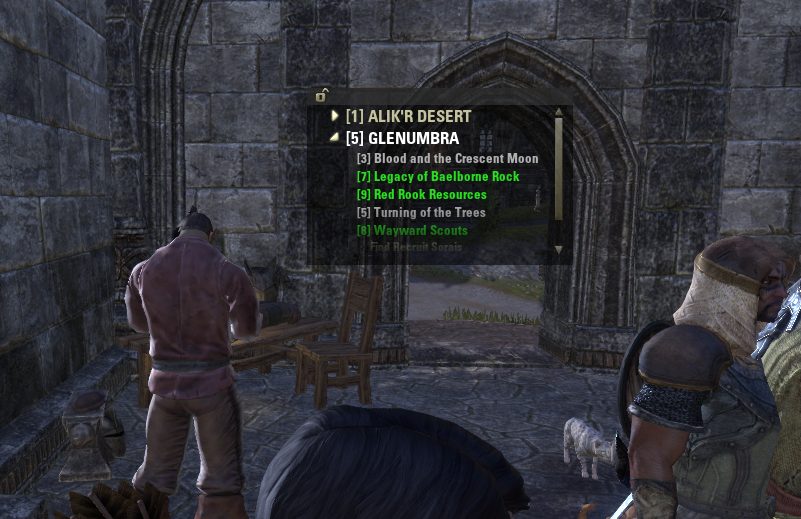
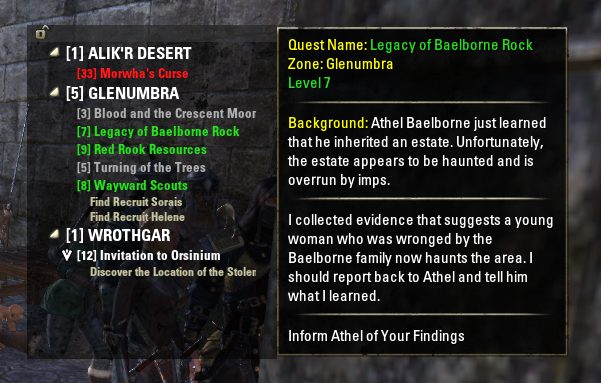
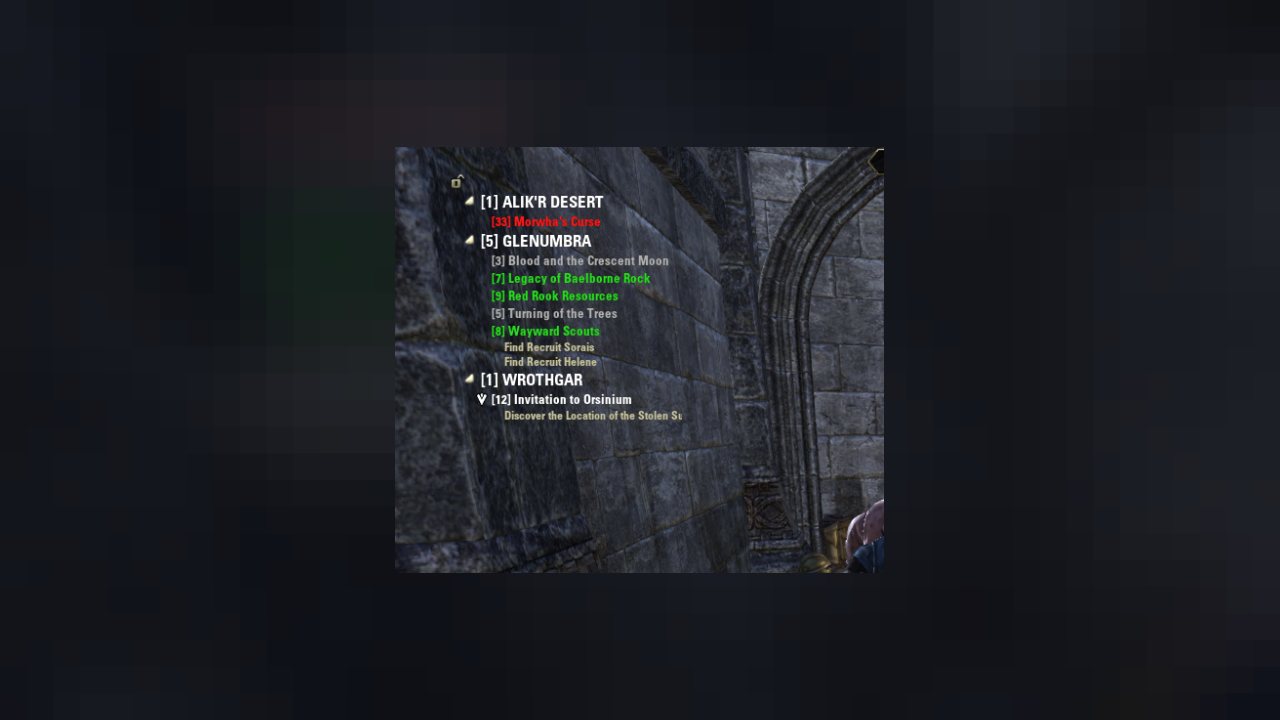
Ravalox' Quest Tracker provides A more intuitive QUEST TRACKER than the in-game provided tracker interface. (see screenshots) The interface can be left on the screen or hidden via settings or /slash commands.
Features:
- Use the ZOS Tracker key-bind to cycle through quests (default "T")
- Can switch between the game's tracker and Ravalox' Tracker in the settings menu
- Option to automatically hide Ravalox' tracker when in combat
- Manual or automatic window re-sizing (by width, height or both)
- Backdrop color and texture can be disabled or changed
- Background and drag bar can be "faded" to become any level of transparent
- Window can be locked or unlocked via /slash command, settings menu, or lock icon
- Can optionally display the number of open quests in each Category or Zone
- Can optionally display and sort by the level of the quest
- Quest Tooltips can be enabled or disabled in the settings menu
- Optionally show Quest Tooltips when a quest is accepted
- Option to display a chat alert when accepting a quest. With or without quest details
- Save settings either account-wide or by character
How to use:
- Lock icon will allow for the UI to be dragged around the screen (by dragging the bar at the top of the UI) when unlocked. (Lock icon can be hidden via the settings menu)
- If the tooltips option is selected, a tooltip window will appear when hovering over a quest.
- Right click on a quest to display quest management options. (Share , Abandon, or show on map)
- Click on the Category to expand or collapse the list.
- Additional options for automatically collapsing Categories, Quests or both
- Options for showing all quests at all times or show all quests in the currently selected category at login
Slash Commands:
- /qt or/qt help Display the QuestTracker /slash command help
- /qth Toggle the Questtracker UI on or off on the fly.
- /qtl Toggle the QuestTracker UI lock on or off on the fly.
- /qta Toggle show/hide Categories and Quest entries on the fly.
- /qts Show and Expand all Quests only in the Selected Category.
- /questracker or /qt settings ... Directly access the settings menu.
ABOUT THIS LISTING
This page describes Ravalox' Quest Tracker by calia1120. The description and screenshots are the author's own, imported from their listing on ESOUI on 3 October 2026: https://www.esoui.com/downloads/info13-RavaloxQuestTracker.html
Mythiq.net hosts no files for it. The download button goes straight to the release file on cdn.esoui.com, so you are downloading from the author's own host, not from a copy of ours.
The download count, rating and comments on this page start at zero and count Mythiq.net only. The source's own figures are not copied here — they measure a different site, and a number that cannot be checked against our own ledger is not worth printing.
Media
Requirements
Game version
12.1.0
API VERSION
Built for ESO API version 12.1.0. After a patch the game marks add-ons built for the previous API as out of date; the "Allow out of date add-ons" checkbox in the add-on menu loads them anyway, and most work.
LIBRARIES
Many ESO add-ons depend on a shared library — LibAddonMenu-2.0 above all — which is installed separately, exactly like an add-on. A dependency that is missing shows as the add-on simply not appearing in the list.
CONSOLE
Add-ons are PC and Mac only. There is no way to load them on console.
Installation
1. Download the archive with the button on this page and unzip it.
2. Move the unzipped folder into your add-ons directory:
Windows — Documents\Elder Scrolls Online\live\AddOns
3. Start the game, and at the character select screen click Add-Ons.
4. Tick the add-on. If it is greyed out and marked out of date, tick "Allow out of date add-ons" at the top of the same panel.
5. Log in. Most add-ons need a /reloadui after they are first enabled.
UPDATING
Delete the old folder first. ESO loads everything it finds, and two copies of one add-on is the usual cause of "an add-on has produced an error" on login.
This release downloads from cdn.esoui.com, not from us, so
there is no checksum to compare against. Scan the archive before you unpack it.
Version history
v3.8.3.4Latest
2 Oct 2026 · 44 KB via cdn.esoui.com · 1 download Download
v3.8.3.4 ~ Calamath
* Addressed an issue where the specification change in Update 51 regarding the behavior of the T-key cycling for the focused quest.
v3.8.3.3 ~ Calamath
* Adjustments for vanilla quest tracker refactoring.
* Updated to API 101051
v3.8.3.2 ~ Calamath
* Adjustments for quest journal refactoring. Special thanks to: Tagarn, barny
* Updated to API 101050
v3.8.3.1 ~ Calamath
* Integrated the embedded LibQuestInfo library.
* Updated to API 101048
v3.8.3.0 ~ Calamath
* Changed add-on name to RavaloxsQuestTracker.
* As a painful side effect, the add-on settings will initialize to default. However, the save data file with the old add-on name remains and should be reusable if renamed with ESO not running.
* Updated to API 101043
v3.8.2.15 ~ Calamath
* Updated to Gold Road API (101042)
v3.8.2.14 ~ Calamath
* Since the 'Automatic Quest Tracking' setting was added to the vanilla UI in Update38, the same setting items in the add-on now work together.
* Updated to Necrom API (101038)
v3.8.2.13 ~ Calamath
* Updated to Firesong API (101036)
v3.8.2.12 ~ Calamath
* Added failsafe to avoid rare UI errors caused by unusual quest update events.
* Updated to Lost Depths API (101035)
v3.8.2.11 ~ Calamath
* Updated to High Isle API (101034)
v3.8.2.10 ~ Calamath
* Updated to Ascending Tide API (101033)
v3.8.2.9 ~ Calamath
* Addressed an issue where if the player changed the default quest tracker display settings in the system menu before opening the settings panel for this add-on, the settings would not be reflected in the add-on's save data.
v3.8.2.8 ~ Calamath
* Updated to Deadlands API (101032)
v3.8.2.7 ~ Calamath
* Removed a temporary fix implemented in the previous version 3.8.2.6.
* Updated to Waking Flame API (101031)
v3.8.2.6 ~ Calamath
* Temporarily fixed an issue where a UI error message was displayed immediately after the player logged in.
v3.8.2.5 ~ Calamath
* Updated to Blackwood API (100035)
v3.8.2.4 ~ Calamath
* Updated to Flames of Ambition API (100034)
v3.8.2.3 ~ Calamath
* Fixed an issue that caused a UI error when showing or hiding the default quest tracker.
* Removed "Arial Narrow" font choice from UI font settings.
* Fixed an issue where the focused quest would automatically switch each time you accepted a new quest.
v3.8.2.2 ~ Calamath
* Updated to Markarth API (100033)
* Removed references and uses of LibStub completely.
* Embedded LibQuestInfo library now has its own manifest file.
* Added 'AddOnVersion' directive to manifest file.
* Fixed an issue where the quest tracker was not updated correctly.
v3.8.2.0
* Updated to Harrowstorm API (10030)
* Removed references and use of LibStub
* LibAddonMenu & LibCustomMenu removed from code and changed to DependsOn components. You will need to install these libraries separately from this addon.
v3.8.1.0
* Updated to Elsweyr API (100027)
v3.8.0.0
* Updated to Wrathstone API (10026)
* LibCustomMenu updated to 6.6.3
v3.7.0.0
* Updated to API 10025
* Updated LAM to 2.0 r26
* Fixed error message when addon initialized. QUEST_TRACKER interface appears to be FOCUSED_QUEST_TRACKER now.
* Fixed error message when quest changed outside of addon. QUEST_TRACKER interface appears to be FOCUSED_QUEST_TRACKER now.
v3.6.0.0 ~ Calia
* Updated to API 20 (Horns Of The Reach)
* Updated LAM to 2.0 r24
v3.5.0.0 ~Calia
*Updated to API 19 (Morrowind)
v3.4.4.2
*Updated to API 18
v3.4.4.2
*Updated to API 17
v3.4.4.1
* Update to API 16
v3.4.4.0
* Temporary fix for white square icons
v3.4.3.2 - June 04 2016
* Updated to API version 15
v3.4.3.1 - March 07 2016
* Updated to API version 14 (1.9)
V3.4.3.0 - February 12 2016
* Corrected a bug where under certain circumstances the ZOS QT will be visible when first using
the addon or after creating a new character
* Inserted workaround for the last of the cutoff text issues. This problem may be ZOS related,
a permanent fix will be made after getting more info.
Off-site on cdn.esoui.com —
no checksum, because we never held this file.
Link checked by our review team on 3 Oct 2026.
Tell us if something is wrong — a file that will not work, content taken from
someone else, or anything that looks unsafe. Reports go to our review team, not
to the author.
We use cookies to ensure that we give you the best experience on our website and improve your experience. By continuing to use this site you consent to such use of cookies.