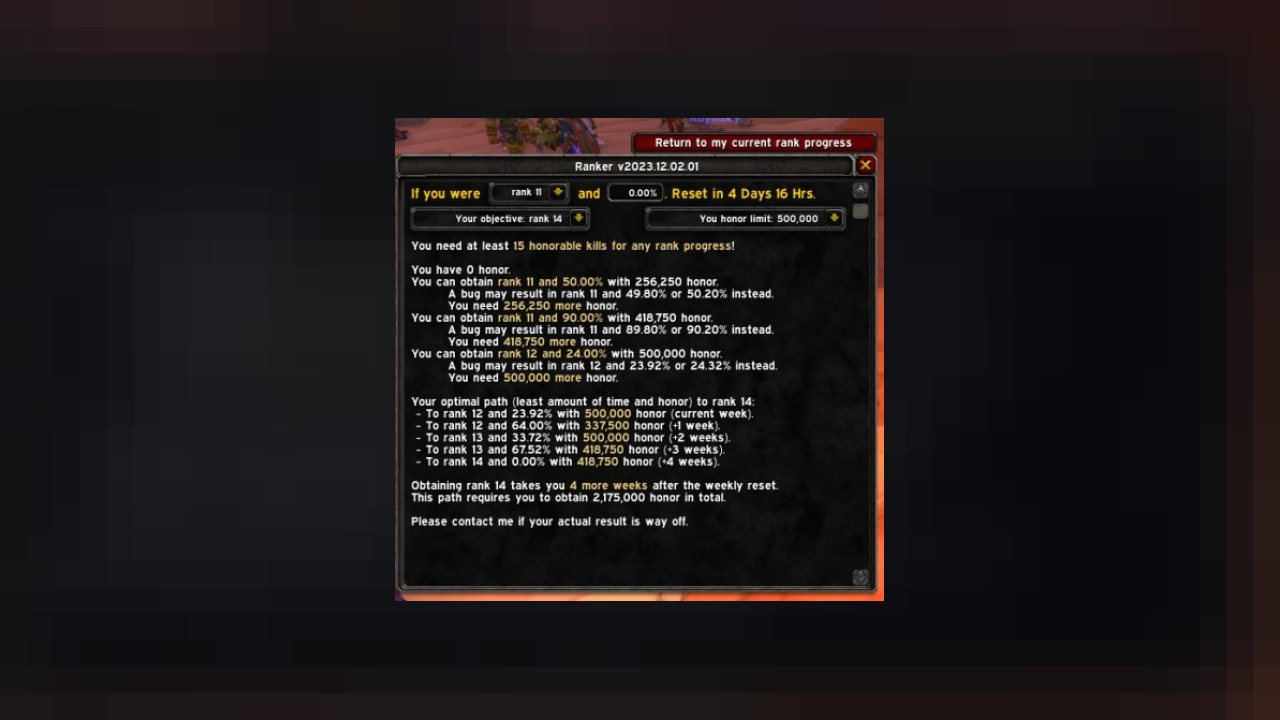
Stop guessing what rank you'll be next reset. Know for certain and spend your time wisely. See your path to rank 14.
- Since the 1.14.4 Classic Era patch, Blizzard has changed the way that honor is converted to rank progression.
- Rank progression predictions by Ranker are exact since Ranker uses the same mathematical formulas used by Blizzard (introduced with the 1.14.4 Classic Era patch). This has been documented extensively on our Discord (https://discord.gg/C529tSDf68).
- Note that a bug exists on Blizzard’s end that sometimes causes predictions to be off by less than 1%.
- Download and use Ranker, and tell your friends to use Ranker too! It works on Classic Era, Seasonal, Hardcore, and Anniversary realms.
Would you like to know more about the ranking system?
Players have a certain rank, and a percentage describing their amount of progress towards the next rank.
For example: 'rank 4 and 60.0%' indicates a player who is rank 4, and 60.0% towards reaching rank 5.
Based upon a player's rank and progress, there are up to four honor milestones to reach within a given week.
Obtaining honor prior to the first milestone does nothing for you. Obtaining honor between the milestones, or obtaining more honor than the milestone, are both useless too.
You will only be awarded rank progress from the milestones you've met prior to the weekly reset.
For example, a player at maximum level with at least 15 Honorable Kills each week that is rank 4 and 60.0%, can expect the following progression based upon how much honor they obtain before the weekly reset:
- Between 0 and 22,499 honor: Rank 4 and 60.0% (no progress)
- Between 22,500 and 44,999 honor: Rank 5 and 0.0%
- Between 45,000 and 77,499 honor: Rank 5 and 80.0%
- Between 77,500 and 109,999 honor: Rank 6 and 50.0%
- With 110,000 honor or more: Rank 7 and 20.0%
No additional progress can be made in that week for the given rank and rank progress!
Ranker shows you the rank progression that is possible for your current, or your simulated, situation. No other outcome is possible!
If you are not at maximum level then your results may vary. The exact cap for each level is still unknown.
Features
- Open the honor pane and click the Show Ranker button on the top, or use the /rank or /ranker commands, and see what your predicted rank and progress will be after the weekly reset.
- The user interface is compatible with the default Blizzard UI and with ElvUI, and can shown or hidden by using a button on top of your Honor pane (default key binding H).
- You can configure whether or not you want the Ranker pane to automatically show when the Honor pane is shown. Go to the addon configuration directly by using the /ranker config command.
- Define your objective rank and your honor limit, or use the defaults (rank 14 and 500k honor). On Season of Discovery, the cap is currently set to rank 3.
- Understand how much you can progress based on how much honor is required for each progression point.
- Understand how much honor is needed to avoid decay (if you have any progress in your current rank and lack enough honor to prevent decay). After the reset of December 5 or 6 (depending on your region), this no longer applies and will no longer be displayed.
- View a simple path to your objective rank, taking into account your current honor, and your honor limit. No predictions will show until you have obtained 15 honorable kills except when using "what if" scenario modeling. There's an AddOn option to confirm you know about this 15 honorable requirement. When this AddOn option is ticked you will again get predictions regardless of your current honorable kill count.
- See a thumbs up, rank objective, and checkmark in the Ranker frame when you've achieved your objective rank.
- Enable "what if" scenario modeling to understand what your path would look like if you were a specific rank and progress. Type in a number between 0.00% and 99.99%, or use the up/down and left/right to change the number by 0.01 or by 1.00 increments. Click the button again, or close and open the pane, to revert back to your current situation.
- Automatically share your own ranking data when grouped, with your guild members, and with players near you.
- Know when a new version is available through an in-game version check.
- Delete data points that are no longer useful with the /ranker prune command . This will delete any data recorded before September 5th 2023, the week when Blizzard changed how they reward points to prevent rank manipulation through dishonorable kills.
What's coming
- Let me know through comments or private messages what else you'd like to see this addon do for you.
Donations
- If you like my work, please consider a donation: https://paypal.me/GrumpyPlayers
ABOUT THIS LISTING
This page describes Ranker by GrumpyPlayers. The description and screenshots are the author's own, imported from their listing on CurseForge on 26 October 2026: https://www.curseforge.com/wow/addons/ranker-your-helper-through-the-classic-era-pvp-honor-system
Mythiq.net hosts no files for it. The download button goes straight to the release file on edge.forgecdn.net, so you are downloading from the author's own host, not from a copy of ours.
The download count, rating and comments on this page start at zero and count Mythiq.net only. The source's own figures are not copied here — they measure a different site, and a number that cannot be checked against our own ledger is not worth printing.
Requirements
Game versions
1.15.8
1.15.9
GAME FLAVOUR
This is a Classic build. Retail and Classic run different interface APIs, and an addon built for one throws Lua errors on the other — check you are installing into the right client folder.
INTERFACE VERSION
Built against game version 1.15.8, 1.15.9. After a patch, an addon that has not been updated is flagged out of date; most keep working, and the "Load out of date AddOns" checkbox on the character screen lets you try.
DEPENDENCIES
Some addons need a separate library addon (Ace3, LibStub and friends) that is not bundled. If the addon does not appear in the list in game, a missing dependency is the usual reason.
Installation
1. Quit World of Warcraft completely. The game reads the AddOns folder at launch and will overwrite settings for an addon added while it is running.
2. Download the archive with the button on this page and unzip it.
3. Move the folder — the one with the .toc file in it, not the zip's wrapper folder — into:
World of Warcraft\_classic_era_\Interface\AddOns (or _classic_ for the current Classic expansion)
4. Start the game. On the character selection screen, click AddOns and check that it is listed and enabled.
IF IT DOES NOT APPEAR
Nine times out of ten the folder is nested one level too deep. Interface/AddOns/Thing/Thing/Thing.toc will not load; Interface/AddOns/Thing/Thing.toc will.
UPDATING
Delete the old folder before unzipping the new one. Unzipping over the top leaves files behind that the new version no longer expects.
This release downloads from edge.forgecdn.net, not from us, so
there is no checksum to compare against. Scan the archive before you unpack it.
Tell us if something is wrong — a file that will not work, content taken from
someone else, or anything that looks unsafe. Reports go to our review team, not
to the author.
We use cookies to ensure that we give you the best experience on our website and improve your experience. By continuing to use this site you consent to such use of cookies.