Shows the items from the Mythic instances in a compact overview
KeystoneLoot
Never miss a piece of loot again. KeystoneLoot gives you a clean, compact overview of all drops from Mythic+ dungeons, raids, and the Catalyst, filtered exactly to your class and spec.
Want a head start? Grab import-ready BiS lists for every class and spec at keystoneloot.io.
What does it do?
Whether you're pushing keys, progging a raid, or converting gear at the Catalyst, KeystoneLoot keeps all the loot information you need in one tidy window. No more external sites, no more spreadsheets.
Features
Smart Filters
Filter by class, specialization, item slot, and item level. Switching characters in the dropdown automatically adjusts the filters, perfect for alt-heavy players.
Favorites
Found an item you need? Mark it as a favorite with one of five priority tiers: Nice to have, Must have, Best in Slot, Transmog, or Catalyst (for items the Catalyst can convert). Favorites are saved per character and per spec, so your Warrior wishlist won't interfere with your Druid's. Use the character dropdown to switch between your alts and manage each one's wishlist independently. You can also export and import favorites as a short string, handy for sharing with your guild or syncing between characters.
Void Core (Bonus Roll) Tracking
See exactly which items you've already secured with Void Cores and what's still left to collect from each dungeon and raid boss. It even works retroactively: anything you'd already obtained is filled in automatically when you install it, so you're never starting from scratch.
Drop Notification
When someone in your group picks up one of your favorites, a pop-up appears showing the item and who got it. You can whisper them directly from the notification, and the message is fully customizable in the settings.
Loot Spec Reminder
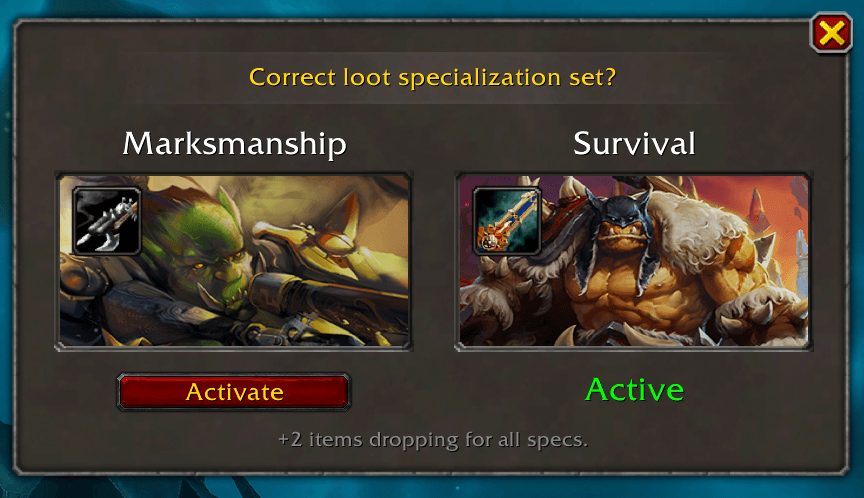
As soon as you zone into a Mythic+ dungeon, KeystoneLoot checks if your loot spec matches your favorited items. It also compares loot pool sizes across specs, so if another spec has fewer items overall but can still drop what you're after, it'll suggest switching for better odds.
Group Favorites Reminder
If you have no favorites in a Mythic+ dungeon, KeystoneLoot checks which items your groupmates have marked as favorites there. It shows you the loot spec that lets those items drop for you, so you can trade them afterwards. Only works if your groupmates also use KeystoneLoot.
Teleport Buttons
Teleport directly to a dungeon entrance with one click, no more digging through your spellbook.
Teleport Notification
When you join a Mythic+ group or the group fills up, a popup shows the dungeon and your role with a teleport button.
The Catalyst
See all Catalyst-eligible items for your class and spec right inside the addon.
Keystone Tooltip
Hover a keystone in your bags to get dungeon information right in the tooltip.
Minimap Button
A draggable minimap icon lets you open and close the window whenever you need it.
Getting started
Install via the CurseForge app or drop the folder into: World of Warcraft/_retail_/Interface/AddOns/
Then reload your UI with /reload and look for the KeystoneLoot button on your minimap.
Languages
Available in English, German, French, Spanish, Italian, Korean, Portuguese, Russian, Chinese (Simplified & Traditional).
ABOUT THIS LISTING
This page describes KeystoneLoot by Shantalya. The description and screenshots are the author's own, imported from their listing on CurseForge on 26 October 2026: https://www.curseforge.com/wow/addons/keystoneloot
Mythiq.net hosts no files for it. The download button goes straight to the release file on edge.forgecdn.net, so you are downloading from the author's own host, not from a copy of ours.
The download count, rating and comments on this page start at zero and count Mythiq.net only. The source's own figures are not copied here — they measure a different site, and a number that cannot be checked against our own ledger is not worth printing.
Media
Raid Overview
Loot Reminder
Drop Alert
Keystone Tooltip
Tooltip of a favorite item
Requirements
Game version
12.1.5
GAME FLAVOUR
This is a retail (modern World of Warcraft) build. It will not work in the Classic clients, which run a different interface API.
INTERFACE VERSION
Built against game version 12.1.5. After a patch, an addon that has not been updated is flagged out of date; most keep working, and the "Load out of date AddOns" checkbox on the character screen lets you try.
DEPENDENCIES
Some addons need a separate library addon (Ace3, LibStub and friends) that is not bundled. If the addon does not appear in the list in game, a missing dependency is the usual reason.
Installation
1. Quit World of Warcraft completely. The game reads the AddOns folder at launch and will overwrite settings for an addon added while it is running.
2. Download the archive with the button on this page and unzip it.
3. Move the folder — the one with the .toc file in it, not the zip's wrapper folder — into:
World of Warcraft\_retail_\Interface\AddOns
4. Start the game. On the character selection screen, click AddOns and check that it is listed and enabled.
IF IT DOES NOT APPEAR
Nine times out of ten the folder is nested one level too deep. Interface/AddOns/Thing/Thing/Thing.toc will not load; Interface/AddOns/Thing/Thing.toc will.
UPDATING
Delete the old folder before unzipping the new one. Unzipping over the top leaves files behind that the new version no longer expects.
This release downloads from edge.forgecdn.net, not from us, so
there is no checksum to compare against. Scan the archive before you unpack it.
Version history
KeystoneLoot-2.19.0Latest
19 Oct 2026 · 190 KB via edge.forgecdn.net · 1 download Download
Off-site on edge.forgecdn.net —
no checksum, because we never held this file.
Link checked by our review team on 26 Oct 2026.
Tell us if something is wrong — a file that will not work, content taken from
someone else, or anything that looks unsafe. Reports go to our review team, not
to the author.
We use cookies to ensure that we give you the best experience on our website and improve your experience. By continuing to use this site you consent to such use of cookies.