Helpful addon for raiders, especially for raid leaders and officers.
Modules: Raid Cooldowns, Notes, Reminders, Visual Notes, Battle Resurrection icon, Fight/combat log, Raid Inspect Viewer, Raid Check, Invite Tools, Timers, Raid Attendance, Encounters Statistics, Saving log (autologging), Marks Bar, Permanent Marks, Loot to chat, Who pulled, WeakAuras checker, Raid Groups Saver
https://www.patreon.com/exorsusraidtools
Raid Cooldowns*
*Only for classic versions
Module tracks all raid's cooldowns and displays them using customizable bars. Works with:
- Talents
- Glyphs
- Spell charges
- Raid batlle resurrection
- Tier sets
- Spells-dispells
- Racial spells
- Trinkets & items
- Pet's spells
- Custom spells
Reminders
Userful text messages during fight. You can quickly setup them via timeline or assignments.
Note
Shows note in your UI, that can be sent to all raidmembers
Fight log*
*Only for classic versions
Module saves most data of the fight and displays them on special page. Tracks:
- Damage to each individual non-friendly unit
- Switch time of all raid member's to this units
- Damage Taken
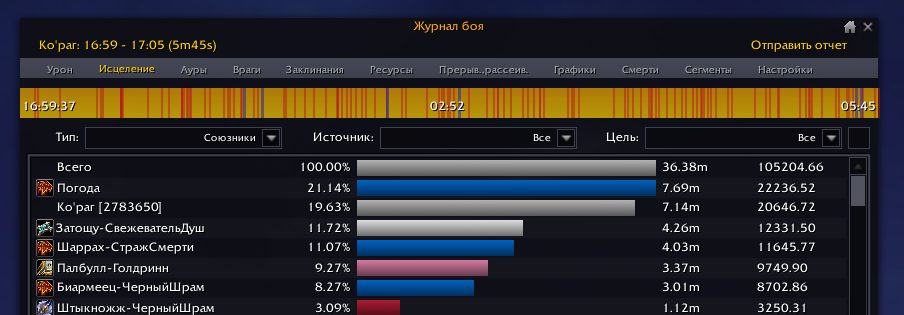
- Healing each to each individual unit
- Interrupts and dispels
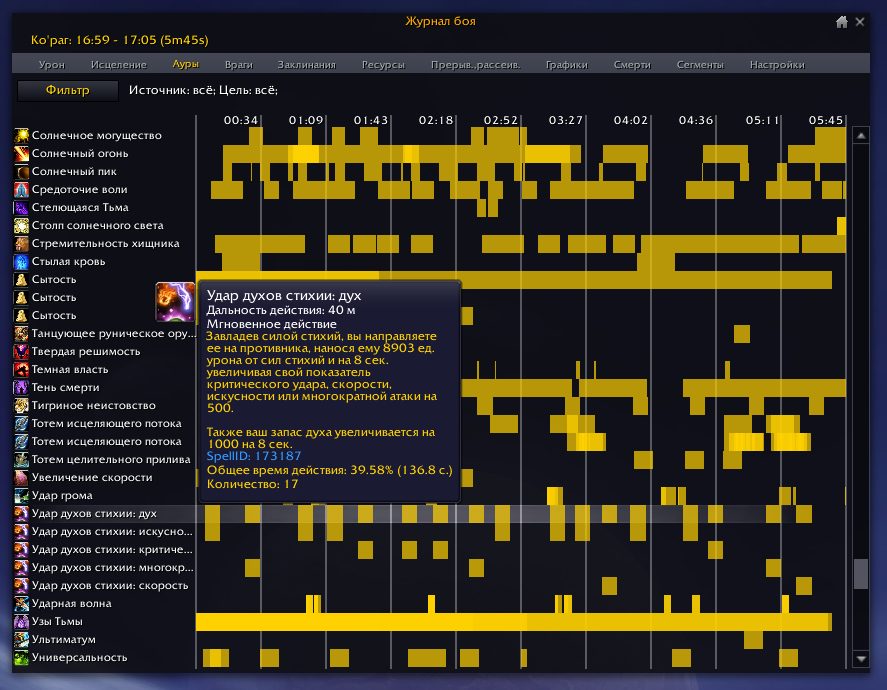
- All buffs/debuffs during fight
- Spells log for players in raid
- All casts during fight
- Energy (resources) gain data
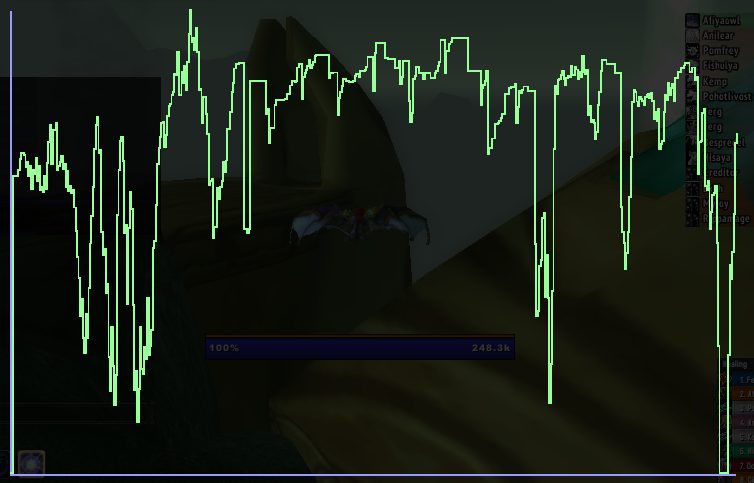
- DPS, health and powers (mana, focus, rage, etc) graphs
- Raid & boss frames history
Auras:
Healing tab:
Battle Res
Shows status of battle ressurection in raidfights (available charges & time to next charge)
Raid Inspect
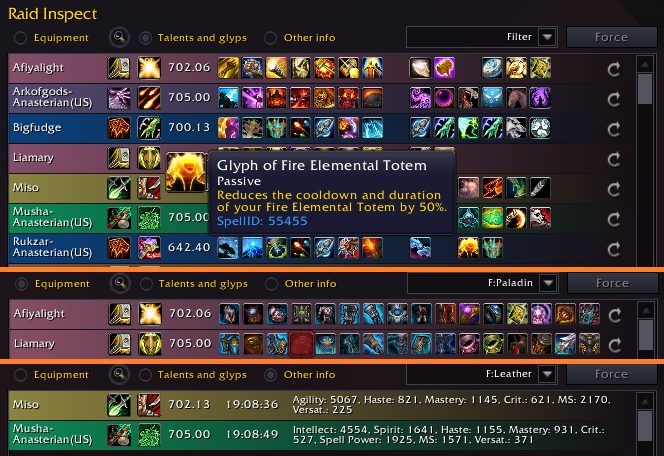
Inspects all raid members and shows information about them: item level, talents, glyphs, items, spec, stats, achivements, number of boss kills. Checking items without gems, enchants; low level items.
Page to inspect talent trees
Raid Check
Checks foods, flasks and runes buffs on raid members. Shows special window during ready check
Invite Tool
- Invite guildmates to raid
- Autopromote in raid
- Autoaccept invites
- Disband raid
- Disband and reinvite raid
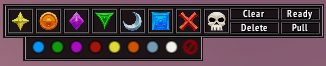
Marks Bar
Timers
Translate pull, afk or custom timers to BigWigs and DBM
Combat timer
Raid Groups
Save and quickly restore players setups in raid groups with a few clicks.
Raid Attendance
History of raid roster during your raids
Encounters statistics
Module saves statistics about pulls, kills, raid itemlevel, fight length and first-bloods
Loot history
Saving history of boss drops and who looted it.
Loot to chat
Linking all dropped loot from raid bosses to raid chat
Saving log
Autoenable logging (saving combat events to 'Logs\WoWCombatLog.txt') in raid and m+ zones
WeakAuras checker*
*Only for classic versions
Interrupts*
*Only for classic versions
Module for assigning people for interrupting enemy mobs spells.
Automarking*
*Only for classic versions
Autoplacing raid marks on mobs by name or on players with debuffs/buffs.
PS
Also you can help to fix errors in translation or make suggestions about addon. Please leave your feedback.
ABOUT THIS LISTING
This page describes Method Raid Tools by ykiigor. The description and screenshots are the author's own, imported from their listing on CurseForge on 14 August 2026: https://www.curseforge.com/wow/addons/method-raid-tools
Mythiq hosts no files for it. The download button goes straight to the release file on edge.forgecdn.net, so you are downloading from the author's own host, not from a copy of ours.
The download count, rating and comments on this page start at zero and count Mythiq only. The source's own figures are not copied here — they measure a different site, and a number that cannot be checked against our own ledger is not worth printing.
Media
RaidInspect_updated2.png
marks_bar_updated.png
new_journal1.png
fightLog_Auras.png
HitGraph.png
Requirements
Game versions
4.4.2
1.15.8
2.5.5
3.80.1
5.5.4
12.0.7
GAME FLAVOUR
This is a retail (modern World of Warcraft) build. It will not work in the Classic clients, which run a different interface API.
INTERFACE VERSION
Built against game version 4.4.2, 1.15.8, 2.5.5, 3.80.1, 5.5.4, 12.0.7. After a patch, an addon that has not been updated is flagged out of date; most keep working, and the "Load out of date AddOns" checkbox on the character screen lets you try.
DEPENDENCIES
Some addons need a separate library addon (Ace3, LibStub and friends) that is not bundled. If the addon does not appear in the list in game, a missing dependency is the usual reason.
Installation
1. Quit World of Warcraft completely. The game reads the AddOns folder at launch and will overwrite settings for an addon added while it is running.
2. Download the archive with the button on this page and unzip it.
3. Move the folder — the one with the .toc file in it, not the zip's wrapper folder — into:
World of Warcraft\_retail_\Interface\AddOns
4. Start the game. On the character selection screen, click AddOns and check that it is listed and enabled.
IF IT DOES NOT APPEAR
Nine times out of ten the folder is nested one level too deep. Interface/AddOns/Thing/Thing/Thing.toc will not load; Interface/AddOns/Thing/Thing.toc will.
UPDATING
Delete the old folder before unzipping the new one. Unzipping over the top leaves files behind that the new version no longer expects.
This release downloads from edge.forgecdn.net, not from us, so
there is no checksum to compare against. Scan the archive before you unpack it.
Version history
Method Raid Tools v.5315Latest
18 Jun 2026 · 14 MB via edge.forgecdn.net · 15 downloads Download
Off-site on edge.forgecdn.net —
no checksum, because we never held this file.
Link checked by our review team on 14 Aug 2026.
Tell us if something is wrong — a file that will not work, content taken from
someone else, or anything that looks unsafe. Reports go to our review team, not
to the author.
We use cookies to ensure that we give you the best experience on our website and improve your experience. By continuing to use this site you consent to such use of cookies.