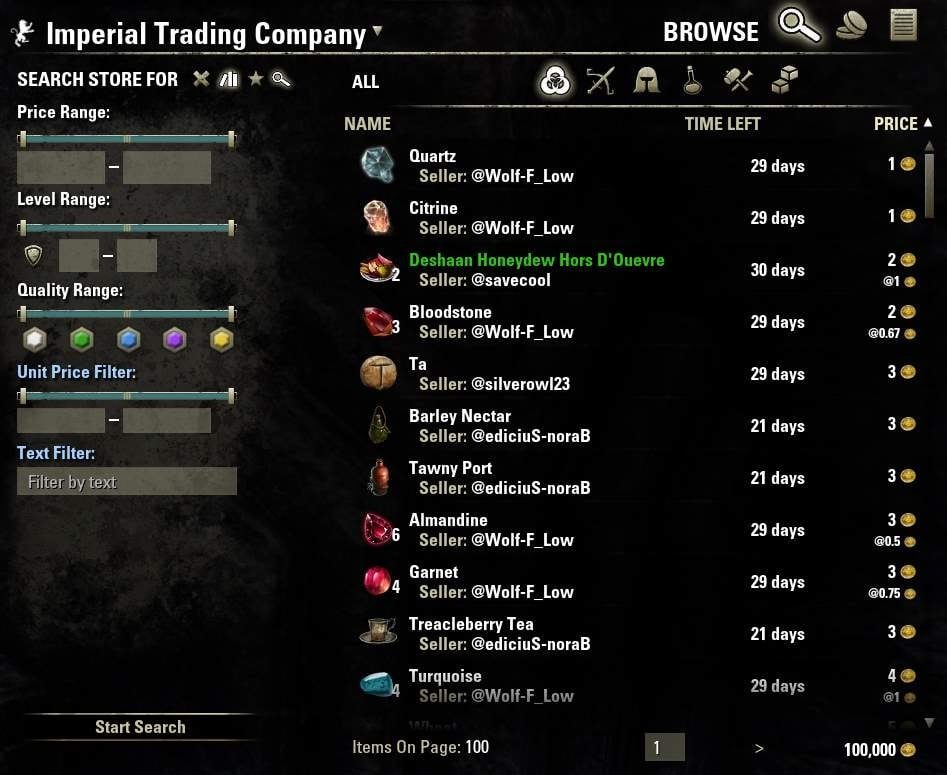
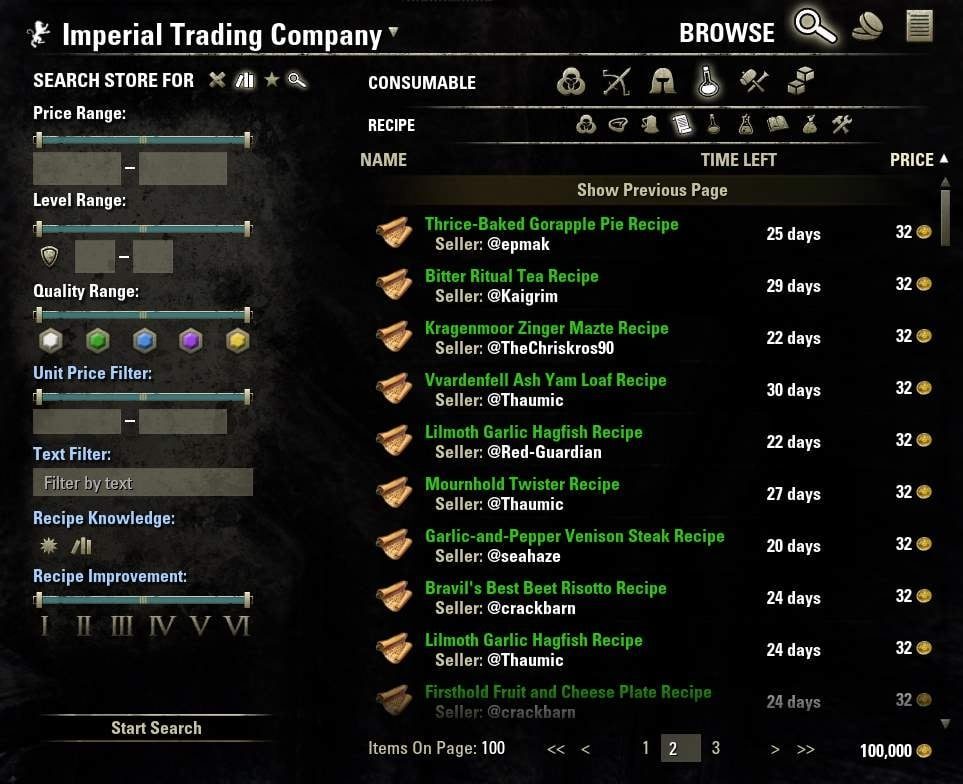
This addon augments the guild store interface with many useful additions.
This addon augments the guild store interface with many useful additions.
Features:
- Search Tab Improvements
- Item categories like in the inventory
- Subcategories similar to Advanced Filters
- Countless filters to refine your search
- Persistent filter state
- Reset buttons for each individual filter
- Search tabs (middle click to quickly close them)
- Local filtering and search result cache
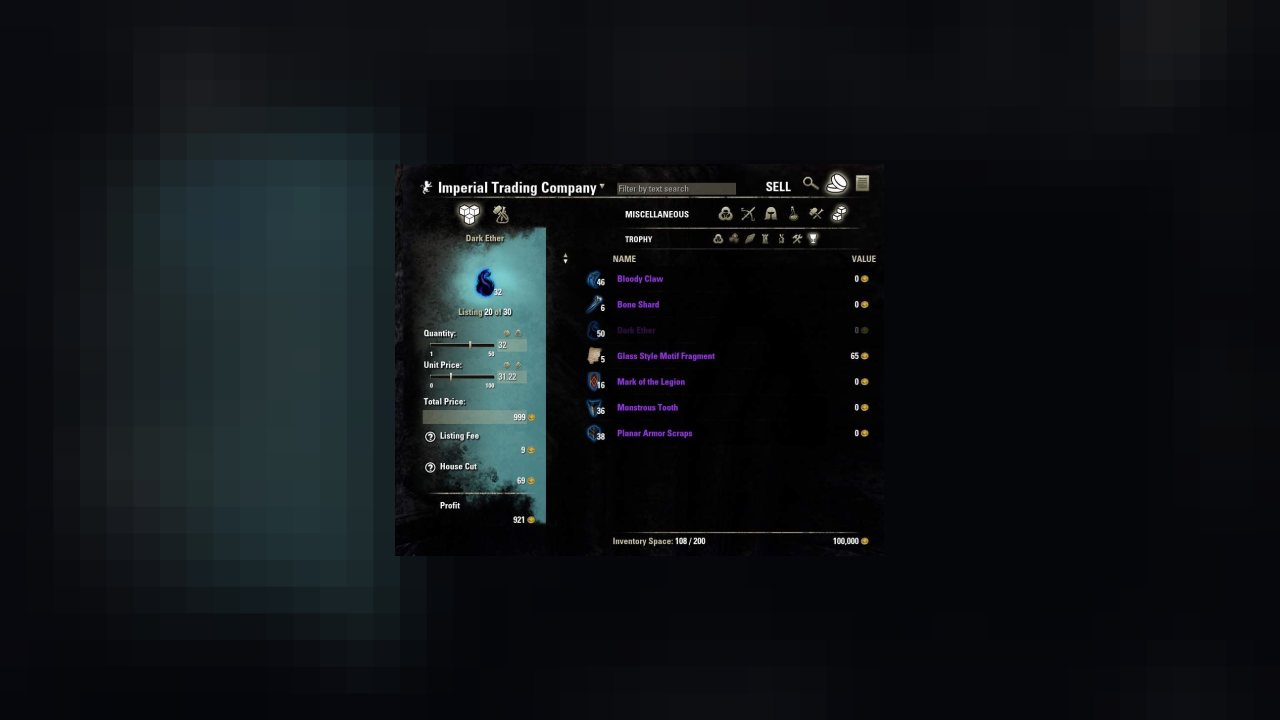
- Sell Tab Improvements
- Categories selection like on the search tab
- Select items quickly for listing with a single click
- Sliders to select sell quantity and unit price
- Multi stack slider (for automatically listing more than one stack)
- Full craft bag support
- Listing Tab Improvements
- Sortable headers
- Number of listed items
- Loading overlay
- Select guilds quickly with two clicks from the dropdown or even faster via the mouse wheel
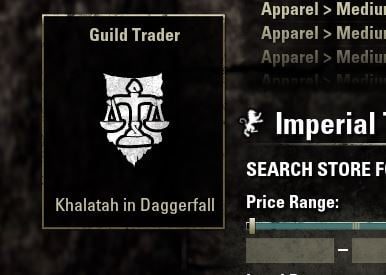
- Shows the current guild trader location in a tooltip
- New custom Icons
- Full support for English, French, German, Russian and Japanese
- List of all visited guild traders in Tamriel
- Automatically skips the dialog when visiting a kiosk (hold shift while talking to the NPC to stay on the dialog)
- and more
Dependencies:
Make sure to install the following required libraries in order to use AwesomeGuildStore.
- LibCustomMenu - Creates context menus for addons
- LibDebugLogger - Extensive logging for debug purposes
- LibDateTime - Simplifies date and time related tasks
- LibAddonMenu-2.0 - Provides settings menus for addons
- LibMapPing - Simplifies creating pings (e.g. waypoints) on the map
- LibGPS - Creates global coordinates (e.g. for storage on disk)
- LibPromises - Simplifies asynchronous code execution
- LibTextFilter - Provides advanced features for filtering text
- LibGetText - Provides localization via gettext and Weblate
- LibChatMessage - Simplifies displaying chat messages
- LibHistoire - Coordinates access to the Guild History between addons
- LibId64 - Simplifies working with the id64 data type
There are also several optional dependencies that are either not required, but can be installed to improve compatibility with other addons or give extra features. Some are already embedded, but can be removed without an issue.
- LibStub (embedded) - For backwards compatibility with old embedded versions of libraries
- LibFilters-2.0 / LibFilters-3.0 - For compatibility with other addons that use LibFilters.
- CraftedPotions - Gives crafted potions and poisons a quality color depending on the number of effects they have.
External Filters:
Some addons provide additional filters for AwesomeGuildStore. Use them at your own risk and report any issues with them to their respective authors:
- Master Merchant 3.0 - Filters listings by "good deal" status using historical sales data. Offers both a selector for deal quality tiers and a boolean deal filter.
- CookeryWiz - Filters provisioner recipes by whether the current character knows them, has the required skills, and has the ingredients to cook them.
- WritWorthy - Filters master writs by the calculated cost per voucher, including both material costs and purchase price from the guild store.
- Arkadius' Trade Tools - Filters listings by "good deal" status using ATT's own guild sales history and average price calculations.
- AGS Individual Item Price Filter - Sets custom maximum purchase prices on a per-item basis within a single search, allowing different price ceilings for each item in a multi-item filter.
- Unknown on Alts Filter - Filters for recipes, motifs, and patterns that the current character does not yet know, based on knowledge across all alts via LibCharacterKnowledge.
- Rulebased Inventory - Evaluates each guild store listing against Rulebased Inventory's rule syntax (e.g., type, name, level, etc.) and shows only items that match the defined buy rule. Reuses RbI's full rule engine for highly customizable filtering.
- Unknown Gear Filter - Searches across Weapons, Armor, and Jewelry simultaneously for gear unknown to the sticker book, without needing to switch categories.
- Writ2Style - Filters for motif chapters or books that correspond to master writs currently in the player's bag, so you can quickly buy the motifs needed to complete those writs.
Reporting a problem:
Before you report something, please make sure you have installed the latest version of all your addons and check the comment section for known issues.
Please take the time to cover the following points in your report:
1) What were you trying to do?
2) What actually happened?
3) Which steps did you take?
4) Can you reproduce it a second time after logging out and in again (or /reloadui)?
Screenshots and videos are also very useful to figure out what is going wrong. In addition you should also log out (or /reloadui) and upload the LibDebugLogger.lua from your Saved Variables here and include the link to it. It contains a lot of useful information that will make it even easier for me to pinpoint an issue and get it fixed fast.
FAQ:
Q: When can I use this awesome addon in gamepad mode?
A: There are currently no plans to support gamepad mode.
Q: How can I select multiple buttons on a filter?
A: Holding the ctrl key while clicking the buttons will allow you to select or deselect more than one.
Q: The search request failed, how can I restart it?
A: Just press the "show more results" button or keybind and it will continue from where it stopped.
Q: I cannot find the guild tabard anymore?
A: The tabard is treated as a regular search result and can be found in the Apprarel > Appearance category or filtered for in other ways (e.g. text filter).
Q: My Deal Filter disappeared/stopped working/throws errors?
A: The deal filter is not part of AwesomeGuildStore. It always has been a part of Master Merchant, so you need to check for updates there.
Q: I am getting a "Filter is already registered" error?
A: Check the description of other addons you have installed. Some are not compatible with each other (e.g. Master Merchant and Tamriel Trade Centre Companion)
Translations:
Translations are managed with the help of Weblate. Click the graphic below if you want to learn more.
Text Filter Tutorial:
Once you enter something in the text box, it will instantly show you the auto completion provided by the game.
In addition you can also search for more complex expressions as described below.
Search terms are case insensitive and are matched against the item name and set name where applicable.
Besides searching for names it is also possible to filter for specific item links.
You can easily acquire an item link via the context menu on any item or item link by pressing "Link in Chat".
Just cut and paste it from the chat input to the search box with ctrl+X and ctrl+V.
The text filter recognizes many commonly seen operations that will allow you to filter for exactly the terms you want.
You can require all search terms to be present in any order by separating them with a space.
Or you can separate them with a "+" which will mark the beginning of a new search and allow you to find multiple different items.
You can change how operators are applied by using parenthesis or even exclude terms by putting a "-" before it.
It's also possible to filter for an exact sequence of characters by using double quotes.
The search terms are limited to a length of 250 characters to keep some leeway for planned features.
List of allowed operators:
- ' ' (space), '&': combine two words with AND
- '+', "/": combine two words with OR
- '-', '^', '!': negate expression
- '~', '*': soft match item link (only item id instead of all fields)
- '(', ')': control the order in which operators are evaluated
- '"': filter for an exact term, handling operators in between two double quotes as part of a term
Examples:
Note: Single quotes are not part of the search term
- 'shadow ring' will match any item that contains shadow AND ring in any order.
- 'los +col +mou' on the alchemy ingredients subcategory will match Columbine OR Bugloss OR Mountain Flower
- 'chapter (helmet+bow)' on the motif subcategory will match any motif chapter that has helmet or bow in its name
- 'chapter -(helmet+bow)' on the motif subcategory will match any motif chapter that does not have helmet or bow in its name
- 'chapter " 1:"' on the motif subcategory will match any motif chapter 1 (just 'chapter 1' would also match chapter 11 or motifs that have a number in the tens)
- '|H1:item:54339:129:50:0:0:0:0:0:0:0:0:0:0:0:0:0:0:0:0:0:8454917|h|h' on the potions subcategory will filter for vr5 [Panacea Of Health] tri-stat potions
- '~|H1:item:54339:129:50:0:0:0:0:0:0:0:0:0:0:0:0:0:0:0:0:0:8454917|h|h' on the potions subcategory will filter for any health potion
There are many possibilities, so try what you can think of and let me know in the comments if you found an especially useful combination!
ABOUT THIS LISTING
This page describes AwesomeGuildStore by sirinsidiator. The description and screenshots are the author's own, imported from their listing on ESOUI on 31 August 2026: https://www.esoui.com/downloads/info695-AwesomeGuildStore.html
Mythiq.net hosts no files for it. The download button goes straight to the release file on cdn.esoui.com, so you are downloading from the author's own host, not from a copy of ours.
The download count, rating and comments on this page start at zero and count Mythiq.net only. The source's own figures are not copied here — they measure a different site, and a number that cannot be checked against our own ledger is not worth printing.
Media
Requirements
Game version
12.0.0
API VERSION
Built for ESO API version 12.0.0. After a patch the game marks add-ons built for the previous API as out of date; the "Allow out of date add-ons" checkbox in the add-on menu loads them anyway, and most work.
LIBRARIES
Many ESO add-ons depend on a shared library — LibAddonMenu-2.0 above all — which is installed separately, exactly like an add-on. A dependency that is missing shows as the add-on simply not appearing in the list.
CONSOLE
Add-ons are PC and Mac only. There is no way to load them on console.
Installation
1. Download the archive with the button on this page and unzip it.
2. Move the unzipped folder into your add-ons directory:
Windows — Documents\Elder Scrolls Online\live\AddOns
3. Start the game, and at the character select screen click Add-Ons.
4. Tick the add-on. If it is greyed out and marked out of date, tick "Allow out of date add-ons" at the top of the same panel.
5. Log in. Most add-ons need a /reloadui after they are first enabled.
UPDATING
Delete the old folder first. ESO loads everything it finds, and two copies of one add-on is the usual cause of "an add-on has produced an error" on login.
This release downloads from cdn.esoui.com, not from us, so
there is no checksum to compare against. Scan the archive before you unpack it.
Version history
v1.7.8Latest
9 Jun 2026 · 394 KB via cdn.esoui.com · 12 downloads Download
version 1.7.8:
Changes:
- Fixed errors in XBox Play Anywhere edition
- Updated for Seasons of the Worm Cult Part 2
version 1.7.7:
Changes:
- Fixed performance issue when swapping between tabs in the guild store UI often
- Updated item style filter data
version 1.7.6:
Changes:
- Added notice text to mails while the guild history is unavailable
version 1.7.5:
Changes:
- Fixed unknown writs filter in "Consumables > Misc" category and changed it to show both surveys and writs
version 1.7.4:
Changes:
- Added unknown writs to "Consumables > Misc" category
- Remade all icons to fit the new UI style
- NOTE: feel free to use the old icons to make an addon that replaces the new ones
- Fixed dependency issue on consoles
version 1.7.3:
Changes:
- Added preliminary compatibility for console
- NOTE: This only means it will load and run without throwing errors, but it won't do anything noteworthy, since there is no UI yet
- Updated for Seasons of the Worm Cult Part 1
version 1.7.2:
Changes:
- Fixed price and unit price header placement in search tab
- Fixed companion armor weight filter not getting applied to server requests
- Fixed bows missing from companion weapon type filter
- Fixed kiosk history list showing some invalid empty week entries
- Fixed error when visiting Leyawiin outlaws refuge when language is set to French
- Updated item style filter data
- Updated for Update 45
version 1.7.1:
Changes:
- Added scribing scripts to consumable category on search tab
- Fixed error on search tab
- Updated for Update 43
version 1.7.0:
Changes:
- Re-implemented mail invoice feature
- NOTE: LibId64 and LibHistoire are new required dependencies
- Updated for Gold Road
version 1.6.10:
Changes:
- Fixed error when clicking sort order dropdown on search tab
version 1.6.9:
Changes:
- Fixed text search not working in bank inventory on sell tab screen
- Temporarily disabled mail invoice feature as it is incompatible with the new history api and needs a complete rewrite
- Updated for Scions of Ithelia
version 1.6.8:
Changes:
- Added missing restoration staff button to companion weapon type filter
- Fixed gamepad mode not being restored correctly when it was set to automatic
- Updated for Secrets of the Telvanni
version 1.6.7:
Changes:
- Fixed error in German and French when visiting the trader in Necrom Outlaws Refuge
version 1.6.6:
Changes:
- Added unit price filter to "All" category
- Added type filters for companion equipment
- Fixed multi button filters not showing their current state on initial store visit
- Fixed search result list position not being reset when visiting stores that already have cached results
- Fixed pending item on sell tab not being cleared correctly when switching guilds or closing the store
- Fixed incorrect entries for Vastyr and Necrom Outlaws Refuge in guild store list
- Updated for Necrom
version 1.6.5:
Changes:
- Fixed guild kiosk detection from guild finder not working in some cases
- Fixed rare error when entering a row on the guild trader list while closing the menu
version 1.6.4:
Changes:
- Fixed some input boxes on the search tab not being clickable in certain situations
- Fixed writs with 0 vouchers causing an error when trying to list them
- Updated Russian translations (thanks mychaelo)
- Updated Brazilian translations (thanks mlsevero)
- Added Simplified Chinese translations (thanks AimerAbyss)
version 1.6.3:
Changes:
- Fixed text filter autocompletion race condition
- Fixed text filter no longer applying correctly on the server side after some time
- Switched to weblate for managing translations
- Updated Polish translations (thanks generaluploads)
- Removed LAUNIG as it no longer serves any real purpose
version 1.6.2:
Changes:
Off-site on cdn.esoui.com —
no checksum, because we never held this file.
Link checked by our review team on 31 Aug 2026.
Tell us if something is wrong — a file that will not work, content taken from
someone else, or anything that looks unsafe. Reports go to our review team, not
to the author.
We use cookies to ensure that we give you the best experience on our website and improve your experience. By continuing to use this site you consent to such use of cookies.