- Includes crafting poison for DLC "Dark Brotherhood"
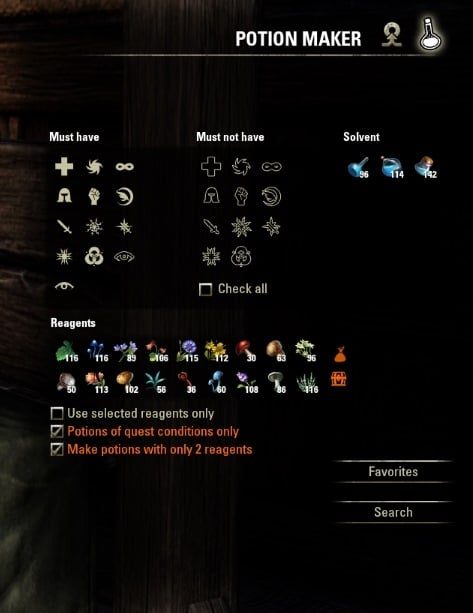
- Since 4.0.0: UI re-design (smaller) Using symbols with tool-tips.
- Auto search for alchemist writs (requested by QuadroTony)
- Favorites (requested by Xirael)
- Marking potions already in bag
- Key-Binding to toggle Potion Maker outside crafting station
- Updating search result upon looting new alchemy items (e.g. to see if there are new unknown traits while training)
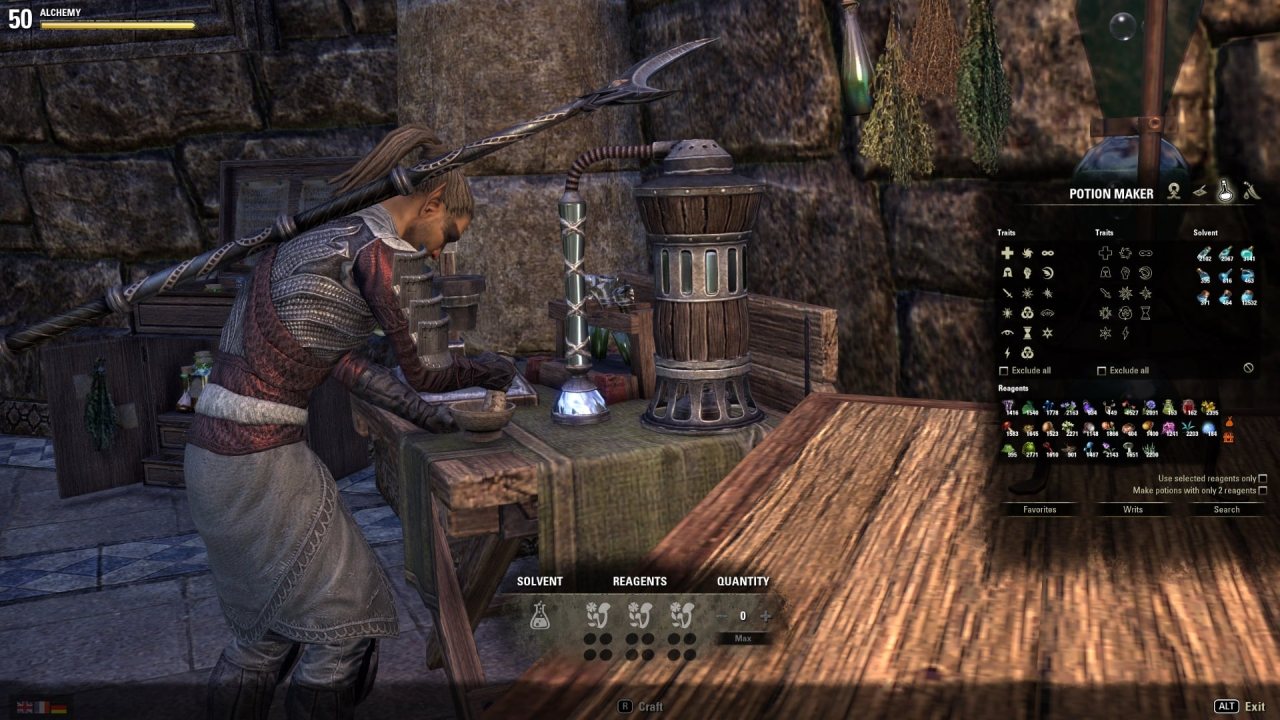
- Since 4.5: Full integration to alchemy station.
For Translators
Hi, everybody.
If you want to provide a translation for a language not included yet or needs updated, feel free to do that.
The only important thing for the translation of the trait names is: They must be written as shown in-game. Even if bad translated or having typos.
Thank You for your help.
CU
To Do
- Move settings to account-wide.
How to create Favorites
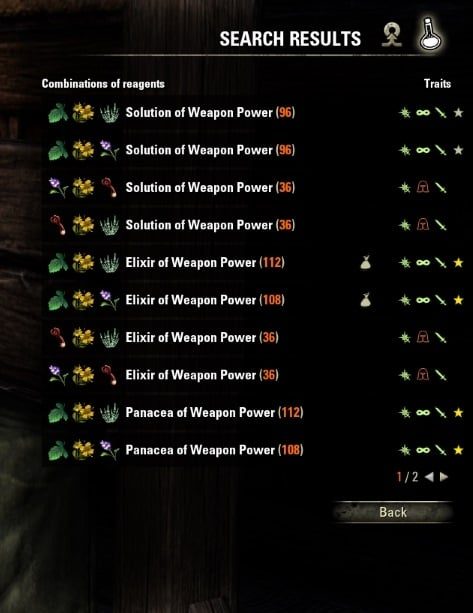
To create a favorite you setup a filter and search for potions. Once you have found a potion with the traits you need, click the result row. There is a button to mark this potion as favorite.
Next time you open Potion Maker you don't need to setup the filter again and just click on "Favorites".
It depends on your addon-settings, if alternative combinations, which result in the same potion, are additional offered or not. The alternatives have a different colored "star".
Description
Jetzt auch in Deutsch! Beschreibung unten.
Maintenant aussi en français! Description plus bas.
English
Potion Maker helps you make the potions you want.
Potion Maker allows you to search for potions to make.
It can also be setup to help you discover new traits.
Potion Maker looks through your available ingredients and uses your chosen filters, to make a comprehensive list of all the potions you could make with those traits, using the reagents you have.
This list is shown in a window and you can click on a potion to add the ingredients to the alchemy table.
If you use Potion Maker away from a alchemy table you instead get more information about the clicked potion.
To use Potion Maker, simply use an alchemy table. Or you can type /potionmaker anywhere to bring it up.
If you have suggestions or find a bug, please don't hesitate to report it.
And feel free to contact me directly here on ESOUI or on Twitter @phazeet.
Huge thanks to Khrill for his work on the addon! Khrill wrote all of version 3.0.0. His code is used with his explicit permission.
Deutsch
Potion Maker hilft Dir die Zaubertränke zu erstellen, die Du haben willst.
Potion Maker erlaubt es Dir nach Zaubertränken zu suchen.
Außerdem can es so eingestellt werden, dass es Dir hilft nach neuen Eigenschaften zu suchen.
Potion Maker durchsucht Dein Inventar nach Reagenzien und verwendete Deine Filtereinstellung um eine vollständige Liste der Zaubertränke mit den gewünschten Eigenschaften anzuzeigen, die erstellt werden können.
Die Liste wird in einem Fenster angezeigt und durch klicken auf ein Zaubertrank werden die Reagenzien dem Alchemietisch hinzugefügt.
Um Potion Maker zu benutzen verwende einfach ein Alchemietisch. Oder gebe /potionmaker oder verwende den neuen Menüpunkt oder definiere Dir eine Tastenbelegung um Potion Maker jederzeit zu aktivieren.
Pу́сский
Potion Maker поможет вам сделать зелья, которые вы хотите.
Potion Maker позволяет воспользовать поиском для того, чтобы найти все зелья, которые вы можете изготовить.
Он также может быть настроен таким образом, чтобы помочь вам открыть неизвестные свойства реагентов.
Potion Maker сканирует ваш инвентарь на наличие алхимических реагентов и, используя выбранные вами фильтры, создаёт полный список всех зелий с заданными свойствами, которые вы можете создать из имеющихся у вас реагентов.
Если вы используете Potion Maker вне алхимического стола, вы можете получить больше информации о выбранном зелье.
Чтобы запустить Potion Maker просто воспользуйтесь алхимическим столом или наберите в чате команду /potionmaker - это откроет окно аддона.
Если у вас есть предложения или вы нашли ошибку, пожалуйста, не стесняйтесь сообщить об этом.
И не стесняйтесь связаться со мной напрямую здесь на ESOUI или на Twitter @phazeet (Я пишу твитты на английском и иногда на шведском).
Огромное спасибо Khrill за проделанную им работу на аддоном! Khrill написал всю версию 3.0.0. Его код используется с его разрешения.
Español
Potion Maker te ayuda a elaborar las pociones que quieras.
Te permite buscar las pociones que quieres elaborar.
Se puede configurar para ayudarte a descubrir nuevas propiedades.
Potion Maker examina los ingredientes que tienes en tu posesión y aplica los filtros que elijas para darte una lista exhaustiva de todas las pociones que puedes hacer con unas propiedades determinadas, usando los reagentes que tienes.
Esa lista se muestra en una ventana y con un clic en una poción añadirás los ingredientes necesarios al laboratorio de alquimia.
Si utilizas Potion Maker fuera del laboratorio de alquimia, recibirás información acerca de la poción en cuestión.
Para utilizar Potion Maker, basta con ir a un laboratorio de alquimia. O teclear /potionmaker en cualquier lugar para mostrar la ventana.
Si encuentras un bug o tienes comentarios, no dudes en comunicarlo.
Me puedes contactar directamente por aquÃ, en ESOUI, o en Twitter @phazeet.
¡Muchas gracias a Khrill por su gran trabajo con el addon! Khrill es el autor de la versión 3.0.0. Se utiliza su código con su autorización explÃcita.
Potion Maker v4.x.x
With permission of facit and Khrill this is a re-designed UI version written by me (votan)
Including feature requests from QuadroTony and Xirael.
Remarks: Potion Maker Extended or Potion Maker?
Basically both add-ons do the same: Finding potions for you. See this redundance as some kind of backup.
The main differences are:
- Potion Maker Extended uses checkboxes with always visible text (wide screen). Potion Maker uses symbols with tool-tips (small screen).
- In Potion Maker Extended you have to always type text to find potions of alchemist writs. In Potion Maker you have a single click option for alchemist writs, only.
- In Potion Maker Extended you can type any text to filter potions by name. In Potion Maker you can manage "Favorites".
- Potion Maker Extended has more desktop app style. Potion Maker has more ESO style.
It is up to your perferences, which version fits better to you.
ABOUT THIS LISTING
This page describes Potion Maker (for Alchemy Crafting) by facit. The description and screenshots are the author's own, imported from their listing on ESOUI on 31 August 2026: https://www.esoui.com/downloads/info405-PotionMakerforAlchemyCrafting.html
Mythiq.net hosts no files for it. The download button goes straight to the release file on cdn.esoui.com, so you are downloading from the author's own host, not from a copy of ours.
The download count, rating and comments on this page start at zero and count Mythiq.net only. The source's own figures are not copied here — they measure a different site, and a number that cannot be checked against our own ledger is not worth printing.
Media
Requirements
Game versions
12.1.0
12.0.0
API VERSION
Built for ESO API version 12.1.0, 12.0.0. After a patch the game marks add-ons built for the previous API as out of date; the "Allow out of date add-ons" checkbox in the add-on menu loads them anyway, and most work.
LIBRARIES
Many ESO add-ons depend on a shared library — LibAddonMenu-2.0 above all — which is installed separately, exactly like an add-on. A dependency that is missing shows as the add-on simply not appearing in the list.
CONSOLE
Add-ons are PC and Mac only. There is no way to load them on console.
Installation
1. Download the archive with the button on this page and unzip it.
2. Move the unzipped folder into your add-ons directory:
Windows — Documents\Elder Scrolls Online\live\AddOns
3. Start the game, and at the character select screen click Add-Ons.
4. Tick the add-on. If it is greyed out and marked out of date, tick "Allow out of date add-ons" at the top of the same panel.
5. Log in. Most add-ons need a /reloadui after they are first enabled.
UPDATING
Delete the old folder first. ESO loads everything it finds, and two copies of one add-on is the usual cause of "an add-on has produced an error" on login.
This release downloads from cdn.esoui.com, not from us, so
there is no checksum to compare against. Scan the archive before you unpack it.
Version history
v5.11.0Latest
30 Aug 2026 · 78 KB via cdn.esoui.com · 14 downloads Download
version 5.11.0:
- Trait name change for U51. I fixed en, fr end de. For all other languages I need your help.
- Thank to @Dack.
version 5.10.3:
- Fixed issue with renamed alchemy trait names showing unknown traits.
version 5.10.2:
- Fixed updating level requirement not working.
version 5.10.1:
- Fixed favorites and writs ain't working.
version 5.10.0:
- New language-independent search for better support of language packs.
version 5.9.2:
- Some deferred initialization for slight faster loading screen.
version 5.9.1:
- Fixed reagent selection not updated, if the order has changed.
version 5.9.0:
- Using language-in-depend search for writs.
- The "Auto tab switch" features uses selected writ.
version 5.8.4:
- Update to API 100034 "Flames of Ambition".
version 5.8.3:
- Update to API 100033 "Markarth".
version 5.8.2:
- Update to API 100032 "Stonethorn".
version 5.8.1:
- Updates russian language. Thanks to @canadagreen.
version 5.8.0:
- Update to "Greymoor"
* New trait.
* New reagents.
- Search for normal writs using a language-independ method.
- Fixed showing triple slot potions for normal writs.
version 5.7.9:
- Fixed out-standing witch fest writ breaking auto-switch.
version 5.7.8:
- New option to disable auto-switching tabs for those having trouble with that.
- Exlude all checkbox for positive traits, too. As requested by @amber1019.
version 5.7.7:
- Fixed nil error for new characters not having the writ certificate yet.
version 5.7.6:
- Fixed copy&paste error. Sorry.
version 5.7.5:
- Update to API 100029 "Dragonhold".
- New reagent "Dragon Rheum".
- Poison writs: Searching case insensitive for poison keyword.
version 5.7.4:
- Of course, auto switch to potion or poison for normal writs as well.
version 5.7.3:
- Update to "Scalebreaker".
- Auto switch to potion or poison for master writs, if required.
- Fixed the "Panacea of ravage health" thing reported by @Amiarah with help of @Jadorkhan.
version 5.7.2:
- Fixed paging for the impatient.
- Fixed writs for French. (again)
version 5.7.1:
- Update to LibAsync 2.0 because for LibStub 1.10 is less than 1.9
version 5.7.0:
- Update to API 100027 "Elsweyr".
- New reagents. Thanks to @Troodon80 for the big help.
- New search algorithm, due to the new reagents.
- Optional keybindings for the three buttons. As requested.
- Update to LibAddonMenu rev 29.
version 5.6.2:
- New: Polish translation. Thanks to @tomkolp.
version 5.6.1:
- Replaced "Quest" checkbox with a button. As requested by @Omenpapa.
version 5.6.0:
- Update to API 100026 "Wrathstone".
- Fixed changing title, even if not selected.
- Optimized UI creation a bit.
version 5.5.4:
- API bump 100025 "Murkmire".
version 5.5.3:
- Fixed French writ quests after ZOS updated localization.
version 5.5.2:
- Update to API 100024 "Wolfhunter".
- New library load structure.
version 5.5.1:
- New poison art made by @manavortex. Thank you!
- Update to LAM rev26.
- Update to LibAsync rev 1.7.
- "Clear Selection" button as requested.
version 5.5.0:
- Update Russian translation. Thanks to @KiriX.
- Update Japanese translation. Thanks to @Marify.
- Update to LibCustomMenu rev. 6.5.
- API bump 100023 "Summerset".
- New reagents.
- Allow to include/exclude all kind of traits.
version 5.4.2:
- Spanish translation update: Cervanteso-01-04-2018
- Update to LibAsync rev. 1.6.
version 5.4.1:
- Russian language update. Thanks to @TERAB1T.
- Update to LibCustomMenu rev. 6.3.
version 5.4.0:
- API bump for "Dragon Bones".
- Split settings into account-wide and player-specific.
- Writs: Spanish localization. (Cervanteso-01-01-2018)
* The translation is not always consistent. The potions are missing their levels in the name. (on my system)
version 5.3.15:
- Little fix for Chinese writ quest search. Thanks to rockingdice.
version 5.3.14:
- Another issue with French translation.
version 5.3.13:
- Added Chinese translation. Thanks to rockingdice.
Off-site on cdn.esoui.com —
no checksum, because we never held this file.
Link checked by our review team on 31 Aug 2026.
Tell us if something is wrong — a file that will not work, content taken from
someone else, or anything that looks unsafe. Reports go to our review team, not
to the author.
We use cookies to ensure that we give you the best experience on our website and improve your experience. By continuing to use this site you consent to such use of cookies.