Removed libraries. Please install the following needed libraries as standalone version:
Removed libraries. Please install the following needed libraries as standalone version:
LibResearch
LibAddonMenu-2.0
LibAddonMenu-2.0 - OrderListBox widget
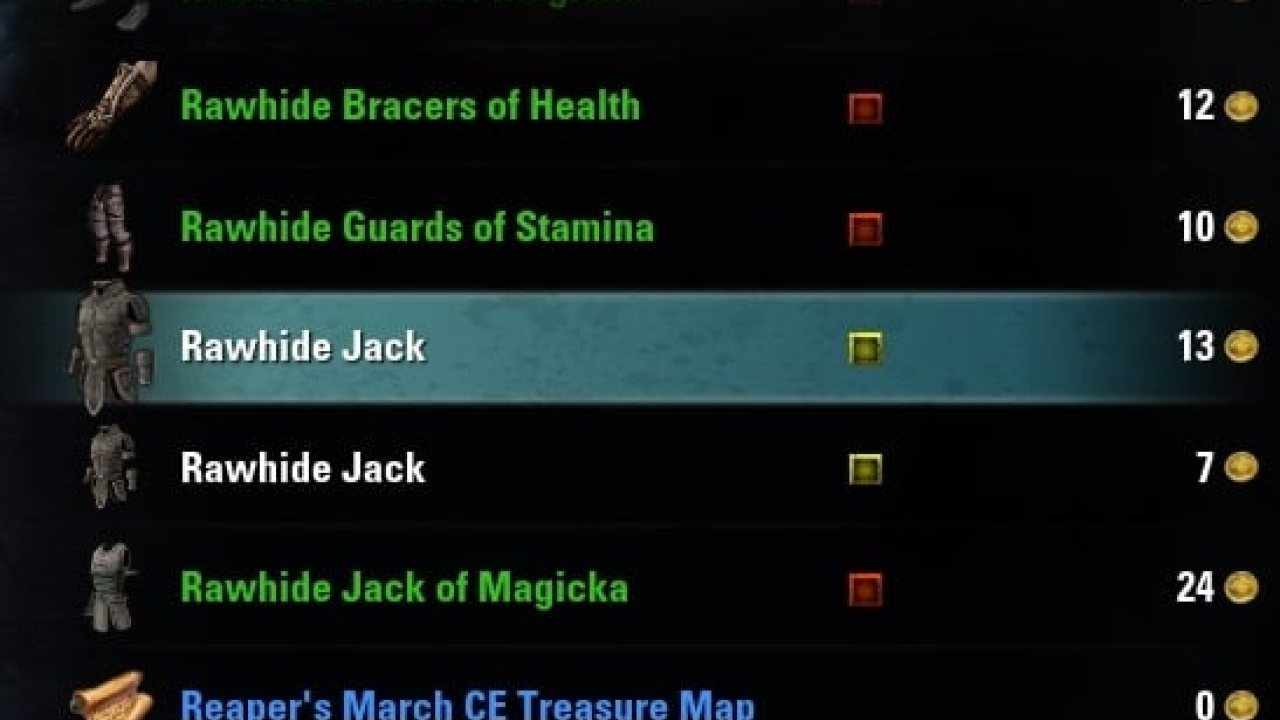
A simple addon that adds a little icon to the list view. The icon only shows up for weapons and armor, and will be ORANGE if you do not have the trait researched. If the icon is GREY, that means you don't need to hold onto it for research! If you have duplicate traits, they will all be YELLOW except for the lowest quality item, which will be ORANGE.
The TEAL interwoven circle icon signifies INTRICATE, and the YELLOW gold pieces icon signified ORNATE.
Features:
- Toggle-able crafting vocations so you only see the icons for items you really care about.
- Customizable colors
- Choose between two different main icons for your Research Assistant.
- Ability to track ORNATE and INTRICATE items, and the ability to track them regardless of what crafting vocations you have toggled on or off.
- Cross-character research tracking with settings independent to each character! Now you can see at a glance what gear is important to your main crafting character(s)! (You must log in to a character to make the character appear in the dropdown box.)
- Optionally select different characters for light and medium armor, and for weaponsmithing and armorsmithing.
- Optionally change the order of the inventory "priority": An order list shows the inventory that will be used as preferred "bag to take the researchable items from" at the top, the 2nd preferred below, and so on. Reload the UI after changing this order please!
How does RA calculate if the item is researchable or a duplicate (also researchable but another item with the same trait should be prefered for research)?
ResearchAssistant builds a kind of preference value on each item with a trait and compares the following things:
-quality
-item level
-Set item or not
-where is it (bank, bag, guild bank, house bank) -> This order can be changed in the settings
-slotindex in the bag
All together produce an integer number where the lowest number is the one to use for reasearch (red icon) and all others with a higher number and same trait will be duplicates (yellow).
As the bag where the item lays plays a BIG role here moving it between bags can change this preference value in total and make items marked for research -> duplicate now e.g.
The order of "priority" in the bags is (where lower = will be priorized for research)
So moving items from the bank (which is the best place to put your items for research obviously as all chars can access it!) to your bag will raise the score and therefor the item might become a duplicate now.
You are able to change this order of bags/inventories in the settings.
For developers:
If you used the code that used to be here, please make your new add-ons use libResearch instead!
Function to check if an item (bagId, slotIndex) is researchable with a charcter which is set inside teh ReseearchAssistant settings for the item's crafting type.
Will return true if it is researchable for that char or false if not (or item is not researchable at all).
If you use the German or French clients, and you see untranslated text, please feel free to contribute a translation on the Comments page!
If you need something to stop you from accidentally destroying your gear, try my (Randactyl)Item Saver add-on.
As an alternative you can also try this addon of Baertram:
FCO ItemSaver
People have been asking me a lot for a sort of grid or print-out for known traits. It was always something I wanted to add but I have never had the time. Stormknight, however, has come out with a wonderful tool called AI Research Grid. You should give it a try if this is a feature you want!
Thanks to these people:
tejón for improving the look and feel and for providing the basis for the algorithm for the YELLOW/ORANGE icons!
Tonyleila and Iphitos for providing German translations!
Ykses, Flagrick, and svan for providing French translations!
Kwisatz for providing Spanish translations!
Carter_DC, for finding and reporting a rare but annoying bug!
Note: This add-on only covers research lines for the BIG THREE (meanwhile FOUR) crafting vocations. This means I will not be implementing known recipes in this add-on. However, if this is something you want, you should give Wobin a visit and download his Sous Chef addon!
If you like what I'm doing feel free to donate something or contact me on the EU servers: @Baertram
Research Assistant at GitHub
https://github.com/Baertram/ResearchAssistant
ABOUT THIS LISTING
This page describes Research Assistant (Find your researchable items) by Baertram. The description and screenshots are the author's own, imported from their listing on ESOUI on 3 October 2026: https://www.esoui.com/downloads/info111-ResearchAssistantFindyourresearchableitems.html
Mythiq.net hosts no files for it. The download button goes straight to the release file on cdn.esoui.com, so you are downloading from the author's own host, not from a copy of ours.
The download count, rating and comments on this page start at zero and count Mythiq.net only. The source's own figures are not copied here — they measure a different site, and a number that cannot be checked against our own ledger is not worth printing.
Requirements
Game versions
11.2.0
11.1.0
11.0.0
10.3.5
10.2.0
10.1.0
API VERSION
Built for ESO API version 11.2.0, 11.1.0, 11.0.0, 10.3.5, 10.2.0. After a patch the game marks add-ons built for the previous API as out of date; the "Allow out of date add-ons" checkbox in the add-on menu loads them anyway, and most work.
LIBRARIES
Many ESO add-ons depend on a shared library — LibAddonMenu-2.0 above all — which is installed separately, exactly like an add-on. A dependency that is missing shows as the add-on simply not appearing in the list.
CONSOLE
Add-ons are PC and Mac only. There is no way to load them on console.
Installation
1. Download the archive with the button on this page and unzip it.
2. Move the unzipped folder into your add-ons directory:
Windows — Documents\Elder Scrolls Online\live\AddOns
3. Start the game, and at the character select screen click Add-Ons.
4. Tick the add-on. If it is greyed out and marked out of date, tick "Allow out of date add-ons" at the top of the same panel.
5. Log in. Most add-ons need a /reloadui after they are first enabled.
UPDATING
Delete the old folder first. ESO loads everything it finds, and two copies of one add-on is the usual cause of "an add-on has produced an error" on login.
This release downloads from cdn.esoui.com, not from us, so
there is no checksum to compare against. Scan the archive before you unpack it.
Version history
v0.9.6.3Latest
15 Jan 2026 · 37 KB via cdn.esoui.com · 0 downloads Download
Important
Update from version 0.9.4.7 to 0.9.4.8
!BACKUP YOUR OLD SAVEDVARIABLES IF YOU WANT TO KEEP THEM BEFORE LOGIN AND BEFORE UPDATING THIS ADDON!
Changelog
0.9.6.3 - Baertram - 2026-01-14
-Updated version and dependency versions
-Fixed alpha channel of colors being respected
0.9.6.2 - Baertram - 2025-08-03
-Updated versions of API, dependencies
-Updated French translations (many thanks to edalongville)
0.9.6.1 - Baertram - 2023-08-28
Fixed API versions of dependencies
0.9.5.9 - Baertram - 2023-03-14
Updated API and dependencies
Added Chinese translation - Thanks to LoongKeiZ
0.9.5.8 - Baertram - 2022-09-18
Updated API and dependencies
Fixed nil error at research item preference value comparison scanner (number < boolean)
0.9.5.7 - Baertram - 2022-06-19
Updated API and dependencies
Fixed error with missing translations
0.9.5.6 - Baertram - 2022-05-26
Research Assistant 0.9.5.6
-Updated API version
-Updated dependency versions
-> Attention: Added new dependency "LibAddonMenuorderListBox widget"
-Added order list box to change the order of the priorized "where do we take the research items from" bag. Default order is bank>bag>guild bank>house bank.
If you change this list (via drag & drop or mark item and use the move buttons at the right edge of the order widget) reload the UI afterwards please!
-Added support for Giladil the ragpicker, thanks to all of you who have sent in GitHub pull requests or wrote me a PM with your code!
-Tried to fix character selection box showing numbers instead of character names -> If this still happens please contact meh and explain me how I'm able to rebuild this as I was not actually able to get that error (tested everything that is possible, even character renaming!).
A good advice for all addons is: Please logout or reload the UI properly after changing guilds.
-Translation fixes for French, thanks lexo1000
0.9.5.5 - Baertram - 2022-02-15
Updated API for Deadlands + PTS
Fixed item weight tooltip not showing the text
Fixed item protection routines to properly check all with logical AND conjunctions (FCOIS marker icon, ZOs lock, set item, set item max level)
0.9.5.4 - Baertram - 2021-11-03
Updated API for Deadlands
Updated needed dependency versions
0.9.5.2 - Baertram - 2021-07-23
Fix for non-supported traits and trait textures
0.9.5.1 - Baertram - 2021-07-23
-Updated dependency versions
-Added new options for tooltips (show armor/weapon type, show armor weight)
-Recoded the tooltips to fix their update in inventories
-Changed the tooltips to show the crafting research character name at the top within []. If the crafting is not tracked and the marker icon is shown (due to the new protected setting e.g.) it will show "-not tracked-" as character name
-Added new options for protected items (show marker icon and tooltip)
-Added RU translations (only a few so far for the tooltips)
-Updated some other translations
0.9.5.0 - Baertram - 2021-07-21
-Updated API version
-Fixed boolean/number comparison error for e.g. bank researchable items
0.9.4.9 - Baertram
To address the problems for users with multiple accounts and/or characters:
Added setting "Use logged in char for all researches" -> Only works if setting "Account-wide same research characters" is disabled!
If you set this setting all characters for research will always be the currently logged in user, automatically upon login.
The popup asking you to choose a character will be gone then AFTER you have enabled this setting.
0.9.4.8 - Baertram
You need to login with each character at least once to scan it's researched data again.
Updated API version
Off-site on cdn.esoui.com —
no checksum, because we never held this file.
Link checked by our review team on 3 Oct 2026.
Tell us if something is wrong — a file that will not work, content taken from
someone else, or anything that looks unsafe. Reports go to our review team, not
to the author.
We use cookies to ensure that we give you the best experience on our website and improve your experience. By continuing to use this site you consent to such use of cookies.