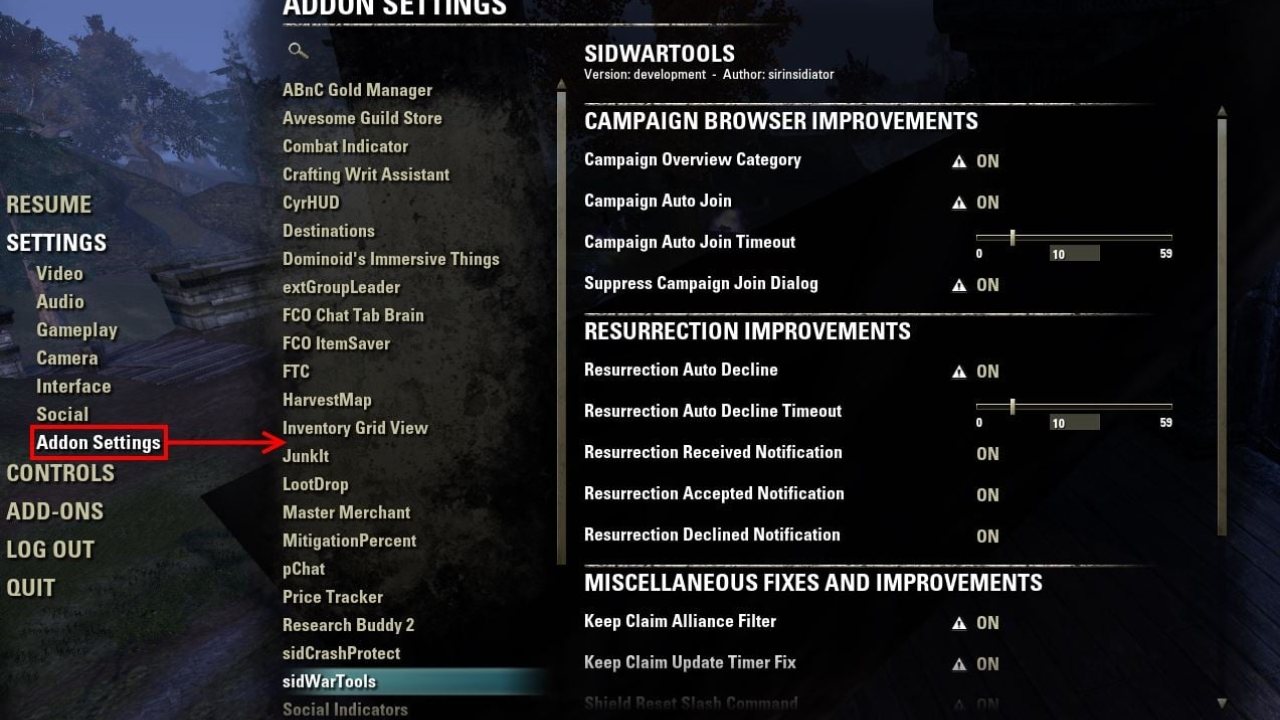
LibAddonMenu is a library which offers many functions for add-on authors to simplify creating a configuration panel in the game's settings menu.
LibAddonMenu is a library which offers many functions for add-on authors to simplify creating a configuration panel in the game's settings menu.
Users:
If the game cannot load some addon because it is missing LibAddonMenu-2.0 as a dependency, simply download and install it like you would any other addon. In case it shows as "out of date" in the game, simply enable the "allow out of date addons" checkbox.
IMPORTANT
In case you get an error that contains text like this:
user:/AddOns//Libs/LibAddonMenu-2.0
Some other addon you have installed likely contains an old version of LibAddonMenu which is loaded before the most current one.
Make sure to search for LibAddonMenu-2.0 folders in your AddOns folder and delete all of them. Afterwards install the latest version of LibAddonMenu-2.0 separately.
Check Kyzderp's guide for more detailed instructions
Developers:
Ever since I (sirinsidiator) have taken over development of LAM-2.0 in 2015, the project is available on github and open for contributions by other authors.
With the ongoing effort to get rid of LibStub in favour of the library management capabilities provided by the game itself since Summerset was released, it is no longer recommended to embed LAM, or use LibStub to access it. Instead it should simply be specified as a dependency and accessed via the new LibAddonMenu2 global variable. Instead of providing it as part of another add-on, users should install and update it separately.
Quickstart:
Simply add LAM2 as a dependency in your addon manifest:
Optionally you can require a specific minimum version of LAM in case you rely on some features that are not available in earlier versions.
In your code you can simply access the library via the global variable "LibAddonMenu2" and start creating your settings panel and controls:
For more examples and information you can take a look at exampleoptions.lua, AwesomeGuildStore/Settings.lua, the LAM wiki or the source code. Each control has a full list of available properties in the comment at the start of the lua file.
Features:
- Controls - LAM offers different control types to build elaborate settings menus
- Reset to Default - LAM can restore the settings to their default state with one key press
- Additional AddOn Info - Add a version label and URLs for website, donations, translations or feedback
- AddOn Search - Can't find the settings for your AddOn between the other hundred entries? No problem! Simply use the text search to quickly find what you are looking for
- Slash Commands - Provides a shortcut to open your settings menu from chat
- Tooltips - In case you need more space to explain what a control does, simply use a tooltip
- Warnings - If your setting causes some unexpected behaviour, you can simply slap a warning on them
- Dangerous Buttons - when flagged as such, a button will have red text and ask for confirmation before it runs any action
- Required UI Reload - For cases where settings have to reload the UI or should be stored to disk right away, LAM offers a user friendly way to ask for a UI reload.
- Support for all 5 official languages and 6 custom localisation projects
External controls:
- DatePicker Widget
ABOUT THIS LISTING
This page describes LibAddonMenu-2.0 by sirinsidiator. The description and screenshots are the author's own, imported from their listing on ESOUI on 14 August 2026: https://www.esoui.com/downloads/info7-LibAddonMenu-2.0.html
Mythiq hosts no files for it. The download button goes straight to the release file on cdn.esoui.com, so you are downloading from the author's own host, not from a copy of ours.
The download count, rating and comments on this page start at zero and count Mythiq only. The source's own figures are not copied here — they measure a different site, and a number that cannot be checked against our own ledger is not worth printing.
Requirements
Game versions
12.0.0
11.3.0
API VERSION
Built for ESO API version 12.0.0, 11.3.0. After a patch the game marks add-ons built for the previous API as out of date; the "Allow out of date add-ons" checkbox in the add-on menu loads them anyway, and most work.
LIBRARIES
Many ESO add-ons depend on a shared library — LibAddonMenu-2.0 above all — which is installed separately, exactly like an add-on. A dependency that is missing shows as the add-on simply not appearing in the list.
CONSOLE
Add-ons are PC and Mac only. There is no way to load them on console.
Installation
1. Download the archive with the button on this page and unzip it.
2. Move the unzipped folder into your add-ons directory:
Windows — Documents\Elder Scrolls Online\live\AddOns
3. Start the game, and at the character select screen click Add-Ons.
4. Tick the add-on. If it is greyed out and marked out of date, tick "Allow out of date add-ons" at the top of the same panel.
5. Log in. Most add-ons need a /reloadui after they are first enabled.
UPDATING
Delete the old folder first. ESO loads everything it finds, and two copies of one add-on is the usual cause of "an add-on has produced an error" on login.
This release downloads from cdn.esoui.com, not from us, so
there is no checksum to compare against. Scan the archive before you unpack it.
Version history
v2.0 r43Latest
13 May 2026 · 50 KB via cdn.esoui.com · 11 downloads Download
2.0 r43
- fixed error when playing in XBox Game Pass PC version (thanks DakJaniels)
- fixed leaking global variable (#155, thanks DakJaniels)
- fixed inconsistent behavior in multi select dropdown when using choiceValues (#156, thanks Kyzeragon)
- updated for Seasons Zero
2.0 r42 (consoles only)
- temporarily turned LHAS into an optional dependency, until the situation is resolved. This unfortunately means, there won't be a settings menu for consoles until then.
2.0 r41
- added "maxChars" to HAS conversion for console (#153, thanks M0RGaming)
- fixed dropdown width not getting calculated correctly
- fixed dropdown height no longer being restricted after opening it for the second time
- updated for Seasons of the Worm Cult Part 2
2.0 r40
- added (temporary) LAM to HAS conversion for console (#149, thanks Dolgubon)
2.0 r39
- added "compatibility" for console
- this just makes it so that there are no errors in console flow - actual menu generation will be subject of a future v3
- fixed click sound no longer working in addon list (#147, thanks DakJaniels)
- updated Chinese translation (#144, thanks Jacko9et)
- updated for Seasons of the Worm Cult Part 1
2.0 r38
- fixed submenus only opening once after Update 45 (#145, thanks Baertram)
- added new callback "LAM-PanelControlsCreated" which gets called right before a panel is shown for the first time
- updated for Fallen Banners
2.0 r37
- added Turkish and Ukrainian translations (#137, thanks Sharlikran)
- fixed multi-select dropdowns not showing selected entries correctly (#140, thanks MycroftJr)
- fixed dropdown choice tooltips not working correctly (thanks Calamath)
- updated for Gold Road
2.0 r36
- added multiselect feature to dropdown control (#135, thanks Baertram)
- fixed anchor constraint warnings in the interface.log (#136, thanks DakJaniels)
- fixed a bug which could lead to some controls not getting created in some rare cases
- updated for Scions of Ithelia
2.0 r35
- added "resetFunc" to each control type which gets called while resetting a panel to default values (#130, thanks Baertram)
- added workaround for dropdown menus getting cut off when used inside submenus
- updated for Secret of the Telvanni
2.0 r34
- added tooltips for header and description controls (#129, thanks remosito)
- fixed old icons not being hidden when choices are updated on the icon picker (thanks Gandalf)
- updated for High Isle
2.0 r33
- fixed dropdown widget choicesValues not accepting boolean "false" (#127, thanks Baertram)
- switched to a new build system
- updated for Ascending Tide
2.0 r32
- added "createFunc", "minHeight" and "maxHeight" properties to custom control (#123, thanks Baertram)
- updated folder structure (#119)
- updated for Markarth
2.0 r31
- fixed iconpicker showing an empty tooltip when no choicesTooltips are set (#111, thanks Scootworks)
- fixed slider mouse wheel interactions (#115)
- fixed translated texts not showing in the official Russian localization (#118, thanks andy.s)
- improved dropdown choice tooltip code compatibility (#115)
- added "helpUrl" property for many control types (#109, thanks Baertram)
- added "textType" and "maxChars" properties for editbox (#110, thanks Scootworks)
- added "readOnly" property for slider (#112, thanks Scootworks)
- removed embedded copy of LibStub (#116)
- updated Japanese translation (#113, thanks Calamath)
- updated for Greymoor
2.0 r30
- updated Korean translation (thanks whya5448)
- added "enableLinks" property to description control (#102, thanks silvereyes333)
- updated for Dragonhold
Off-site on cdn.esoui.com —
no checksum, because we never held this file.
Link checked by our review team on 14 Aug 2026.
Tell us if something is wrong — a file that will not work, content taken from
someone else, or anything that looks unsafe. Reports go to our review team, not
to the author.
We use cookies to ensure that we give you the best experience on our website and improve your experience. By continuing to use this site you consent to such use of cookies.