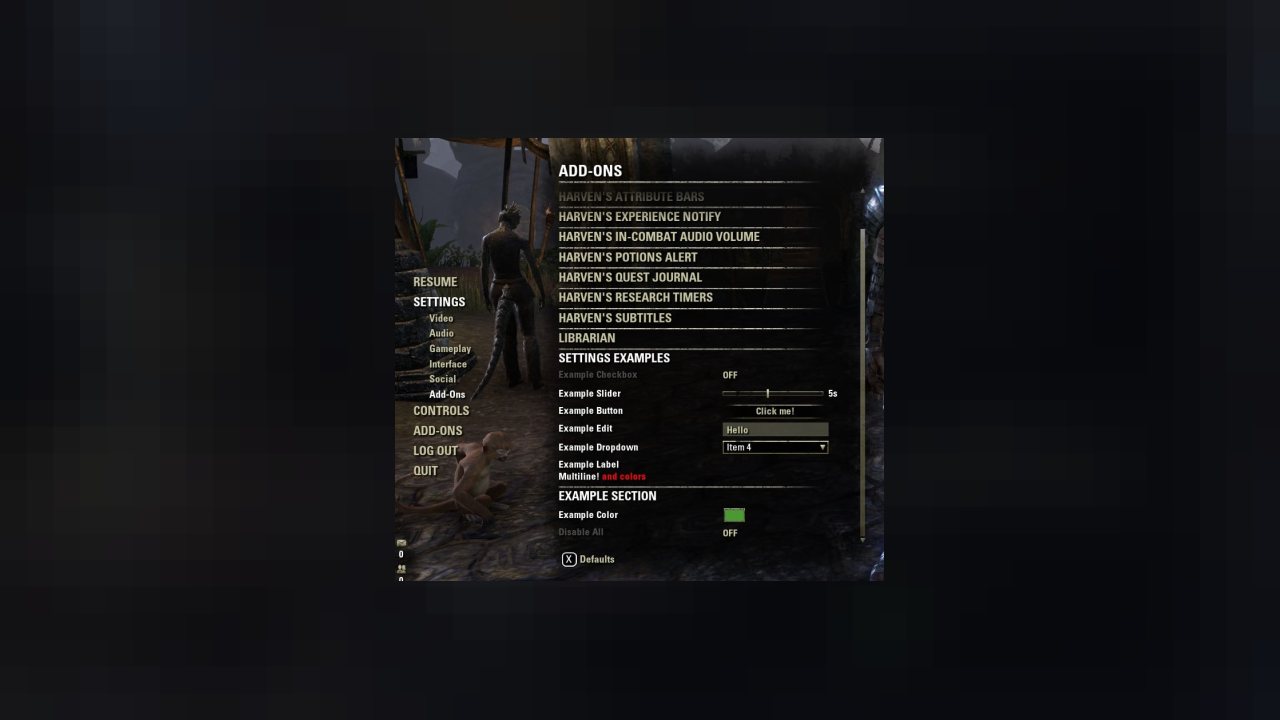
With this addon you can create and add your addon settings to the common settings page. The functionality is similar to great Seerah's LibAddonMenu addon but it's written from scratch. The settings page can be found in Settings->Addons menu. When you open that menu you will see sorted addons…
Description
With this addon you can create and add your addon settings to the common settings page. The functionality is similar to great Seerah's LibAddonMenu addon but it's written from scratch. The settings page can be found in Settings->Addons menu. When you open that menu you will see sorted addons names. Chosen addon setting will appear after clicking addon name. Main features:
- only one addon settings are visible at a time,
- no control is created when you define your addon settings to avoid "Too many anchors processed" error,
- controls are created when you select an addon,
- when you select another addon the controls are reused, so the number of controls will stay at decent level :)
For Console
Since LibHarvensAddonSettings has been removed by this fake DMCA, LibVotans is the same package using a different name.
Just change the dependency in your bnet uploader to LibVotans. For ESO all remains the same.
Usage
Edit your addon manifest file and add following line:
Detailed description at github by @DakJaniels: DakJaniels/HowToUse_LibHarvensAddonSettings
Then take a look at this example addon:
lua: HarvensAddonSettingsExample.lua
manifest: HarvensAddonSettingsExample.txt
ABOUT THIS LISTING
This page describes LibHarvensAddonSettings by Harven. The description and screenshots are the author's own, imported from their listing on ESOUI on 3 October 2026: https://www.esoui.com/downloads/info584-LibHarvensAddonSettings.html
Mythiq.net hosts no files for it. The download button goes straight to the release file on cdn.esoui.com, so you are downloading from the author's own host, not from a copy of ours.
The download count, rating and comments on this page start at zero and count Mythiq.net only. The source's own figures are not copied here — they measure a different site, and a number that cannot be checked against our own ledger is not worth printing.
Requirements
Game version
12.0.0
API VERSION
Built for ESO API version 12.0.0. After a patch the game marks add-ons built for the previous API as out of date; the "Allow out of date add-ons" checkbox in the add-on menu loads them anyway, and most work.
LIBRARIES
Many ESO add-ons depend on a shared library — LibAddonMenu-2.0 above all — which is installed separately, exactly like an add-on. A dependency that is missing shows as the add-on simply not appearing in the list.
CONSOLE
Add-ons are PC and Mac only. There is no way to load them on console.
Installation
1. Download the archive with the button on this page and unzip it.
2. Move the unzipped folder into your add-ons directory:
Windows — Documents\Elder Scrolls Online\live\AddOns
3. Start the game, and at the character select screen click Add-Ons.
4. Tick the add-on. If it is greyed out and marked out of date, tick "Allow out of date add-ons" at the top of the same panel.
5. Log in. Most add-ons need a /reloadui after they are first enabled.
UPDATING
Delete the old folder first. ESO loads everything it finds, and two copies of one add-on is the usual cause of "an add-on has produced an error" on login.
This release downloads from cdn.esoui.com, not from us, so
there is no checksum to compare against. Scan the archive before you unpack it.
version 2.2.0:
- New setting "Atlas Icon Picker" (Multi icon texture). Thanks to @imPDA.
- Fixed PC version of "Atlas Icon Picker".
version 2.1.9:
- Batch section setup in `AddSettings` to improve performance on large panels. Thanks to @Dack.
version 2.1.8:
- Fixed empty menu. (Console)
- Allow to suppress section creates a sub-menu (Console)
version 2.1.7:
- Dynamic setting pages should have settings correctly added into sections. Thanks to @Shienar.
version 2.1.6:
- GameCoreUI support.
version 2.1.2:
- New option to selective ignore "reset to default" per setting. Defaults to false for backwards compatibility. Thanks to @gamersa22.
- Tweak RefreshSelection method due to comments from ZOS source code. Good catch from @DakJaniels.
version 2.1.1:
- Fixed color picker alpha channel selection. Thanks to @M0RGaming.
version 2.1.0:
- New features: Dynamic setting pages & sub-menu. Thanks to @Shienar.
version 2.0.7:
- For LibConsoleDialogs: Allow to override "Back" button.
version 2.0.6:
- Remove sort from dropdown control creation.
version 2.0.5:
- Fixed initialization issue for LibConsoleDialogs.
version 2.0.4:
- Fixed issues for LibConsoleDialogs:
* Addon settings are shown instead of dialog, if there is just one addon with settings.
* Second dialog showing the controls of the first one.
version 2.0.3:
- Console: New option for ST_LABEL: canSelect
- Both: Support for string identifier.
version 2.0.2:
- Fixed issue with "Reset to defaults", if dropdown items using a function instead of a fix table.
- Fixed console UI does not respect allowDefaults.
- Fixed "StateChange" using wrong constant, which does not really matter, (yet)
- New control "Icon Picker". (ST_ICONPICKER)
version 2.0.0:
- Console UI support.
Version 1.9.1
- Fixed drop-downs get cut off.
- API bump for update 41.
Version 1.9.0
- Fixed dropdown with long text.
- Fixed sticky controls after
Version 1.8.0
- Fixed error caused by API change, e.g. Harven's Potion Alert.
- Code refactoring. Thanks to @Scootworks.
Version 1.7.5
- editcontrol: new parameters textType and maxChars (thanks to Scootworks),
- editcontrol: save value if you leave the control without pressing enter (thanks to Scootworks),
- bye bye LibStub
Version 1.7.4
- Fixed controls reanchoring to the top of the panel when used together with LAM
Version 1.7.3
- Changed the type of this addon to library,
- Made LibStub optional,
- Compatibility fixes to 100029 API
Version 1.0.7.2
- Lots of changes since last update ;)
Version 1.0.4
- Added support for default values and "Defaults" button handler,
- Settings controls can be enabled/disabled,
- Done some code refactoring,
- Support for optional "options" table as second parameter to LibHarvensAddonSettings:AddAddon(), see example addon.
Version 1.0.3
- Fixed exception caused by adding more than one addon with the same name,
- Colors are removed from addons names.
Version 1.0.2
- Made some fixes suggested by Garkin.
Version 1.0.1
- Removed whole .xml file because when used in more than one addon, virtual controls were redefined and ESO doesn't like it. Insted the controls are created inside the lua code (still using control pools).
Off-site on cdn.esoui.com —
no checksum, because we never held this file.
Link checked by our review team on 3 Oct 2026.
Tell us if something is wrong — a file that will not work, content taken from
someone else, or anything that looks unsafe. Reports go to our review team, not
to the author.
We use cookies to ensure that we give you the best experience on our website and improve your experience. By continuing to use this site you consent to such use of cookies.