The original guild history API was written more than 10 years ago and never had any of the things addons (ab)use it for in mind.
New guild history
The original guild history API was written more than 10 years ago and never had any of the things addons (ab)use it for in mind.
A few years ago in 2020 the amount of requests generated by addons reached the point where it destabilized the game servers and as a result the API was even disabled completely for a while, until ZOS implemented limits on how many requests can be sent.
This was when I wrote the first version of LibHistoire to provide a cache for guild history data, which different addons could use to avoid sending unnecessary requests to the server and avoid even more restrictions for addons.
Starting with Update 41 in early 2024, the game finally received its own guild history cache. Due to that the library won't need to store event data any more and instead just offers features to inspect and manage the ingame cache as well as a compatibility layer to make transitioning old addons to the new API easier.
Any data that was collected by old versions of LibHistoire in the past will be deleted the first time you log in with version 2 enabled, in order to improve loading times.
Currently the game stores its cache files outside of the usual live folder and they can be found in the following location:
Windows:
MacOS:
You should always back them up together with your LibHistoire saved variable file to ensure proper operation.
The cache is stored per account, so data received for a guild on one account currently won't be shared with another who's in the same guild and will have to be requested again from the server.
The new API allows to receive up to 500 events (from previously 100) with each request, but at the same time the cooldown for addon requests has been increased to 2 minutes (from 30 seconds).
This means automated requests will be effectively 25% faster for busy categories, but may currently take a bit longer overall to finished for all categories.
Depending on how well the new history performs on the server, this cooldown is subject to change and we may see less waiting time between requests in the future.
So what is this library for now?
The main purpose of the library is currently to coordinate server requests and event processing between different addons via a common interface, to reduce waiting time and improve game performance.
It also provides a variety of functions and settings for users to see what is going on in the background and to interact with and control the cache behaviour.
Dependencies
The following dependencies are required by LibHistoire:
- LibAsync - to minimize fps loss while processing history events
- LibCustomMenu - for the options menu of the status window
- LibDebugLogger - for logging useful debug information in case something goes wrong
- LibAddonMenu-2.0 - Provides settings menus for addons
User Interface
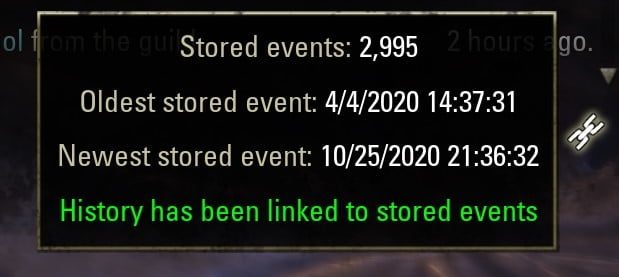
The status icon on the bottom right of the guild history symbolizes the link status of the currently viewed category in the selected guild. On hover it will show a tooltip that gives information about the stored history and unlinked events.
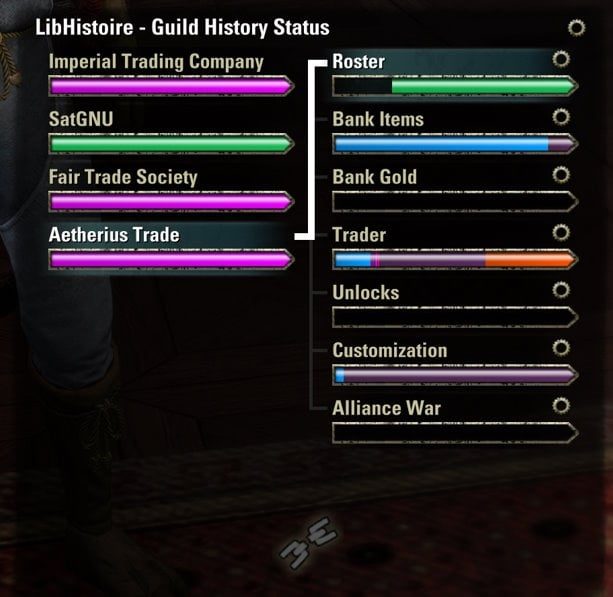
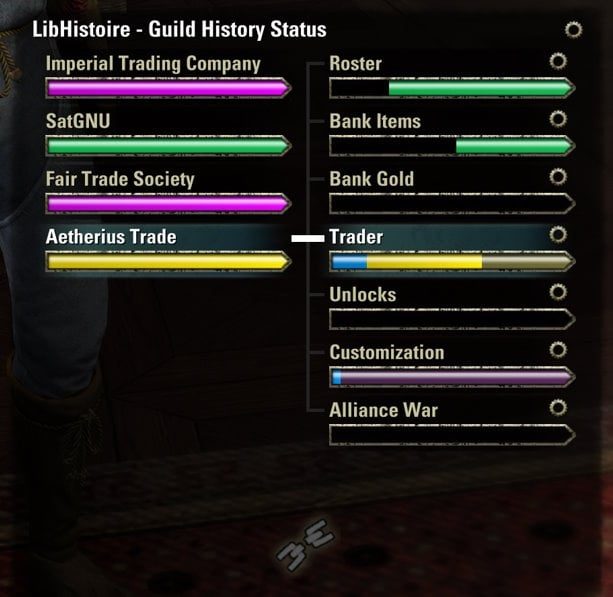
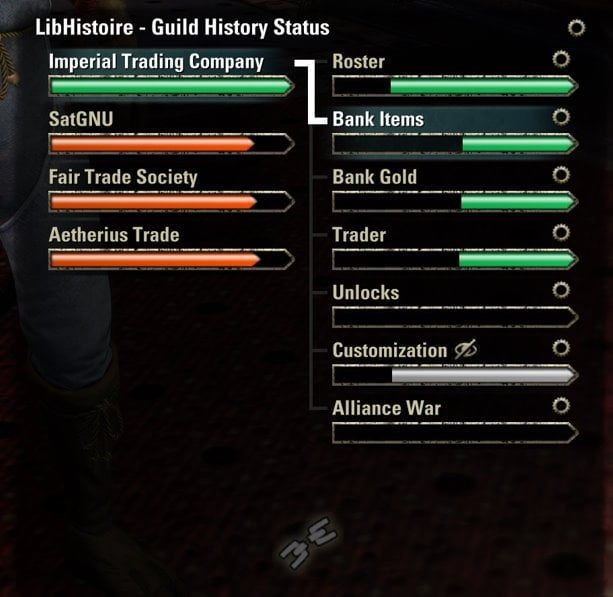
The new guild history status panel will provide an overview of the cache status for each guild and category.
On the left side it will show each guild and the overall progress, on the right side it will show the individual categories for the currently selected guild.
Clicking on a guild or category will update the selection in both the status window and the guild history menu accordingly.
The category status bar shows all the time ranges which are stored in the cache, as well as queued requests and currently processed events. It also uses different colors to symbolize different states for each segment.
Guild status colors:
Pink - Waiting for server requests to finish
Red - No more requests queued, but not everything is linked
Yellow - Processing events
Green - Everything is linked up
Category status colors:
Blue - Linked range, but has not been connected with newest events yet
Red - Events after the linked range, but not connected to the linked range
Green - Linked range is up to date with newest events
Dark green - Last part of the linked range which does not contain any events
Grey - Events before the linked range, or events in a category with no listeners or which is forced off
Purple - Pending server request
Pink - Part of the request range which already contains events
Yellow - Already processed events
Dark Yellow - Events to be processed
Examples for all the colors:
When you hover over any of the entries, a tooltip will show you the same information as the tooltip in the guild history menu.
The category entries also offer a menu with some options.
On the bottom of the panel you can see an icon which symbolizes the overall state and gives some general information about what is happening when you hover over it.
The cog button on the top right will open a context menu with an option to unlock the window so it can be moved and an option to hide it (same as the button on the bottom left of the guild history)
The library also features a settings menu to control various game settings that are currently not exposed in the vanilla UI, a feature to mark gaps in the history data in the ingame history UI, as well as the possibility to jump directly to either the first page, or the first page with missing history data by holding shift while clicking on the previous or next page ingame UI buttons.
Special Thanks
FooWasHere who helped me test how the history behaves on rank and permission changes
ZOSDanBatson and ZOSSethL for answering my many questions about the history API
Everyone else who helped me test this and gave me feedback
For Developers
Why should you use it?
- It minimizes the cooldown for server requests sent by addons to the absolute minimum and if every addon starts using it, everyone gets their data faster.
- It takes care of all the complexity that comes with requesting the history. There are many special cases you probably didn't even think about. The lib will handle them all for you.
- It makes it easy to process a specifc time range, or continuously follow the history in chronological order.
- It automatically spreads out event processing over multiple frames via LibAsync, so you don't have to worry about fps impact.
How does it work
The library keeps track of which events have already been sent to listeners and ensures that it doesn't skip anything in case newer events are received before it caught up.
When a listener starts, it will first iterate over available "linked" events, then wait for "unlinked" events to get linked before it iterates over those and finally start passing along newer events whenever they arrive. This is all done via LibAsync, so you will only get as many events per frame as you can safely process without affecting performance.
To ensure an addon only starts processing from where it left off, it offers ways to select a starting point either by specifying an eventId or a timestamp.
If you find a problem, feel free to open an issue over on github, or leave a comment here on ESOUI.
Migration Guide
Here is a short guide on how to migrate your addon to the new processor api.
The GUILD_HISTORY_* and GUILD_EVENT_* constants used by the old history api are not compatible with the new processor api and need to be replaced with the appropriate new constants.
You can use the mapping for the legacy listener api found in compatibility.lua as a starting point to figure out what to replace them with.
The new processor class is very similar to the legacy listener class, but has a few key differences:
- You now have to specify an addon name which is shown in the status UI and debug information to help identify who is registered to a category.
- SetBeforeEventTime has been changed to exclude the specified time. Keep that in mind when updating code that uses this function directly.
- The iterationCompletedCallback has been removed in favor of a new onStopCallback which passes a StopReason to inform you why the processor has stopped.
- SetStopOnLastEvent has been renamed to SetStopOnLastCachedEvent to better communicate what it does.
- A new registeredForFutureEventsCallback was added to inform you when the processor has finished passing all cached events and is now waiting for new events to arrive.
- A new receiveMissedEventsOutsideIterationRange flag was added to give you a way to listen to incoming events that are not included in the specified iteration range.
- SetTimeFrame was removed in favor of StartIteratingTimeRange which simplifies configuration and directly starts the processor.
- A new StartStreaming function was added to simplify the most common use case of processing cached events since the last time the addon was loaded and then waiting for new events to arrive.
- The event callbacks now directly receive the new event objects specified in the ingame ui code. These are shared between all addons and can point to a different event after the callback has ended, so make sure you do not modify or store them and instead extract the information you need in the context of the callback.
Check the examples and the API reference section below for more details on how you can use the new processor api.
In case you have stored any eventIds received via the legacy listener api, you will also want to convert these the first time a user starts the new version of your addon.
You can use the new LibHistoire:ConvertArtificialLegacyId64ToEventId() function to attempt converting id64 eventIds to the new id53 values.
Keep in mind that the original id64s from the old history api cannot be mapped to the new id53s, so the function may return nil for values that are not produced by the legacy listener api.
The library now also offers a new OnReady function which simplifies ensuring that it has fully loaded before you start using it.
There are now also new callbacks for when the library has linked a category to present events, as well as when the managed range has been lost, or a new managed range has been established.
Check the MANAGED_RANGE_LOST, MANAGED_RANGE_FOUND and CATEGORY_LINKED callbacks in the API reference section below.
Examples
Iterating a specific time range
This example outlines how a processor can iterate over all currently cached events in a specific time range. It will automatically stop in case the time range is not fully cached, so make sure to handle early stops as needed.
This could for example be used together with LibDateTime's GetTraderWeek function to iterate over all donations in a specific trading week and do something with them.
Listening to all events in a category
This example shows how to use the new processor api to start a processor for each guild and process guild store events starting from the last time the addon was loaded and without an explicit end.
The processor may still be stopped in case the user does something that requires to evaluate how to continue without data loss. You can either handle that case by registering the onStopCallback before calling StartStreaming, or just ignore it and let the addon resume the next time the user logs in.
API Reference
You can also use the api.doc.lua file in the addon folder to get autocompletion with IDEs that support it.
LibHistoire
ConvertArtificialLegacyId64ToEventId
Utility function to convert id64s that have been artificially created by a legacy listener to the new id53 equivalent.
Should be used one time only to convert all id64s that have been stored by the addon when switching to the new event processor api, since it's not the fastest operation.
@param id64 — The id64 to convert.
@return id53 — The converted id53 or nil if the id64 cannot be converted.
CreateGuildHistoryListener (deprecated)
This method will be removed in a future version. Use CreateGuildHistoryProcessor instead.
Creates a legacy listener object which emulates the old guild history api. See guildHistoryCache/GuildHistoryLegacyEventListener.lua for details.
It's highly recommended to transition to CreateGuildHistoryProcessor instead, to take better advantage of the new history api.
@param guildId — The id of the guild to listen to.
@param category — The legacy category to listen to. One of the GUILD_HISTORY_* constants. See guildHistoryCache/compatibility.lua for details.
@return listener — The created listener object or nil if no caches were found for the provided guildId and category.
Creates a processor object which can be configured before it starts sending history events to an addon. See guildHistoryCache/GuildHistoryEventProcessor.lua for details.
@param guildId — The id of the guild to process history events for.
@param category — The category to process history events for.
@param addonName — The name of the addon that is processing the events. This is used to allow users to identify addons that are registered to a category, as well as to provide better logging.
@return processor — The created processor object or nil if no caches were found for the provided guildId and category.
See:
- GuildHistoryEventProcessor
IsReady
This function can be used to check if the library is ready to be used. It will return true after the INITIALIZED callback has been fired.
When the library is not ready yet, make sure to register to the INITIALIZED callback to know when it is.
@return isReady — True if the library is ready to be used, false otherwise.
See:
- Callbacks.INITIALIZED
OnReady
A convenience function to execute a callback when the library is ready. When the library is already initialized, the callback will be executed immediately.
@param callback — The function to call when the library is ready. It will receive the LibHistoire object as an argument.
See:
- - Callbacks.INITIALIZED
- LibHistoire.IsReady
RegisterCallback
Register to a callback fired by the library. Usage is the same as with ZO_CallbackObject.RegisterCallback. You can find the list of exposed callbacks in api.lua
@param callbackName — One of the exposed callbacks.
@param callback — The function to call when the callback is fired.
See:
- Callbacks
UnregisterCallback
Unregister from a callback fired by the library. Usage is the same as with ZO_CallbackObject.UnregisterCallback.
@param callbackName — One of the exposed callbacks.
@param callback — The function to unregister.
See:
- Callbacks
GuildHistoryEventProcessor
GetAddonName
Returns the name of the addon that created the processor.
@return addonName — The name of the addon that created the processor.
GetCategory
Returns the category.
@return category — The event category the processor is listening to.
GetGuildId
Returns the guild id.
@return guildId — The id of the guild the processor is listening to.
GetKey
Returns a key consisting of server, guild id and history category, which can be used to store the last received eventId.
@return key — The key that identifies the processor.
GetPendingEventMetrics
Returns information about history events that need to be sent to the processor.
@return numEventsRemaining — The amount of queued history events that are currently waiting to be processed by the processor.
@return processingSpeed — The processing speed in events per second (rolling average over 5 seconds).
@return timeLeft — The estimated time in seconds it takes to process the remaining events or -1 if it cannot be estimated.
IsRunning
Returns true while iterating over or listening for events.
@return running — true if the processor is currently running.
SetAfterEventId
Allows to specify a start condition. The nextEventCallback will only return events which have a higher eventId.
@param eventId — An eventId to start after.
@return success — true if the condition was set successfully, false if the processor is already running.
SetAfterEventTime
Allows to specify a start condition. The nextEventCallback will only receive events after the specified timestamp. Only is considered if no afterEventId has been specified.
@param eventTime — A timestamp to start after.
@return success — true if the condition was set successfully, false if the processor is already running.
SetBeforeEventId
Allows to specify an end condition. The nextEventCallback will only return events which have a lower eventId.
@param eventId — An eventId to end before.
@return success — true if the condition was set successfully, false if the processor is already running.
SetBeforeEventTime
Allows to specify an end condition. The nextEventCallback will only return events which have a lower timestamp. Only is considered if no beforeEventId has been specified.
@param eventTime — A timestamp to end before.
@return success — true if the condition was set successfully, false if the processor is already running.
SetEventCallback
Convenience method to set both callback types at once.
@param callback — The function that will be called for each missed event that was found.
@return success — true if the condition was set successfully, false if the processor is already running.
Sets a callback which will get passed events that had not previously been included in the managed range, but are inside the start and end criteria. The order of the events is not guaranteed.
If SetReceiveMissedEventsOutsideIterationRange is set to true, this callback will also receive events that are outside of the specified iteration range.
The callback will be handed an event object (see guildhistory_data.lua) which must not be stored or modified, as it can change after the function returns.
@param callback — The function that will be called for each missed event that was found.
@return success — true if the condition was set successfully, false if the processor is already running.
Sets a callback which will get passed all events in the specified range in the correct historic order (sorted by eventId).
The callback will be handed an event object (see guildhistory_data.lua) which must not be stored or modified, as it can change after the function returns.
@param callback — The function that will be called for each event that is processed.
@return success — true if the condition was set successfully, false if the processor is already running.
See:
- ZO_GuildHistoryEventData_Base
SetOnStopCallback
Set a callback which is called after the listener has stopped.
Receives a reason (see lib.StopReason) why the processor has stopped.
ABOUT THIS LISTING
This page describes LibHistoire - Guild History by sirinsidiator. The description and screenshots are the author's own, imported from their listing on ESOUI on 3 October 2026: https://www.esoui.com/downloads/info2817-LibHistoire-GuildHistory.html
Mythiq.net hosts no files for it. The download button goes straight to the release file on cdn.esoui.com, so you are downloading from the author's own host, not from a copy of ours.
The download count, rating and comments on this page start at zero and count Mythiq.net only. The source's own figures are not copied here — they measure a different site, and a number that cannot be checked against our own ledger is not worth printing.
Media
Requirements
Game version
12.0.0
API VERSION
Built for ESO API version 12.0.0. After a patch the game marks add-ons built for the previous API as out of date; the "Allow out of date add-ons" checkbox in the add-on menu loads them anyway, and most work.
LIBRARIES
Many ESO add-ons depend on a shared library — LibAddonMenu-2.0 above all — which is installed separately, exactly like an add-on. A dependency that is missing shows as the add-on simply not appearing in the list.
CONSOLE
Add-ons are PC and Mac only. There is no way to load them on console.
Installation
1. Download the archive with the button on this page and unzip it.
2. Move the unzipped folder into your add-ons directory:
Windows — Documents\Elder Scrolls Online\live\AddOns
3. Start the game, and at the character select screen click Add-Ons.
4. Tick the add-on. If it is greyed out and marked out of date, tick "Allow out of date add-ons" at the top of the same panel.
5. Log in. Most add-ons need a /reloadui after they are first enabled.
UPDATING
Delete the old folder first. ESO loads everything it finds, and two copies of one add-on is the usual cause of "an add-on has produced an error" on login.
This release downloads from cdn.esoui.com, not from us, so
there is no checksum to compare against. Scan the archive before you unpack it.
Version history
v2.7.1Latest
9 Jun 2026 · 152 KB via cdn.esoui.com · 0 downloads Download
v2.7.1
- fixed errors in XBox Play Anywhere edition
- removed obsolete code
v2.7.0
- improved how events with invalid timestamps are handled during processing
- integrated various minor modifications and bugfixes by DakJaniels (huge thanks!)
- added some resilience against saved variable corruption
- fixed last index of a history page getting calculated incorrectly in some cases when using shift+click to jump to the first page with a gap
- fixed various potential nil and type errors
- improved intellisense support
- improved debug log output
- reduced debug log spam and made some output more concise
v2.6.2
- fixed link warning dialog showing when guild history system is disabled
- added system status to debug info
- dump additional cache information to history log on show debug info
v2.6.1 (consoles only)
- fixed tiny text in history list
v2.6.0
- added notice text in guild history menu when history is currently unavailable
- added api function IsGuildHistorySystemDisabled for other addons
- disabled automated requests while history is unavailable
v2.5.2
- fixed dependency issue in console flow
v2.5.1
- added preliminary compatibility for console
- NOTE: there is currently no UI, but at least the api should work
- adjusted some debug logging
- updated license information
v2.5.0
- updated cache location info for MacOS in settings (thanks nightstrike2!)
- fixed link state not getting detected correctly in some cases
- fixed quick navigation error in Update 43
- fixed quick navigation jumping to wrong page in categories with subcategories
- fixed quick navigation potentially causing prolonged cooldowns
- NOTE: It will now no longer automatically request data and you will instead have to navigate to the next page without pressing shift to trigger a load via ingame code
v2.4.2
- fixed another new error during event processing
- fixed history list entries sometimes getting stuck when switching categories while the gap marker feature is active
v2.4.1
- fixed new error during event processing
v2.4.0
- added feature to mark gaps in the ingame history list + setting to turn it off
- added setting to enable ingame guild history logging feature
- added setting to keep cache data after leaving guilds
- NOTE: this will only prevent the data from getting deleted, but it won't be accessible in the game unless you rejoin the guild
- updated cache path in the settings menu
- NOTE: Please let me know if the path for MacOS is still correct
- fixed currently selected guild not showing properly in the status window in some cases
- fixed an error that could occur when shift clicking the next page button in the history window
- fixed performance issues when navigating categories with a large amount of events
- fixed unlinked events not getting processed in some situations
- fixed errors when no managed range is available when processing events
v2.3.0
- added new LibAddonMenu settings panel with
- sliders to set how long the guild history cache should retain data
- a button to allow resetting all caches at once
- the path to the cache files
- fixed managed range reset not working correctly in some cases
- fixed assertion errors during processing not getting displayed
- now it will properly explode instead of silently getting stuck when invalid timestamps are received
v2.2.1
- fixed error when resetting managed range while a legacy listener is registered
v2.2.0
- re-enabled the selection of guilds and categories via the status window, now that the game has been fixed
- NOTE: switching guilds and categories via the status panel won't send requests automatically. You'll have to manually hit E or use the ingame ui to do so
- added new entry to status window menu to show debug information
- added new API callback "CATEGORY_LINKED" for when a category has been linked to present events
- added new API functions "IsReady" and "OnReady" for easier initialization
- added new guild history event processor API
Off-site on cdn.esoui.com —
no checksum, because we never held this file.
Link checked by our review team on 3 Oct 2026.
Tell us if something is wrong — a file that will not work, content taken from
someone else, or anything that looks unsafe. Reports go to our review team, not
to the author.
We use cookies to ensure that we give you the best experience on our website and improve your experience. By continuing to use this site you consent to such use of cookies.