Originally created by Circonian and named Circonians LibNotifications here on ESOUI.
Originally created by Circonian and named Circonians LibNotifications here on ESOUI.
Who is it for?
Developers.
What does it do?
Allows you to add messages to the games notification area.
How do I use it?
Register the library in your code file:
After your addon is initialized call the libraries CreateProvider() function.
The provider will have a notifications table. This is where you put your messages.
How do I create a Message?
Messages need to be written in a certain format, the following is an example:
So what do all of those keys do?
dataType's and what buttons are available with them:
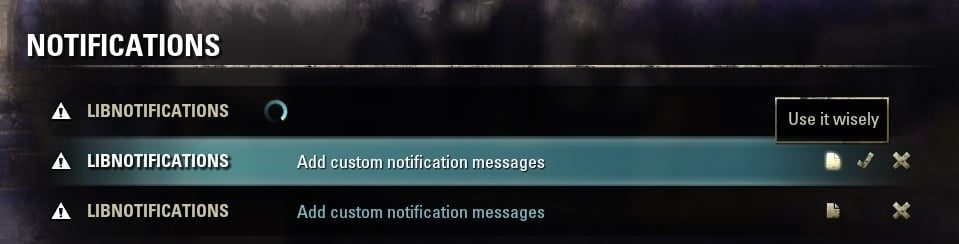
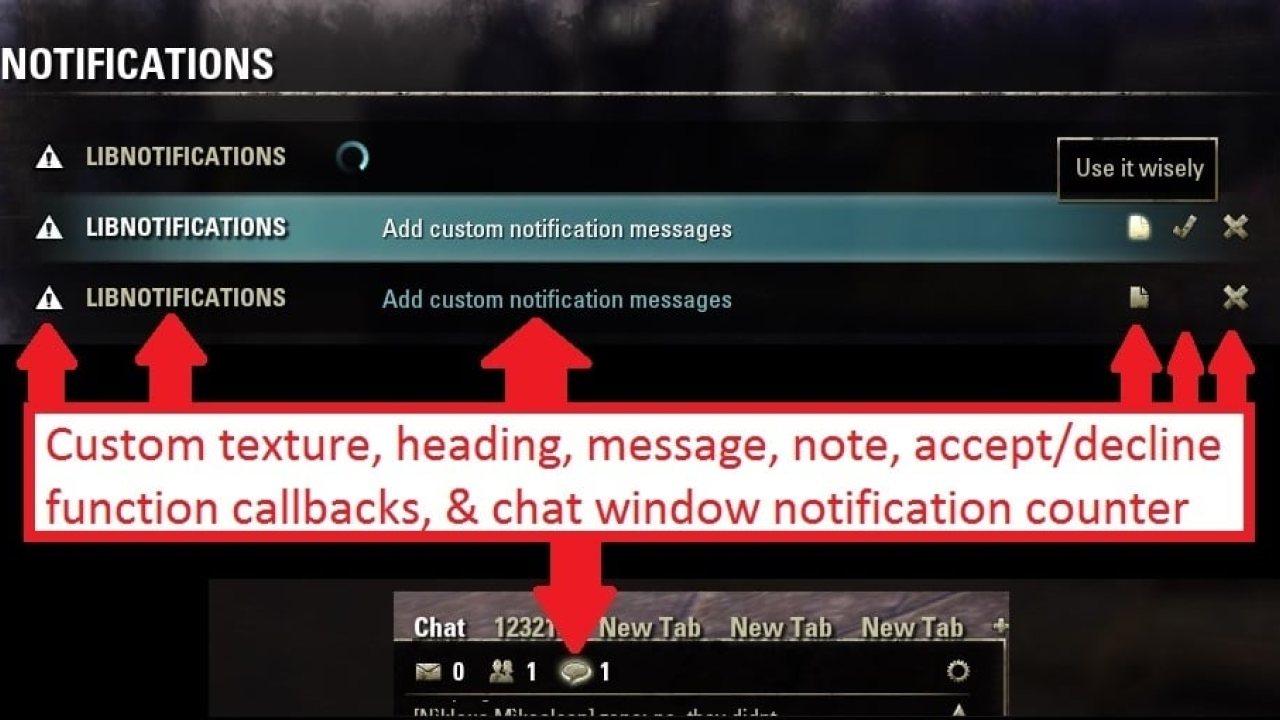
NOTIFICATIONS_REQUEST_DATA -- note, accept (checkmark), & decline (x) buttons
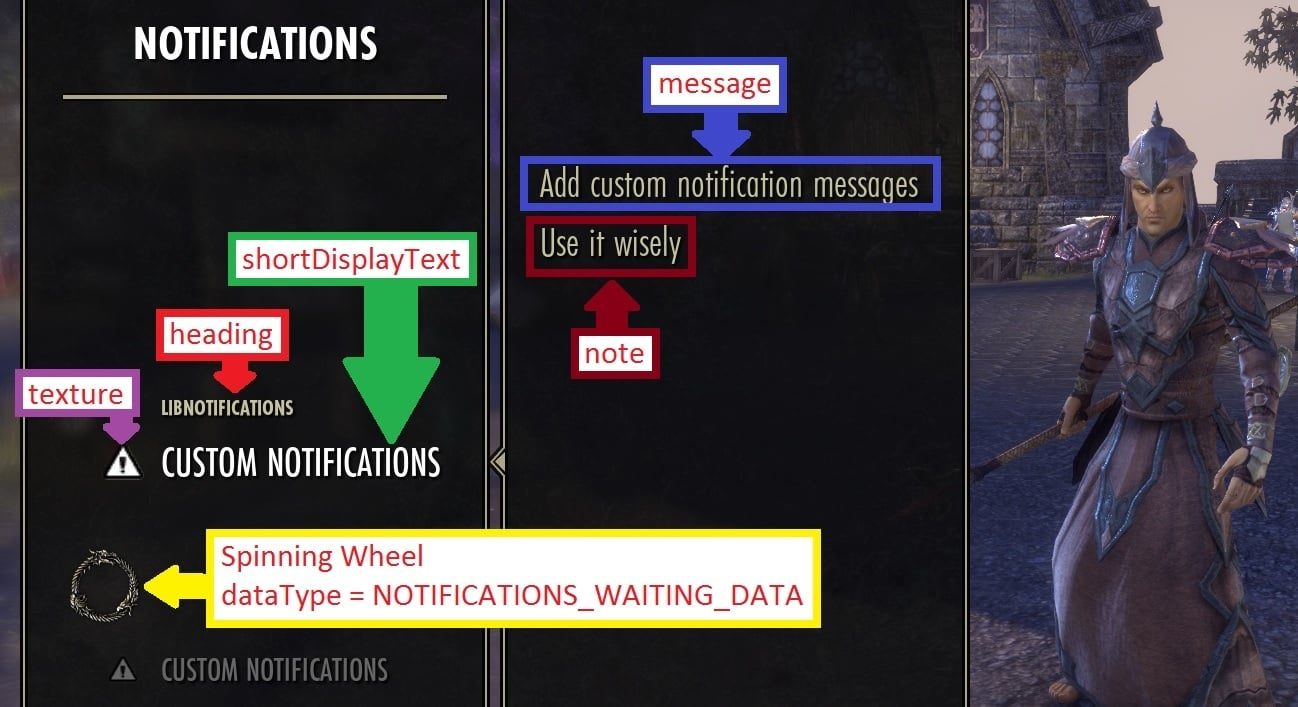
NOTIFICATIONS_WAITING_DATA -- shows a spinning wheel (no message text, note, accept, or decline)
NOTIFICATIONS_ALERT_DATA -- note & delete (x) buttons
secsSinceRequest: Is used for sorting the notifications (in descending order). You should use ZO_NormalizeSecondsSince(0), which is the seconds since login. This will keep the notifications in order, newest notifications on top. Note since it sorts in descending order the keyName is misleading. Its not really the seconds since request, ZOS named it, not me.
note: In keyboard mode this is the tooltip text for the note button. If you leave out the note, the note button will be hidden automatically. In gamepad mode it is just displayed as text after the message. See gamepad picture for an example.
message: The message text to be displayed.
heading: In keyboard mode this is the heading text to be displayed (next to the icon). In gamepad mode this is used as a category header for all messages displayed by your provider. See gamepad picture for an example. *Warning: You can NOT display more than one heading/category at a time in gamepad mode (without creating multiple providers). In gamepad mode the category heading will be named after this key/value from the FIRST msg in your list. Changing the heading name on other messages in your notifications table will do nothing, unless you delete the first message and some other message becomes the first in the list. Then that heading will be used. This is not my doing, this is the way ZOS wrote the gamepad notification system.
texture: The texture to be displayed. In keyboard mode it is 32 x 32.
shortDisplayText: Only used in gamepad mode. This is the text that is displayed under the category/heading, next to the texture, for your message. See gamepad picture for an example.
controlsOwnSounds: When false the game will automatically play the SOUNDS.ACCEPT, SOUNDS.DECLINE sounds when the buttons are clicked. When set to true no sounds will be played so that you can play your own click sounds.
The reason for separate keyboard/gamepad callbacks is because sometimes different code needs to be run for keyboard/gamepad mode. If your code can use the same callback for both just set the keyboard/gamepad callbacks to the same callback function.
keyboardAcceptCallback: Accept callback function for keyboard mode.
keyboardDeclineCallback: Decline callback function for keyboard mode.
gamepadAcceptCallback: Accept callback function for gamepad mode.
gamepadDeclineCallback: Decline callback function for gamepad mode.
data = {} There are other key/value pairs that are used by the game inside the message table. To avoid interfering with key names used by the game place any custom data you want to store with your message in this table.
Create your messages and add them to your provider notifications table:
It is up to you to add & remove your messages from the notifications table when you are done with them.
WARNING:
The table must be numerically indexed & there can be no missing indices. I recommend using table.insert() & table.remove() for adding/removing messages
After you are done making changes Adding/Removing messages, call the update function:
Try not to call this anymore than necessary.
It fires off ALL of the BuildNotificationList functions for every notification provider in the game!
Other Information
Just In case anyone needs to know for creating/selecting icons. The icon on the keyboard rowControl is 32 x 32.
The code can be found on github: https://github.com/sirinsidiator/ESO-LibNotification.
ABOUT THIS LISTING
This page describes LibNotification by sirinsidiator. The description and screenshots are the author's own, imported from their listing on ESOUI on 3 October 2026: https://www.esoui.com/downloads/info1224-LibNotification.html
Mythiq.net hosts no files for it. The download button goes straight to the release file on cdn.esoui.com, so you are downloading from the author's own host, not from a copy of ours.
The download count, rating and comments on this page start at zero and count Mythiq.net only. The source's own figures are not copied here — they measure a different site, and a number that cannot be checked against our own ledger is not worth printing.
Media
Requirements
Game versions
11.0.0
10.3.5
API VERSION
Built for ESO API version 11.0.0, 10.3.5. After a patch the game marks add-ons built for the previous API as out of date; the "Allow out of date add-ons" checkbox in the add-on menu loads them anyway, and most work.
LIBRARIES
Many ESO add-ons depend on a shared library — LibAddonMenu-2.0 above all — which is installed separately, exactly like an add-on. A dependency that is missing shows as the add-on simply not appearing in the list.
CONSOLE
Add-ons are PC and Mac only. There is no way to load them on console.
Installation
1. Download the archive with the button on this page and unzip it.
2. Move the unzipped folder into your add-ons directory:
Windows — Documents\Elder Scrolls Online\live\AddOns
3. Start the game, and at the character select screen click Add-Ons.
4. Tick the add-on. If it is greyed out and marked out of date, tick "Allow out of date add-ons" at the top of the same panel.
5. Log in. Most add-ons need a /reloadui after they are first enabled.
UPDATING
Delete the old folder first. ESO loads everything it finds, and two copies of one add-on is the usual cause of "an add-on has produced an error" on login.
This release downloads from cdn.esoui.com, not from us, so
there is no checksum to compare against. Scan the archive before you unpack it.
Version history
v1.1.0Latest
10 May 2025 · 5.3 KB via cdn.esoui.com · 0 downloads Download
1.1.0--
- added console compatibility
- added support for function values on data.texture to stay in sync with the ingame code
- updated license information
- updated for Seasons of the Worm Cult Part 1
1.0.11--
- removed LibStub support
- switched to semantic versioning
- updated for Secret of the Telvanni
r10--
- fixed incorrect string id for gamepad notification header (Thanks ZOSDanBatson!)
- updated for Markarth
r9--
- added LICENSE and put the code on github
r8--
- updated for Harrowstorm and Greymoor
- added a second global variable "LibNotification" to match the ingame addon name
r7--
- updated for Dragonhold
- made LibStub dependency optional (it's now recommended to use the LibNotifications global variable to access it)
- fixed typo in "keyboardDeclineCallback" (was "keybaordDeclineCallback" before. The incorrect spelling still works, but I recommend you fix it in your addons!)
- added IsLibrary flag to manifest
r6--
- updated for Murkmire
- switched to standalone package structure (developers: make sure you remove it from the manifest and change to DependsOn!)
- permanently fixed the errors that occur when ZOS adds new notification types (thanks Chip for making these tables global!)
r5--
- updated for Summerset
r4--
- updated for Morrowind
r3--
- updated for Homestead
r2--
- updated for Dark Brotherhood
- gamepad support seems to be broken and will be updated in a future version
Version 1.2--
Gamepad Support Added
WARNING: In order to add support for notifications in gamepad mode the entire library was rewritten. There have been some changes to the required structure of the message table. Please read the new instructions for creating a message table on the addons main page.
WARNING: To avoid errors if you wish to store extra data with your message store all of your custom data in a data table inside the message table. Read the new instructions for creating a message table on the addons main page.
Off-site on cdn.esoui.com —
no checksum, because we never held this file.
Link checked by our review team on 3 Oct 2026.
Tell us if something is wrong — a file that will not work, content taken from
someone else, or anything that looks unsafe. Reports go to our review team, not
to the author.
We use cookies to ensure that we give you the best experience on our website and improve your experience. By continuing to use this site you consent to such use of cookies.