LibZone
A library to help with zone information.
It contains:
-Localized zone names for the languages DE, EN, FR, RU
and partially translated zoneNames of the languages: JP, PL
-ZoneId, ZoneIndex, ZoneParentId
-Geographical zone parents: Provide the real geo parents of zones, where ZOs API returns 0 or incorrect values.
API functions as of changelog 2022-07-11.
Used for addons like -> Code and data provided by IsJustaGhost (thank you)
Optional dependencies:
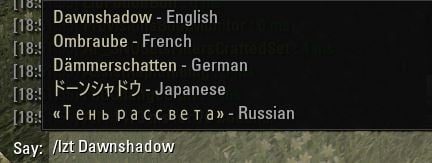
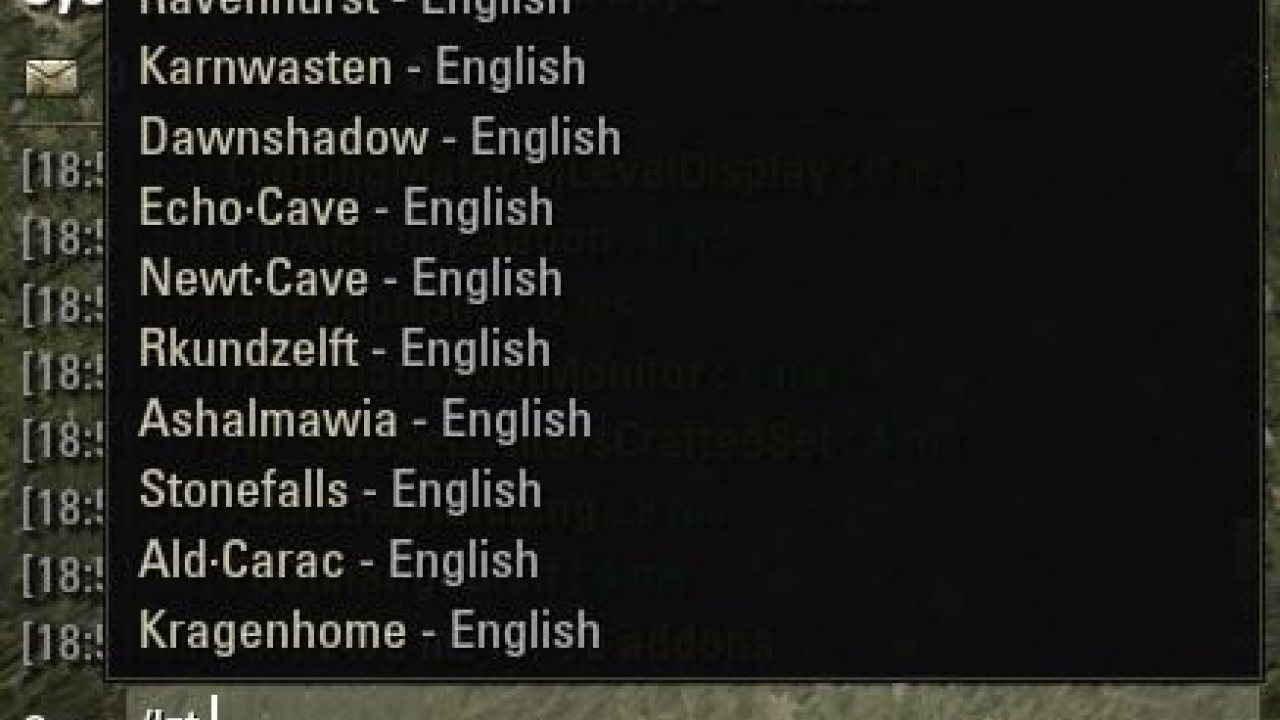
Only on PC (not console): And to help with translations of zone names between different languages:
This library needs the library LibSlashCommander installed seperately if you want to use the zone name translations with chat commands!
Use one of the following slash commands in your chat (only if 'LibSlashCommander' is active!):
Usage
-Download, use as standalone library or keep (otherwise the SavedVariables are lost!) the manifest txt file and just use the library file within your addon.
-Load the library within your addon code using the global variable LibZone
LibStub support was removed with version 6.3 so make sure to ONLY load the library via it's global variable "LibZone"
Please add the dependency to your addon's manifest txt file using the addonversion 069 to make sure the users install at least this version to be access via the global variable:
-> This will make your addon stop loading if the library is missing or installed with a version < then 6.9.
-> This will make your addon load if the library is missing or installed with a version < then 6.9, but it WILL throw error messages if you try to load it via LibStub and might throw other error messages.
Where is the data?
Your instance of LibZone contains 2 tables.
1. for the localized data:
-> Do NOT access this table directly but use the API function LibZone:GetAllZoneData() instead!
-> Language = String, length 2. Example: "en", "de", "fr", "ru"
-> ZoneId = The zone's unique id which you are able to get via some API function like these ones:
2. for the non localized data:
->zoneIndex = The zoneIndex which can be determined via some API functions like these ones:
->zoneId = see above
Data:
The file LibZone_Data.lua contains the localized zone names of the supported languages.
LibZone API functions
Please check this file for the given API functions:
The file LibZone.lua contains functions to read this, and the other information, for your addons.
e.g.
Building new zoneData on PTS e.g. -> SavedVariables
This function will build new zone data and save them to the savedvariables. It will use the current client's language and will be run once as the library loads. So if you are playing on a non-official client language the data will be read and added to your savedvariables.
GitHub
LibZone on Github
ABOUT THIS LISTING
This page describes LibZone by Baertram. The description and screenshots are the author's own, imported from their listing on ESOUI on 3 October 2026: https://www.esoui.com/downloads/info2171-LibZone.html
Mythiq.net hosts no files for it. The download button goes straight to the release file on cdn.esoui.com, so you are downloading from the author's own host, not from a copy of ours.
The download count, rating and comments on this page start at zero and count Mythiq.net only. The source's own figures are not copied here — they measure a different site, and a number that cannot be checked against our own ledger is not worth printing.
Media
Requirements
Game versions
12.1.0
12.0.0
11.3.0
11.2.0
11.1.0
11.0.0
API VERSION
Built for ESO API version 12.1.0, 12.0.0, 11.3.0, 11.2.0, 11.1.0. After a patch the game marks add-ons built for the previous API as out of date; the "Allow out of date add-ons" checkbox in the add-on menu loads them anyway, and most work.
LIBRARIES
Many ESO add-ons depend on a shared library — LibAddonMenu-2.0 above all — which is installed separately, exactly like an add-on. A dependency that is missing shows as the add-on simply not appearing in the list.
CONSOLE
Add-ons are PC and Mac only. There is no way to load them on console.
Installation
1. Download the archive with the button on this page and unzip it.
2. Move the unzipped folder into your add-ons directory:
Windows — Documents\Elder Scrolls Online\live\AddOns
3. Start the game, and at the character select screen click Add-Ons.
4. Tick the add-on. If it is greyed out and marked out of date, tick "Allow out of date add-ons" at the top of the same panel.
5. Log in. Most add-ons need a /reloadui after they are first enabled.
UPDATING
Delete the old folder first. ESO loads everything it finds, and two copies of one add-on is the usual cause of "an add-on has produced an error" on login.
This release downloads from cdn.esoui.com, not from us, so
there is no checksum to compare against. Scan the archive before you unpack it.
9.10 2026-09-28
-Added new zones of Update 51
-Fixed SavedVariables growing by piling-up debug information for the same API version
-Removed SavedVariables storing the current zoneId, index and parentZoneId -> Directly stored in the library internally now during gameplay, to reduce SV size
Console: Removed slash commands auto completion as it hit the memory limit too fast and console players usually do not use the chat's slash commands that often. Maybe re-added in the future once there is a way the memory does not grow that much with LibSlashCommander and all the zone translations.
8.95 2025-10-28
-Updated APIversion to Update 48
-Added new zones
-Preparation for console release - Changed file structure: manifest uses .addon instead of .txt now
New folder PC containing LibSlashCommander "PC only" slash command helpers
8.94 2025-08-19
-Updated APIversion
-Added new zones
8.92 2025-01-04
-Updated APIversion
-Updated dependencies
-Updated all zone names for all languages (except custom language PL as I'm missing the data here, noone provides them).
Thanks to Calamath for the jp data!
-Added debug function
LibZone:DebugGetAllZoneDataNew(doReloadUI)
which saves to the new SV table LibZone_Debug_SV_Data
-All SV tables can contain a subtable __debugInfo__ now which contains 1 to n history entries of the last time the data was updated (per language)
["__debugInfo__"] =
{
=
{
["APIVersionLastUpdate"] = 101044,
["LastUpdate"] = "1/4/2025 12:17:27 AM",
},
},
8.9 2024-05-31
Updated for Gold Road
8.8 2024-03-18
-Fixed Chinese zone lua error (sorry, and thanks for the fix bevisbear)
8.7 2024-03-11
-Updated API version for Scions of Ithelia
-Added new zones
8.6 2023-08-04
Updated APIversion
Updated GeoPArentData for Apocrypha public dungeons & delves which showed their parent = Telvanni Peninsula (thanks to DeadSoon)
8.5 2023-05-02
-Updated API version for Necrom
-Added new zones for Necrom
-Added 2 new public dungeons
8.4 2023-03-14
-Updated API version for Scribes of Fate
-Added new zones for Scribes of Fate
8.3 2022-12-27
-Updated API version for Firesong
-Added new zones for Firesong
8.2 2022-08-26
-Updated API version
-Added new zones for geoParent -> IsJustaGhost
8.1 2022-07-30
-Updated for API101035 Lost Depths
-Added new zoneIds and names
-Added support for Spanish zone names (language: ES)
8.0 2022-07-11
-Added on request:
Geographical parent data - by IsJustaGhost
Used so far in addon: AccurateWorldMap by Thal-J
[New API functions]
--Get the zoneData of the zoneId and read it's pinInfo, and return the parentZoneId and,
--if exists, poiIndex of the map pin associated with the zoneId.
--parameters number: zoneId, number:nilable parentZoneId
-->return: number:nilable parentZoneId, number:nilable parentZoneIndex, table:nilable poiIndex
function lib:GetZoneMapPinInfo(zoneId, parentZoneId)
--Get the geographical parentZoneId of a zoneId. This will not use the games API function GetParenZoneId(zoneId) as this
--might return any other zoneId which is not the geographical parent zoneId.
--If you need to get the normal parent zoneId use GetParenZoneId(zoneId)
-->return: number:nilable parentZoneId
function lib:GetZoneGeographicalParentZoneId(zoneId)
--Get the geographical parentMapId of a zoneId.
-->return: number:nilable parentMapId
function lib:GetZoneGeographicalParentMapId(zoneId)
--Get the geographical parentMapId of a mapId
-->return: number:nilable parentMapId
function lib:GetGeographicalParentMapId(mapId)
-- Display mapPins of relevant POIs for the selected zone.
--parameters number: zoneId
function lib:InspectZonePoiInfo(zoneId)
----Debugging and adding/updating new geo parent zone data after patches----
Off-site on cdn.esoui.com —
no checksum, because we never held this file.
Link checked by our review team on 3 Oct 2026.
Tell us if something is wrong — a file that will not work, content taken from
someone else, or anything that looks unsafe. Reports go to our review team, not
to the author.
We use cookies to ensure that we give you the best experience on our website and improve your experience. By continuing to use this site you consent to such use of cookies.