Track instance lockouts with detailed stats about your time in an instance. Money Trade logs. Alts rested XP amounts. And more.
Nova Instance Tracker
What it does:
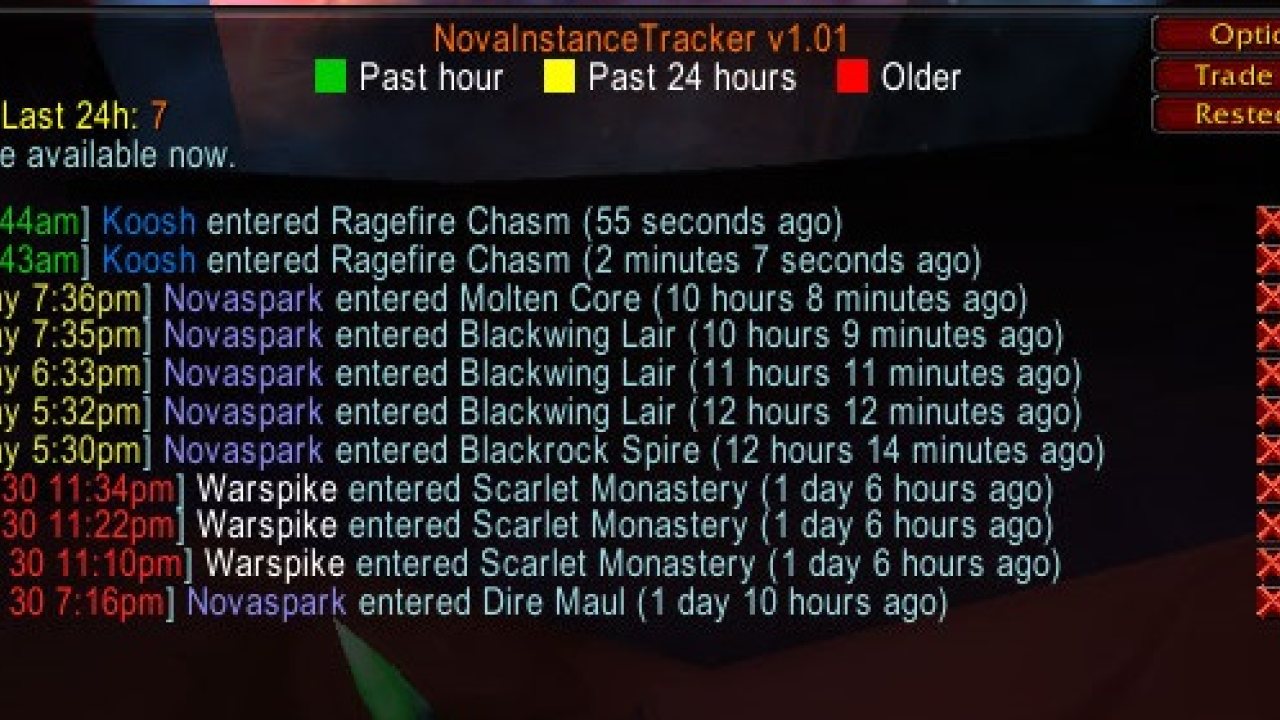
Tracks all your instance lockouts across all alts and servers.
Shows you how long left on 5 per hour and 30 per 24hour lockouts.
Tells you if you are currently on hourly lockout or 24h lockout so you can tell the difference.
Calculates from when you leave the instance not when you enter.
Tells your group when you reset an instance.
Tells you if your leader resets an instance if they have this addon or NovaWorldBuffs installed.
Print your dungeon stats to the group chat or just your chat window when leaving a dungeon (can be turned on/off in /wb config).
Click any text in chat from this addon to open the instance log easily, or type /nit, or use minimap button.
Detects if you re-enter the same instance ID to not add duplicates to the instance log and calc lockouts correctly (like different Scarlet Monastery wings).
Easily clickable X icon in chat to delete any instance you enter if it's not new and not auto detected.
Hover your mouse over any entry in the log to show detailed stats
-Logs all group members Name/Level/Class etc.
-Time you entered and left the instance.
-Time spent inside each instance.
-How many mobs were killed.
-How much XP was earnt.
-Average XP per mob killed.
-Average Group level.
-Raw gold looted from mobs.
-What level you were when entered/left to see which dungeons you dinged in.
-All rep gains (good for checking how much you got while inside raids like MC/ZG/AQ).
Print your instance stats to chat window when you zone out.
Or print them to the group.
Hover the minimap button to easily see lockouts
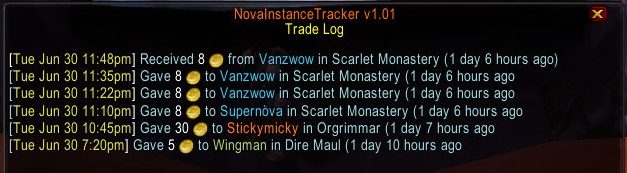
Gold trades
This addon also tracks gold trades to help boosters and people buying.
Shows you in chat window any time you give or receive gold to/from another player.
Has a trade log window to show all trade history and what instance you were in at the time.
Alt statistics and tracking (Includes rested XP and more)
-The alts list showing rested xp will be display when you open the "Your Characters" window.
-You can open the "Your Characters" window by clicking the button in the /nit window or right clicking the minimap button.
-Hover your mouse over any realm name to see your total gold on that realm.
-Hover over any character to get some detailed stats about that character.
--Level, XP, Current RestedXP saved up.
--Gold, free bag slots, armor durability.
--Profession skills.
--Important reagent counts for buffing, soul shards, and more.
--Hunter alts will show how much ammo they have and detailed stats about their pet.
PvP Instance Logging
Arena stats
Battleground Stats
My addon discord for support or suggestions: https://discord.gg/RTKMfTmkdj
ABOUT THIS LISTING
This page describes Nova Instance Tracker by Venomisto. The description and screenshots are the author's own, imported from their listing on CurseForge on 3 October 2026: https://www.curseforge.com/wow/addons/nova-instance-tracker
Mythiq.net hosts no files for it. The download button goes straight to the release file on edge.forgecdn.net, so you are downloading from the author's own host, not from a copy of ours.
The download count, rating and comments on this page start at zero and count Mythiq.net only. The source's own figures are not copied here — they measure a different site, and a number that cannot be checked against our own ledger is not worth printing.
Media
Trade Log
New Instance Entered.
Same Instance Re-entered.
Group Stats Output
Print Stats
Requirements
Game versions
4.4.2
5.5.4
12.1.0
2.5.6
1.15.9
1.60.1
GAME FLAVOUR
This is a retail (modern World of Warcraft) build. It will not work in the Classic clients, which run a different interface API.
INTERFACE VERSION
Built against game version 4.4.2, 5.5.4, 12.1.0, 2.5.6, 1.15.9, 1.60.1. After a patch, an addon that has not been updated is flagged out of date; most keep working, and the "Load out of date AddOns" checkbox on the character screen lets you try.
DEPENDENCIES
Some addons need a separate library addon (Ace3, LibStub and friends) that is not bundled. If the addon does not appear in the list in game, a missing dependency is the usual reason.
Installation
1. Quit World of Warcraft completely. The game reads the AddOns folder at launch and will overwrite settings for an addon added while it is running.
2. Download the archive with the button on this page and unzip it.
3. Move the folder — the one with the .toc file in it, not the zip's wrapper folder — into:
World of Warcraft\_retail_\Interface\AddOns
4. Start the game. On the character selection screen, click AddOns and check that it is listed and enabled.
IF IT DOES NOT APPEAR
Nine times out of ten the folder is nested one level too deep. Interface/AddOns/Thing/Thing/Thing.toc will not load; Interface/AddOns/Thing/Thing.toc will.
UPDATING
Delete the old folder before unzipping the new one. Unzipping over the top leaves files behind that the new version no longer expects.
This release downloads from edge.forgecdn.net, not from us, so
there is no checksum to compare against. Scan the archive before you unpack it.
Tell us if something is wrong — a file that will not work, content taken from
someone else, or anything that looks unsafe. Reports go to our review team, not
to the author.
We use cookies to ensure that we give you the best experience on our website and improve your experience. By continuing to use this site you consent to such use of cookies.