Shows information about what you are looking at. (Hwyla/Waila fork for Minecraft 1.16+)
Jade 🔍
Jade is the information HUD mod - Hwyla/Waila for modern Minecraft versions. Designed for better user experience and API.
Jade can be installed only on the client side. But many features require Jade on the server side. (item storage, brewing stand fuel amount, bees in beehive...)
For mod integration, try Jade Addons: NeoForge Fabric
Notable changes compared to Hwyla:
- API re-design
- More vanilla addons
- Higher configurability
- Better accessibility
As required by the original project Hwyla, Jade utilizes the Creative Commons Attribution-NonCommercial-ShareAlike 4.0 International (CC BY-NC-SA 4.0) license.
ABOUT THIS LISTING
This page describes Jade 🔍 by Snownee. The description and screenshots are the author's own, imported from their listing on Modrinth on 14 August 2026: https://modrinth.com/mod/jade
Mythiq hosts no files for it. The download button goes straight to the release file on cdn.modrinth.com, so you are downloading from the author's own host, not from a copy of ours.
The download count, rating and comments on this page start at zero and count Mythiq only. The source's own figures are not copied here — they measure a different site, and a number that cannot be checked against our own ledger is not worth printing.
Media
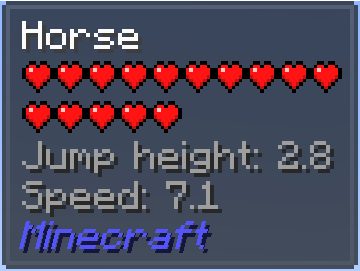
Horse stats
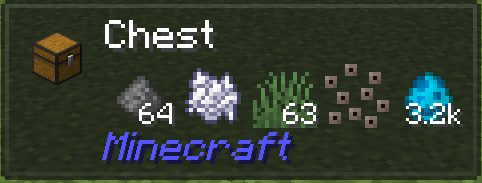
Item storage
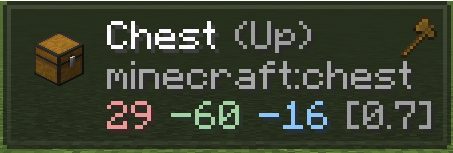
Shows targeted face, position and distance
Harvestability and mining progress
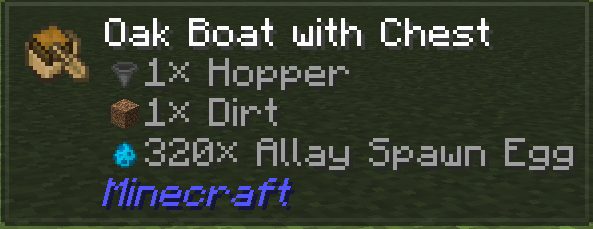
Shows item names in inventory
Requirements
Game versions
26.1.2
26.1.1
26.1
MOD LOADER
This release is built for Neoforge. A mod built for one loader will not load under another — Fabric mods do not run on Forge, and vice versa.
GAME VERSION
Built for Minecraft 26.1.2, 26.1.1, 26.1. Minecraft mods are tied to an exact version: a 1.21.4 build will refuse to load on 1.21.5.
DEPENDENCIES
Check the author's listing for required libraries before you start the game — a missing dependency shows up as a crash on launch, not as a warning.
Installation
1. Install Neoforge for the Minecraft version you play, if you have not already.
2. Download the .jar with the button on this page. Do not unzip it — a mod jar is installed as it is.
4. Launch the game with the Neoforge profile selected.
ON A SERVER
Anything that changes world generation or gameplay has to be installed on the server as well as on every client. Client-side visual and interface mods do not.
UPDATING
Replace the old .jar rather than adding the new one beside it. Two versions of the same mod in the folder is a crash on launch.
This release downloads from cdn.modrinth.com, not from us, so
there is no checksum to compare against. Scan the archive before you unpack it.
Version history
v26.1.9+neoforgeLatest
14 Aug 2026 · 980 KB via cdn.modrinth.com · 15 downloads Download
26.1.9
- fix: CME in registerTagsUpdatedListener
- feat: add /jadec generate_server_overrides
- Update build.gradle for 26.1-neoforge
26.1.8
- #777
- fix: Jade Loot Table Tooltip Crash (Invalid Translatable Argument Type)
- fix: Crash in KeybindOptionButton due to invalid narration argument (StringWidget)
26.1.7
- fix: Only the first element of a MutableComponent is shown in appendTooltip
- feat: add REI integration back
- feat: add JEI integration back (close #774)
26.1.5
- feat: add support for resource packs that use pua characters in the container names (close #770)
- fix: KeybindOptionButton not working (close #773)
26.1.3
- fix: tooltip not updating in JadeTooltipCollectedCallback (close #771)
- Update uk_ua.json (#763)
- chore: update some translations using AI
- chore: change the "loot not generated yet" hint text
- feat: Datapack support improvements (close #754)
- improve: update player name cache if they are online on the client side (close #721)
26.1.1
- fix: Duplicate plugin class error when multiple mods are bundled in a single JAR (close #758)
- feat: display fed status for animals (#757)
- fix: option list entry tooltip overrides server feature tooltip
- feat: loot table provider
- update Chinese translation (#752)
Off-site on cdn.modrinth.com —
no checksum, because we never held this file.
Link checked by our review team on 14 Aug 2026.
Tell us if something is wrong — a file that will not work, content taken from
someone else, or anything that looks unsafe. Reports go to our review team, not
to the author.
We use cookies to ensure that we give you the best experience on our website and improve your experience. By continuing to use this site you consent to such use of cookies.