AI Research Grid allows you to quickly and easily see which traits you have researched for Blacksmithing, Clothing, Woodworking, Jewelry, and known motifs, wherever you are in the world
AI Research Grid allows you to quickly and easily see which traits you have researched for Blacksmithing, Clothing, Woodworking, Jewelry, and known motifs, wherever you are in the world
Features:
- Support for viewing multiple characters on the same account!
- Shows which motifs (styles) you have learned on each character.
- Shows a timer for research on ALL characters (not just the one you're logged in as).
- Can display all known traits as a composite (ALL Mode)
- Can display how to update a character (Relative Mode)
- Shows Chapters known for chapter based styles.
- Right click a style to paste the achieve link (useful for trading/buying chapters)
To open/close the addon, either type the command "/airg" or preferably open the Keybindings set-up and set a key to toggle the addon on/off.
When the addon main window appears, you will see icons on the left of the window, representing Blacksmithing, Clothing, Woodworking, Jewelry Crafting and Styles.
You will also see a dropdown box at the top-right that allows you to select the character to view. The data on other characters will be up-to-date as of the last time you logged out on that character. This means you need to login each character before their data will display.
Click on the icon for the craft profession (or Styles) you wish to see information on.
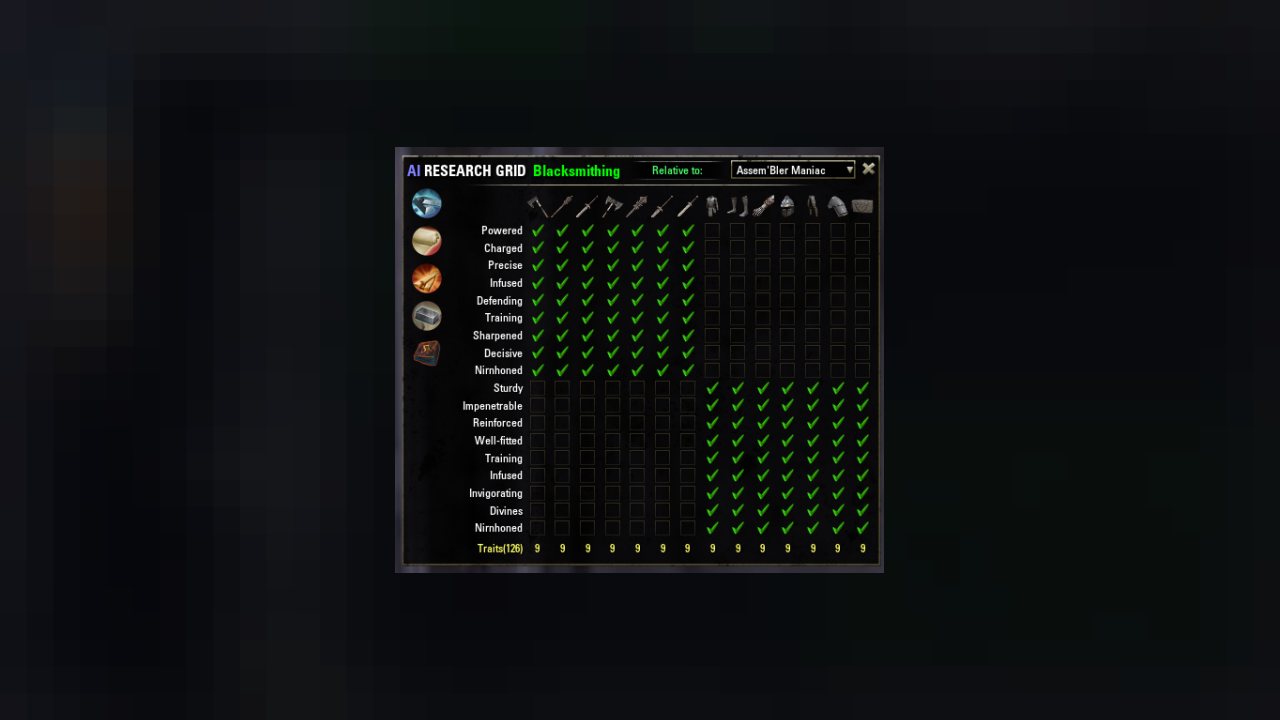
A table will be displayed, showing which traits you have researched for each item type.
- Green check - you have researched this trait.
- Red cross - you have not researched this trait.
- Blue hourglass - you are currently researching this trait.
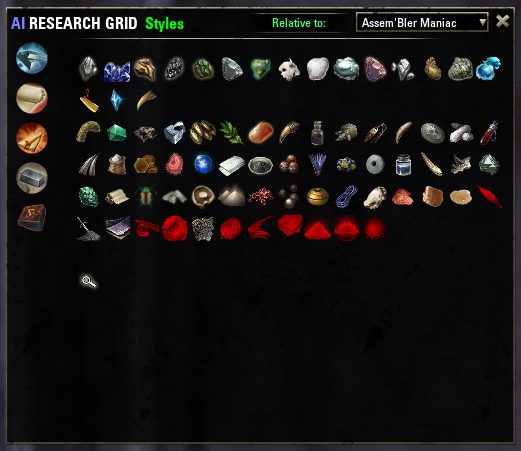
On the Styles page, you can see which styles are known by each character (or combined with #All). Top row is all of the base styles (no chapters). Second row is Crown Store styles (no chapters, available for limited time), and the third and following rows are learned through motif chapters, or gold motifs (full style). If you know a style fully, it'll be in full color, if it's partially know, it's yellow, if completely unknown, it'll be red.
Right-click a style icon to paste the known chapters in an Achieve link.
-- You can hover over the icon of an item type to see it's name if you're not sure what it is (daggers & swords look kinda similar).
You can find the answer to: "Which item/traits am I still missing across all characters?"
Do this by scrolling to the Virtual Character "#ALL". The missing traits will show an X. You may need to trade for these.
At some time, you will need to update your master crafters with traits that are known from your crafting mules.
Log in to the mule and select your master crafter destination.
Click on "Set relative to:" and the grid will now show items/traits that your logged in character can craft that the selected character can research. If the tick is dull red, the selected character is currently researching another item of that type and can't immediately research another, even if a research slot is available.
A quick note that the addon Research Assistant by ingeniousclown provides some great functionality that works with this addon, showing you which items in your inventory can be used for research.
Setting up a Keybinding
To set-up this addon so that you can toggle it off/on with a single key, follow these instructions:
- Hit the escape key to bring up the system menu.
- Select the Keybindings section within CONTROLS
- Scroll down the list of keybindings in the main window until you find the one for AI Research Grid.
- Click on the [Not Bound] box and follow the instructions to bind a key (in the screenshot I have bound the [ key).
Background
There had been so many times that I was in the middle of something and someone in my guild would ask in guild chat, "Can anyone make me an infused robe?" and the only way I could check was either to visit a Clothing workbench or to keep a spreadsheet/page of notes to remember.
So, several hours later, this addon was born --StormKnight
A big thank you to all those who have contributed with ideas and feedback.
Special mention goes to the following:
Krysstof - ideas for the code used to implement timers.
rkuhnjr -- for the Dwemer motif patch.
garkin for the improved Dwemer motif patch
Motar for the French Translation
scinutz for Glass, Xivkyn motifs and Ancient Orc.
ABOUT THIS LISTING
This page describes AI Research Grid by AssemblerManiac. The description and screenshots are the author's own, imported from their listing on ESOUI on 3 October 2026: https://www.esoui.com/downloads/info265-AIResearchGrid.html
Mythiq.net hosts no files for it. The download button goes straight to the release file on cdn.esoui.com, so you are downloading from the author's own host, not from a copy of ours.
The download count, rating and comments on this page start at zero and count Mythiq.net only. The source's own figures are not copied here — they measure a different site, and a number that cannot be checked against our own ledger is not worth printing.
Media
Requirements
Game version
7.3.5
API VERSION
Built for ESO API version 7.3.5. After a patch the game marks add-ons built for the previous API as out of date; the "Allow out of date add-ons" checkbox in the add-on menu loads them anyway, and most work.
LIBRARIES
Many ESO add-ons depend on a shared library — LibAddonMenu-2.0 above all — which is installed separately, exactly like an add-on. A dependency that is missing shows as the add-on simply not appearing in the list.
CONSOLE
Add-ons are PC and Mac only. There is no way to load them on console.
Installation
1. Download the archive with the button on this page and unzip it.
2. Move the unzipped folder into your add-ons directory:
Windows — Documents\Elder Scrolls Online\live\AddOns
3. Start the game, and at the character select screen click Add-Ons.
4. Tick the add-on. If it is greyed out and marked out of date, tick "Allow out of date add-ons" at the top of the same panel.
5. Log in. Most add-ons need a /reloadui after they are first enabled.
UPDATING
Delete the old folder first. ESO loads everything it finds, and two copies of one add-on is the usual cause of "an add-on has produced an error" on login.
This release downloads from cdn.esoui.com, not from us, so
there is no checksum to compare against. Scan the archive before you unpack it.
Version history
v11.5.04Latest
8 Feb 2022 · 18 KB via cdn.esoui.com · 0 downloads Download
11.5.04
- Motif list updated to current (yeah, it's been a while, but it's Baaaaack)
11.5
- Motifs now searchable by name (no, you can't search by Style Mat yet)
- Hide Known button (magnifying glass) now stays hightlited when On
- Greymoor motifs added
11.4a
Added Refabricated style (it's between Telvanni and Worm Cult) because it's achieve is in the same DLC
11.4
- Straightened out the previous straightening - hope Achieves are finally tracking right (I don't have any of the motifs to test with, even on PTS)
11.3
- Straightened out style id/achieve id mismatches for Dragonguard, Stags of Z'en and Moongrave Fane
11.2
- Re-added a few missing styles
11.1
- Re-arranged the layout, styles are on their own page now, just like traits
- New styles added (will work on PTS)
10.11a
- Fixed Honor Guard achieve so it displays correct item style
10.11
- Added Honor Guard style
10.10
- Added Coldsnap, Meridian, Anequine, and Pellitine styles
- removed LibAnnyoingUpdateNotificationInGame (the notice about addons being outdated)
v10.9
- Added missing styles
- API bump
v10.8 (AM)
- Added Dead-water and Elder Argonian styles to the list
v10.7 (AM)
- Skills update was running before player activate. It no longer runs if player is not yet activated, should eliminate the nil errors once and for all
v10.6 (AM)
- ZOS changed order of some events, moved a couple of var declarations to prevent nil index problems
v10.5 (AM)
- Added Welkynar and Dremora motifs
v10.4 (AM)
- Added Tsaesci style (crown store purchase)
v10.3 (AM)
- Show/hide button no longer hides partially known styles
- Added Scalecaller style
v10.2 (AM)
- Added button (magnifying glass) to hide/show fully known styles. State of button not saved, will always default to showing all styles.
v10.1 (AM)
- fixed tooltips over style so they always match
- fixed order of the style icons so newest will always be at the end
- added savedvar that remembers which tab you used last (per account, not char)
- flipped the tooltips for woodworking & clothier buttons
v10 (AssemblerManiac)
- API Bump
- Jewelry Crafting support
- Slight layout change of the Crafting Type buttons (they now run down the left edge instead of across the top)
- Crafting type buttons have tooltips so new players can tell which is which quickly
- Added new Crafting styles (Sapiarch, Psijic and Pyandonean)
- Right clicking the Style icon will allow you to paste the style Achieve into chat. No more hunting through the achieve menus to find all the styles so you can paste 'em into chat when looking to buy/trade for motifs.
v9.1
- Little optimization for upcoming patch
v9
- API Bump
- Added Clockwork city styles
v8.3 (Ayantir)
- Tiny fixs
v8.2 (Ayantir)
- Disabled a feature which due to a ZOS bug would cause the addon to lag your game (mostly in combat).
v8.1 (Ayantir)
- Two tiny fixs
v8 (Ayantir)
- API & Lib update
- Update for HotR styles. Please note, the style data as been resetted. You'll need to login each char again to get the data back.
- Little fix on relative Mode
v7.1 (Ayantir)
- Few fixes
v7 (Ayantir)
- API Update
- Added styles of Morrowind
v6 (Ayantir)
- API Update
- Added styles of Homestead DLC
- Crown Store styles are now displayed at the left of the panel
- Reduced size of chapterized styles to handle all new (and incoming) styles
- Resetted sytle knowledge to a system a bit better. You'll need to relog every character in order to have the information again.
- Few cleaning and optimizations
v5.1 (Ayantir)
- Fixed Grim Harlequin false knowledge. Because this style have no achievement linked with, tracking of this specific style is impossible. Research grid will consider for now that full knowledge will be acquired on 1st Grim harlequin style learning. Please note that #ALL table will still be with wrong data but should be fixed in a future version.
- Removed Compatibility Code
v5 (Ayantir)
Off-site on cdn.esoui.com —
no checksum, because we never held this file.
Link checked by our review team on 3 Oct 2026.
Tell us if something is wrong — a file that will not work, content taken from
someone else, or anything that looks unsafe. Reports go to our review team, not
to the author.
We use cookies to ensure that we give you the best experience on our website and improve your experience. By continuing to use this site you consent to such use of cookies.