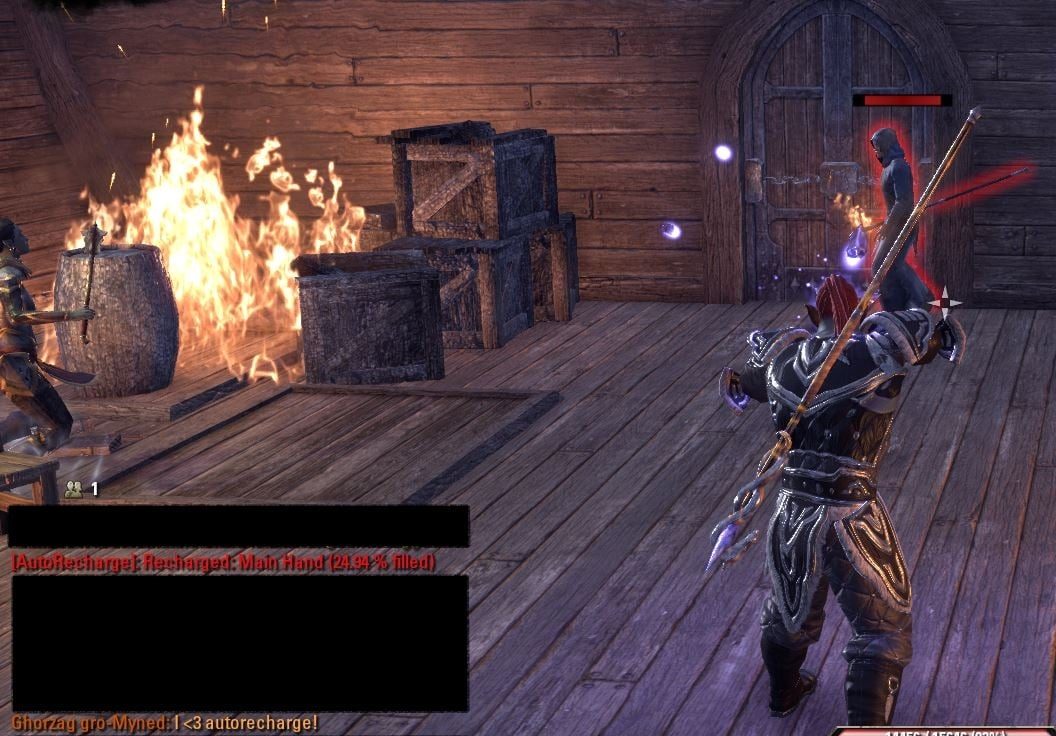
Recharges and repairs your equipped weapons and amour automatically upon entering and leaving combat.
Auto Recharge
Needed dependencies: LibAddonMenu-2.0
Recharges and repairs your equipped weapons and amour automatically upon entering and leaving combat.
A single soul gem will be consumed per weapon recharged in the order of worst to best (e.g lesser soul gems will be used before common).
A single repair kit will be consumed per piece of armour recharged in the order of worst to best (e.g common repair kits will be used before greater). A single crown repair kit will be used to repair all of your equipped armor.
Features
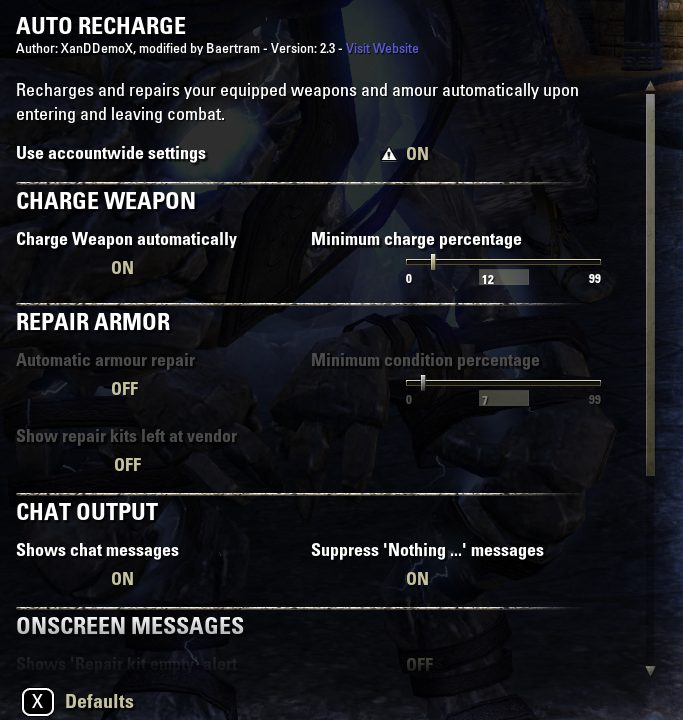
-Recharge weapons if the charge drops below a threshold (at combat start, in combat, and after combat, optionally: As weapon pair changes)
-Repair equipment if they drop below a threshold (at combat start, in combat, and after combat, optionally: No crown repair kits will be used)
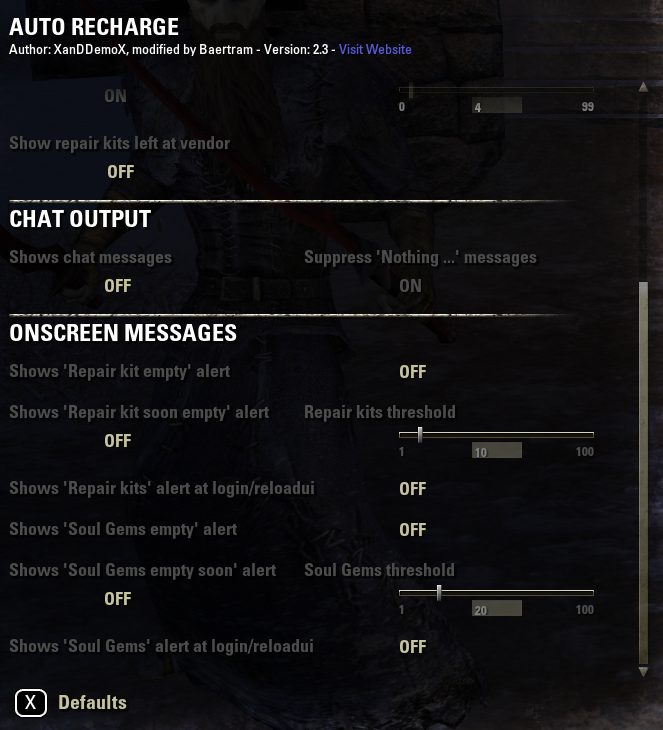
-Remind me after login/as fight ends if my soul gems drop below a threshold
-Remind me after login/as fight ends if my repair kits drop below a threshold
-Show my number of repair kits left at a vendor
-Show info about what happened in the chat
-Suppress chat messages if nothing was done etc.
-Multi language support was added
Usage
You are able to setup everything in the LAM settings menu.
Automatic Charging
/arc Attempts to recharge the currently equipped primary and secondary weapons.
/arc + Enable automatic equipped weapons recharging (you can also use the localized value on, an, на).
/arc - Disable automatic equipped weapons recharging (you can also use the localized value off, aus, от).
/arc 0-99 Set the minimum charge percentage
Automatic Repair
/arp Attempts to repair the currently equipped armour.
/arp + Enable automatic amour repairing (you can also use the localized value on, an, на).
/arp - Disable automatic armour repairing (you can also use the localized value off, aus, от).
/arp 0-99 Set the minimum condition percentage
Languages supported
DE
EN
FR
IT - L'addon è perfettamente compatibile con la traduzione italiana degli Italian Scrolls Online. Disponibile qui ItalianScrollsOnline
RU
Many thanks to XanDDemoX for the base of this great helper!
And many thanks to Scootworks for helping me test and translate the addon!
ABOUT THIS LISTING
This page describes Auto Recharge (and repair) by XanDDemoX. The description and screenshots are the author's own, imported from their listing on ESOUI on 24 October 2026: https://www.esoui.com/downloads/info1091-AutoRechargeandrepair.html
Mythiq.net hosts no files for it. The download button goes straight to the release file on cdn.esoui.com, so you are downloading from the author's own host, not from a copy of ours.
The download count, rating and comments on this page start at zero and count Mythiq.net only. The source's own figures are not copied here — they measure a different site, and a number that cannot be checked against our own ledger is not worth printing.
Media
Requirements
Game versions
10.0.0
9.3.0
9.2.5
9.1.5
9.0.0
8.3.5
API VERSION
Built for ESO API version 10.0.0, 9.3.0, 9.2.5, 9.1.5, 9.0.0. After a patch the game marks add-ons built for the previous API as out of date; the "Allow out of date add-ons" checkbox in the add-on menu loads them anyway, and most work.
LIBRARIES
Many ESO add-ons depend on a shared library — LibAddonMenu-2.0 above all — which is installed separately, exactly like an add-on. A dependency that is missing shows as the add-on simply not appearing in the list.
CONSOLE
Add-ons are PC and Mac only. There is no way to load them on console.
Installation
1. Download the archive with the button on this page and unzip it.
2. Move the unzipped folder into your add-ons directory:
Windows — Documents\Elder Scrolls Online\live\AddOns
3. Start the game, and at the character select screen click Add-Ons.
4. Tick the add-on. If it is greyed out and marked out of date, tick "Allow out of date add-ons" at the top of the same panel.
5. Log in. Most add-ons need a /reloadui after they are first enabled.
UPDATING
Delete the old folder first. ESO loads everything it finds, and two copies of one add-on is the usual cause of "an add-on has produced an error" on login.
This release downloads from cdn.esoui.com, not from us, so
there is no checksum to compare against. Scan the archive before you unpack it.
Version history
v2.79Latest
17 May 2024 · 36 KB via cdn.esoui.com · 0 downloads Download
IMPORTANT: With version 2.67: The SavedVariables changed to server dependent ones.
You need to setup your SavedVariables new! LOGOUT and BACKUP your SavedVariables before updating from version 2.66
Version 2.79 - 2024-05-17
Fixed Chinese translations
Version 2.78 - 2024-05-16
-Fixed bug with soulgems empty soon reporting too often
-Added Chinese translations (thanks to LoongKeiZ)
Version 2.77 - 2023-10-21
-Finally fixed center screen messages for soulgems and repair kits missing/near empty:
--Added new settings to "Only alert on login/reloadui/zone change (with loading screen) for repair kits soon empty, and soulgems soon empty
--Added new settings to "Only alert at vendor" for repair kits soon empty
-Rearranged the other settings about repair kits and soul gems to properly be "in relating blocks" (empty warning vs. soon empty warning)
Version 2.76 - 2023-07-10
-Added settings (settings menu added) to "Prefer crown soul gems" and "Prefer crown repai kits"
-Working on fix for "Only 1 item equipped -> does not get repaired". Caused by always checking the "head" item's "is slotted" and not the correct actual slot e.g. legs
-Fixed center screen messages for soulgems and repair kits missing/near empty
Version 2.75 - 2022-12-05
Fixed default settings variables not loading in some situations, which lead to errors with the minPercent sliders
Version 2.74 - 2022-10-30
-Updated API and version
-Fixed account wide settigs not loading/saving it's data properly (was still saved per character sometimes)
Version 2.73 - 2022-08-21
-Re-uploaded correct version where the settings menu does not throw an error upon changing percentage sliders
Version 2.72 - 2022-08-13
-Updated API
-Added upon request: setting to show the repair kits empty reminder as you interact with a vendor
-Fixed: More "are we dead" checks to overcome ZOs API which does not recognize we are dead fast enough. This hopefully should fix the disconnects
Many thanks to Busygeezus for all the feedback and testing!
-Fixed: Delayed charge/repair should work properly now, allthough a delay of 0 should be working fine
Version 2.71 - 2022-02-01
-Updated API
-Added more "IsPlayerDeath" checks
-Added more "IsCrownRepairKit" checks
-Fixed typo in en.lua, thanks to all mentioning it
Version 2.70
Added Italian translations, thanks to Dusty82
L'addon è perfettamente compatibile con la traduzione italiana degli Italian Scrolls Online.
Disponibile qui https://www.esoui.com/downloads/info2854-ItalianScrollsOnline-TraduzioneItaliana.html
Version 2.69
-Updated API version
-Updated French translation (thanks to @jakez31)
Version 2.68
-Fixed LAM settings checkbox for account wide settings to be saved server dependent
-> Please check your settings after updating to version 2.68 as this checkbox might be disabled!
-Fixed Cannot create LAM ... error message
-Fixed "this item is fully repaired" multiple messages
Version 2.67
-Tested on Markarth & Stonethorn
-Updated API and files
-Updated Russian translation (thanks to ivann339)
-Added speed up variables for settings
-Fixed slash commands and keybindings trying to access the non-loaded settings
-Fixed in combat repair/recharge
-Fixed event filters for recharge and repair not overwriting each other
-Added setting for "No crown store repair kits"
-Fixed: Crown store repair kits usage on 1 equipped item (will repair all then) instead of trying to use it as normal repair kit + checking other equipped items afterwards unnecessarily
-Fixed non-slotted items (2hd backup slot e.g.) -> No repair start anymore
-Fixed settings
-Added event filter on BAG_WORN for charge and repair checks
-Added setting to check weapon charge on weapon pair change + setting for only in combat
Version 2.66
-Updated API to Stonethorn
-Updated needed versions of dependencies
-Updated French translations (thanks to jakez31)
Off-site on cdn.esoui.com —
no checksum, because we never held this file.
Link checked by our review team on 25 Oct 2026.
Tell us if something is wrong — a file that will not work, content taken from
someone else, or anything that looks unsafe. Reports go to our review team, not
to the author.
We use cookies to ensure that we give you the best experience on our website and improve your experience. By continuing to use this site you consent to such use of cookies.